Skip to Content

How to Enable Markup Annotation Tools in macOS

by

Recognizing the utility of Markup annotation tools, Apple has extended their availability in recent versions of iOS, but it's worth bearing in mind that you can access a similar and equally useful annotation toolset within several native Mac applications.

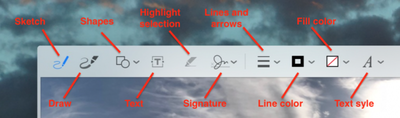
In macOS, accessing an application's Markup toolbar lets you draw on and annotate images or PDF documents within the app using arrows, shapes, and text. You can also use it to quickly sign a document with your digital signature.
macos markup tools
We've highlighted which native apps support Markup in this article. But before you can access the toolset in desktop apps, you'll need to check that the relevant extension is enabled on your Mac. Keep reading to learn how it's done.

How to Enable the Markup Extension in macOS

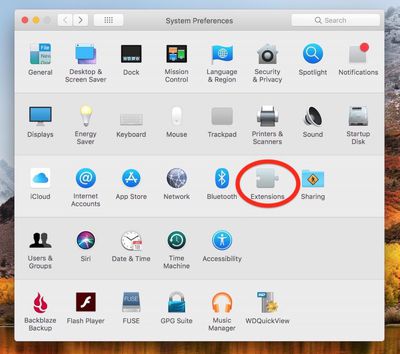
  1. Click the Apple () symbol in your Mac's menu bar and select System Preferences....
    macos extensions

  2. Click the Extensions preference pane.

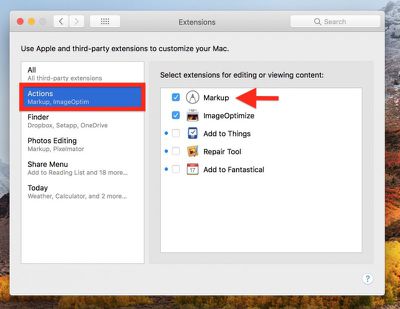
  3. Click Actions in the left column of the Extension pane.
    macos Markup extension

  4. If it isn't already ticked, click on the box next to the Markup extension in the right column.
macos mail markup
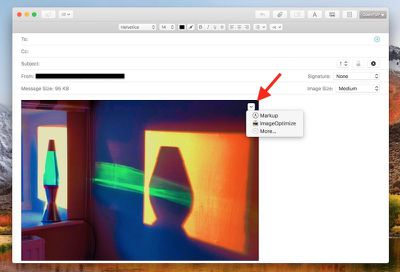
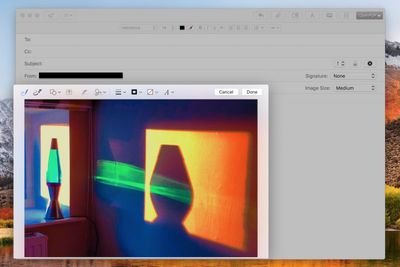
One of the most useful Markup integrations can be found in Mail. Once you've dragged an image into your message, hover your mouse cursor over it, click the arrow button that appears in the upper right corner, and select Markup from the dropdown menu.
macos mail markup 2
Your attached image will be foregrounded with the Markup toolbar across the top, ready for you to apply your annotations.

Markup can be accessed in the same manner within TextEdit as well as some third-party document editors. To test whether it's available, simply hover your cursor over the image once it's inside your document and look for the arrow in the upper right corner.

macos preview markup
In Preview, the Markup toolbar has its own button next to the Search input field on the right of the taskbar. You also get a few extra Markup tools here, like Adjust Color, Adjust Size, and Crop, so if you can't annotate an image within your application of choice then Preview should be your next stop.
macos photos markup
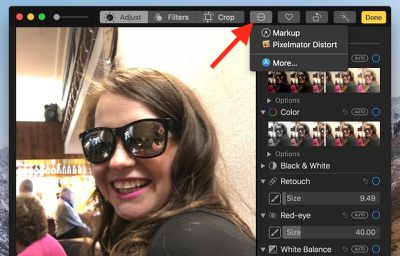
Finally, the Markup toolset is also accessible in Apple's Photos application: Next time you're editing an image, click the Extensions icon (the three dots in a circle) and select Markup to enter annotation mode.


Top Rated Comments

112 months ago
Apple pencil support (on trackpad) with more expansive markup tools in macos would be awesome.
Score: 4 Votes (Like | Disagree)
chucker23n1 Avatar
112 months ago
Having Markup available in many places (such as Mail and Notes) is cool, but in practice I find the annotation tools a bit baffling. Maybe I just need to get used to them. I want a highlight pen like in Windows Snipping Tool.

Is there a third-party extension that does this?
Score: 2 Votes (Like | Disagree)
chucker23n1 Avatar
112 months ago
I browse the internet on an iPad docked to a keyboard/case. No reason this can't happen on a Macbook as well.
There are plenty of reasons. There's plenty Apple would need to do to change macOS to make it suitable for touch, such as adding a virtual keyboard, making the controls suitable in size for touch targets, changing the gestures, …. And you'd roughly end up with the touch experience of Windows 7, which wasn't great.
Score: 1 Votes (Like | Disagree)
112 months ago
Apple pencil support (on trackpad) with more expansive markup tools in macos would be awesome.
I'll go further and suggest touch screens on all Apple products.
I don't understand the opposition.

No, you're not going to draw vertically on an iMac or laptop. But there are plenty of times where a quick finger touch to select a button is quicker than a cursor.

Make it optional. If you don't like using touch...guess what...don't touch the screen.
Score: 1 Votes (Like | Disagree)

Popular Stories

apple design award 2025

Apple Announces 2025 Design Award Winners Ahead of WWDC 2025

Tuesday June 3, 2025 10:14 am PDT by
As we wait for WWDC to kick off next Monday, Apple today announced the winners of its annual Apple Design Awards, recognizing apps and games for their innovation, ingenuity, and technical achievement. The 2025 Apple Design Award winners are listed below, with one app and one game selected per category: Delight and Fun - CapWords (App) and Balatro (Game) Innovation - Play (App) and PBJ -...
1password deal blue

1Password Security Breach: What Was Accessed and What Wasn't

Wednesday November 25, 2026 1:09 pm PST by
Popular password management app 1Password today said it experienced a security breach earlier this month. 1Password says some customer names and email addresses were accessed, but no customer vault contents were compromised. On November 19, 1Password saw indications that an employee's GitHub account had been breached and began investigating. The company says the breached GitHub account was...
Apple 2026 Black Friday Event Hero

Apple's Official 2026 Black Friday Offer Starts Rolling Out

Thursday November 26, 2026 8:37 am PST by
Apple's annual four-day Black Friday through Cyber Monday shopping event is now live in Australia, New Zealand, and Thailand, and it will continue to roll out across Europe, the U.S., and Canada as the calendar turns to Friday, November 27 around the world. In the U.S., Apple's terms and conditions say the promotion begins on November 27 at 12 a.m. Pacific Time and ends on November 30 at...
Latest Stories
The 50+ Best Apple Black Friday Deals Still Available on AirPods, iPads, and More
12 hours ago
HomePod Mini 2 in (RED) Seemingly Spotted Ahead of Announcement
9 hours ago
Apple's M6 and PROLED MacBook Pro Reach New Low Prices for Black Friday
19 hours ago
The MacRumors Show: iPhone Air 2 and iPhone 18 Are Coming
19 hours ago
Apple Store in Brisbane Reopening Next Month With New Design
20 hours ago
The 60+ Best Black Friday Accessory Deals on iPhone Chargers, TVs, Headphones, and More
21 hours ago
GTA VI Now (Barely) Running on Apple Silicon Macs
21 hours ago
The Best Black Friday Streaming Deals on Apple TV, Disney+, and More
22 hours ago
Apple TV's 'Carême' Wins International Emmy for Best Drama
22 hours ago
iPhone 18 Production Delay Leaves Apple Little Time Before Launch
23 hours ago
The Best Black Friday AirPods Deals Still Available
15 hours ago
The Best Black Friday Deals on Apple Home Products
23 hours ago
The Best Black Friday iPhone Deals Still Available
15 hours ago
The Best Black Friday iPad Deals Still Available
15 hours ago
The Best Black Friday Apple Watch Deals Still Available
15 hours ago
The Best Black Friday AirTag Deals Still Available
15 hours ago
The Best Black Friday Mac Deals Still Available
15 hours ago
iPhone Share of US Smartphone Market Hits 57% as Rivals Slip
1 day ago
iPhone 20 Pro Rumored to Feature 3D-Printed Titanium Frame
1 day ago
Apple's Official 2026 Black Friday Offer Starts Rolling Out
2 days ago
Halide Adds Fill Light Feature for iPhone Duo
2 days ago
MacBook Air Black Friday Deals Now Live With Massive $399 Savings
2 days ago
Amazon Discounts All MacBook Neo Models by $99 for Black Friday
2 days ago
Kodak Launches Unique AirTag Rival With E-Ink Display
2 days ago
Here's Why the Apple Store is Going Down
2 days ago
Apple Still Working on Giant Foldable iPad That Could Cost $5,000
2 days ago
iPhones Dominate China's Weak Singles' Day Smartphone Sales
2 days ago
iPhone 20 Pro Could Feature Ceramic in Limited-Edition Model
2 days ago
Apple Faces Korean Regulator Review Over iPhone 16 AI Advertising
2 days ago
Apple Watch Ultra 4 Hits New Best-Ever Price of $649.99 for Black Friday
2 days ago
Related Apple News: Buyers Guide | Reviews | Iphone | World News | Iphone