Skip to Content

Photos in iOS 10: How to Find and Use Image Markup

by

Apple is expanding the iPhone's photo editing abilities in iOS 10 with a new feature called "Markup" that lets you doodle, magnify, and place text on any picture you have within the Photos app. Thanks to Markup's flexibility, it could be used for both casually sharing photos with friends and family, and also to enhance and add detail to an image in an enterprise situation.

Markup is also available directly through the Messages app in iOS 10, adding it to the roster of inventive and colorful updates coming to text messaging in the new iPhone operating system this fall. In both locations, Markup is a bit buried and somewhat difficult to find, so follow these steps to discover the new photo editing feature in iOS 10.

Finding Image Markup in Photos
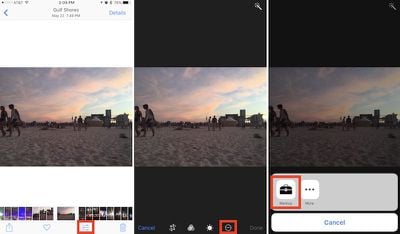
How To Markup 3

  1. Open the Photos app.
  2. Find the image you want to edit and tap on it.
  3. Tap the editing slider button.
  4. While in editing mode, tap the button that looks like an ellipsis within a circle and choose "Markup" from the popup menu.

Finding Image Markup in Messages
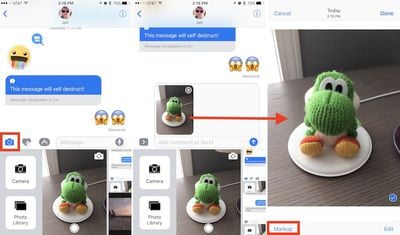
How To Markup 4

  1. Open Messages.
  2. Tap the contact you want to send the photo to.
  3. Tap the Camera icon to the left of the iMessage conversation box.
  4. Find the image you want to edit by taking a new picture, scrolling right to browse all your images, or scrolling left to jump into a vertical version of your Photo Library.
  5. Tap on the photo to place it in the conversation box, then tap on it once again within the box.
  6. Tap "Markup" in the bottom left corner.

Using Image Markup

In Photos or Messages, the editing features of Markup are mostly similar, although the former app presents a darker layout, while the latter has a lighter one. First, the feature lets you doodle on the picture you've decided to edit, with eight different colors and three different stylus thickness options to the right of the color dots.

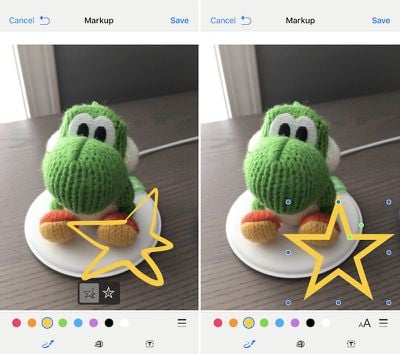
Within each of the three options, you can change the thickness of the doodle by pressing harder or softer as you draw on the photo if you have a device that supports 3D Touch. If you begin free-styling on the photo and draw a recognizable shape, Markup will intelligently suggest a more true-to-form representation, be it a basic circle, oval, square, or even a star. You can also keep your hand-drawn option.
How To Markup 6

Start drawing any shape and Markup will recommend a symmetrical version

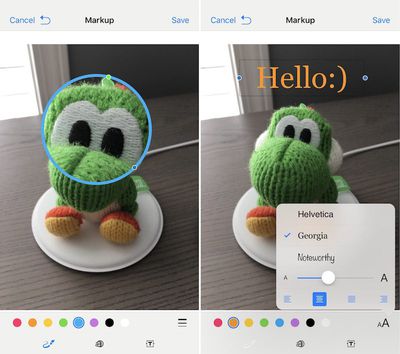
The second icon, to the right of the doodle feature, is a magnifying glass that can zoom in on any part of a picture it's placed over. After tapping on it, you can tap on the small green dot and then scrub it to the right to enhance the zoom of the magnifying glass. The blue dot will increase or decrease the circumference of the circle, while tapping anywhere within the circle will allow you to drag it around on the photo. After placing the zoom feature, tapping on any of the color dots will change the border of the magnification circle to match the color, while jumping into the thickness menu will let you alter the boldness of the border.

The last option on the bottom row of the Markup screen is a simple text box that lets you type out any message on top of the photo, and adjust its size by dragging the two blue dots on each side of the box. Similar to the magnifying glass, tap anywhere within the box to drag it, and double tap to add text. You can also change the color of the text by choosing any from the color dot menu, and a new "aA" option to the right of the color dots allows for new font options, sizes, and indentations.
How To Markup 7
Since there is no direct trash button, the only way to undo a mistake is a simple undo button, which is one of the major differences between marking up a photo in Photos or in Messages. In Photos, the reversed arrow is located at the bottom right of the screen; in Messages, it appears at the top left, next to "Cancel," once you start editing the photo. If you want to change a lot about the edits you've made to a photo, it's potentially faster to simply tap "Cancel" and then jump back into Markup to start over.

The biggest difference between Markup in these two apps lies in how permanent you want the edits to be. If done within Photos, your Markups will remain a permanent addition to each picture within the app, which can of course be reversed using the "Revert" option in the editing menu of each image. If executed within Messages, Markup is more transient, keeping the edits only on the version of the image sent to your contact, and not saving any edits onto the version in your own Photos app.


Related Forum: iOS 10

Top Rated Comments

133 months ago
This update is way awesome!!! Best release ever!! And the smoothest!
Score: 3 Votes (Like | Disagree)
133 months ago
Will you guys be covering anything using apps that shoot in RAW? The Lightroom mobile app has a nice camera and RAW editing. Actually very surprised with what I was able to pull detail wise with the tiny sensor in the 6S plus.
Score: 3 Votes (Like | Disagree)
Keane16 Avatar
133 months ago
Without a third party app?

In which app do you open the PDF to do the markup?
Pretty sure it's without a 3rd party App (checked the wife's iPhone and she has it too - 99% sure she wouldn't have installed anything for markup).

Open a email with PDF attachment. Tap the toolbox bottom right. You're in markup mode.

Just had a play around and you can also save PDFs to iCloud Drive and it allows you to markup PDFs from there too (then send them however you want using the share sheet). This should be extra handy once macOS Sierra launches and iCloud Drive supports the Desktop and Documents folder from my mac, will make some my workflows slicker.
Score: 1 Votes (Like | Disagree)
133 months ago
Great how-to. Wish markup was more obvious. It's a great feature.
Score: 1 Votes (Like | Disagree)
iThingsGurl Avatar
133 months ago
A much needed feature! Thanks for the How-to guys :)
Score: 1 Votes (Like | Disagree)

Popular Stories

apple design award 2025

Apple Announces 2025 Design Award Winners Ahead of WWDC 2025

Tuesday June 3, 2025 10:14 am PDT by
As we wait for WWDC to kick off next Monday, Apple today announced the winners of its annual Apple Design Awards, recognizing apps and games for their innovation, ingenuity, and technical achievement. The 2025 Apple Design Award winners are listed below, with one app and one game selected per category: Delight and Fun - CapWords (App) and Balatro (Game) Innovation - Play (App) and PBJ -...
1password deal blue

1Password Security Breach: What Was Accessed and What Wasn't

Wednesday November 25, 2026 1:09 pm PST by
Popular password management app 1Password today said it experienced a security breach earlier this month. 1Password says some customer names and email addresses were accessed, but no customer vault contents were compromised. On November 19, 1Password saw indications that an employee's GitHub account had been breached and began investigating. The company says the breached GitHub account was...
apple store down feature

Here's Why the Apple Store is Going Down

Thursday November 26, 2026 5:49 am PST by
Apple's online store is going down for a few hours on a rolling country-by-country basis right now, but do not get your hopes up for new products. Apple takes its online store down for a few hours ahead of Black Friday every year to tease its annual gift card offer with the purchase of select products. The store is down in Australia, New Zealand, and Thailand, right now, and it will...
Latest Stories
The 50+ Best Apple Black Friday Deals Still Available on AirPods, iPads, and More
2 hours ago
Apple's M6 and PROLED MacBook Pro Reach New Low Prices for Black Friday
9 hours ago
The MacRumors Show: iPhone Air 2 and iPhone 18 Are Coming
9 hours ago
Apple Store in Brisbane Reopening Next Month With New Design
10 hours ago
The 60+ Best Black Friday Accessory Deals on iPhone Chargers, TVs, Headphones, and More
10 hours ago
GTA VI Now (Barely) Running on Apple Silicon Macs
11 hours ago
The Best Black Friday Streaming Deals on Apple TV, Disney+, and More
11 hours ago
Apple TV's 'Carême' Wins International Emmy for Best Drama
12 hours ago
iPhone 18 Production Delay Leaves Apple Little Time Before Launch
13 hours ago
The Best Black Friday AirPods Deals Still Available
5 hours ago
The Best Black Friday Deals on Apple Home Products
13 hours ago
The Best Black Friday iPhone Deals Still Available
5 hours ago
The Best Black Friday iPad Deals Still Available
5 hours ago
The Best Black Friday Apple Watch Deals Still Available
5 hours ago
The Best Black Friday AirTag Deals Still Available
5 hours ago
The Best Black Friday Mac Deals Still Available
5 hours ago
iPhone Share of US Smartphone Market Hits 57% as Rivals Slip
15 hours ago
iPhone 20 Pro Rumored to Feature 3D-Printed Titanium Frame
16 hours ago
Apple's Official 2026 Black Friday Offer Starts Rolling Out
1 day ago
Halide Adds Fill Light Feature for iPhone Duo
1 day ago
MacBook Air Black Friday Deals Now Live With Massive $399 Savings
1 day ago
Amazon Discounts All MacBook Neo Models by $99 for Black Friday
1 day ago
Kodak Launches Unique AirTag Rival With E-Ink Display
2 days ago
Here's Why the Apple Store is Going Down
2 days ago
Apple Still Working on Giant Foldable iPad That Could Cost $5,000
2 days ago
iPhones Dominate China's Weak Singles' Day Smartphone Sales
2 days ago
iPhone 20 Pro Could Feature Ceramic in Limited-Edition Model
2 days ago
Apple Faces Korean Regulator Review Over iPhone 16 AI Advertising
2 days ago
Apple Watch Ultra 4 Hits New Best-Ever Price of $649.99 for Black Friday
2 days ago
New Apple Store Opening in India, Download the Special Wallpaper Now
2 days ago
Related Apple News: Iphone | Travel | Motoring | Opinion | World News






























