Skip to Content

How to Electronically Sign a PDF Using Preview on Mac

by

When you receive a PDF document by email that you must sign, the process of printing out the file, signing on the dotted line with a pen, scanning the signed document and sending it back can be a rather tedious task. Fortunately, Apple has added the ability to electronically sign a PDF document using Preview, a program that comes preinstalled on every Mac running OS X Lion or later.
macrumors pdf signature mojave
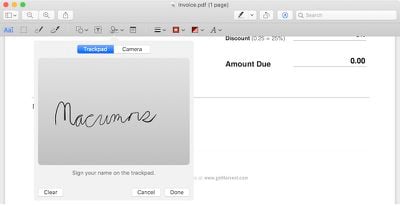
The steps involved to electronically sign a PDF using Preview on Mac are quite simple and will save you valuable time, especially if you have multiple documents, contracts, forms or other paperwork to sign. If you are worried that your virtual signature will look bad, rest assured that you can create your signature by using the trackpad or holding up your signature on paper to a Mac's built-in iSight camera.

Steps to Electronically Sign a PDF Using Trackpad

  1. Open the PDF file you need to sign in Preview.
  2. Click on the Markup icon (markuppenicon) and then the signature (Screen Shot 2015-03-26 at 1.28.51 PM) icon.
  3. Click on Create Signature > Click Here to Begin. Draw your signature on the trackpad. Click any key when finished. Click Done.
  4. Click on the signature created to insert it into the PDF document. The signature can be moved or resized like a regular image.

Steps to Electronically Sign a PDF Using Camera

  1. Open the PDF file you need to sign in Preview.
  2. Click on the Markup icon (markuppenicon) and then the signature (Screen Shot 2015-03-26 at 1.28.51 PM) icon.
  3. Click on Create Signature > Camera. Sign your name on white paper and hold it to be visible to the camera. Preview will draw a virtual signature. Click Done.
  4. Click on the signature created to insert it into the PDF document. The signature can be moved or resized like a regular image.

Tips

  • If you are using the trackpad to create your electronic signature, it is recommended that you look at Preview and go slow and steady with your finger to achieve the best result. For an even more precise signature, you can use an iPhone or iPad stylus, preferably one with a fine-tipped ending, to draw your signature on the trackpad.
  • Signing a piece of white paper and holding it up to the camera is the easiest way of creating an electronic signature in Preview, although this method does not always yield the best results. The signature will appear inverted when you hold it up to your Mac's camera, but Preview will automatically ensure that it reads properly from left to right.
  • You can create an electronic signature in Preview by following steps above even if you do not have a PDF document opened. By default, all electronic signatures that you create are automatically stored in a list on Preview so that you can insert them into future PDFs documents and other files without needing to repeat these steps. Preview can store multiple signatures at once.
  • Apple also provides markup tools in the Mail app in macOS to create electronic signatures that can be directly inserted into your emails.


Top Rated Comments

Westside guy Avatar
152 months ago
Just to be "that guy"...

While people often do refer to this as a "digital signature", it really isn't anything of the sort. A digital signature is a cryptographic entity that at some level proves that you are indeed who you claim you are. It generally doesn't involve anything resembling your on-paper signature.

Anyone can append a rasterized/digitized version of your written signature to a document - it doesn't have to be you. With a real digital signature, though, that can't happen unless you are sloppy with your private key(s).
Score: 25 Votes (Like | Disagree)
152 months ago
"Click on the briefcase icon"

Pretty sure that's a tool box
Score: 10 Votes (Like | Disagree)
AlecZ Avatar
152 months ago
Just to be "that guy"...

While people often do refer to this as a "digital signature", it really isn't anything of the sort. A digital signature is a cryptographic entity that at some level proves that you are indeed who you claim you are. It generally doesn't involve anything resembling your on-paper signature.

Anyone can append a rasterized/digitized version of your written signature to a document - it doesn't have to be you. With a real digital signature, though, that can't happen unless you are sloppy with your private key(s).

This is exactly what I was going to say. I thought this article would be about RSA.
Score: 7 Votes (Like | Disagree)
152 months ago
This is exactly what I was going to say. I thought this article would be about RSA.
Me three!

This scanned signature is a joke, if I sent my invoices with such a signature, my clients would laugh (and obviously return it), this has no legal value whatsoever.

I was hoping to view an easy way to sign with a certified signature (a cryptographic token) in Preview.app, I've been doing it with Acrobat until now.
Score: 4 Votes (Like | Disagree)
152 months ago
Quit whining. Nobody is asking you to pay for it. It's free in OS X.

Thank you. I like this tip.
Score: 3 Votes (Like | Disagree)
nagromme Avatar
152 months ago
Doesn't matter. Preview 8.0 cannot even properly render PDF. And apparently Apple don't care.

Reference:
https://discussions.apple.com/thread/6607274
http://superuser.com/questions/829302/pdf-font-renderings-in-yosemite
https://www.reddit.com/r/apple/comments/2joxlh/os_x_yosemite_1010_bug_thread/cleisr8
False alarm: signatures still work, despite the font anti-aliasing being wrong.
Score: 3 Votes (Like | Disagree)

Popular Stories

apple design award 2025

Apple Announces 2025 Design Award Winners Ahead of WWDC 2025

Tuesday June 3, 2025 10:14 am PDT by
As we wait for WWDC to kick off next Monday, Apple today announced the winners of its annual Apple Design Awards, recognizing apps and games for their innovation, ingenuity, and technical achievement. The 2025 Apple Design Award winners are listed below, with one app and one game selected per category: Delight and Fun - CapWords (App) and Balatro (Game) Innovation - Play (App) and PBJ -...
1password deal blue

1Password Security Breach: What Was Accessed and What Wasn't

Wednesday November 25, 2026 1:09 pm PST by
Popular password management app 1Password today said it experienced a security breach earlier this month. 1Password says some customer names and email addresses were accessed, but no customer vault contents were compromised. On November 19, 1Password saw indications that an employee's GitHub account had been breached and began investigating. The company says the breached GitHub account was...
Apple 2026 Black Friday Event Hero

Apple's Official 2026 Black Friday Offer Starts Rolling Out

Thursday November 26, 2026 8:37 am PST by
Apple's annual four-day Black Friday through Cyber Monday shopping event is now live in Australia, New Zealand, and Thailand, and it will continue to roll out across Europe, the U.S., and Canada as the calendar turns to Friday, November 27 around the world. In the U.S., Apple's terms and conditions say the promotion begins on November 27 at 12 a.m. Pacific Time and ends on November 30 at...
Latest Stories
The 50+ Best Apple Black Friday Deals Still Available on AirPods, iPads, and More
11 hours ago
HomePod Mini 2 in (RED) Seemingly Spotted Ahead of Announcement
8 hours ago
Apple's M6 and PROLED MacBook Pro Reach New Low Prices for Black Friday
19 hours ago
The MacRumors Show: iPhone Air 2 and iPhone 18 Are Coming
19 hours ago
Apple Store in Brisbane Reopening Next Month With New Design
19 hours ago
The 60+ Best Black Friday Accessory Deals on iPhone Chargers, TVs, Headphones, and More
20 hours ago
GTA VI Now (Barely) Running on Apple Silicon Macs
20 hours ago
The Best Black Friday Streaming Deals on Apple TV, Disney+, and More
21 hours ago
Apple TV's 'Carême' Wins International Emmy for Best Drama
22 hours ago
iPhone 18 Production Delay Leaves Apple Little Time Before Launch
22 hours ago
The Best Black Friday AirPods Deals Still Available
14 hours ago
The Best Black Friday Deals on Apple Home Products
23 hours ago
The Best Black Friday iPhone Deals Still Available
14 hours ago
The Best Black Friday iPad Deals Still Available
14 hours ago
The Best Black Friday Apple Watch Deals Still Available
14 hours ago
The Best Black Friday AirTag Deals Still Available
14 hours ago
The Best Black Friday Mac Deals Still Available
14 hours ago
iPhone Share of US Smartphone Market Hits 57% as Rivals Slip
1 day ago
iPhone 20 Pro Rumored to Feature 3D-Printed Titanium Frame
1 day ago
Apple's Official 2026 Black Friday Offer Starts Rolling Out
2 days ago
Halide Adds Fill Light Feature for iPhone Duo
2 days ago
MacBook Air Black Friday Deals Now Live With Massive $399 Savings
2 days ago
Amazon Discounts All MacBook Neo Models by $99 for Black Friday
2 days ago
Kodak Launches Unique AirTag Rival With E-Ink Display
2 days ago
Here's Why the Apple Store is Going Down
2 days ago
Apple Still Working on Giant Foldable iPad That Could Cost $5,000
2 days ago
iPhones Dominate China's Weak Singles' Day Smartphone Sales
2 days ago
iPhone 20 Pro Could Feature Ceramic in Limited-Edition Model
2 days ago
Apple Faces Korean Regulator Review Over iPhone 16 AI Advertising
2 days ago
Apple Watch Ultra 4 Hits New Best-Ever Price of $649.99 for Black Friday
2 days ago
Related Apple News: Sport | Buyers Guide | South Africa | Mac | Ipad