


How to Prevent Unsolicited AirDrops to Your Apple Device
Since its introduction with iOS 7, AirDrop has become the favored means for iPhone and iPad users to instantly share photos, videos, documents, and more to nearby Apple devices over Wi-Fi and Bluetooth. Using it to transmit content from apps like Photos and Safari couldn't be simpler, thanks to its top-level location in the iOS Share Sheet, accessed via the ubiquitous Share icon.
AirDrop is...
Read Full Article • 39 comments

How to Stop Sharing Your Location With a Friend Using Find My
In iOS 13 and iPadOS, the Find My app replaces the Find My Friends and the Find My iPhone apps of old, and brings their features together in a unified interface that allows you to find whatever you need.
The Find My app works much like the two apps it replaces. For example, you can use it to share your location with friends, get notifications on friends' movements, stop sharing your location...
How to Share Your Location With a Friend Using Find My
In iOS 13 and iPadOS, Apple combined the earlier Find My Friends and Find My iPhone apps into a single app called "Find My," a sort of catch-all place on your iOS device that you can use for finding whatever you need to find.
Find My works much like the apps it replaces. For example, the new app lets you share your location with friends and family members, and allows them to share their...
How to Turn Off Location Sharing Using Find My
In iOS 13 and iPadOS, Apple has combined its stock Find My Friends and Find My iPhone apps into a single, unified app called "Find My" – a sort of catch-all user interface for finding your friends and devices.
Find My works similarly to the apps it replaces. For example, just like Find My Friends, it gives you access to your location sharing options – including the option to disable...
How to Locate Friends Using Find My
In iOS 13 and iPadOS, Apple combined the earlier Find My Friends and Find My iPhone apps into a single app called "Find My," a sort of catch-all place on your iOS device that you can use for finding whatever you need to find.
Find My works much like the apps it replaces. For example, the new app features a section that allows you to locate friends and family members that have shared their...
How to Mark an Apple Device as Lost in the Find My App
In iOS 13 and iPadOS, Apple has combined the Find My Friends and the Find My iPhone apps into a single app, simply called "Find My."
Find My works similarly to the Find My iPhone and Find My Friends apps that it replaces, but it also allows you to locate lost devices that aren't connected to Wi-Fi or LTE by using the Bluetooth signal of other nearby Apple devices. When your lost device is...
How to Remove a Lost Device From Your iCloud Account in Find My
In iOS 13 and iPadOS, Apple has combined the Find My Friends and the Find My iPhone apps into a single app called "Find My." Find My works similarly to the apps it replaces. For example, just like Find My iPhone, it allows you to put stolen, lost or misplaced Apple devices into Lost Mode.
Remotely turning on Lost Mode ensures that your passcode is required on the device, meaning no one but...
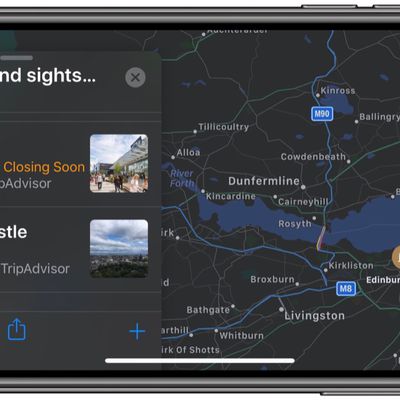
How to Create a Collection in Apple Maps
In iOS 13, Apple added a Collections feature to its Maps app on iPhone and iPad that lets you search for and aggregate lists of different locations, such as restaurants you're thinking of eating out at, sightseeing locations for when you're on vacation, or other places you want to visit.
Collection lists can also be shared, so you can create lists of places for friends and family that will...
How to Send Feedback About Errors in Apple Maps
In iOS 13, Apple introduced a redesigned customer feedback process for its Apple Maps app which is designed to make it easier for users to submit corrections for things like incorrect addresses, business locations, or operating hours.
If you find an error or something that needs updating in Apple's maps information, you can now send the correct details in just a few quick taps. The following...
How to Add Places to Your Favorites in Apple Maps
In the latest version of Apple Maps that comes with iOS 13, Apple has added a Favorites feature that lets you search for specific places and then add them to a list. Favorites are meant for places that you visit frequently, and Home and Work are already added by default.
Any place you frequent can be added to the Favorites list, such as a favorite restaurant or coffee shop, or a friend or...
How to Use Look Around in Apple Maps
With iOS 13, Apple introduced several additional features to its Maps app, one of which is called Look Around. This gives you a street-level view of what's around your current location or the location you search for on the map.
If you've ever used Google Street View, you already have a good idea of how Look Around works, but Apple's equivalent feature includes a couple of functions that...
How to Use Lighting Mode Photo Effects in iOS 13, Including the New High-Key Mono
When you take a picture in Apple's Portrait mode, iOS uses the dual cameras of your iPhone to create a depth-of-field effect, allowing you to compose a photo that keeps your subject sharp with a blurred background.
On iPhone X and later, and iPhone 8 Plus, Apple also includes a Portrait Lighting feature that you can use to apply studio-quality lighting effects to your Portrait mode images.
...

How to Use the Portrait Mode Lighting Adjustment Tools on Your iPhone
In iOS, the Portrait mode in Apple's Camera app uses the dual cameras of your iPhone to create a depth-of-field effect, allowing you to compose a photo that keeps your subject sharp with a blurred background.
On iPhone X and later, and iPhone 8 Plus, Apple also includes a Portrait Lighting feature that you can use to apply studio-quality lighting effects to your Portrait mode images.
And...
How to Adjust a Filter Applied to Your Images in Photos
The Photos app on the iPhone and the iPad has had pre-set filters for a number of years, but Apple previously provided no way to adjust the effect those filters had on your pictures.
Happily, iOS 13 adds a simple way to change the intensity of pre-set filters, giving you a little more agency over your photo enhancements. Keep reading to learn how it works.
Before you follow these steps,...
How to Edit a Video on iPhone and iPad
In iOS 13, Apple has enhanced the built-in photo and video editing capabilities available to iPhone and iPad users, and for the first time it has made many of its stock photo adjustment tools available for editing videos.
In addition to the new video editing options, Apple has introduced a new tool selection interface that makes the whole process quicker and easier than ever before. Let's...
How to Crop, Rotate, and Straighten Your Photos in iOS 13
In iOS 13, Apple enhanced the built-in photo editing capabilities available on iPhones and iPads, and redesigned the photo editing interface to make it easier to manipulate your pictures.
This article offers a brief introduction to the new photo editing interface in the stock Photos app by looking at how you can crop, rotate, and straighten your shots in next to no time.
The first thing ...
How to Use the Editing Tools in Photos
In iOS 13, Apple has introduced a redesigned photo editing interface that improves upon earlier versions by making it easier to select tools and apply adjustments in the stock Photos app.
Previously, the photo editing tools in iOS where hidden away in expandable subsections of a vertical menu, which meant finding the one you wanted was sometimes a chore.
Apple has replaced this menu with...
How to Apply a Filter to a Video in iOS 13
In iOS 13, Apple has enhanced the built-in photo and video editing capabilities available to iPhone and iPad users, and for the first time it has made many of its stock photo adjustment tools available for editing video.
One of those is the filter tool, so now you can easily apply an Instagram-style filter to one of your captured videos in just a few quick taps. The following steps show you...
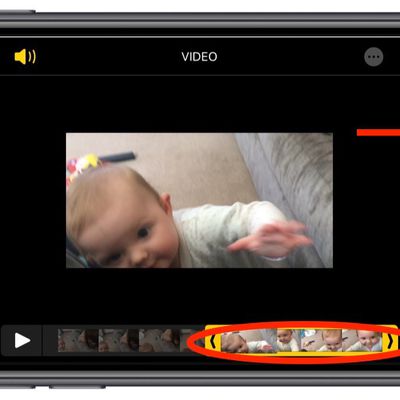
How to Crop, Rotate, and Straighten Videos in iOS 13
In iOS 13, Apple has enhanced the built-in photo and video capture capabilities available to iPhone and iPad users, and for the first time it has made many of its stock photo editing tools available for editing video.
This article introduces you to the new video editing interface in Photos, and in particular the crop, rotate, and straighten tools, which you can get to whenever you tap the Edit...
How to Use the New Photos Tab in iOS 13
Apple has been steadily improving its stock Photos app in recent years to make viewing pictures on the iPhone and iPad easier and more fulfilling. iOS 13 continues that trend with several welcome enhancements, one of which is a redesigned Photos tab.
In previous versions of iOS, you could view all your photos by day, month, and year, but the bigger the time window you selected, the smaller...
