Skip to Content

How to Mark an Apple Device as Lost in the Find My App

by

find my app iconIn iOS 13 and iPadOS, Apple has combined the Find My Friends and the ‌Find My‌ iPhone apps into a single app, simply called "‌Find My‌."

‌Find My‌ works similarly to the ‌Find My‌ iPhone and ‌Find My‌ Friends apps that it replaces, but it also allows you to locate lost devices that aren't connected to Wi-Fi or LTE by using the Bluetooth signal of other nearby Apple devices. When your lost device is offline but close to another device, it can connect to that device over Bluetooth and relay its location. The feature makes your devices are more trackable than ever, and gives you a better chance of finding a device that's been lost.

Of course, if the device you're trying to find isn't in proximity to another device, then the feature won't work. In such cases, you can put the device into Lost Mode. This ensures your passcode is required on the device before anyone can turn off its ‌Find My‌ status or erase it.

Lost Mode also lets you to include contact details on the lost device's screen, so that anyone who recovers it can make sure it finds its way back to you. Keep reading to learn how to enable Lost Mode on a device in Apple's new ‌Find My‌ app.

How to Put a Device into Lost Mode

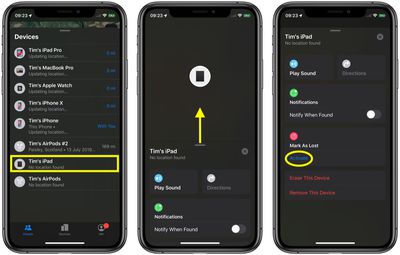
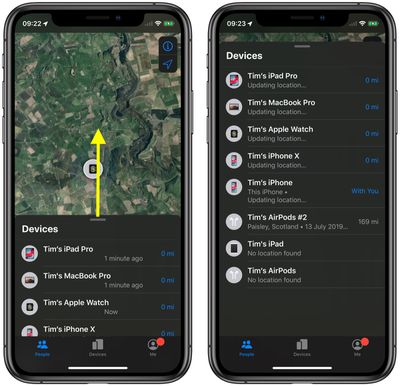
  1. Launch the Find My app on your iPhone or iPad.
  2. Swipe up with your finger to reveal the full list of devices.
    find my app

  3. Tap the lost device in the devices list.
  4. If you can't see the Mark as Lost option for the selected device, swipe up with your finger to reveal the full menu.
  5. Under Mark As Lost, tap Activate.
    how to turn on lost mode in find my 1

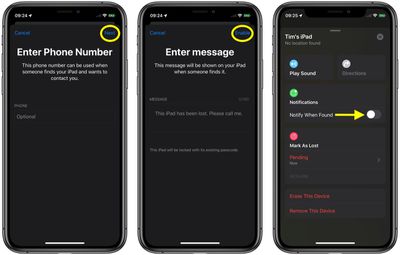
  6. Tap Continue to confirm.
  7. Optionally, enter the phone number you'd like to appear on the device's screen. This can be used when someone finds your device and wants to contact you.
  8. Tap Next.
  9. Enter a message to be shown on your device when someone finds it. The example Apple gives is "This ‌iPad‌ has been lost. Please call me," but you can add your own custom message.
  10. If you don't want to get emails regarding the status of the device, toggle the switch beside Receive Email Updates to the off position.
  11. Tap Enable to mark the device as lost.
  12. To receive a notification on this device if the lost device is found, toggle the switch beside Notify When Found to the green ON position.
    find my app lost mode

How to Turn off Lost Mode

  1. Launch the Find My app on your iPhone or ‌iPad‌.
  2. Tap the device designated "lost" in the devices list (you'll see a padlock on the device icon to signify that it's locked). If you can't see it on the screen, swipe up with your finger to reveal the full list of devices.
  3. If you can't see the Mark as Lost section for the selected device, swipe up with your finger and reveal the full menu.
  4. Under Mark as Lost, tap Pending.
  5. Tap Turn Off Mark as Lost at the bottom of the Lost Mode screen.
  6. Tap Turn Off to confirm.

Lost Mode can also be disabled by entering your passcode and unlocking a device that was put into Lost Mode but has now been found.


Related Forum: iOS 13

Popular Stories

apple design award 2025

Apple Announces 2025 Design Award Winners Ahead of WWDC 2025

Tuesday June 3, 2025 10:14 am PDT by
As we wait for WWDC to kick off next Monday, Apple today announced the winners of its annual Apple Design Awards, recognizing apps and games for their innovation, ingenuity, and technical achievement. The 2025 Apple Design Award winners are listed below, with one app and one game selected per category: Delight and Fun - CapWords (App) and Balatro (Game) Innovation - Play (App) and PBJ -...
1password deal blue

1Password Security Breach: What Was Accessed and What Wasn't

Wednesday November 25, 2026 1:09 pm PST by
Popular password management app 1Password today said it experienced a security breach earlier this month. 1Password says some customer names and email addresses were accessed, but no customer vault contents were compromised. On November 19, 1Password saw indications that an employee's GitHub account had been breached and began investigating. The company says the breached GitHub account was...
Apple 2026 Black Friday Event Hero

Apple's Official 2026 Black Friday Offer Starts Rolling Out

Thursday November 26, 2026 8:37 am PST by
Apple's annual four-day Black Friday through Cyber Monday shopping event is now live in Australia, New Zealand, and Thailand, and it will continue to roll out across Europe, the U.S., and Canada as the calendar turns to Friday, November 27 around the world. In the U.S., Apple's terms and conditions say the promotion begins on November 27 at 12 a.m. Pacific Time and ends on November 30 at...
Latest Stories
The 50+ Best Apple Black Friday Deals Still Available on AirPods, iPads, and More
10 hours ago
HomePod Mini 2 in (RED) Seemingly Spotted Ahead of Announcement
7 hours ago
Apple's M6 and PROLED MacBook Pro Reach New Low Prices for Black Friday
18 hours ago
The MacRumors Show: iPhone Air 2 and iPhone 18 Are Coming
18 hours ago
Apple Store in Brisbane Reopening Next Month With New Design
18 hours ago
The 60+ Best Black Friday Accessory Deals on iPhone Chargers, TVs, Headphones, and More
19 hours ago
GTA VI Now (Barely) Running on Apple Silicon Macs
19 hours ago
The Best Black Friday Streaming Deals on Apple TV, Disney+, and More
20 hours ago
Apple TV's 'Carême' Wins International Emmy for Best Drama
21 hours ago
iPhone 18 Production Delay Leaves Apple Little Time Before Launch
21 hours ago
The Best Black Friday AirPods Deals Still Available
14 hours ago
The Best Black Friday Deals on Apple Home Products
22 hours ago
The Best Black Friday iPhone Deals Still Available
14 hours ago
The Best Black Friday iPad Deals Still Available
14 hours ago
The Best Black Friday Apple Watch Deals Still Available
14 hours ago
The Best Black Friday AirTag Deals Still Available
14 hours ago
The Best Black Friday Mac Deals Still Available
14 hours ago
iPhone Share of US Smartphone Market Hits 57% as Rivals Slip
23 hours ago
iPhone 20 Pro Rumored to Feature 3D-Printed Titanium Frame
1 day ago
Apple's Official 2026 Black Friday Offer Starts Rolling Out
2 days ago
Halide Adds Fill Light Feature for iPhone Duo
2 days ago
MacBook Air Black Friday Deals Now Live With Massive $399 Savings
2 days ago
Amazon Discounts All MacBook Neo Models by $99 for Black Friday
2 days ago
Kodak Launches Unique AirTag Rival With E-Ink Display
2 days ago
Here's Why the Apple Store is Going Down
2 days ago
Apple Still Working on Giant Foldable iPad That Could Cost $5,000
2 days ago
iPhones Dominate China's Weak Singles' Day Smartphone Sales
2 days ago
iPhone 20 Pro Could Feature Ceramic in Limited-Edition Model
2 days ago
Apple Faces Korean Regulator Review Over iPhone 16 AI Advertising
2 days ago
Apple Watch Ultra 4 Hits New Best-Ever Price of $649.99 for Black Friday
2 days ago
Related Apple News: Iphone | Technology | South Africa | Buyers Guide | Entertainment