Skip to Content

How to Prevent Unsolicited AirDrops to Your Apple Device

by

ios12 airdrop topic iconSince its introduction with iOS 7, AirDrop has become the favored means for iPhone and iPad users to instantly share photos, videos, documents, and more to nearby Apple devices over Wi-Fi and Bluetooth. Using it to transmit content from apps like Photos and Safari couldn't be simpler, thanks to its top-level location in the iOS Share Sheet, accessed via the ubiquitous Share icon.

AirDrop is popular with all sorts of users, from teenagers who use it to flirt or share innocent memes in public places like concerts and festivals, to professionals who AirDrop project materials to each other across the office. Unfortunately, however, the way AirDrop currently works also leaves it wide open to abuse.

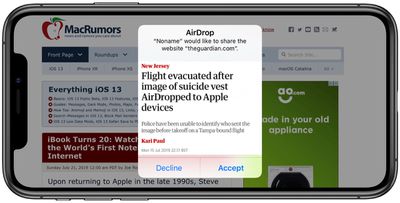
Technically, iOS doesn't allow just anyone to share a photo or document to your device unless you actively choose to accept it. The problem with AirDrop though is that it displays a preview of the proposed shared content on your device's screen, whether or not you actually want to see it.

Riders on New York City's subways often report being subjected to unsolicited nude images sent over AirDrop in this way. In fact the problem is so bad that NYC lawmakers introduced a bill last year that would make it illegal "for a person to send an unsolicited sexually explicit video or image to another person with intent to harass, annoy or alarm such other person."
how to protect yourself from airdrop harassment 1
But finding and prosecuting an AirDrop offender would be extremely difficult. The problem is that when someone attempts to send something to you over AirDrop, iOS identifies them by their device's name. However, the name of a device can be changed by its user at a moment's notice, which would make it almost impossible for the average user to know where the AirDropped content came from.

Protecting Yourself From AirDrop Harassment

To protect yourself from receiving unsolicited content in a public place, you could disable AirDrops to your device by turning off Wi-Fi and Bluetooth, but this limits you unnecessarily when you consider that Apple lets you control who can see your device and send you content using AirDrop.

There are two active settings for AirDrop: You can set it to accept shares from anyone, or only from people whose email address or mobile number appears in your contacts. Alternately, you can turn off the feature completely. You can use these settings to ensure that you don't become the unwitting victim of an unsolicited AirDrop share. Keep reading to learn how.

How to Restrict AirDrop in iOS

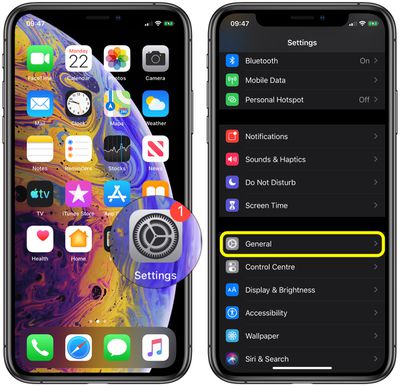
  1. Launch the Settings app on your iPhone or ‌iPad‌.
  2. Scroll down and tap General.
    how to protect yourself from AirDrop harassment 2

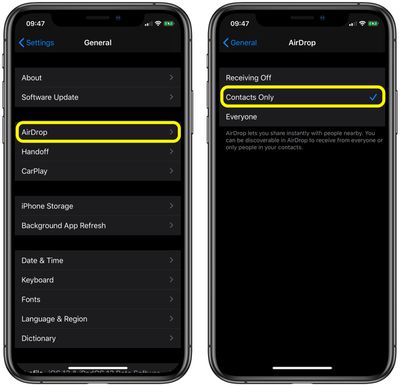
  3. Tap AirDrop.
    airdrop

  4. Tap Contacts Only or Receiving Off.

How to Restrict AirDrop via Control Center

You can also set your AirDrop options in Control Center. Here's how:

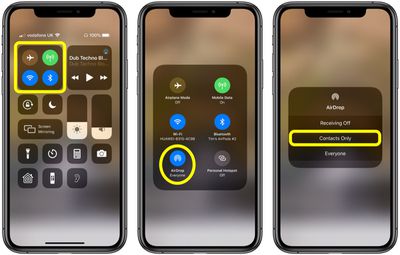
  1. Open Control Center on your device in the following way: On an ‌iPad‌ with a Home button, double-tap the Home button; on iPhone 8 or earlier, swipe up from the bottom of the screen; and on a 2018 iPad Pro or iPhone X/XR/XS/XS Max, swipe down from the upper right of the screen.
    how to protect yourself from airdrop harassment

  2. Press firmly or touch and hold the network settings card in the upper-left corner.
  3. Tap AirDrop.
  4. Tap Contacts Only or Receiving Off.

How to Restrict AirDrop in macOS

If you've been the victim of AirDrop harassment on a Mac at work (in an open plan office, for instance) here's how to restrict who can share content with you in macOS.

  1. Open a Finder window on your Mac.
  2. Select AirDrop from the Finder sidebar (if AirDrop isn't listed, use the keyboard combination Command-Shift-R to open it.
    how to protect yourself from airdrop harassment 3

  3. Click the setting prefaced with Allow me to be discovered by: and select Contacts Only or Receiving Off from the drop-down menu.
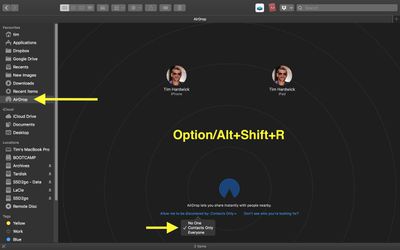
If you're a regular user of AirDrop in macOS and regularly open it in Finder, consider adding an AirDrop shortcut to your Dock for one-click access to it from any screen.


Tag: AirDrop

Top Rated Comments

Loge Avatar
96 months ago
But the obvious solution, "disable Airdrop preview" does not exist!
Score: 10 Votes (Like | Disagree)
96 months ago
TLDR set airdrop to contacts only

Job done!
Score: 6 Votes (Like | Disagree)
H3LL5P4WN Avatar
96 months ago
With this story, MacRumors is killing my favorite way to prove to strangers that Bigfoot is watching over them.
Score: 6 Votes (Like | Disagree)
kycophpd Avatar
96 months ago
With this story, MacRumors is killing my favorite way to hook up on a subway.
Score: 6 Votes (Like | Disagree)
MisterSavage Avatar
96 months ago
I’m actually surprised at the number of people that purposely leave airdrop set to everyone... it would also use more battery even if it’s a small amount
The kids like it!

https://www.businessinsider.com/teens-using-apple-airdrop-instead-of-snapchat-and-instagram-2015-1

Isn't Airdrop just bluetooth sharing like it was on the Nokia phones days?

Plus, why use Airdrop when the internet is so fast today you can send the images over any IMs or email
No. It uses a combination of bluetooth and its own local Wifi network. It doesn't require any cellular or existing Wifi networks and you can send huge files like video. Was incredibly useful when traveling overseas where connectivity was spotty and I wanted to share files with others. I can also send/receive a large amount of pictures at their full size and resolution using AirDrop.
Score: 2 Votes (Like | Disagree)
wesk702 Avatar
96 months ago
TLDR set airdrop to contacts only

Job done!
I don’t know why, but I have it set to everyone cause whenever I select “contacts only” it never consistently sees my devices.
Score: 2 Votes (Like | Disagree)

Popular Stories

apple design award 2025

Apple Announces 2025 Design Award Winners Ahead of WWDC 2025

Tuesday June 3, 2025 10:14 am PDT by
As we wait for WWDC to kick off next Monday, Apple today announced the winners of its annual Apple Design Awards, recognizing apps and games for their innovation, ingenuity, and technical achievement. The 2025 Apple Design Award winners are listed below, with one app and one game selected per category: Delight and Fun - CapWords (App) and Balatro (Game) Innovation - Play (App) and PBJ -...
1password deal blue

1Password Security Breach: What Was Accessed and What Wasn't

Wednesday November 25, 2026 1:09 pm PST by
Popular password management app 1Password today said it experienced a security breach earlier this month. 1Password says some customer names and email addresses were accessed, but no customer vault contents were compromised. On November 19, 1Password saw indications that an employee's GitHub account had been breached and began investigating. The company says the breached GitHub account was...
Apple 2026 Black Friday Event Hero

Apple's Official 2026 Black Friday Offer Starts Rolling Out

Thursday November 26, 2026 8:37 am PST by
Apple's annual four-day Black Friday through Cyber Monday shopping event is now live in Australia, New Zealand, and Thailand, and it will continue to roll out across Europe, the U.S., and Canada as the calendar turns to Friday, November 27 around the world. In the U.S., Apple's terms and conditions say the promotion begins on November 27 at 12 a.m. Pacific Time and ends on November 30 at...
Latest Stories
The 50+ Best Apple Black Friday Deals Still Available on AirPods, iPads, and More
3 minutes ago
HomePod Mini 2 in (RED) Seemingly Spotted Ahead of Announcement
10 hours ago
Apple's M6 and PROLED MacBook Pro Reach New Low Prices for Black Friday
20 hours ago
The MacRumors Show: iPhone Air 2 and iPhone 18 Are Coming
20 hours ago
Apple Store in Brisbane Reopening Next Month With New Design
21 hours ago
The 60+ Best Black Friday Accessory Deals on iPhone Chargers, TVs, Headphones, and More
22 hours ago
GTA VI Now (Barely) Running on Apple Silicon Macs
22 hours ago
The Best Black Friday Streaming Deals on Apple TV, Disney+, and More
23 hours ago
Apple TV's 'Carême' Wins International Emmy for Best Drama
23 hours ago
iPhone 18 Production Delay Leaves Apple Little Time Before Launch
1 day ago
The Best Black Friday AirPods Deals Still Available
16 hours ago
The Best Black Friday Deals on Apple Home Products
1 day ago
The Best Black Friday iPhone Deals Still Available
16 hours ago
The Best Black Friday iPad Deals Still Available
16 hours ago
The Best Black Friday Apple Watch Deals Still Available
16 hours ago
The Best Black Friday AirTag Deals Still Available
16 hours ago
The Best Black Friday Mac Deals Still Available
16 hours ago
iPhone Share of US Smartphone Market Hits 57% as Rivals Slip
1 day ago
iPhone 20 Pro Rumored to Feature 3D-Printed Titanium Frame
1 day ago
Apple's Official 2026 Black Friday Offer Starts Rolling Out
2 days ago
Halide Adds Fill Light Feature for iPhone Duo
2 days ago
MacBook Air Black Friday Deals Now Live With Massive $399 Savings
2 days ago
Amazon Discounts All MacBook Neo Models by $99 for Black Friday
2 days ago
Kodak Launches Unique AirTag Rival With E-Ink Display
2 days ago
Here's Why the Apple Store is Going Down
2 days ago
Apple Still Working on Giant Foldable iPad That Could Cost $5,000
2 days ago
iPhones Dominate China's Weak Singles' Day Smartphone Sales
2 days ago
iPhone 20 Pro Could Feature Ceramic in Limited-Edition Model
2 days ago
Apple Faces Korean Regulator Review Over iPhone 16 AI Advertising
2 days ago
Apple Watch Ultra 4 Hits New Best-Ever Price of $649.99 for Black Friday
2 days ago
Related Apple News: Education | South Africa | Mac | Politics | Iphone