Skip to Content

How to Crop, Rotate, and Straighten Your Photos in iOS 13

by

photos iconIn iOS 13, Apple enhanced the built-in photo editing capabilities available on iPhones and iPads, and redesigned the photo editing interface to make it easier to manipulate your pictures.

This article offers a brief introduction to the new photo editing interface in the stock Photos app by looking at how you can crop, rotate, and straighten your shots in next to no time.

The first thing to do is launch the stock ‌Photos‌ app on your iPhone or iPad, and then using the Photos tab (shown in the first screen below) tap to select a picture from your Photo library.
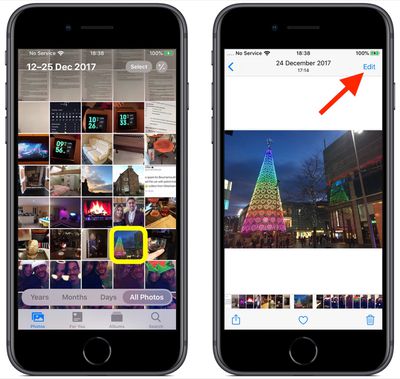
photos editing interface in iOS 13
If it isn't a recent photo that you want to edit, you can use the Days, Months, and Years views to whittle down your collection. Alternatively, select a photo from one of your albums via the Albums tab.

Once you've selected a picture, tap Edit in the top-right corner of the screen to enter the black editing interface.
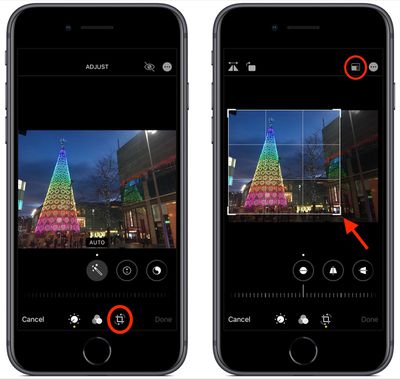
photos editing interface in iOS 13
Next, tap the Crop tool (the rightmost tool icon at the bottom of the screen). Notice that a grid now overlays your picture. Drag any corner of this frame to custom crop the image. You can also choose from a set of pre-defined cropping ratios by tapping the first of the two icons in the top-right corner of the screen.

Notice that the horizontal strip of adjustment tools below the photo also changed when you selected the Crop icon. From left to right, these allow you to straighten the image, adjust vertical alignment, and adjust horizontal alignment.
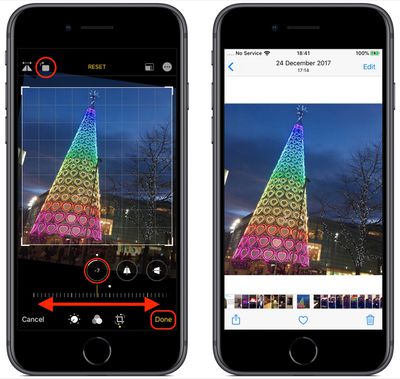
photos editing interface in iOS 13
Tap one of the tools and slide the horizontal dial left or right with your finger to adjust to the desired level, indicated by the number in the selected tool's icon. At the top-right corner of the editing interface you'll also see more tools allowing you to flip and rotate the image.

If you make a mistake when editing your photo, simply tap the Reset button to the right of these tools to undo your adjustments. Press Done in the bottom-right corner of the screen when you're happy with your edits and they'll be automatically saved.

Remember, in addition to using the ‌Photos‌ app, you can also use these editing tools whenever you take a picture using the built-in Camera app – you don't even have to unlock your device to edit the photo you just shot.


Popular Stories

apple design award 2025

Apple Announces 2025 Design Award Winners Ahead of WWDC 2025

Tuesday June 3, 2025 10:14 am PDT by
As we wait for WWDC to kick off next Monday, Apple today announced the winners of its annual Apple Design Awards, recognizing apps and games for their innovation, ingenuity, and technical achievement. The 2025 Apple Design Award winners are listed below, with one app and one game selected per category: Delight and Fun - CapWords (App) and Balatro (Game) Innovation - Play (App) and PBJ -...
Apple 2026 Black Friday Event Hero

Apple's Official 2026 Black Friday Offer Starts Rolling Out

Thursday November 26, 2026 8:37 am PST by
Apple's annual four-day Black Friday through Cyber Monday shopping event is now live in Australia, New Zealand, and Thailand, and it will continue to roll out across Europe, the U.S., and Canada as the calendar turns to Friday, November 27 around the world. In the U.S., Apple's terms and conditions say the promotion begins on November 27 at 12 a.m. Pacific Time and ends on November 30 at...
apple store down feature

Here's Why the Apple Store is Going Down

Thursday November 26, 2026 5:49 am PST by
Apple's online store is going down for a few hours on a rolling country-by-country basis right now, but do not get your hopes up for new products. Apple takes its online store down for a few hours ahead of Black Friday every year to tease its annual gift card offer with the purchase of select products. The store is down in Australia, New Zealand, and Thailand, right now, and it will...
Latest Stories
Apple Now Aims to Repair Rather Than Replace iPhone Duos With Cracked Screens
2 hours ago
Here Are the Best Apple Black Friday Leftover Deals You Can Get Today
11 hours ago
HomePod Mini 2 in (RED) Seemingly Spotted Ahead of Announcement
22 hours ago
Apple's M6 and PROLED MacBook Pro Reach New Low Prices for Black Friday
1 day ago
The MacRumors Show: iPhone Air 2 and iPhone 18 Are Coming
1 day ago
Apple Store in Brisbane Reopening Next Month With New Design
1 day ago
The 60+ Best Black Friday Accessory Deals on iPhone Chargers, TVs, Headphones, and More
11 hours ago
GTA VI Now (Barely) Running on Apple Silicon Macs
1 day ago
The Best Black Friday Streaming Deals on Apple TV, Disney+, and More
1 day ago
Apple TV's 'Carême' Wins International Emmy for Best Drama
1 day ago
iPhone 18 Production Delay Leaves Apple Little Time Before Launch
2 days ago
The Best Black Friday AirPods Deals Still Available
1 day ago
The Best Black Friday Deals on Apple Home Products
2 days ago
The Best Black Friday iPhone Deals Still Available
1 day ago
The Best Black Friday iPad Deals Still Available
1 day ago
The Best Black Friday Apple Watch Deals Still Available
1 day ago
The Best Black Friday AirTag Deals Still Available
1 day ago
The Best Black Friday Mac Deals Still Available
1 day ago
iPhone Share of US Smartphone Market Hits 57% as Rivals Slip
2 days ago
iPhone 20 Pro Rumored to Feature 3D-Printed Titanium Frame
2 days ago
The 50+ Best Apple Black Friday Deals Still Available on AirPods, iPads, and More
3 hours ago
Apple's Official 2026 Black Friday Offer Starts Rolling Out
2 days ago
Halide Adds Fill Light Feature for iPhone Duo
2 days ago
MacBook Air Black Friday Deals Now Live With Massive $399 Savings
2 days ago
Amazon Discounts All MacBook Neo Models by $99 for Black Friday
2 days ago
Kodak Launches Unique AirTag Rival With E-Ink Display
3 days ago
Here's Why the Apple Store is Going Down
3 days ago
Apple Still Working on Giant Foldable iPad That Could Cost $5,000
3 days ago
iPhones Dominate China's Weak Singles' Day Smartphone Sales
3 days ago
iPhone 20 Pro Could Feature Ceramic in Limited-Edition Model
3 days ago
Related Apple News: Apple Events | Travel | Culture | Imac | Apple Tv Shows