

Apple today released the new iOS 16 update to the public, so there are dozens if not hundreds of new features for you to learn about. Some of these options must be set up ahead of time, so we've developed a getting started with iOS 16 guide that walks you through what you should do after upgrading.


Set Up Your Lock Screens
The Lock Screen has been overhauled in iOS 16, with Apple introducing customization options so you can personalize your Lock Screen. You can customize colors, pick a font for the time, choose a wallpaper, use emojis as a background, and select widgets.
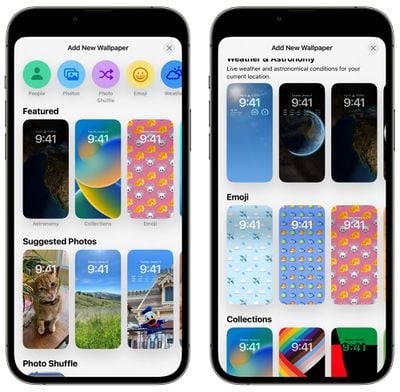
To edit your Lock Screen, unlock your iPhone and then long press on the Lock Screen. From there, tap on the "+" button to create a Lock Screen. Choose your wallpaper and then tap on "Add Widgets" to select your widgets. You can also tap on the time to select a font and a color for the time.
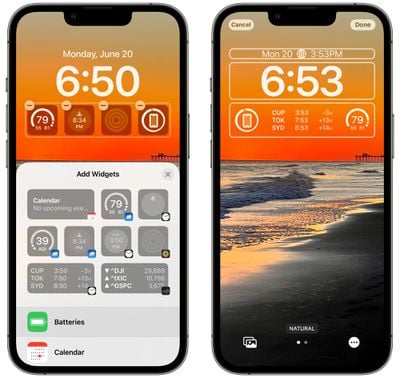
You can create multiple Lock Screens and swap between them much like Apple Watch faces, just long press on the Lock Screen to get to your collection and swipe to change them.
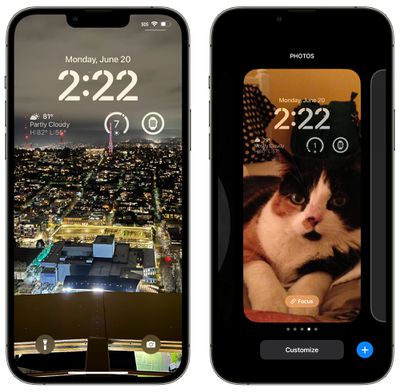
For more instructions on Lock Screen creation and a look at all of the different options, we have a dedicated iOS 16 Lock Screen Guide.
Link Focus Modes
After you've created a Lock Screen, you can link it to one of your existing Focus Modes or create a new Focus Mode to use with it. To do so, long press on the Lock Screen to get to the customization interface and then on your chosen Lock Screen, tap on the "Focus" icon.
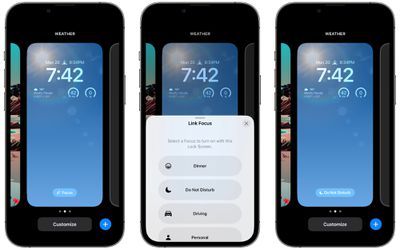
Choose a Focus to use with the Lock Screen, and then whenever you use that Lock Screen, it'll activate that Focus Mode. If you want to create a new Focus, you can do so in the Settings app, with additional information on the iOS 16 Focus Mode changes available in our iOS 16 Focus Mode guide.
Set Up Focus Filters
Focus Modes can filter out more specific kinds of content in iOS 16, letting you set up a Focus that displays select information from apps like Calendar, Mail, Safari, and Messages. You can, for example, set up a Focus that shows only your work calendar, work tabs, and your work email when in "work" mode.
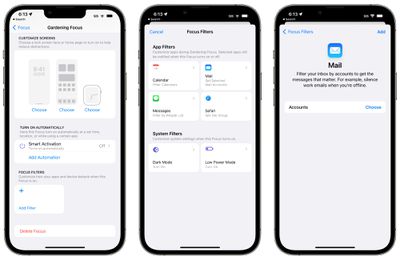
To set up Focus Filters, open up the Settings app, select a Focus mode, scroll down, and then choose the "Add Filter" option under Focus Filters. From there, you can customize your Focus to meet your needs, and over time, filters will get more advanced because Apple designed an API for developers.
More on setting up Focus Filters can be found in our guide and our Focus Filter how tos.
- How to Use Focus Filters to Hide Content in Apps
- How to Switch On Dark Mode With a Focus
- How to Activate Low Power Mode With a Focus
- How to Limit Browsing to a Specific Safari Tab Group in Focus Mode
- How to Associate a Mail Account With a Focus
Bonus tip: You may also want to set up Silence and Allow lists, a new Focus feature in iOS 16. You can select people and apps that are not allowed to notify you when a specific Focus is active, rather than simply allowing them. Silence and Allow Lists can be found in the Focus section of the Settings app.
Add Your Medications to the Health App
Apple in iOS 16 added a new feature for tracking medications, which can be found in the Health app. Medication tracking lets you add all of your medications and vitamins that you take, and it sends you notifications so you can make sure you're taking them regularly and on time.
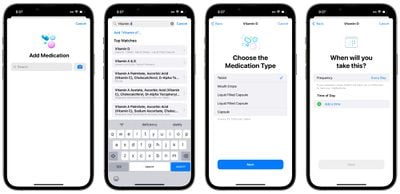
It lets you know about potential drug interactions with anything that you're taking, and if you have an Apple Watch, it's super simple to mark a medication as taken right from your wrist (but it's not required).
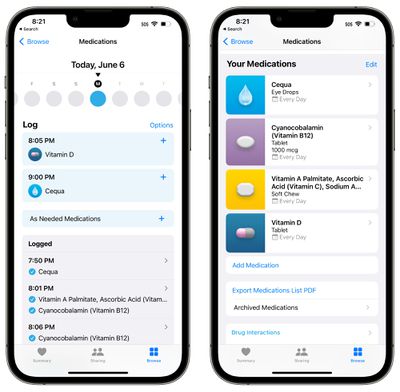
To use it, open up the Health app, tap over to Browse, and select the Medications interface. You can manually add medications or scan your pill bottles, and choose a custom look for each one. More information on how to set up and use the new Medications feature can be found in our dedicated Health guide.
Try Out the New iMessage Features
In iOS 16, you can edit an iMessage for up to 15 minutes after it's sent, as long as you're communicating with other iMessage users who also have iOS 16.
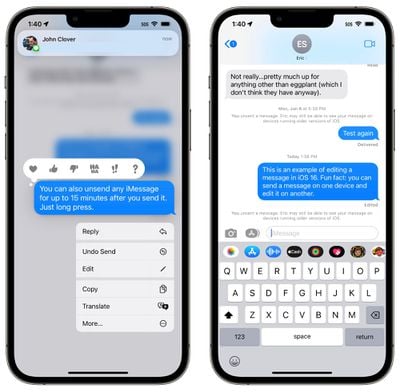
There are also options for undoing a sent message, marking a message as unread, and recovering deleted messages. Note that editing and unsending iMessages has time limitations and it can't be used with those who have Android devices. More information is available in our Messages guide.
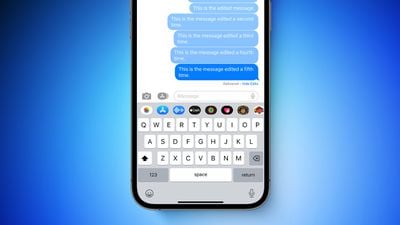
The SharePlay feature that was once limited to FaceTime is also now available in Messages, so you can watch TV shows, movies, or use apps with friends while you chat using the Messages app.
Bonus tip: Undo send is also available in the Mail app, plus there are other useful new features like Scheduled Send and reminders to Follow Up on a message you haven't heard back on.
Pin Your Favorite Tabs and Set Up Tab Group Start Pages
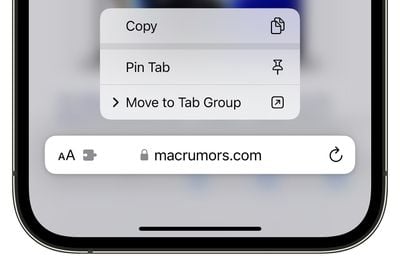
Safari in iOS 16 supports pinned tabs, so if you have tabs that you regularly use, you can pin them for easy access. Just open up a website, long press on the URL bar, and choose the "Pin Tab" option to pin a tab.
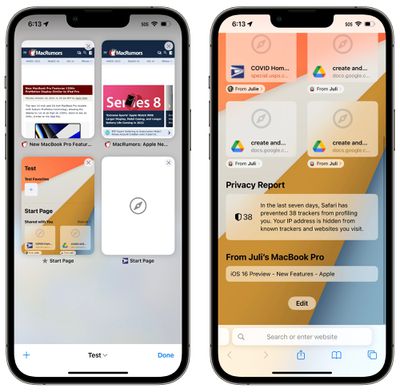
If you use Tab Groups, you can now customize a Start Page for each and every one, allowing for different favorites, wallpapers, frequently visited sites, and more. Open up a Tab Group and scroll down to the bottom of the screen to get to the "Edit" button where you can customize your home pages.
For more on what's new in Safari and how to use these features, we have a dedicated Safari guide.
Try Out Lift Subject From Background
iOS 16 has a fun feature that lets you drag subjects right out of images, and it works in apps like Photos, Safari, and more. Just open up any image, long press on it, and choose the "Copy Subject" option or drag it out of the image.
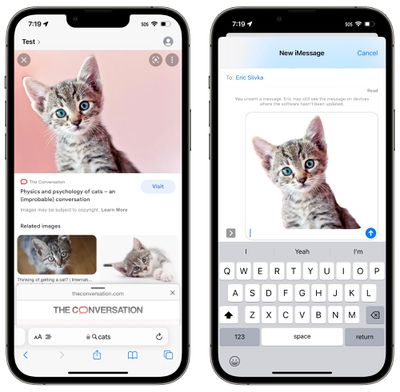
From there, you can paste it into another app like Messages or Mail.
Clear Duplicate Photos
If you have duplicate photos on your device, iOS 16 can detect them and clean them up. You might need to wait for a bit after installing iOS 16 for your device to scan your photos, but once it does, it'll detect anything that's a duplicate.
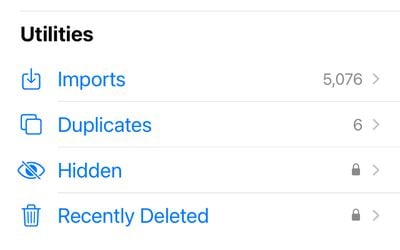
To see duplicates, open up the Photos app, tap on "Albums" and scroll down to Utilities. If there are duplicate photos, you'll see a "Duplicates" album and will have the option to merge them. If not, you won't see the album at all.
Clear Duplicate Contacts
Have a Contacts app riddled with duplicates you haven't been able to fix? iOS 16 has a solution. In the iOS 16 Contacts app, if you have more than one contact card for the same person, the app will detect the duplicate and let you know that multiples were found.
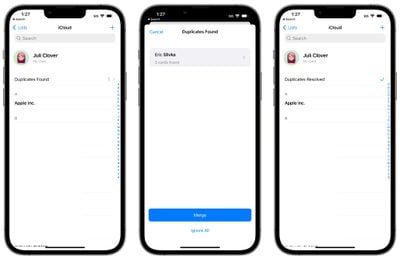
To use this feature, just upgrade to iOS 16 and open up Contacts. If there are duplicates, you'll see a notice right at the top and will be able to merge contacts.
Do a Safety Check
The iOS 16 Settings app has a new "Safety Check" feature that's meant to make it simple for people to reset all of the data and location access that's been granted to people and apps. It's technically aimed at people in domestic or intimate partner violence situations, but it provides a good overview of privacy settings for all users.
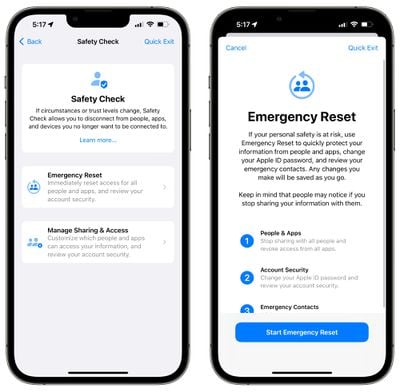
Open up the Settings app, select the Privacy and Security section, and scroll down to Safety Check to get to it. From there, tap on Manage Sharing & Access to get an overview of everything you're sharing and who you're sharing it with. More information can be found in our privacy and security guide.
Try the New FaceTime Handoff Feature
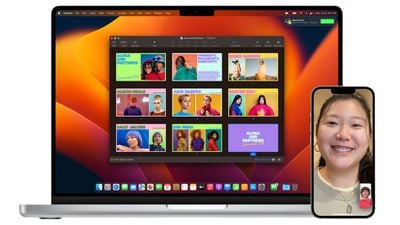
If you're on a FaceTime call with someone, you can now hand off calls to a different device like a Mac or an iPad. Calls and video chats transfer over seamlessly, and it's worth checking out if you're a regular FaceTime user and want to swap from one device to another.
More on iOS 16
These are just a handful of the many, many features that are available in iOS 16. Make sure to check out our iOS 16 roundup for a full walkthrough on all of what iOS 16 has to offer.
We also have an iOS 16 forum where you can discuss the new features with other MacRumors readers.



































