Skip to Content

iOS 16 Security and Privacy Features: Everything You Need to Know

Every iOS update adds new privacy and security features, and iOS 16, available now, is no exception. Apple has added tools to make it easier to apply security updates, new Face ID capabilities, improvements to photo security, and more, with details on all of the new privacy and security options outlined below.
Apple Privacy Yellow

Safety Check

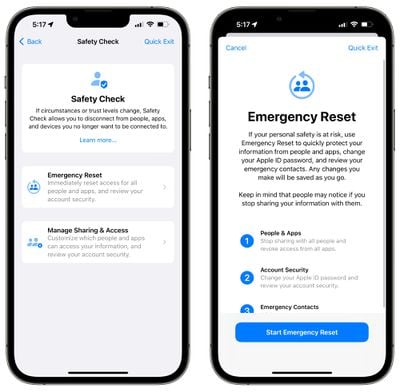
The Settings app houses a new "Safety Check" feature that is designed to make it easy for people to quickly reset all of the data and location access that they have granted to other people. According to Apple, Safety Check is aimed at people in domestic or intimate partner violence situations.

You can get to Safety Check by opening up the Settings app and tapping into the Privacy and Security section. From there, scroll down to Safety Check. Safety Check has two options, including an Emergency Reset and a checklist of all your data sharing options.

Note that Safety Check has a "Quick Exit" button that takes you right to the iPhone's Home Screen in case you're in danger of getting caught using it.

Emergency Reset

Emergency Reset is a one-tap option that lets you protect your iOS device with just a couple of taps. When you use Emergency Reset, it immediately stops sharing everything with all people and apps.
ios 16 safety check emergency reset
That includes anything you might be sharing with people, such as location information, your home data, photo albums, and more.

Emergency Reset also lets you remove all emergency contacts and reset your Apple ID and password so no one can log into your account.

Manage Sharing

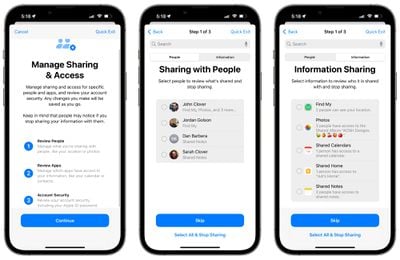
For less of an emergency situation, there's a Manage Sharing and Access walkthrough that lets you see an overview of what you're sharing so you can't be secretly tracked or monitored using location sharing, shared albums, or other iPhone features.
ios 16 manage sharing
You can see exactly who you're sharing data with and what data those people have access to, along with which apps have access to your data. You can select people or apps and choose the "Stop Sharing" option to turn off sharing right away.

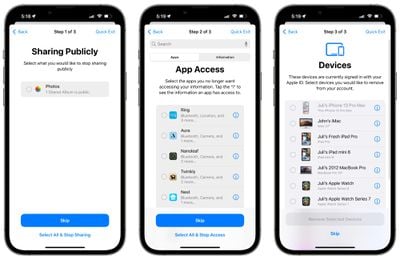
You will also see a list of all the third-party apps that you have installed and what data they have access to, along with tools to disable that access. You can see which permissions an app has on an individual basis, or by data such as Bluetooth, Location, Contacts, and more.
ios 16 manage sharing 2
Manage Sharing will tell you exactly which devices your iCloud account is logged into, giving you the option to log out, plus it will let you reset your ‌Apple ID‌ and password as well as deactivate Emergency contacts.

Locked Hidden and Recently Deleted Photo Albums

In the iOS 16 Photos app, the Hidden and Recently Deleted albums are not able to be opened up without biometric authentication through ‌Face ID‌, Touch ID, or a passcode.

Landscape Face ID

On iPhone 13 models, ‌Face ID‌ works in landscape mode after iOS 16 has been installed. This allows ‌Face ID‌ to unlock the iPhone regardless of whether it's held in portrait or landscape orientation.

Rapid Security Response

With iOS 16, Apple can send out security updates without needing to update the entire operating system. in iOS 15, security updates are tied to iOS updates and require a full update, but iOS 16 will make it easier for Apple to distribute security updates, and it will make them quicker to download.
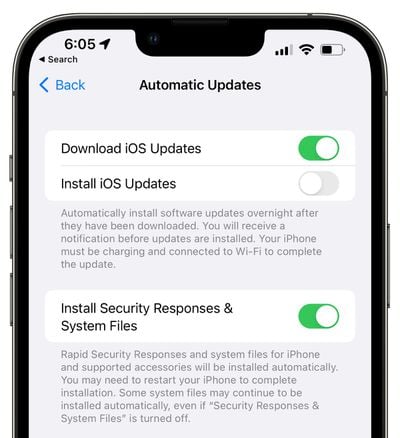
ios 16 security updates
When you update to iOS 16, Apple will set your device to install security updates automatically, but the feature can be turned off under General > Software Update > Automatic Updates.

Get important security improvements to your devices even faster. These improvements can be applied automatically between standard software updates.

Pasteboard Permissions

Apps in iOS 16 need explicit user permission before accessing the clipboard to copy and paste content. Apps will need to ask to use the copy and paste feature, similar to the way apps need permission to access the microphone, camera, location, and other sensitive data.

Passkeys

With iOS 16 and its sister updates, Apple is adding Passkeys that are designed to replace traditional passwords when signing into a website or app. Apple says that Passkeys are more secure than passwords, protecting users from phishing, malware, and other attacks that attempt to gain account access. Passkeys were not implemented in the iOS 16 beta, but will be introduced later this year.
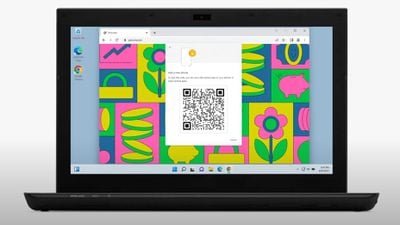
passkeys ios 16 2
Passkeys work through a key system. One key is public and stored on the website server, while the second key is private and kept on-device. On the iPhone and other devices with biometric authentication, ‌Face ID‌ or ‌Touch ID‌ is used to authorize the passkey to authenticate the user to a website or app.

The key from the website and the key from the Apple device must match to allow for a login, and since the device key is private and only available to the user, it cannot be stolen, leaked, or phished.

Passkeys use ‌iCloud‌ Keychain, which requires two-factor authentication for further protection. Passkeys sync across all of a user's devices through ‌‌iCloud‌‌ Keychain, which is end-to-end encrypted with its own cryptographic keys.

Passkey synchronization across devices offers redundancy in case an iPhone is lost, but should all of a person's Apple devices become lost and the passkeys along with them, Apple created an ‌iCloud‌ keychain escrow function to recover passkey information. There is a multi-step authentication process to go through to recover an ‌‌iCloud‌‌ Keychain with passkeys, or users can set up a person to serve as an account recovery contact.

Passkeys sound complicated, but in practice, it will be as simple as using ‌‌Touch ID‌‌ or ‌‌Face ID‌‌ to create a passkey to go along with a login.

Apple has been working with members of the FIDO Alliance, including Google and Microsoft, to ensure that passkeys can also be used with non-Apple devices and across platforms. On non-Apple devices, Passkeys will work through QR codes that will authenticate using the ‌iPhone‌, but it will require support from other companies and needs to be adopted across the tech world.

Lockdown Mode

iOS 16 adds Lockdown Mode, which has an "extreme" level of security for activists, journalists, and others who are targeted by sophisticated cyberattacks. Lockdown Mode strictly limits or disables the functionality of many of the iPhone's features as well as locking down apps and websites.
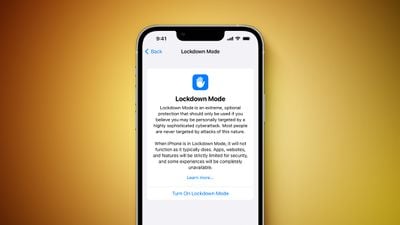
Lockdown Mode Feature
Lockdown Mode blocks most attachment types in Messages, blocks FaceTime calls from non-contacts, limits web browsing functions, prevents configuration profiles from being installed, and more, with a full list available in our Lockdown article.

Lockdown Mode is not for the average user and most people should not turn it on given how restrictive it is. The feature is disabled by default and can be activated in the Privacy and Security section of the Settings app.

Guide Feedback

Have questions about the new security and privacy features in iOS 16, know of a feature we left out, or want to offer feedback on this guide? Send us an email here.


Related Forum: iOS 16

Popular Stories

apple design award 2025

Apple Announces 2025 Design Award Winners Ahead of WWDC 2025

Tuesday June 3, 2025 10:14 am PDT by
As we wait for WWDC to kick off next Monday, Apple today announced the winners of its annual Apple Design Awards, recognizing apps and games for their innovation, ingenuity, and technical achievement. The 2025 Apple Design Award winners are listed below, with one app and one game selected per category: Delight and Fun - CapWords (App) and Balatro (Game) Innovation - Play (App) and PBJ -...
1password deal blue

1Password Security Breach: What Was Accessed and What Wasn't

Wednesday November 25, 2026 1:09 pm PST by
Popular password management app 1Password today said it experienced a security breach earlier this month. 1Password says some customer names and email addresses were accessed, but no customer vault contents were compromised. On November 19, 1Password saw indications that an employee's GitHub account had been breached and began investigating. The company says the breached GitHub account was...
apple store down feature

Here's Why the Apple Store is Going Down

Thursday November 26, 2026 5:49 am PST by
Apple's online store is going down for a few hours on a rolling country-by-country basis right now, but do not get your hopes up for new products. Apple takes its online store down for a few hours ahead of Black Friday every year to tease its annual gift card offer with the purchase of select products. The store is down in Australia, New Zealand, and Thailand, right now, and it will...

Top Rated Comments

JayAgostino Avatar
56 months ago

Is there a lockdown mode against Apple? 🤔
Yes, all you have to do is not purchase Apple products. Problem solved! :)
Score: 15 Votes (Like | Disagree)
56 months ago
How about Face ID for the files app? Kinda blows my mind that apple has yet to implement that.
Score: 8 Votes (Like | Disagree)
56 months ago
Passkey looks damn sweet but if we're forced to use it I'm afraid it might be even more painful to get out of the apple ecosystem
Score: 7 Votes (Like | Disagree)
56 months ago

People really have to be dumb to believe Apple cares about your privacy. Lets see: 24/7 tracking of cell phone even when off, CSAM spying on all devices, Apple in cahoots with the NSA, and much more.
you forgot to add China and other governments, looks like you have solid proof because you sound confident about this.
Score: 7 Votes (Like | Disagree)
Apple_Robert Avatar
56 months ago
Really looking forward to iOS 16.
Score: 7 Votes (Like | Disagree)
56 months ago

Locked Hidden and Recently Deleted Photo Albums

In the iOS 16 Photos app, the Hidden and Recently Deleted albums are not able to be opened up without biometric authentication through Face ID, Touch ID, or a passcode.
I feel like this is gonna be useful to avoid awkward moments.

Your nudes will be safe...


Rapid Security Response

With iOS 16, Apple can send out security updates without needing to update the entire operating system. in iOS 15, security updates are tied to iOS updates and require a full update, but iOS 16 will make it easier for Apple to distribute security updates, and it will make them quicker to download.
I think this will complicate jailbreaks.


Pasteboard Permissions

Apps in iOS 16 need explicit user permission before accessing the clipboard to copy and paste content. Apps will need to ask to use the copy and paste feature, similar to the way apps need permission to access the microphone, camera, location, and other sensitive data.
I nagged Apple on feedbacks to implement this.

I think apps should also ask for permission before they access your carrier information through CoreTelephony API. For example, TikTok scans for your carrier data everytime you open it, and blocks certain content to you based on your carrier, which is a form of geolocking/censorship. They obviously use that as a factor in ad targeting too.
Score: 5 Votes (Like | Disagree)
Latest Stories
The 50+ Best Apple Black Friday Deals Still Available on AirPods, iPads, and More
5 hours ago
HomePod Mini 2 in (RED) Seemingly Spotted Ahead of Announcement
2 hours ago
Apple's M6 and PROLED MacBook Pro Reach New Low Prices for Black Friday
12 hours ago
The MacRumors Show: iPhone Air 2 and iPhone 18 Are Coming
12 hours ago
Apple Store in Brisbane Reopening Next Month With New Design
13 hours ago
The 60+ Best Black Friday Accessory Deals on iPhone Chargers, TVs, Headphones, and More
14 hours ago
GTA VI Now (Barely) Running on Apple Silicon Macs
14 hours ago
The Best Black Friday Streaming Deals on Apple TV, Disney+, and More
15 hours ago
Apple TV's 'Carême' Wins International Emmy for Best Drama
15 hours ago
iPhone 18 Production Delay Leaves Apple Little Time Before Launch
16 hours ago
The Best Black Friday AirPods Deals Still Available
8 hours ago
The Best Black Friday Deals on Apple Home Products
17 hours ago
The Best Black Friday iPhone Deals Still Available
8 hours ago
The Best Black Friday iPad Deals Still Available
8 hours ago
The Best Black Friday Apple Watch Deals Still Available
8 hours ago
The Best Black Friday AirTag Deals Still Available
8 hours ago
The Best Black Friday Mac Deals Still Available
8 hours ago
iPhone Share of US Smartphone Market Hits 57% as Rivals Slip
18 hours ago
iPhone 20 Pro Rumored to Feature 3D-Printed Titanium Frame
19 hours ago
Apple's Official 2026 Black Friday Offer Starts Rolling Out
2 days ago
Halide Adds Fill Light Feature for iPhone Duo
2 days ago
MacBook Air Black Friday Deals Now Live With Massive $399 Savings
2 days ago
Amazon Discounts All MacBook Neo Models by $99 for Black Friday
2 days ago
Kodak Launches Unique AirTag Rival With E-Ink Display
2 days ago
Here's Why the Apple Store is Going Down
2 days ago
Apple Still Working on Giant Foldable iPad That Could Cost $5,000
2 days ago
iPhones Dominate China's Weak Singles' Day Smartphone Sales
2 days ago
iPhone 20 Pro Could Feature Ceramic in Limited-Edition Model
2 days ago
Apple Faces Korean Regulator Review Over iPhone 16 AI Advertising
2 days ago
Apple Watch Ultra 4 Hits New Best-Ever Price of $649.99 for Black Friday
2 days ago
Related Apple News: Health | Local News | South Africa | Iphone | World News






























