

Apple in iOS 15 introduced Focus mode, an expansion of Do Not Disturb that allows you to set up different permissions for apps, contacts, and more depending on what you're doing. You can have separate tasks for when you're at work, when you're studying, when you're at home, and more.
In iOS 16, available now, Apple has improved Focus with new features, and this guide covers everything that you need to know about using Focuses in iOS 16.
Improved Focus Setup
Setting up a Focus is more straightforward than it was before, with a new personalized setup experience for each Focus that you create.
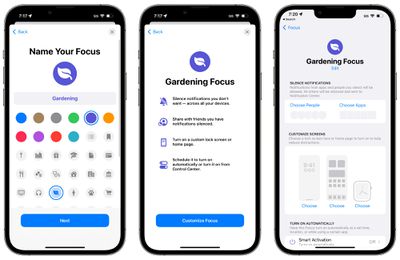
Apple used to drop you right into a confusing array of options for doing things like allowing people and apps for notifications, but now there's an explainer that lets you know how all the Focus features work, and a streamlined process for selecting your options.
With the Silence Notifications section, you can choose the apps and the people that are able to contact you when a Focus is turned on, and Apple has added options to allow or silence notifications from select people, which wasn't an option previously. With iOS 15, you could only choose allowed apps and allowed people, rather than specific people and apps to silence.
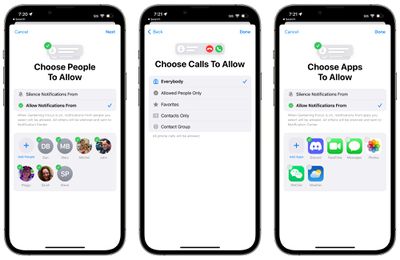
Note: Silence lists are only available on devices running iOS 16, iPadOS 16, and macOS Ventura. Devices running iOS 15 and earlier cannot access silence lists.
Apple walks you through choosing who to allow calls from as well, plus you can go through the customize screens interface, set Focus schedules, and add filters to block out certain email inboxes in Mail, Safari Tab Groups, and more, which we outline in the sections below.
Customize Screens
With iOS 16, you can customize everything about your Focus, including what the Home Screen, Lock Screen, and Apple Watch face look like. You can select from any of the Lock Screens that you've created, linking it to a Focus mode. You can also create a new Lock Screen from the Gallery.
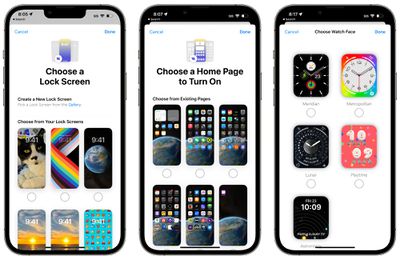
For the Home Screen customization, you can select any one of your existing app pages to serve as your main Home Screen for the Focus mode. So if you want to create a Home Screen with specific apps for a Focus, you'll first need to set up an app page by rearranging your apps.
As for the Apple Watch, if you are an Apple Watch owner, you can select one of your Apple Watch faces to activate on your wrist for a specific Focus mode.
If you've set up a custom Lock Screen, Home Screen, or Apple Watch face for your Focus and change your mind, just tap on the "-" symbol to clear it.
Linked Lock Screens and Focus Modes
You can create custom Lock Screens in iOS 16, and each Lock Screen can be associated with a different Focus. That means you can set a Lock Screen to coincide with a Focus, giving your phone a different look throughout the day.
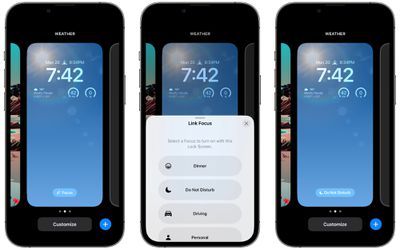
If you have a work focus, for example, you can set up a Lock Screen with the style and widgets that are useful for your job, and then when at home, you can have an entirely different setup. You can do the same thing on the Apple Watch.
To associate a Focus with a Lock Screen, open up the Lock Screen interface by long pressing on an unlocked iPhone's Lock Screen, scroll to the Lock Screen of your choice, and then tap on "Focus" to choose which Focus mode to associate the Lock Screen with.
After that, the Lock Screen will have a little icon at the bottom that lets you know which Focus it is linked to. Then, to activate the Focus, you can just swap over to that Lock Screen, so it's super easy to change Focus modes.
Note that you can also go through this setup process in the Focus section of the Settings app. Just open it up, select the Focus you want to use for a Lock Screen, and choose the "Customize Screens" option that's described up above.
Lock Screen and Home Page Suggestions
When you're creating a Focus, Apple says that iOS can suggest Lock Screens for the Focus option, like a photo Lock Screen when you're home, and a more data-central set of options for when you're at work. Apple also offers suggestions for Home Screen pages that have the apps and widgets that are most relevant to the Focus you're selecting.
Focus Filters
Focus Filters are an entirely new feature in iOS 16. With this option, you can choose to filter out content within apps, displaying a specific Mail account or Calendar, if you have multiple. When you use a Focus with a filter set, the app with the filter will only show what you've selected, hiding everything else.
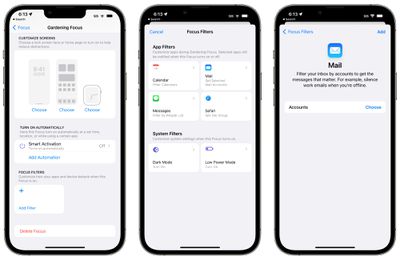
Here's what you can filter out with Focus Filters:
- Calendar - If you have different calendars set up for work and family, you can associate just one calendar with a Focus so you see only relevant events when that Focus is activated.
- Mail - You can choose any of your Mail accounts to associate with a Focus, and with this activated, when you're in that Focus, the Mail app will only show the accounts you've selected. It's useful if you want to filter out personal emails while working, and vice versa.
- Messages - The Messages app can be set to hide all messages except for the messages from the People list that you created for the particular Focus mode. So if you have a "Personal" Focus that filters out all contacts from work, you won't see their messages in the Messages app with the Personal Focus turned on.
- Safari - Safari can be set to only show a specific Tab Group when a Focus is turned on. You'll need to set up the Tab Group ahead of time in the Safari app.
- Dark Mode - You can choose Dark mode or Light mode for a Focus.
- Low Power Mode - You can opt to have Low Power mode activated or deactivated with a Focus.
- How to Use Focus Filters to Hide Content in Apps
- How to Switch On Dark Mode With a Focus
- How to Activate Low Power Mode With a Focus
- How to Limit Browsing to a Specific Safari Tab Group in Focus Mode
- How to Associate a Mail Account With a Focus
Focus Filter API
Apple made a Focus Filter API for developers so third-party apps can allow the same specific filtering options within a Focus as Apple's own app. If you use a third-party email app, for example, you'll be able to select a mailbox to show within that app provided the developer adds the Focus Filter API.
Focus Status
Apple has made it easier to control whether apps can let people know that you have a Focus activated and are silencing notifications. With the "Focus Status" section, you can choose which Focus modes are permitted to share that you have your notifications silenced.
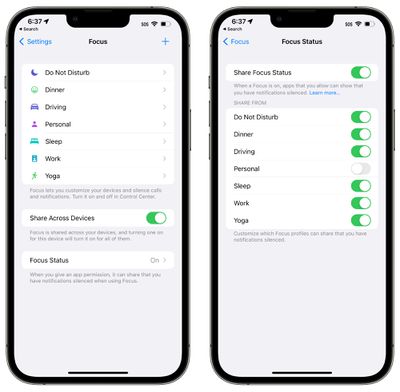
You can block a Focus mode from sharing that information, so people won't be informed that your notifications are off if they try to message you. This was possible to set in iOS 15, but in iOS 16, it's simpler to get to and manage.
Silence and Allow Lists
As mentioned up above, Silence and Allow lists are available in the Focus app in iOS 16, which may be one of the most notable quality of life improvements. Rather than just selecting people or apps that are allowed to notify you, you can also select people or apps that are not allowed to notify you with a specific Focus.
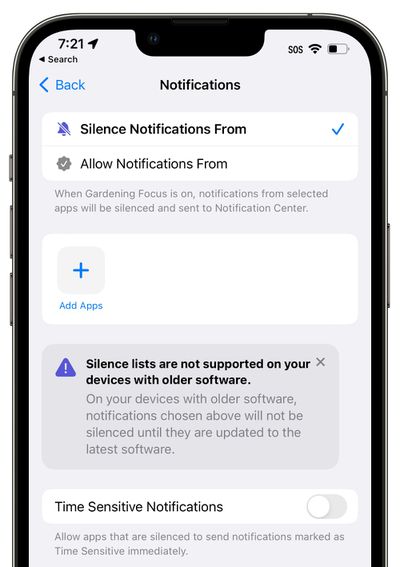
If you wanted to block out a specific person or app prior to iOS 16, there was no easy way to do so because you could only allow contacts and apps. For example, if you wanted to block out just the Messages app in iOS 15 while leaving everything else accessible, you would have to "allow" every other app. That's not the case in iOS 16, as you can choose apps (or people) to silence.
- How to Silence Notifications From Specific People When in a Focus Mode
- How to Silence Notifications From Specific Apps When in a Focus Mode
Guide Feedback
Have questions about the iOS 16 Focus option, know of a feature we left out, or want to offer feedback on this guide? Send us an email here.



































