Skip to Content

iOS 16 Mail App: Improved Search, Undo Send, Scheduled Send, Reminders and More

With iOS 16 and iPadOS 16, Apple has added a number of improvements to the Mail app to bring it in line with competing email apps. The Mail app includes search updates, an undo send option, and tools for getting reminders about emails that you need to follow up on, plus more.
iOS 16 Mail Guide Feature
This guide covers everything that you need to know about the Mail app in iOS 16, available now, and in iPadOS 16, coming in October.

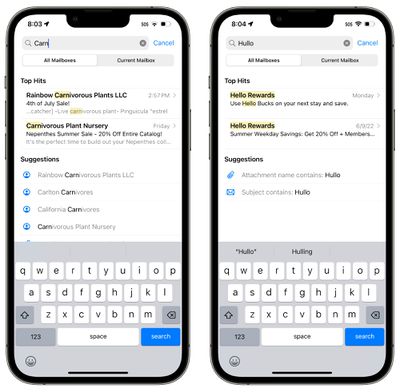
Search in the Mail app has been improved and you'll now see a wider range of suggestions when you start typing in a search term. You'll see more relevant email messages come up, and Apple also says that search corrects typos and uses synonyms for search terms.
ios 16 mail app improved search
It's not significantly different from the iOS 15 search function, but it does make search quicker, more accurate, and more intuitive to use.

Improved search is available for all users, while the typo correction feature is available in English (Australia, Canada, India, Singapore, UK, and United States).

Undo Send

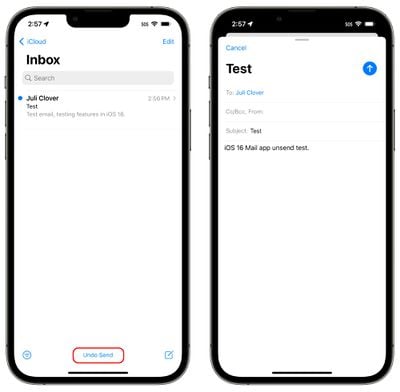
After you send an email in iOS 16 or iPadOS 16, you have a 10 second period in which to unsend the email if you make a mistake. 10 seconds is shorter than the amount of time that other mail apps like Gmail give you to unsend an email (30 seconds), but it's better than no unsend option at all.
ios 16 mail app undo send
Once you send an email in iOS 16, you'll see an "Undo Send" button at the bottom of the interface in the Mail app. You'll need to tap it within 10 seconds to unsend the email, which takes you back to the compose interface. From there, you can correct your error and resend or delete the email entirely.

Scheduled Send

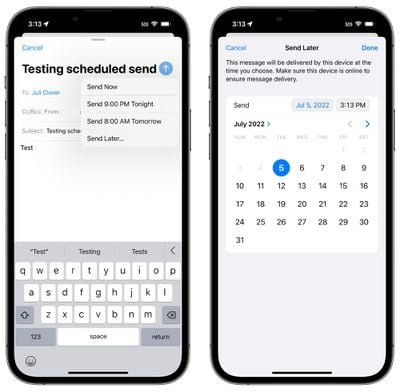
When you're ready to send an email that you've written, you can schedule a time to send it, which is a new feature in iOS 16. To do so, long press on the send icon (the blue arrow) and then select an option.
ios 16 mail app scheduled send
Apple has preset options that include "Send Now," "Send 9:00 PM Tonight," and "Send 8:00 AM Tomorrow." If those preset times don't work for you, you're able to tap on "Send Later..." and choose any date or time that you want.

Before it goes out, the email will be listed in a "Send Later" mailbox that's listed under options like Flagged and Unread. You can tap into this email inbox to see the messages you have scheduled and what time they're scheduled for.
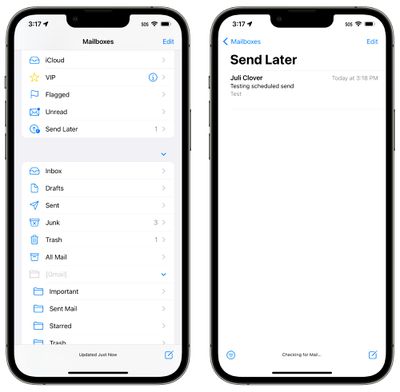
ios 16 mail app send later

Mail Reminders

If you opened up an email and don't have the time to respond to it, you can have the Mail app remind you to get back to it later. Apple allows you to select a date and time to have messages resurface in your inbox so nothing goes missing.
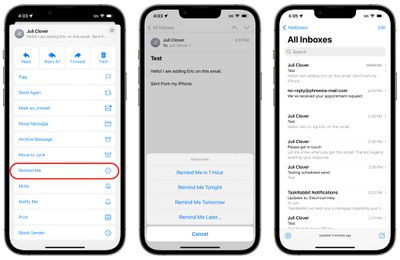
ios 16 mail app remind me
To use the Remind Me feature, tap the Reply button on any email in your inbox. From there, scroll down to "Remind Me" and tap it. Apple will give you the preset options to be reminded about it in an hour, "tonight," and "tomorrow." You can also for the "Remind Me Later..." option that lets you set a specific date and time to get a reminder to respond.

When the reminder time rolls around, the Mail app will move the email to the top of your inbox with a "Remind Me" label so you can respond.

Follow Up

Apple has added a "Follow Up" feature that is designed to move sent email messages to the top of your inbox so you can send a follow-up if you don't hear back from the person you sent the email to.
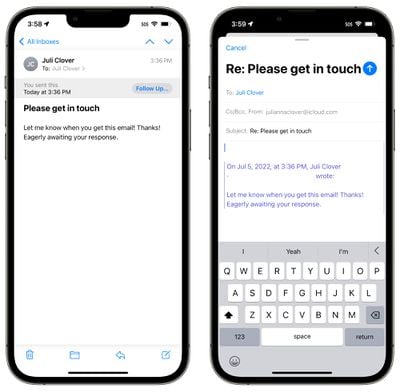
ios 16 mail app follow up
On certain emails in your inbox where you've indicated that you're awaiting a response, you'll see a "Follow Up" option. Tapping it will take you to the compose interface with an email addressed to the person that you're waiting to hear from.

Notifications for Missing Recipients and Attachments

If you mention an attachment or a person that you are planning to include on an email in the body of the email and then forget to add that information, the Mail app will let you know.
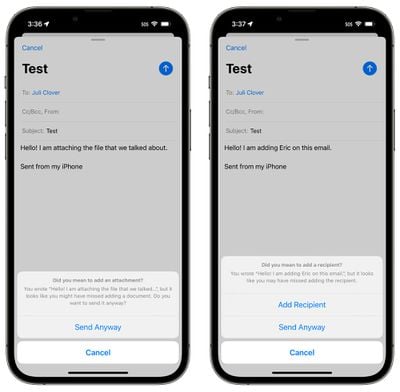
ios 16 mail app missing attachment
This feature brings the Mail app in line with competing mail services like Gmail, informing you if you forget an attachment or to add someone you meant to add to an email.

Links to websites, songs in Apple Music, and more are displayed as rich links in iOS 16, rather than plaintext. This means if someone sends you a link in the mail app, you can see a preview of the contents right in the message without having to click on the link.
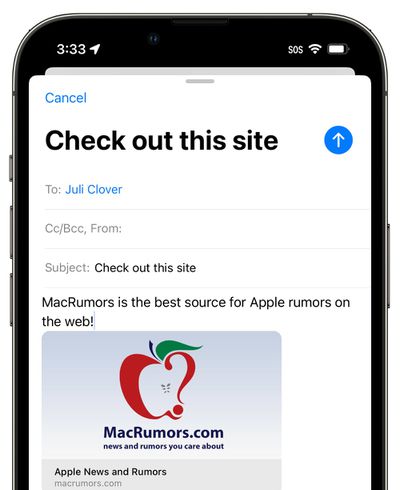
ios 16 mail app rich links
Apple already uses rich links in apps like Messages, so the iOS 16 update brings the Mail app in line with Apple's other apps.

Focus Filters for Mail

Apple in iOS 16 added a new Focus option called Filters. Filters are designed to allow users to filter out content within apps, displaying a specific Mail account or Calendar, if you have multiple. When you use a Focus with a filter set, the app with the filter will only show what you've selected, hiding everything else.
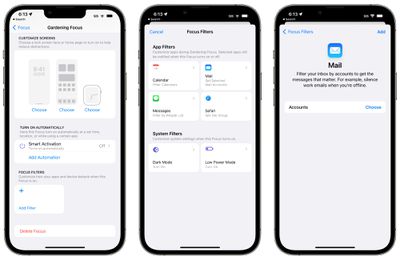
ios 16 focus filters 1
For the Mail app, you can choose any Mail account to associate with a Focus. With a filter set, when you're in that Focus, the Mail app will only show the accounts you've selected. It's useful if you want to filter out personal emails while working, and vice versa, for example.

Guide Feedback

Have questions about the iOS 16 Mail app, know of a feature we left out, or want to offer feedback on this guide? Send us an email here.


Popular Stories

apple design award 2025

Apple Announces 2025 Design Award Winners Ahead of WWDC 2025

Tuesday June 3, 2025 10:14 am PDT by
As we wait for WWDC to kick off next Monday, Apple today announced the winners of its annual Apple Design Awards, recognizing apps and games for their innovation, ingenuity, and technical achievement. The 2025 Apple Design Award winners are listed below, with one app and one game selected per category: Delight and Fun - CapWords (App) and Balatro (Game) Innovation - Play (App) and PBJ -...
1password deal blue

1Password Security Breach: What Was Accessed and What Wasn't

Wednesday November 25, 2026 1:09 pm PST by
Popular password management app 1Password today said it experienced a security breach earlier this month. 1Password says some customer names and email addresses were accessed, but no customer vault contents were compromised. On November 19, 1Password saw indications that an employee's GitHub account had been breached and began investigating. The company says the breached GitHub account was...
Apple 2026 Black Friday Event Hero

Apple's Official 2026 Black Friday Offer Starts Rolling Out

Thursday November 26, 2026 8:37 am PST by
Apple's annual four-day Black Friday through Cyber Monday shopping event is now live in Australia, New Zealand, and Thailand, and it will continue to roll out across Europe, the U.S., and Canada as the calendar turns to Friday, November 27 around the world. In the U.S., Apple's terms and conditions say the promotion begins on November 27 at 12 a.m. Pacific Time and ends on November 30 at...

Top Rated Comments

sirdir Avatar
57 months ago

So it just waits 10 seconds before actually sending the email? Haha
What else could it do, use magic to delete a delivered message?
Score: 16 Votes (Like | Disagree)
57 months ago
What amazes me is that we need to wait a whole year to get those improvements on the mail app.

This could be just a simple update that could be out months ago, so we don’t need to wait until October to benefit from this kind of things.
Score: 16 Votes (Like | Disagree)
JM Avatar
57 months ago
I do hope search is better. I hate the mail search so much. It will return a bunch of emails that have nothing to do with the search term.
Score: 13 Votes (Like | Disagree)
57 months ago
It would be cool if notifications of unread emails were synced so that I don’t need to open mail on every device (after reading on a different device) to get rid of the badge/notification.
Score: 11 Votes (Like | Disagree)
dumastudetto Avatar
57 months ago

Cool. Now let’s bring end to end encryption to email.
Mail already supports the most robust SSL encryption implementation on any platform.
Score: 6 Votes (Like | Disagree)
AppleTO Avatar
57 months ago
So it just waits 10 seconds before actually sending the email? Haha
Score: 6 Votes (Like | Disagree)
Latest Stories
The 50+ Best Apple Black Friday Deals Still Available on AirPods, iPads, and More
11 hours ago
HomePod Mini 2 in (RED) Seemingly Spotted Ahead of Announcement
8 hours ago
Apple's M6 and PROLED MacBook Pro Reach New Low Prices for Black Friday
18 hours ago
The MacRumors Show: iPhone Air 2 and iPhone 18 Are Coming
18 hours ago
Apple Store in Brisbane Reopening Next Month With New Design
19 hours ago
The 60+ Best Black Friday Accessory Deals on iPhone Chargers, TVs, Headphones, and More
19 hours ago
GTA VI Now (Barely) Running on Apple Silicon Macs
20 hours ago
The Best Black Friday Streaming Deals on Apple TV, Disney+, and More
20 hours ago
Apple TV's 'Carême' Wins International Emmy for Best Drama
21 hours ago
iPhone 18 Production Delay Leaves Apple Little Time Before Launch
22 hours ago
The Best Black Friday AirPods Deals Still Available
14 hours ago
The Best Black Friday Deals on Apple Home Products
22 hours ago
The Best Black Friday iPhone Deals Still Available
14 hours ago
The Best Black Friday iPad Deals Still Available
14 hours ago
The Best Black Friday Apple Watch Deals Still Available
14 hours ago
The Best Black Friday AirTag Deals Still Available
14 hours ago
The Best Black Friday Mac Deals Still Available
14 hours ago
iPhone Share of US Smartphone Market Hits 57% as Rivals Slip
1 day ago
iPhone 20 Pro Rumored to Feature 3D-Printed Titanium Frame
1 day ago
Apple's Official 2026 Black Friday Offer Starts Rolling Out
2 days ago
Halide Adds Fill Light Feature for iPhone Duo
2 days ago
MacBook Air Black Friday Deals Now Live With Massive $399 Savings
2 days ago
Amazon Discounts All MacBook Neo Models by $99 for Black Friday
2 days ago
Kodak Launches Unique AirTag Rival With E-Ink Display
2 days ago
Here's Why the Apple Store is Going Down
2 days ago
Apple Still Working on Giant Foldable iPad That Could Cost $5,000
2 days ago
iPhones Dominate China's Weak Singles' Day Smartphone Sales
2 days ago
iPhone 20 Pro Could Feature Ceramic in Limited-Edition Model
2 days ago
Apple Faces Korean Regulator Review Over iPhone 16 AI Advertising
2 days ago
Apple Watch Ultra 4 Hits New Best-Ever Price of $649.99 for Black Friday
2 days ago
Related Apple News: Entertainment | Ipad | Opinion | Sport | News






























