

 Ahead of new software releases for iOS devices, Apple provides early copies to both developers and public beta testers to work out bugs and refine features. Major updates often include exciting new additions that people are eager to try out right away, such as iOS 9.3's Night Shift Mode and all of its other new features.
If you want to get your hands on iOS 9.3 ahead of its prospective spring public launch date, there are two legitimate ways to do it: a developer license or a public beta invitation. We'll outline both ways to get iOS 9.3 below, plus we'll include some instructions on downgrading in case you run into bugs.
Both those who sign up for a developer license and those who test betas through Apple's public beta testing program should use caution when installing beta software. It's called a beta because it's unfinished, and there are often significant issues and problems that can prevent apps and features from working, especially in the early beta testing process.
iOS 9.3, though relatively stable, should not be installed on a main iOS device that's used on a daily basis. Testing should be done on an extra device that can be easily wiped should something go wrong.
First, Create an Archived iTunes Backup
Before installing beta software (or any update), it's important to make a fresh iTunes backup in case something goes wrong and a restore is needed. You don't want to lose important data. Even if you regularly back up using iCloud, you will need a separate archived iTunes backup to restore to an earlier version of iOS. iCloud backups don't work for downgrading.
If you don't already have an archived iTunes backup, make sure to check out our Archived iTunes Backup how to, which will walk you through the steps on making one.
Getting iOS 9.3 Beta With a Free Public Beta Account
Once a backup has been created, the first (free) option is to sign up to participate in Apple's Beta Software Program. Apple has been offering OS X public betas since mid-2014 and iOS betas since March of 2015.
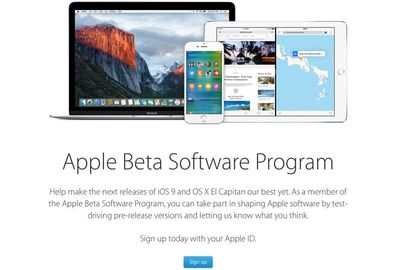
The only disadvantage using this method is that public betas for iOS software are often released a week or two after developers first receive the betas, but sometimes the wait can be just a matter of days.
To sign up for Apple's beta program, go to the Apple Beta Software Program website and click on "Sign up." You will need to enter your Apple ID and password, along with a verification code if two-step authentication is enabled. Once signed up, getting the beta is easy.
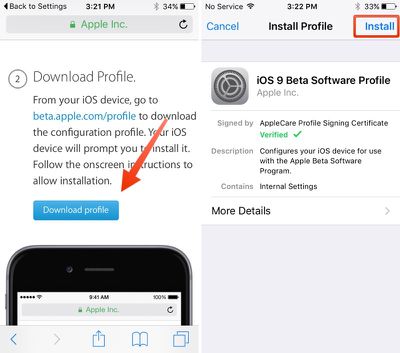
- After creating an account, to go beta.apple.com/profile on your iOS device and tap on "Download Profile."
- The beta profile will be downloaded and opened within the Settings app, where you will be prompted to install it by clicking "Install."
- After agreeing to the terms of service, the configuration profile will be installed. You'll be prompted to restart your iOS device.
- Open the Settings app, tap on the "General" tab and then "Software Update." The beta can then be installed over the air like any standard iOS update.
All future iOS 9.3 public beta updates will be installed in the same way, through the Software Update mechanism on iOS devices.
Getting iOS 9.3 Beta With a Paid Developer Account
Developers have access to iOS betas to develop apps for new features and to make sure existing apps are up to date when new software is released to the public. While there are free developer accounts available, downloading beta software requires a paid developer account, priced at $99 per year.
Developers used to have to pay $99 for access to OS X and another $99 for iOS, but the developer programs were merged in 2015. $99 now allows developers to access betas of iOS, OS X, watchOS, and tvOS.
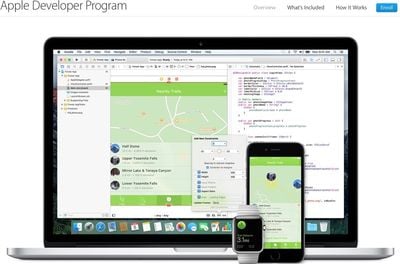
Developer betas are designed specifically for actual app developers, hence the cost, but Apple does approve accounts even without an app in the App Store. Given that a developer account is expensive and oriented towards iOS and Mac developers, most general testers will want to opt for the public beta instead of signing up for a developer account. For those who want to create a developer account, it's a simple process.
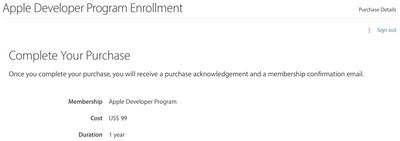
- Go to Apple's main Developer Program website and click on the "Enroll" button.
- Sign in with your Apple ID and agree to the terms of service. Read the terms of service carefully - there are restrictions on the sharing of information from the beta.
- At the "Entity Type" menu, Select "Individual" to enroll as an individual or "Company" to enroll a multi-person organization.
- Enter your legal name, phone number, and address.
- Agree to Apple's Developer Agreement and confirm the information listed is correct.
- Complete the purchase with a payment of $99. There's an optional checkbox for automatic renewal on a yearly basis.
Before a developer account can be created, there is a short waiting period while Apple approves and activates the account. This process can take up to 24 hours, but once a developer account is available, betas can be downloaded right away.
Installing a developer beta via iTunes:
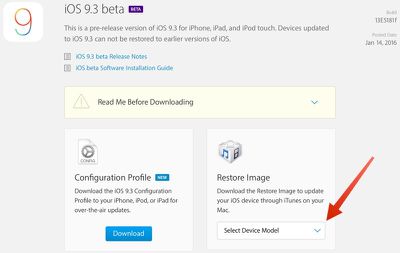
- Go to the iOS section of the Apple Developer Center.
- Click on "Download."
 Find your device and select the appropriate software from the list. For newer devices like the iPad Pro, iPad mini 4, and iPhone 6/6s, a model number isn't required. Just select the device.
- For older iPhones and iPads, the model number can be found in the small print on the back of the device. The number you want starts with an A followed by four numbers.
- Install the beta by connecting an iOS device to iTunes. At the device menu, hold down the option key (shift key on a PC) and click on "Check for Update."
- Select the file that was downloaded from the Developer Center. The iOS beta will be installed as a traditional update, without wiping all of the content from an iPhone or iPad.
- To install a fresh copy of the iOS beta, follow the same steps, but click on "Restore iPhone" instead.
- Subsequent betas can be installed over the air through the Software Update option in the Settings app.
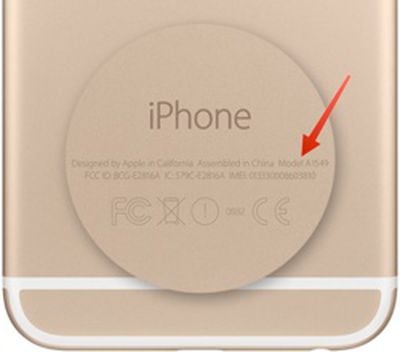 Find your device and select the appropriate software from the list. For newer devices like the iPad Pro, iPad mini 4, and iPhone 6/6s, a model number isn't required. Just select the device.
Installing a developer beta over the air:
As of January 2016, developer betas can be installed over the air like public betas using a configuration profile. Prior to that date, installing the first developer beta required iTunes.
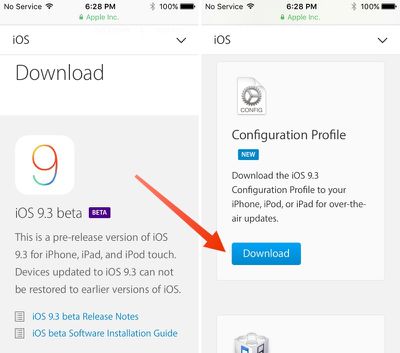
- Navigate to the iOS section of the Apple Developer Center on an iOS device.
- Scroll down to "Configuration Profile" option and click on "Download."
- When the iOS Beta Software Profile pops up, click on "Install." After agreeing to the terms of service, the profile will be installed and the iPhone or iPad will need to be restarted.
- Open the Settings app, tap on "General" and then "Software Update." The beta can then be installed over the air like any standard iOS update.
Avoid Sketchy Beta Download Offers
Now that Apple offers public beta access to its major iOS updates, there's little reason to use sites that advertise ways for non-developers to install developer betas using beta files. Such tools used to be popular when iOS betas were restricted to developer accounts, but with a legitimate way to get early software access, attempting to install a developer beta without a developer account isn't worth the trouble.
Public betas are often a week or two behind developer betas and that can tempt some people into using alternate means to get access to developer betas, but the earliest beta content is restricted because it can be rife with bugs, glitches, and other serious issues. Installing an unofficial version of the developer beta can result in activation errors and other problems that can't be resolved so we recommend sticking to official channels.
Downgrading From a Beta
If you've installed an iOS beta but want to reinstall the standard non-beta version of iOS, you can downgrade. Downgrading without losing data requires an iTunes backup, which is another reason why it's important to make a backup before installing beta software. The steps on downgrading from an iOS beta to the current public release version of iOS can be found in our dedicated how to.
Apple's iOS 9.3 operating system update won't see a public release until the spring, so that means we have several weeks of betas to go through before we get to the final version of the software. If you have a spare iOS device, signing up for beta access is a great way to try out new features without having to wait for months.
For those of you without an extra device who are considering installing iOS 9.3 on a main device, it's a risky choice. The iOS 9.3 betas are relatively stable and most apps appear to be fully functional, but there's always a chance there could be an installation issue or that a major bug could come along later in the beta testing process.


































Top Rated Comments
Those that need a guide like this are the same people that complain when they have random bugs in a beta and can't understand why a BETA doesn't have the same stability or compatibility as a release version.