Skip to Content

How to Create an Archived iTunes Backup

by

Regularly creating iCloud or iTunes backups should be routine for every iOS user, but if you want to upgrade to a beta version of iOS or if you think you might want to downgrade shortly after installing a new iOS update, you'll want to make sure create an archived iTunes backup beforehand.

An archived iTunes backup is essential because it saves the current state of your iOS device and prevents it from being accidentally overwritten by subsequent backups. Apple recommends all public beta testers create an archived backup before installing a beta in case something goes wrong and a restore is needed. Here's how to do it.

Create an Encrypted Backup
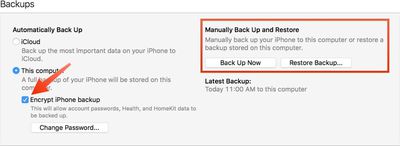
encryptedbackup

  1. Connect your iPhone or iPad to a Mac with the latest version of iTunes installed and click on the device icon in iTunes.
  2. Under backups, choose "This computer." Select "Encrypt iPhone backup" and set a password. An encrypted backup includes account passwords, Health, and HomeKit data. A non-encrypted backup will wipe all of this data if it's used for a restore.
  3. Click "Back Up Now" and wait for the backup process to finish. It will take approximately five minutes to complete depending on what's installed on your iPhone.

Archive the Backup
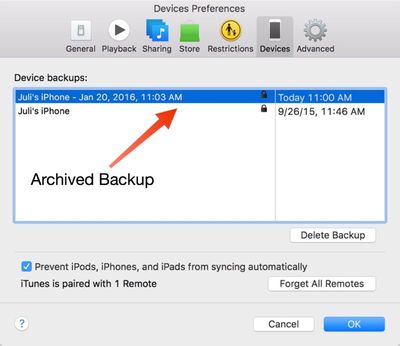
archivedbackup

  1. To archive the backup, choose "Preferences" from the iTunes menu and select the "Devices" tab. Choose the fresh backup and right click to bring up the "Archive" option.
  2. Once archived, a backup will be marked with the date and the exact time that it was archived.

Your archived backups are always visible in the Preferences section of iTunes, even when a device is not plugged in. Deleting one of your archived backups can be done from the same menu, by selecting a backup and choosing the "Delete Backup" option.

This guide is applicable to iTunes users on the Mac. Windows iTunes users are not able to create archived iTunes backups using the same method and will instead need to rename their iTunes backup folder or move it to another location to prevent it from being overwritten.

Creating an archived backup is one of the key steps in our how to that walks users through installing a beta version of iOS, which is available here.


Top Rated Comments

jclo Avatar
140 months ago
I realize this how to may be something that a lot of people already know and creating an archived backup is nothing new, but we're publishing it now to fill in some gaps in our existing how to coverage.

It'll be useful to people who aren't familiar with creating archived backups and it's specifically being added for future use in other how tos where an archived backup is a requirement, like this one: https://www.macrumors.com/how-to/how-to-download-ios-beta/

You'll see a few other how tos like this here and there with the same disclaimer.
Score: 5 Votes (Like | Disagree)
naeS1Sean Avatar
140 months ago
I realize this how to may be something that a lot of people already know and creating an archived backup is nothing new, but we're publishing it now to fill in some gaps in our existing how to coverage.

It'll be useful to people who aren't familiar with creating archived backups and it's specifically being added for future use in other how tos where an archived backup is a requirement, like this one: https://www.macrumors.com/how-to/how-to-download-ios-beta/

You'll see a few other how tos like this here and there with the same disclaimer.
I love this article and all the articles you do like it. Even though it's often basic stuff, it's nice to affirm and also see if I missed some obvious things. Thank you!
Score: 2 Votes (Like | Disagree)
jack daniels Avatar
140 months ago
Thanks for clarifying that the instructions don't work on a PC. However, at the beginning of the article it mentions that the instructions are for Mac adn PC, so could you please clear this up.

Could you please also give us more complete instructions on how to archive a backup on a PC? For example, the location of the backup folder and/or how to rename it (e.g. do you just rename the folder or change a setting in iTunes)?

I'm not entirely sure that archived backups aren't possible on a PC. I have an archived backup on my PC together with a date and time, and some non archived backups. Perhaps this happens automatically if you restore your device to an earlier state then back up (e.g. if you back up a new iPhone, then restore it from an older iPhone, does the new iPhone backup gets archived).
iTunes for Windows doesn't contain anything in the UI for archiving iTunes backups, which is why it's not included in this guide. You can manually archive backups on Windows by moving the backup itself to somewhere other than the default directory. Depending on your version of Windows, this varies.

Find and Manage your iTunes backups
https://support.apple.com/en-us/HT204215

The backups in the default directory will be named the UDID of the device that created them. Simply drag the folder to an external drive or wherever you back up your files, and when it's time to restore, move them back into the default directory and it will be available in iTunes to restore from.
Score: 2 Votes (Like | Disagree)
140 months ago
Thanks for clarifying that the instructions don't work on a PC. However, at the beginning of the article it mentions that the instructions are for Mac adn PC, so could you please clear this up.

Could you please also give us more complete instructions on how to archive a backup on a PC? For example, the location of the backup folder and/or how to rename it (e.g. do you just rename the folder or change a setting in iTunes)?

I'm not entirely sure that archived backups aren't possible on a PC. I have an archived backup on my PC together with a date and time, and some non archived backups. Perhaps this happens automatically if you restore your device to an earlier state then back up (e.g. if you back up a new iPhone, then restore it from an older iPhone, does the new iPhone backup gets archived).
Score: 1 Votes (Like | Disagree)
jclo Avatar
140 months ago
Is this something that can be used to revert back to the iOS version you archived at if you're subsequently unhappy with an upgrade?

e.g. My iPad 2 is on iOS 6. Can I archive backup now, upgrade to iOS 9, and then if I find the performance hit unacceptable revert back to iOS 6 via the archived backup?
Only so long as Apple is signing the update. Apple doesn't sign software for very long following a new version of iOS so the window for downgrading is pretty small.
Score: 1 Votes (Like | Disagree)
Carvensno Avatar
140 months ago
Is this something that can be used to revert back to the iOS version you archived at if you're subsequently unhappy with an upgrade?

e.g. My iPad 2 is on iOS 6. Can I archive backup now, upgrade to iOS 9, and then if I find the performance hit unacceptable revert back to iOS 6 via the archived backup?
Nope because Apple isn't signing iOS 6 anymore. Backup is only for your stuff on the phone, ie... Texting, contacts, music, pics, apps, and etc...not the OS.
Score: 1 Votes (Like | Disagree)

Popular Stories

apple design award 2025

Apple Announces 2025 Design Award Winners Ahead of WWDC 2025

Tuesday June 3, 2025 10:14 am PDT by
As we wait for WWDC to kick off next Monday, Apple today announced the winners of its annual Apple Design Awards, recognizing apps and games for their innovation, ingenuity, and technical achievement. The 2025 Apple Design Award winners are listed below, with one app and one game selected per category: Delight and Fun - CapWords (App) and Balatro (Game) Innovation - Play (App) and PBJ -...
1password deal blue

1Password Security Breach: What Was Accessed and What Wasn't

Wednesday November 25, 2026 1:09 pm PST by
Popular password management app 1Password today said it experienced a security breach earlier this month. 1Password says some customer names and email addresses were accessed, but no customer vault contents were compromised. On November 19, 1Password saw indications that an employee's GitHub account had been breached and began investigating. The company says the breached GitHub account was...
apple store down feature

Here's Why the Apple Store is Going Down

Thursday November 26, 2026 5:49 am PST by
Apple's online store is going down for a few hours on a rolling country-by-country basis right now, but do not get your hopes up for new products. Apple takes its online store down for a few hours ahead of Black Friday every year to tease its annual gift card offer with the purchase of select products. The store is down in Australia, New Zealand, and Thailand, right now, and it will...
Latest Stories
The 50+ Best Apple Black Friday Deals Still Available on AirPods, iPads, and More
3 hours ago
HomePod Mini 2 in (RED) Seemingly Spotted Ahead of Announcement
1 minute ago
Apple's M6 and PROLED MacBook Pro Reach New Low Prices for Black Friday
10 hours ago
The MacRumors Show: iPhone Air 2 and iPhone 18 Are Coming
11 hours ago
Apple Store in Brisbane Reopening Next Month With New Design
11 hours ago
The 60+ Best Black Friday Accessory Deals on iPhone Chargers, TVs, Headphones, and More
12 hours ago
GTA VI Now (Barely) Running on Apple Silicon Macs
12 hours ago
The Best Black Friday Streaming Deals on Apple TV, Disney+, and More
13 hours ago
Apple TV's 'Carême' Wins International Emmy for Best Drama
13 hours ago
iPhone 18 Production Delay Leaves Apple Little Time Before Launch
14 hours ago
The Best Black Friday AirPods Deals Still Available
6 hours ago
The Best Black Friday Deals on Apple Home Products
15 hours ago
The Best Black Friday iPhone Deals Still Available
6 hours ago
The Best Black Friday iPad Deals Still Available
6 hours ago
The Best Black Friday Apple Watch Deals Still Available
6 hours ago
The Best Black Friday AirTag Deals Still Available
6 hours ago
The Best Black Friday Mac Deals Still Available
6 hours ago
iPhone Share of US Smartphone Market Hits 57% as Rivals Slip
16 hours ago
iPhone 20 Pro Rumored to Feature 3D-Printed Titanium Frame
18 hours ago
Apple's Official 2026 Black Friday Offer Starts Rolling Out
1 day ago
Halide Adds Fill Light Feature for iPhone Duo
2 days ago
MacBook Air Black Friday Deals Now Live With Massive $399 Savings
2 days ago
Amazon Discounts All MacBook Neo Models by $99 for Black Friday
2 days ago
Kodak Launches Unique AirTag Rival With E-Ink Display
2 days ago
Here's Why the Apple Store is Going Down
2 days ago
Apple Still Working on Giant Foldable iPad That Could Cost $5,000
2 days ago
iPhones Dominate China's Weak Singles' Day Smartphone Sales
2 days ago
iPhone 20 Pro Could Feature Ceramic in Limited-Edition Model
2 days ago
Apple Faces Korean Regulator Review Over iPhone 16 AI Advertising
2 days ago
Apple Watch Ultra 4 Hits New Best-Ever Price of $649.99 for Black Friday
2 days ago
Related Apple News: Health | World News | Motoring | Entertainment | Local News






























