Skip to Content

How to Downgrade From an iOS Beta

by

If you've installed an iOS beta either through Apple's developer program or the public beta testing website, you may find yourself wanting to downgrade if you've run into issues. iOS beta software can be notoriously buggy, especially during the first few betas of a major update.

Apps often don't work, devices crash, battery life is poor, and entire features can be rendered non-functional. In some cases, these problems are a big enough deal that users will want to downgrade back to the more stable release version of iOS.

It's possible to restore your iPhone or iPad to the release version of iOS, but you're going to need an archived iTunes backup to restore your iPhone or iPad to its pre-beta state, so hopefully you have one on hand (this is the first step in any beta installation).

If not, downgrading will require wiping your device, so you'll need to start from scratch with apps, accounts, and preferences. Here are the steps to downgrade:
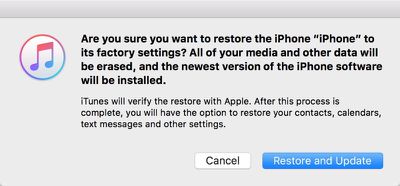
restoreandupdateios

  1. Turn off Find My iPhone in the iCloud section of the Settings app.
  2. Turn off the iPhone or the iPad.
  3. Hold down the Home button while plugging the device into a PC or Mac running iTunes.
  4. Continue to hold down the Home button until the iTunes logo pops up on the device display. This is called recovery mode.
  5. If you don't see the iTunes logo, entering recovery mode did not work. Repeat steps 2 to 4.
  6. When recovery mode is successful, an iTunes popup will show up on your Mac or PC. Click on "Restore." A warning will pop up letting you know the device will be erased.
  7. Click on "Restore and Update" to bring up the iPhone Software Update menu, which will display details about the current publicly available version of iOS. Click "Next" and then "Agree" to agree to the terms and conditions and start the restoration process.
  8. iTunes will download the current version of iOS and the restore will begin.

Restoring this way results in a clean installation of the current release version of iOS. All apps and data will be erased, which is why you want an archived iTunes backup to restore all of your information. It will take a several minutes for the recovery process to complete, but once it's done, the next step is to restore from a backup.
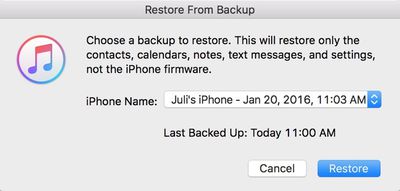
restorefrombackup

  1. Choose "Restore Backup" in iTunes.
  2. Select the archived backup.
  3. Click on "Restore" to confirm that you want to begin the backup restoration process.

When the install is complete, your iOS device will be restored to the condition that it was in prior to the beta. If you do not have an archived backup to work with, your device will need to be set up from scratch.

This how to is part of our iOS beta installation series. To see the rest of the steps involved with upgrading to a beta, make sure to check out our how tos on creating an archived iTunes backup and the steps to download the beta.


Top Rated Comments

Quu Avatar
140 months ago
If you don't want to restore like this (I didn't). Just wait a little while until a normal release comes out, update to that and remove the certificates on your iOS device that force it to seek out the betas from the update system. And of course remove your iOS device from the beta.

I just had to wait a couple weeks while on a Beta to get back on Stable and didn't need to faff around with restorations. Also last time I tried to restore my phone from backup it failed. The backup was not corrupted but an app installed on my Phone got backed up and it was for whatever reason unable to be restored to my iPhone and that stopped the entire restoration from being able to complete.

I had to get a 3rd party app that could open and modify the backup to fix the issue.
Score: 3 Votes (Like | Disagree)
psycho93 Avatar
140 months ago
So is the new 9.3 build garbage or what?
Have read a lot of reports re messed up notifications on Apple Watch after upgrading to iOS 9.3 Public Beta 4.

I'm running iOS Public Beta 9.3 on iPhone 5s with my Apple Watch and no problems
Score: 2 Votes (Like | Disagree)
jclo Avatar
140 months ago
You are correct and it's pretty similar to Juli Clover's post.

Just complete steps 1 through 5. Now for step 6, instead of clicking "Restore", just click the "Update" button and continue the process of downgrading to the latest non-beta version, no backup or data loss required.

If you don't want to take my word for it, check out this link ('http://www.imore.com/how-downgrade-ios-91-beta-back-ios-9') along with the user comments at the bottom of the page.
I tried this method on two different devices and both times the installation was corrupt for me. On one it didn't end up downgrading me from iOS 9.3 and on another, it broke it so bad that while all my apps are installed, they're not visible. It was weird. That's why I didn't end up recommending "update" over "restore." So use with caution!
Score: 1 Votes (Like | Disagree)
140 months ago
Someone on Reddit gave a hint that there's a much easier way of restoring from a beta without wiping the phone / clean install.
I'll update if I find it.
You are correct and it's pretty similar to Juli Clover's post.

Just complete steps 1 through 5. Now for step 6, instead of clicking "Restore", just click the "Update" button and continue the process of downgrading to the latest non-beta version, no backup or significant data loss required (see newer post).

If you don't want to take my word for it, check out this link ('http://www.imore.com/how-downgrade-ios-91-beta-back-ios-9') along with the user comments at the bottom of the page.
Score: 1 Votes (Like | Disagree)
jayducharme Avatar
140 months ago
Although I liked the thought that I was helping Apple by debugging the Betas, I stopped participating because I experienced a lot of serious issues with a previous version. My iPhone and my Mac are too important to me to have a lot of down time. I'm glad there's a way to back up from a Beta, but it's not worth the trouble for me any more.
Score: 1 Votes (Like | Disagree)

Popular Stories

apple design award 2025

Apple Announces 2025 Design Award Winners Ahead of WWDC 2025

Tuesday June 3, 2025 10:14 am PDT by
As we wait for WWDC to kick off next Monday, Apple today announced the winners of its annual Apple Design Awards, recognizing apps and games for their innovation, ingenuity, and technical achievement. The 2025 Apple Design Award winners are listed below, with one app and one game selected per category: Delight and Fun - CapWords (App) and Balatro (Game) Innovation - Play (App) and PBJ -...
1password deal blue

1Password Security Breach: What Was Accessed and What Wasn't

Wednesday November 25, 2026 1:09 pm PST by
Popular password management app 1Password today said it experienced a security breach earlier this month. 1Password says some customer names and email addresses were accessed, but no customer vault contents were compromised. On November 19, 1Password saw indications that an employee's GitHub account had been breached and began investigating. The company says the breached GitHub account was...
Apple 2026 Black Friday Event Hero

Apple's Official 2026 Black Friday Offer Starts Rolling Out

Thursday November 26, 2026 8:37 am PST by
Apple's annual four-day Black Friday through Cyber Monday shopping event is now live in Australia, New Zealand, and Thailand, and it will continue to roll out across Europe, the U.S., and Canada as the calendar turns to Friday, November 27 around the world. In the U.S., Apple's terms and conditions say the promotion begins on November 27 at 12 a.m. Pacific Time and ends on November 30 at...
Latest Stories
The 50+ Best Apple Black Friday Deals Still Available on AirPods, iPads, and More
9 hours ago
HomePod Mini 2 in (RED) Seemingly Spotted Ahead of Announcement
6 hours ago
Apple's M6 and PROLED MacBook Pro Reach New Low Prices for Black Friday
17 hours ago
The MacRumors Show: iPhone Air 2 and iPhone 18 Are Coming
17 hours ago
Apple Store in Brisbane Reopening Next Month With New Design
17 hours ago
The 60+ Best Black Friday Accessory Deals on iPhone Chargers, TVs, Headphones, and More
18 hours ago
GTA VI Now (Barely) Running on Apple Silicon Macs
18 hours ago
The Best Black Friday Streaming Deals on Apple TV, Disney+, and More
19 hours ago
Apple TV's 'Carême' Wins International Emmy for Best Drama
20 hours ago
iPhone 18 Production Delay Leaves Apple Little Time Before Launch
20 hours ago
The Best Black Friday AirPods Deals Still Available
12 hours ago
The Best Black Friday Deals on Apple Home Products
21 hours ago
The Best Black Friday iPhone Deals Still Available
12 hours ago
The Best Black Friday iPad Deals Still Available
12 hours ago
The Best Black Friday Apple Watch Deals Still Available
12 hours ago
The Best Black Friday AirTag Deals Still Available
12 hours ago
The Best Black Friday Mac Deals Still Available
12 hours ago
iPhone Share of US Smartphone Market Hits 57% as Rivals Slip
22 hours ago
iPhone 20 Pro Rumored to Feature 3D-Printed Titanium Frame
1 day ago
Apple's Official 2026 Black Friday Offer Starts Rolling Out
2 days ago
Halide Adds Fill Light Feature for iPhone Duo
2 days ago
MacBook Air Black Friday Deals Now Live With Massive $399 Savings
2 days ago
Amazon Discounts All MacBook Neo Models by $99 for Black Friday
2 days ago
Kodak Launches Unique AirTag Rival With E-Ink Display
2 days ago
Here's Why the Apple Store is Going Down
2 days ago
Apple Still Working on Giant Foldable iPad That Could Cost $5,000
2 days ago
iPhones Dominate China's Weak Singles' Day Smartphone Sales
2 days ago
iPhone 20 Pro Could Feature Ceramic in Limited-Edition Model
2 days ago
Apple Faces Korean Regulator Review Over iPhone 16 AI Advertising
2 days ago
Apple Watch Ultra 4 Hits New Best-Ever Price of $649.99 for Black Friday
2 days ago
Related Apple News: Business | News | Ipad | Opinion | Ipad





























