


iOS 14.5: How to Share Apple Music Lyrics and Song Clips
With the release of iOS 14.5, Apple added a new Apple Music feature that lets subscribers of the streaming service share lyrics as text as well as audio clips containing the sung lyrics. Read on to learn how it works.
Apple Music features real-time lyrics for many songs that you can sing along to while the track plays or use to skip to specific parts of a song. In iOS 14.5 and later...
Read Full Article • 7 comments

iOS 14.5: How to Recalibrate Your iPhone 11 Battery
With the release of iOS 14.5, Apple introduced a new process for recalibrating the battery health reporting on the iPhone 11, 11 Pro, and 11 Pro Max.
The update recalibrates the maximum battery capacity and peak performance capacity on iPhone 11 models to address inaccurate estimates of battery health reporting that some users have encountered.
Symptoms of this bug include...

How to Use Two HomePods With a Mac for Stereo Audio Output
If your Mac is running macOS Big Sur 11.3 or later, you can use a HomePod stereo pair as your Mac's system audio output. This article explains how to set up two HomePod speakers as a stereo pair and then connect them to your Mac.
Dedicated stereo speakers are always going to provide a better listening experience than relying on your Mac's built-in speakers for audio, so it makes sense that...
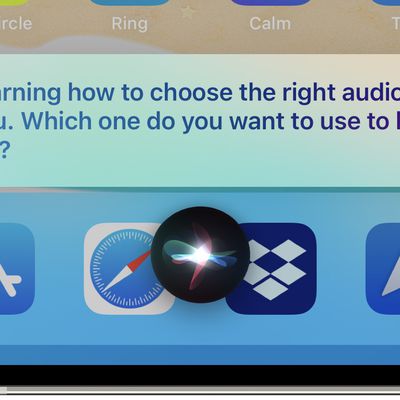
iOS 14.5: How to Set a Preferred Music Streaming Service With Siri
With the release of iOS 14.5, Apple introduced a feature that lets users select a specific music service to use with Siri, with the options including third-party services like Spotify in addition to Apple Music.
When this feature first came to light in beta versions of iOS 14.5, many early reports interpreted it as Apple allowing users to select a default streaming service, similar to the...
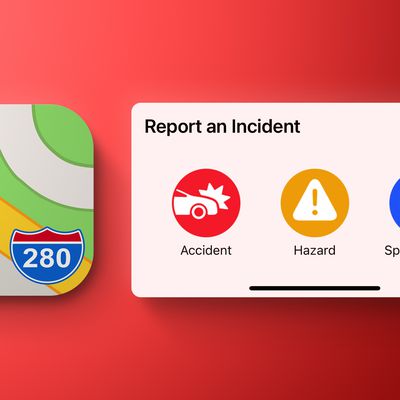
iOS 14.5: How to Report Speed Checks, Traffic Accidents, and Other Hazards in Apple Maps
In iOS 14.5 and later, Apple has added a Waze-like feature to its native Maps app that lets you report accidents, hazards, and speed checks along your route when getting directions. Keep reading to learn how it works.
Driving on public roads can throw up all sorts of hazards, but if you're given prior warning then you can be better prepared to deal with them. Apple recognizes this, which is...

How to Stop Apps From Tracking You in iOS 14.5
With the launch of iOS 14.5, apps are no longer allowed to access the IDFA or tracking advertiser on your iPhone, iPad, or Apple TV without your express permission, keeping your app data more private. Apps use your IDFA to track you across different apps and websites, keeping tabs on your preferences and app usage habits.
When an app wants to use your IDFA, you'll see a popup that says...

iOS 14.5: How to Mask Unlock Your iPhone With Apple Watch
iOS 14.5 is now available, and a key new feature is the ability to unlock an iPhone with Face ID while wearing a mask, so long as you are wearing an Apple Watch. Read on to learn how this feature works.
Apple introduced its Face ID facial recognition system in November 2017 with the launch of the iPhone X, offering users an even simpler way to unlock their smartphone than traditional...

How to Use Apple TV's iPhone-Based Color Balance Feature
In April, Apple introduced an iPhone-based color balance feature for Apple TV that can improve the overall picture quality of your television set when you're using Apple's set-top box.
Using the iPhone's light sensor, the feature compares the color balance to industry-standard specifications, and automatically adjusts your Apple TV's video output to deliver more accurate colors and improved ...

How to Disable an Unknown AirTag Found Moving With You to Prevent Being Tracked
Apple's new AirTag item tracker lets you easily track things like your keys, wallet, purse, backpack, luggage, and more. AirTags have a small, circular design with a white side and a polished stainless steel side with an Apple logo.
AirTag has been designed to discourage unwanted tracking. If you are an iPhone or iPad user, the built-in Find My app will notify you if an unknown AirTag is...

How to Export Facebook Notes and Text-Based Posts
Facebook has introduced a tool that lets users export notes and text-based posts to third-party services, making it easier than ever to leave the social network without saying goodbye to your content.
The new "data portability types" mean people can now directly transfer their notes and posts to Google Docs, Blogger and WordPress. The updates are extensions to Facebook's existing tool that...

How to Clear Cookies in Firefox on Mac and iOS
Whenever you browse the web in Firefox, the browser stores website data including cookies so that it doesn't have to do so again each time you revisit a site. In theory this should speed up your browsing experience, but there are some scenarios where you might want to clear the cache and start anew. Keep reading to learn how it's done on Mac, iPhone, and iPad.
There are a couple of...

How to Watch the 'Spring Loaded' Apple Event on April 20, 2021
Apple Event Happening Now
April 20 Event Day! Follow along with our live blog for the latest updates, and we're also live tweeting the event on Twitter.
Apple is planning to hold its first media event of 2021 tomorrow on Tuesday, April 20, at 10:00 a.m. Pacific Time through a live stream. The event is expected to see the unveiling of updated iPad models, likely some information related to...

Chrome 90: How to Link Directly to Specific Text on a Webpage
With the release of Chrome 90, Google is rolling out a new browser feature that lets you create a shareable link to a section of text you've highlighted on a webpage. Here's how to use it.
Sometimes when you share a webpage link with someone, you just want to bring their attention to a specific passage or sentence to make your point, rather than have them read through the entire article.
...

How to Clear Cookies in Chrome on iOS and Mac
Whenever you browse the web in Google Chrome, the browser stores website data including cookies so that it doesn't have to do so again each time you revisit a site. In theory this should speed up your browsing experience, but there are some scenarios where you might want to clear the cache and start anew. Keep reading to learn how it's done on Mac, iPhone, and iPad.
There are a couple of...

How to Check if Your Email and Password Were Leaked in the Facebook Hack
Websites, apps, and social networks are regularly targeted by hackers who are after valuable user data, which can be sold to those interested in stealing usernames and passwords to various sites.
One of the most recent significant attacks affected more than 553 million Facebook users, with data stolen in 2019. In 2021, that stolen data was published on a website for hackers and made easily...
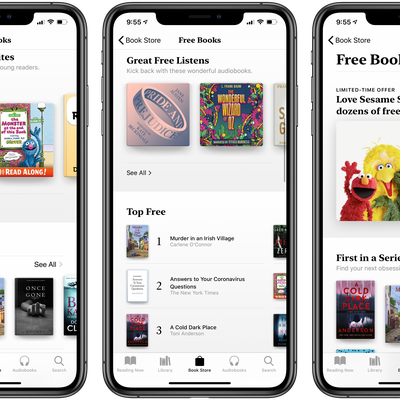
Delete Downloaded Books and Audiobooks on iPhone
If you've downloaded books, audiobooks, or PDFs to the Books app on your iPhone or iPad, it's worth going through them every once in a while. You may find that some of them no longer need to be there, in which case they're just taking up space on your device.
The following steps show you how to delete unecessary items from the Books app, which should help free up some valuable storage.
Laun...

How to Delete Large Attachments on iPhone and iPad
Apple's iOS mobile operating system includes built-in features that offer suggestions on how you can save space on your iOS device. These space-saving suggestions can help you free up space on your iPhone and iPad when storage space is running low, so it's worth checking in on them from time to time.
One of these built-in features encourages you to review large attachments taking up storage in ...
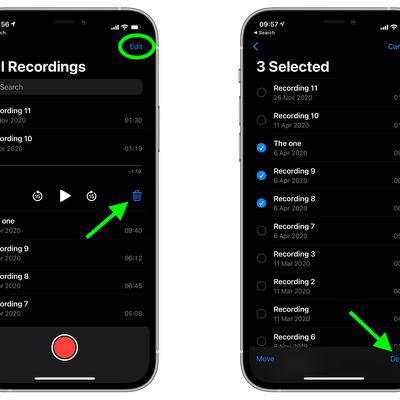
Delete Voice Memo Recordings on iPhone and iPad
Deleting individual recordings in Apple's native Voice Memos app for iPhone and iPad is really easy. Launch the app, and in the list of recordings, just swipe leftwards across the one you want to delete, then tap the red trash icon.
If you want to delete multiple recordings in one go, tap the Edit button in the top-right corner of the screen, then select the recordings that you want to...

How to Review and Delete WhatsApp Media
If you're a heavy WhatsApp user and your iPhone is running low on storage, it may be that all the videos, voice messages and photos stored in the app are taking up a hefty amount of space on your device.
Fortunately, WhatsApp features a built-in media management tool that can help you identify, select, and bulk delete GIFs, photos, and videos that may be filling up your phone.
The tool...

Delete Redundant Burst Mode Photos on iPhone and iPad
Burst Mode refers to when the camera on your iOS device captures a series of photos in rapid succession, at a rate of ten frames per second. It's a great way to shoot an action scene or an unexpected event, since you're always more likely to end up with the picture you were aiming for.
Whenever you take a series of burst photos, they automatically appear in the Photo app under the Album name ...
