Skip to Content

Satechi CubeDock Review: A Thunderbolt 5 Dock That Doubles as an SSD Enclosure

by

Accessory maker Satechi released its first Thunderbolt 5 dock earlier this year, debuting the $400 Thunderbolt 5 CubeDock. Satechi's dock combines Thunderbolt 5 connectivity with the traditional ports you expect from a dock, plus extra SSD storage thanks to an added SSD enclosure.
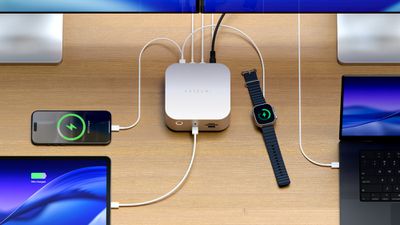
satechi cubedock 2
Satechi likes to make things shaped like the Mac mini, and the CubeDock gives ‌Mac mini‌ vibes. It's five inches by five inches, and two inches thick, identical to the ‌Mac mini‌. It's silver, so it matches Apple hardware that comes in that shade, and it would pair well with a ‌Mac mini‌.

The front of the dock has a 30W/10Gbps USB-C port, a 7.5W/10Gbps USB-A port, a 3.5mm audio jack, and SD and microSD card slots. I like the positioning of the card readers because they're easy to get to. I don't use wired headphones, but if I did, I'd also appreciate having that front audio jack. 30W charging for the front USB-C port is useful too, because 30W is enough to fast charge an iPhone and charge an iPad or MacBook Air.
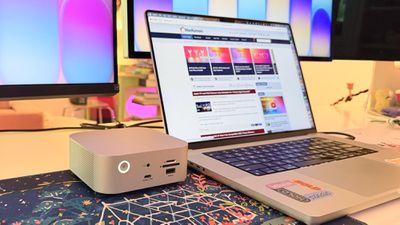
cubedock with mac
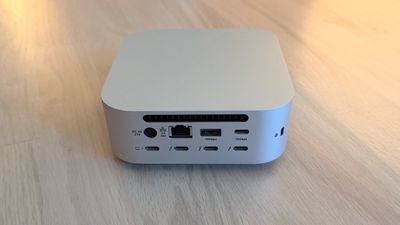
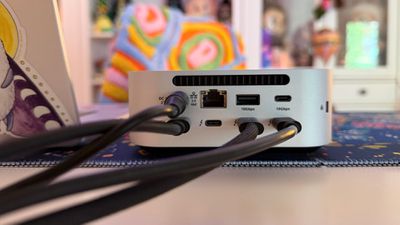
The back has a 2.5Gb Ethernet port, an 80/120Gbps Thunderbolt 5 host port to connect to a Mac, three additional 80Gbps Thunderbolt 5 ports (with 15W each for accessories), a 10Gbps 4.5W USB-A port, a 10Gbps 7.5W USB-C port, and a DC port for connecting the power supply. The CubeDock provides 140W for a MacBook,can charge the 16-inch MacBook Pro at the fastest speed.
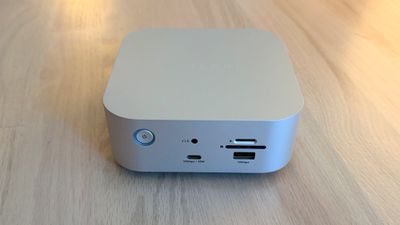
cubedock front
At the bottom of the CubeDock, there's a panel that can be popped out to add in up to an 8TB NVMe SSD. It supports 2230, 2242, 2260, and 2280 sizes with transfer speeds of up to 6000MB/s, depending on the SSD used. The CubeDock has an SSD enclosure, but it does not come with SSD storage. You need to buy an internal SSD separately if you want to use the enclosure, and SSDs aren't cheap right now.
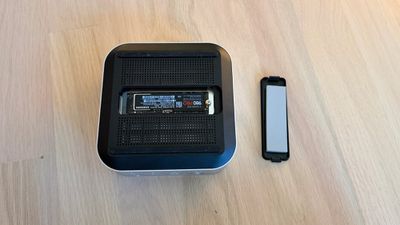
cubedock ssd
I installed a 2TB SSD in the slot at the bottom of the CubeDock. There's a plastic cover that comes off, and the SSD plugs in underneath. It's held in place with a screw, but the installation process was a little annoying because the screw needs to be positioned before the SSD is inserted. Satechi includes a thermal pad, which I added before closing it back up. My Mac recognized the SSD in the enclosure just as it would any other SSD I plugged in.
cubedock back scaled
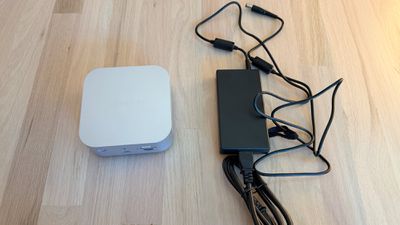
There is a fan in the CubeDock that circulates air, along with vent holes at the sides. It has an LED power button on the front, and it charges with an included 180W power supply. The power supply is not built into the dock and is instead an external brick. Satechi also includes a Thunderbolt 5 cable to connect the dock to a Mac.

I don't generally mind the sound of fans, but the CubeDock's fans have a subtle electronic whine that bothers me. I know some people can't hear that high-pitched electronic noise, but I can, and in a quiet room, it's the audio equivalent of having a pebble stuck in my shoe. I can't hear the sound when the TV is on, when music is playing, or when my AC is running. Anker's Thunderbolt 5 Dock has fans and had a similar noise, but fanless models like the CalDigit TS5 Plus are silent.

With the fans, the CubeDock doesn't get blazingly hot, but it is warm to the touch. The temperature is closer to a hand warmer on a cold day than scorching coffee. I didn't notice a temperature difference testing with the SSD installed and without it.
satechi cubedock power supply
The CubeDock supports up to three 8K displays at 60Hz, but Satechi says 8K is limited to Windows machines. The M5 Pro and M5 Max chips do support 8K displays, but I don't have one to test with.

What I do have on hand is a 5K Studio Display and a 32-inch 4K 120Hz OLED display, both of which the CubeDock can handle with no problem. I plugged in two iPhones to charge, put in an SD card, and connected two SSDs, and transferred large files. I had no issues with the CubeDock under this stress test, and everything also worked during day-to-day testing.

The benefit of a dock like the CubeDock is being able to plug in multiple displays, peripherals, and accessories while only having one cable connected to a Mac. I can tuck the CubeDock under a display, route the cables out the back, and keep my desk neater with less cable clutter. I felt like the CubeDock had a good number of ports for everyday use, and I wasn't missing anything. It has fewer USB-C and USB-A ports than some other docks that it competes with, but I have few enough USB-A devices that even two USB-A ports felt like one too many.

The Apple silicon chip you have determines the number of displays that the CubeDock can drive over a single Thunderbolt port. M5 Pro and M5 Max Macs can drive three displays at 6K/60Hz with Satechi's dock. M4 Max, M4 Pro and earlier Pro/Max chips support up to two external displays with the CubeDock (up to 6K/60Hz).
cubedock rear cables
Pro/Max Macs can generally support more than two external displays, but you need to use more than one Thunderbolt port. I have two displays connected to an M1 Max with the CubeDock, and a third display plugged into a different Thunderbolt port.

Base M1 and M2 Macs support a single external display over Thunderbolt, but base M4 and M5 Macs can drive two. The M3 is complicated because an M3 ‌MacBook Air‌ can support two displays, but only in clamshell mode. It's best to check Satechi's website for compatibility info to make sure you can connect what you want to connect.

Bottom Line

Satechi's dock lets you connect multiple displays, peripherals, and accessories to your Mac with one cable, offering easy plug-and-play functionality. The addition of an SSD enclosure helps differentiate the CubeDock from competing products. It puts the ports most people need right up front, and hides the rest away for desk organization.

The CubeDock is one of the better looking options on the market because of how well it matches Apple's aesthetic, and it doesn't run as hot as docks without a fan included. Unfortunately, the fan noise can be distracting for people who are sensitive to certain sounds.

With two generations of Thunderbolt 5 Macs now available, there's more reason to choose a Thunderbolt 5 over a Thunderbolt 4 dock. Compared to Thunderbolt 4, Thunderbolt 5 offers double the bandwidth (80Gbps instead of 40Gbps) and up to 120Gbps for display-heavy setups.

If you have a newer Mac that supports Thunderbolt 5 and need extra ports, a Thunderbolt 5 dock makes the most sense. If you have an older Mac and are trying to decide between Thunderbolt 4 and Thunderbolt 5, Thunderbolt 5 is the better choice if you're going to upgrade anytime in the next couple of years.

How to Buy

The Satechi Thunderbolt 5 CubeDock with SSD Enclosure can be purchased from the Satechi website or from Amazon.com for $399.99.

Note: Satechi provided MacRumors with a CubeDock for the purpose of this review. No other compensation was received. MacRumors is an affiliate partner with Satechi and may earn commissions on purchases made through links in this article.


Tag: Satechi

Top Rated Comments

25 weeks ago

I recommend this to MacBook Neo users, they need more ports !
Neo doesn't have Thunderbolt, why would you ever recommend them a TB dock?
Score: 9 Votes (Like | Disagree)
enricoclaudio Avatar
25 weeks ago

The unit appears to be the same size as the MacStudio. Is it stackable with a MacStudio? Satechi's website shows them side-by-side, but not stacked. Enough with more SD, Mini-SD, and USB-A ports. Users of MacStudios are likely to use CFExpress A and B cards, not SD cards. Or even older Compact Flash and XQD cards are still in use. Even if the ports are USB-C instead of Thunderbolt 5, folks with old USB-A devices can use a dongle to connect to the new connector. I currently stack my MacStudio on two Raycue docks. Each of the Raycue MacStudio docks holds two SSD cards and can be set up as RAIDs. It has CFExpress A and B slots. But those darn USB-A ports instead of USB-C or Thunderbolt 5 ports.
It's NOT the same size as the Mac Studio. It is the same size as the Mac mini M4. I have one on my desk next to my Mac Studio M1 Max and it performs great. I got in anticipation to the Mac Studio M5 Max which I'm planning to get as soon it is released. I put in my Satechi CubeDock a 2TB WD SN850P that I got on sale at Best Buy and fit perfectly because the CubeDock is designed to take M.2 SSD with heatsink.


Attachment Image
Score: 8 Votes (Like | Disagree)
Timpetus Avatar
25 weeks ago
I have such a love/hate relationship with Thunderbolt. It's great that it's so fast and versatile, but it really sucks that TB accessories/peripherals are so pricey, especially docks. It feels like the high cost has slowed adoption significantly vs. much cheaper USB peripherals.
Score: 8 Votes (Like | Disagree)
East India Company Avatar
25 weeks ago

I recommend this to MacBook Neo users, they need more ports !
a $400 dock for a $500 laptop? ok..
Score: 5 Votes (Like | Disagree)
25 weeks ago
180w just isn't enough for a TB5 dock like this, especially if you use a 140w 16" MacBook Pro. That only leaves ~40w of headroom and the dock needs some of it for itself. I've had disconnection issues on docks with these low wattage power supplies while in a heavy workload. I'd recommend looking elsewhere, especially at this price. There are some out there with 240w which is much better, some even higher.
Score: 2 Votes (Like | Disagree)
richpjr Avatar
23 weeks ago

Thunderbolt 4 is plenty fast enough for me.
I'm still very happy with my solution:

One of these:
https://satechi.com/products/thunderbolt-4-dock?srsltid=AfmBOorg4xNHrDTer_GXRlQQHSbndnV7VQq6WLhtwHkxtTCuU5J20haU

And a couple of these, with 4TB NVMe chips:
https://www.acasis.com/products/acasis-usb4-0-mobile-m-2-nvme-enclosure-40gbps-compatible-with-typec-thunderbolt-3-interface-solid-state-nvme-ssd-universal-tools?variant=43694516601061

Total cost (no chips); ~$300usd.
Working well for a couple of years now. NVMe enclosures are fanless, so silent. Thunderbolt 4 dock is powered, so very solid and reliable.
I am trying to cut down on the clutter on my desk so am going for the all in one and might as well go TB5 for future proofing.
Score: 1 Votes (Like | Disagree)

Popular Stories

apple design award 2025

Apple Announces 2025 Design Award Winners Ahead of WWDC 2025

Tuesday June 3, 2025 10:14 am PDT by
As we wait for WWDC to kick off next Monday, Apple today announced the winners of its annual Apple Design Awards, recognizing apps and games for their innovation, ingenuity, and technical achievement. The 2025 Apple Design Award winners are listed below, with one app and one game selected per category: Delight and Fun - CapWords (App) and Balatro (Game) Innovation - Play (App) and PBJ -...
Apple 2026 Black Friday Event Hero

Apple's Official 2026 Black Friday Offer Starts Rolling Out

Thursday November 26, 2026 8:37 am PST by
Apple's annual four-day Black Friday through Cyber Monday shopping event is now live in Australia, New Zealand, and Thailand, and it will continue to roll out across Europe, the U.S., and Canada as the calendar turns to Friday, November 27 around the world. In the U.S., Apple's terms and conditions say the promotion begins on November 27 at 12 a.m. Pacific Time and ends on November 30 at...
1password deal blue

1Password Security Breach: What Was Accessed and What Wasn't

Wednesday November 25, 2026 1:09 pm PST by
Popular password management app 1Password today said it experienced a security breach earlier this month. 1Password says some customer names and email addresses were accessed, but no customer vault contents were compromised. On November 19, 1Password saw indications that an employee's GitHub account had been breached and began investigating. The company says the breached GitHub account was...
Latest Stories
The 50+ Best Apple Black Friday Deals Still Available on AirPods, iPads, and More
2 hours ago
Here Are the Best Apple Black Friday Leftover Deals You Can Get Today
1 hour ago
HomePod Mini 2 in (RED) Seemingly Spotted Ahead of Announcement
12 hours ago
Apple's M6 and PROLED MacBook Pro Reach New Low Prices for Black Friday
23 hours ago
The MacRumors Show: iPhone Air 2 and iPhone 18 Are Coming
23 hours ago
Apple Store in Brisbane Reopening Next Month With New Design
23 hours ago
The 60+ Best Black Friday Accessory Deals on iPhone Chargers, TVs, Headphones, and More
57 minutes ago
GTA VI Now (Barely) Running on Apple Silicon Macs
1 day ago
The Best Black Friday Streaming Deals on Apple TV, Disney+, and More
1 day ago
Apple TV's 'Carême' Wins International Emmy for Best Drama
1 day ago
iPhone 18 Production Delay Leaves Apple Little Time Before Launch
1 day ago
The Best Black Friday AirPods Deals Still Available
18 hours ago
The Best Black Friday Deals on Apple Home Products
1 day ago
The Best Black Friday iPhone Deals Still Available
18 hours ago
The Best Black Friday iPad Deals Still Available
18 hours ago
The Best Black Friday Apple Watch Deals Still Available
18 hours ago
The Best Black Friday AirTag Deals Still Available
18 hours ago
The Best Black Friday Mac Deals Still Available
18 hours ago
iPhone Share of US Smartphone Market Hits 57% as Rivals Slip
1 day ago
iPhone 20 Pro Rumored to Feature 3D-Printed Titanium Frame
1 day ago
Apple's Official 2026 Black Friday Offer Starts Rolling Out
2 days ago
Halide Adds Fill Light Feature for iPhone Duo
2 days ago
MacBook Air Black Friday Deals Now Live With Massive $399 Savings
2 days ago
Amazon Discounts All MacBook Neo Models by $99 for Black Friday
2 days ago
Kodak Launches Unique AirTag Rival With E-Ink Display
2 days ago
Here's Why the Apple Store is Going Down
2 days ago
Apple Still Working on Giant Foldable iPad That Could Cost $5,000
2 days ago
iPhones Dominate China's Weak Singles' Day Smartphone Sales
2 days ago
iPhone 20 Pro Could Feature Ceramic in Limited-Edition Model
2 days ago
Apple Faces Korean Regulator Review Over iPhone 16 AI Advertising
2 days ago
Related Apple News: Business | News | South Africa | Health | Ipad






























