Signal is extending screenshot-blocking protections to iPhones and supported Android devices to prevent AI assistants such as Siri and Gemini from capturing private conversations.
In its announcement, Signal said AI assistants can capture messages displayed on screen, potentially exposing conversations to processing outside the app. End-to-end encryption protects message delivery, but cannot prevent another app from reading messages visible on a recipient's device.
On iPhones running iOS 27, the new "Block Siri AI" setting is enabled by default in Signal version 8.37 or later. It blocks screenshots, screen recordings, and AI screen-reading. On supported Android devices running Signal 8.35.1 or later, screen security activates when an AI assistant attempts to read the screen.
iPhone users can disable the protection under Signal's Settings → Privacy → Block Siri AI, either permanently or for 10 minutes to take a screenshot. Apple also offers an Excluded Apps setting under Settings → Siri that prevents Siri from accessing selected apps.
Signal previously blocked Microsoft's Recall from capturing chats on Windows 11. It said equivalent screenshot blocking is unavailable on macOS and recommends excluding Signal from Siri there. The company is asking Apple, Google, and Microsoft for better tools to keep app content out of AI systems.
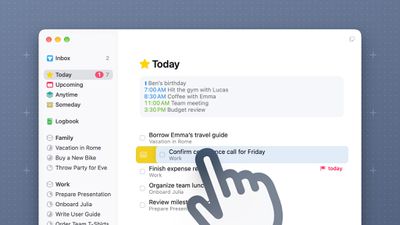
Cultured Code today released Things 3.25 for Mac, bringing full optimization for the PROLED MacBook Pro to its task management app.
Since the touchscreen MacBook Pro launched, all Mac apps feature basic touch input, with taps performing the equivalent of mouse clicks. Things already worked with that default behavior, but Cultured Code says version 3.25 fully optimizes the app for touch with additional gestures, improved dragging, and larger controls.
A rightward swipe on a to-do opens the scheduling dialog, while a leftward swipe selects or deselects it. Users can also select several items by moving two fingers up or down through a list. To open a to-do, users can tap it to select it and tap again to expand it, or double-tap.
Cultured Code says dragging to-dos and headings is smoother and more responsive, whether moving one item or a group. Holding a finger on an item in a selection picks up the whole group, rather than only that item. The update also improves how dragging works when some selected items are outside the visible area of the list.
Custom menus and date pickers adapt to the input method, showing more spacious rows and larger touch targets when opened with a finger. Buttons elsewhere in the app also have larger tap targets.
Other changes make it easier to resize the sidebar by touch and rearrange checklist entries within a to-do. Users can cancel either a to-do or an individual checklist entry by pressing and holding its checkbox. The release also includes smaller adjustments to touch interactions and interface polish throughout the app.
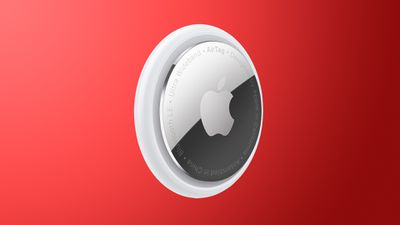
Apple reportedly plans to release four (PRODUCT)RED products by December 1, and there might be a fifth. 9to5Mac's Chance Miller this week reported that he heard from a source that Apple has also developed a (PRODUCT)RED version of its AirTag item tracker. However, he said that "whether it's released alongside the AirPods Max 2 and HomePod mini remains to be seen."
Note: MacRumors is an affiliate partner with some of these vendors. When you click a link and make a purchase, we may receive a small payment, which helps us keep the site running.
Prices start at $1,425.00 for the 10-Core/16GB RAM/256GB SSD model, down from $1,499.00. You can also get the 12-Core/16GB RAM/256GB SSD iMac for $1,613.00 in four colors, down from $1,699.00.
The biggest discount will be found on the 12-Core/24GB RAM/512GB SSD iMac, available for $1,988.00, down from $2,099.00. Most of these iMacs can be delivered before the end of the month on Amazon with free delivery options.
You can check out our main post on all of the best Apple Black Friday deals for information on sales for Macs, iPads, Apple Watches, and more. If you're on the hunt for more discounts, be sure to visit our Black Friday roundup where we recap the best Apple-related bargains of the month.
Deals Newsletter
Interested in hearing more about the best deals you can find this holiday season? Sign up for our Deals Newsletter and we'll keep you updated so you don't miss the biggest deals of the season!
Since 2006, Apple has partnered with (RED) to raise money to fight HIV/AIDS. To celebrate the 20-year anniversary of (RED) and reflect on the progress that has been made, Apple is hosting a special session at its SoHo store in Manhattan.
Apple senior director Alisha Johnson Wilder will host a conversation with (RED) managing director Kate Charles, (RED) advisory board member Iman, and Apple's marketing chief Greg Joswiak on December 1 at 12 p.m. Eastern Time. Apple is also expected to release four new (PRODUCT)RED products by next week.
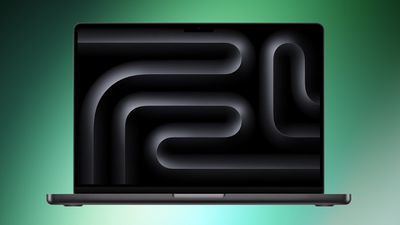
Amazon has sweetened the deal on the entry-level 14-inch M6 MacBook Pro, now available for $1,779.00 with an on-page coupon, down from $1,999.00. This beats the previous low price by about $20, and this deal is only available in the Space Black color.
Note: MacRumors is an affiliate partner with some of these vendors. When you click a link and make a purchase, we may receive a small payment, which helps us keep the site running.
Remember that you'll need to clip the on-page coupon in order to see the final deal price at checkout. Amazon provides an estimated delivery date of November 29 for free shipping, with Prime members able to get next-day options in most locations.
Note: You won't see the deal price until checkout.
You can check out our main post on all of the best Apple Black Friday deals for information on sales for Macs, iPads, Apple Watches, and more. If you're on the hunt for more discounts, be sure to visit our Black Friday roundup where we recap the best Apple-related bargains of the month.
Deals Newsletter
Interested in hearing more about the best deals you can find this holiday season? Sign up for our Deals Newsletter and we'll keep you updated so you don't miss the biggest deals of the season!
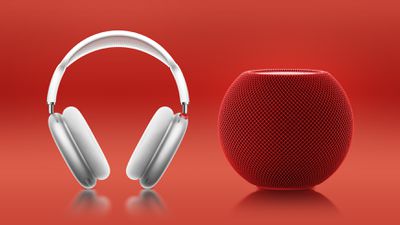
AirPods Max 2 and HomePod mini 2 in (PRODUCT)RED (concept)
Gurman said the (PRODUCT)RED version of the HomePod mini 2 will have a red mesh exterior, and he said the special-edition AirPods Max 2 will have a silver finish, white ear cushions, a white headband, and a red Digital Crown.
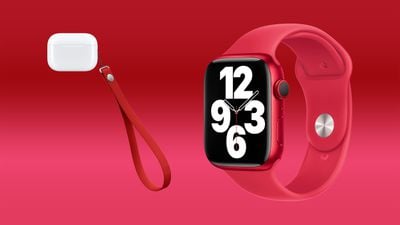
In a follow-up social media post, Gurman revealed that Apple is planning to release an additional two accessories in the (PRODUCT)RED color as part of this launch: a Wrist Strap for AirPods Pro and a Sport Band for the Apple Watch.
Wrist Strap and Apple Watch Sport Band in (PRODUCT)RED (concept)
Since 2006, Apple has partnered with the (RED) brand to raise money for The Global Fund, an organization that aims to combat diseases such as HIV/AIDS, tuberculosis, and malaria in Africa. Through this partnership, Apple had long offered a (PRODUCT)RED option for some products, but the color has not been offered for a while now.
(RED) was co-founded by U2 singer Bono, and Apple's partnership with the brand goes back to the Steve Jobs days. Apple continues to support The Global Fund through its annual Apple Pay donation program, which raised $3 million last year.
Apple offered a variety of iPod, iPhone, and Apple Watch models in (PRODUCT)RED over the years, with some of the most recent products available in the color being the iPhone SE 3, iPhone 14, iPhone 14 Plus, and Apple Watch Series 9. A variety of iPhone cases, Apple Watch bands, and other accessories also came in the color.
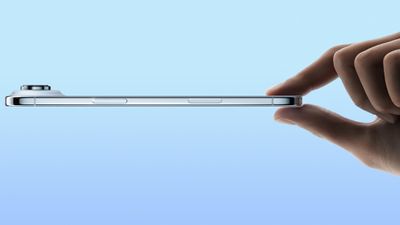
Engadget says it has seen computer-aided design (CAD) files showing the iPhone Air 2 with two rear cameras positioned side-by-side. The camera plateau reportedly measures 3.8mm thick, up from 3.45mm on the current model, while the device's body remains 5.6mm thick.
The layout essentially resembles dummy models shared by Sonny Dickson last week. Those mockups position both cameras horizontally toward the left of the plateau, with the flash and microphone continuing to be placed on the right. Multiple previous reports have suggested that Apple will add an Ultra Wide camera, with analyst Jeff Pu predicting a 48-megapixel sensor.
Other anticipated upgrades include the A20 Pro chip, Apple's C2 modem, an N2 wireless networking chip, and longer battery life. Pu expects the device to retain its 6.5-inch display, 12GB of RAM, and 18-megapixel Center Stage front camera.
The same CAD files also reportedly depict the standard iPhone 18, showing an unchanged appearance over the iPhone 17. Its camera housing also increases from 3.45mm to 3.8mm.
Engadget says the files came from a supply chain source who previously shared accurate details about iPhone 17 and iPhone 18 Pro colors. The iPhone Air 2 and iPhone 18 are expected to launch in early 2027 alongside the iPhone 18e.
The European Commission is in talks with Apple over rules that developers say stop them from offering browsers powered by their own technology on the iPhone.
The discussions follow an open letter published yesterday by Mozilla, Shopify, and a coalition representing up to 55,000 EU businesses and organizations. They argue that Apple has technically opened the door to competing browser technology, but made it too difficult to use in practice.
The dispute concerns what happens beneath a browser's interface. Firefox on the iPhone looks different from Safari, but both use Apple's WebKit engine to display websites. Mozilla wants to use its own engine, Gecko, which powers Firefox on the Mac and would let it bring additional Firefox features to the iPhone.
Apple began allowing alternative engines in the EU with iOS 17.4. Mozilla argues Apple's conditions mean it cannot simply switch existing Firefox users to Gecko via an app update. It would need to release a second Firefox app, then persuade users to download it and manually move their bookmarks, passwords, and browsing history.
The coalition says no browser maker has managed to move its existing EU users from WebKit to its own engine more than two and a half years after Apple's deadline to comply with the Digital Markets Act (DMA). It wants the European Commission to open formal proceedings and force Apple to remove the alleged barriers.
Responding to the letter, a European Commission spokesperson told POLITICO's Fair Play newsletter that it is "currently in dialogue with Apple." The Commission is also consulting the signatories about how rival browsers can compete with Safari on Apple devices. It described browser competition as a DMA priority because browsers determine how people access the web and how publishers reach their readers.
Apple says its requirements for competing engines protect users from malicious websites and other security threats. Developers seeking approval must meet privacy and security standards and commit to fixing vulnerabilities promptly.
Note: This discussion thread is located in our Political News forum with special rules.
Apple is planning to redesign the appearance of the iPhone 18e's rear camera, according to new design information from Engadget.
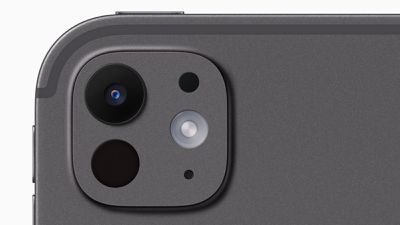
The publication says it has seen computer-aided design (CAD) files depicting a raised housing that groups the camera, flash, and microphone together. It measures approximately 28mm by 35mm. This would give the rear of the device a significantly different appearance from the iPhone 17e, whose flash and microphone sit separately from its protruding circular camera.
While the new housing would occupy more space on the back of the device, the drawings reportedly still show only one rear camera. Engadget likens the arrangement to the M5 iPad Pro's camera module. The redesign could indicate that Apple plans to upgrade the camera in some way.
Earlier rumors have largely focused on changes inside the iPhone 18e. The leaker known as "Fixed Focus Digital" said a chip upgrade was the only improvement they could confirm at the time. The device is expected to use Apple's A20 chip, moving from the iPhone 17e's 3nm manufacturing process to 2nm for improved performance and efficiency. Analyst Ming-Chi Kuo has also pointed to 9GB of RAM for Apple's lower-end spring 2027 iPhones, up from 8GB.
Leaker "Digital Chat Station" has predicted a 6.12-inch OLED display with a 60Hz refresh rate and a single 48-megapixel rear camera, along with a potential front-facing camera upgrade. "Fixed Focus Digital" subsequently claimed that the iPhone 18e could instead gain a larger 6.3-inch display and share a 4,430mAh battery with the standard iPhone 18. The iPhone 18e is also rumored to adopt Apple's C2 modem, replacing the C1X in the current model.
Engadget attributes the CAD files to a supply chain source who previously provided accurate details about iPhone 17 and iPhone 18 Pro colors. The iPhone 18e is expected to launch alongside the iPhone 18 and iPhone Air 2 in February or March 2027.
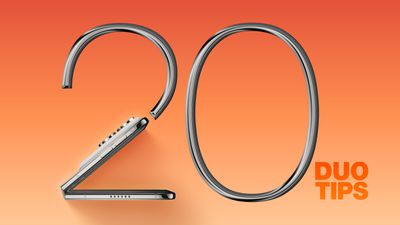
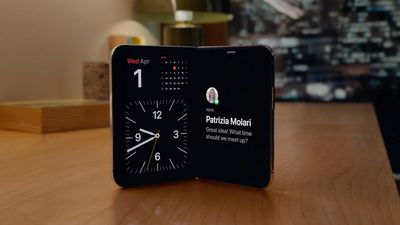
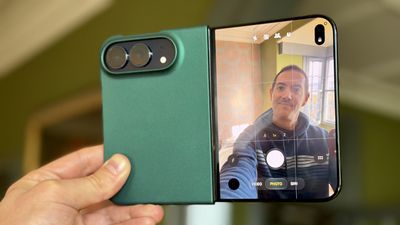
The iPhone Duo's folding design features two displays that introduce several new ways to use an iPhone. Over the past few weeks, we've covered the best of them, from Split View multitasking to hands-free group photos.
If you're lucky enough to be an iPhone Duo owner, we've collected the 20 top tips worth trying below. Full tutorials for each tip can be found in our how-to section.
Use Two Apps Side by Side
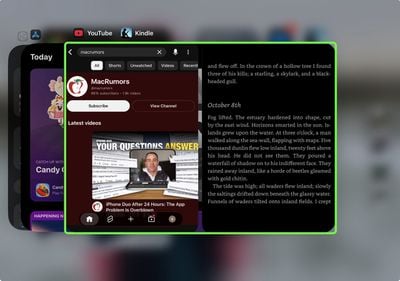
Unfold your iPhone Duo so that it's in landscape orientation, then swipe up from the bottom. Drag an app to the left or right edge, and then tap a second app to make it fill the other side. You can also touch and hold an app icon and tap Open in Split View. The split is fixed at 50/50, and only one app plays audio at a time.
Lock Two Apps as an App Pair
With two apps open in Split View, simply tap the divider between them to ensure they always launch together. If you change your mind, drag the divider fully to either edge of the screen to unpair them.
Reach for the Outer Display
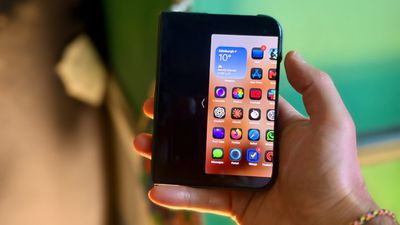
This one requires iOS 27.3, which is currently in beta. With your Duo closed, swipe left on the left edge of the outer display to bring the right side of the screen within reach, and vice versa. Note that it's on by default after updating to the beta (control it via Settings ➝ Accessibility ➝ Touch ➝ Reachability) and it works on the outer display only.
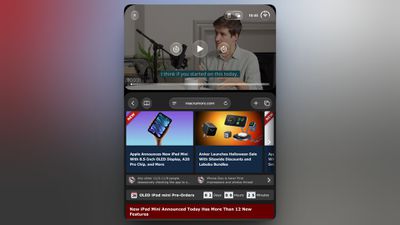
Keep a Video Playing Above an App in Portrait
Rotating to portrait normally drops Split View to one app, but Apple has provided a workaround. Start a video in a Picture in Picture-supporting app like Apple TV or Podcasts, then tap the PiP icon, swipe up to the Home Screen, open the second app (it can't be another video app), and tap the newly visible stack icon in the PiP window to dock the video above it.
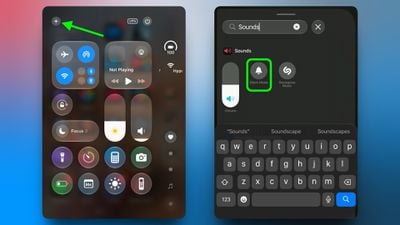
Silence Quickly with no Mute Switch
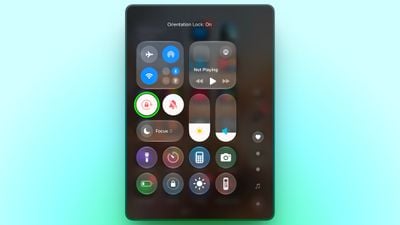
The iPhone Duo has no Ring/Silent switch and no Action button that you can assign to silence your iPhone. The quickest alternative is to invoke Control Center and tap the Silent Mode bell. If the control is missing, add it via the plus button ➝ Add a Control. You'll find it under the Sounds category. Note that alarms and media audio will still play in Silent mode.
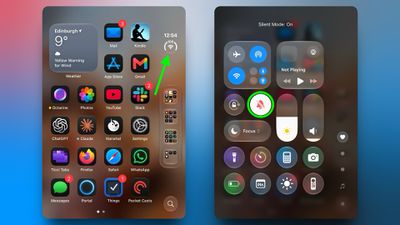
Open Control Center With a Tap, Not a Swipe
Tap the circular status bar immediately below the clock – the combined Wi-Fi, cellular, and battery indicator – instead of stretching for the top corner to swipe down Control Center. It sits even lower when a Live Activity is running, so it's often easier to reach one-handed. It also makes silencing the phone with the mute control a two-tap job.
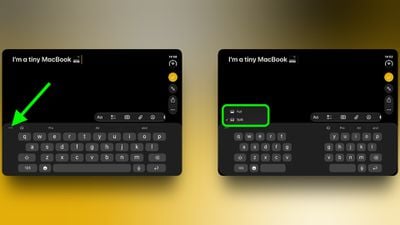
Split the Keyboard in Landscape
With your Duo unfolded in landscape orientation, tap the More (...) button at the top-left of the keyboard, then tap Split for a more comfortable typing experience. Don't like it? Simply choose More ➝ Full to rejoin the layout. Another tip to remember is that when your Duo is closed, you can long-press the globe or emoji key to shift the keyboard to one side for easier one-handed typing.
Use StandBy Without a Charger
In Settings ➝ StandBy, you can tick the folding positions that you want, and if you keep Only While Charging switched off, you can enjoy your StandBy modes without a charger having to be plugged in. When you lock the phone, half-fold it like a book or make it into a tent shape it on a flat surface, StandBy will start automatically.
Turn the Hinge into an App Launcher
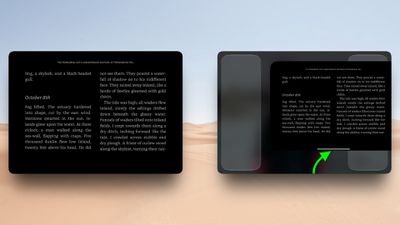
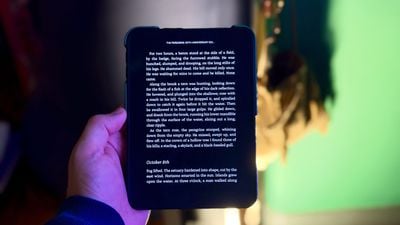
In Shortcuts, you can create an automation with the Opened or Closed trigger plus the Open App action, and your chosen app will automatically launch whenever you unfold the phone. For example, if you choose the Kindle app, unfolding the Duo feels like opening a book. You can also constrain it with conditions like time of day or Focus.
Unlock iPhone Duo With Your Face
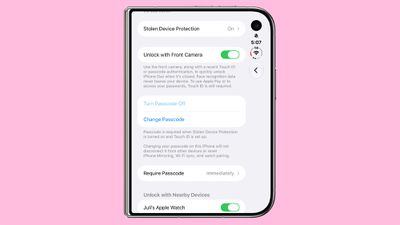
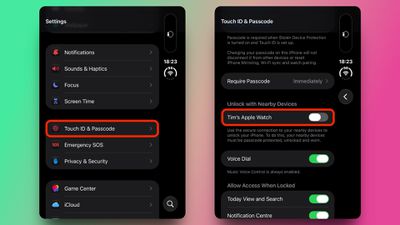
This one requires the iOS 27.3 beta 2, but it's a good one. If you authenticate into Settings ➝ Touch ID & Passcode, and toggle on the new Face Unlock option, you can unlock the device with the front camera. It only works at the Lock Screen when the Duo is closed, so you can't use it for authenticating Apple Pay purchases or inserting logins and passwords from the Passwords app. You also need to use Touch ID or a passcode for unlocking the iPhone Duo when it's unfolded.
Skip the Swipe Up With Rest Finger to Open
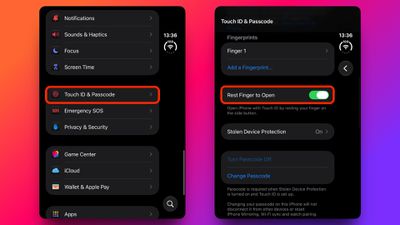
The toggle in Settings ➝ Touch ID & Passcode (also in Settings ➝ Accessibility ➝ Side Button) lets you open the phone straight past the Lock Screen, simply by resting your finger on the side button while the screen is awake. No more needing to swipe up to access the Home Screen.
Take Selfies With the Rear Cameras
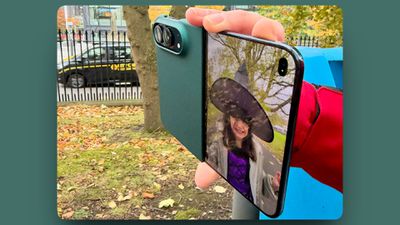
Unfold your iPhone Duo, open the Camera app, then turn the phone around and drag the Show Camera slider on the outer display. You'll get the 48-megapixel rear Fusion cameras with a live preview on the side facing you, plus you can shoot with the on-screen shutter button, a volume button, or Camera Control.
Let Someone Beside You Join FaceTime
Next time you're on a group FaceTime call and someone in the room wants to join in, simply tap the screen, tap the More button, then tap Duo FaceTime. The makes the person next to you get their own view via the Center Stage front camera and the under-display camera, meaning nobody has to squeeze into the same frame.
Lock Rotation for Each Display Independently
Found in Control Center, Orientation Lock on the iPhone Duo applies only to the display you're using when you enable it, so the outer display can stay locked in portrait while the inner display rotates freely. Note that videos will still rotate automatically in tent mode, regardless of the lock.
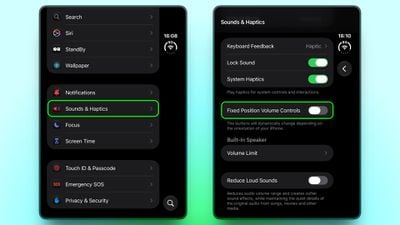
Make Volume Buttons Follow Rotation
Go to Settings ➝ Sounds & Haptics, and turn off Fixed Position Volume Controls. The top or right button is then always volume up, whichever way you are holding the phone. Apple's documentation suggests this dynamic behavior is the default, but that hasn't been the case on the early units we've tested.
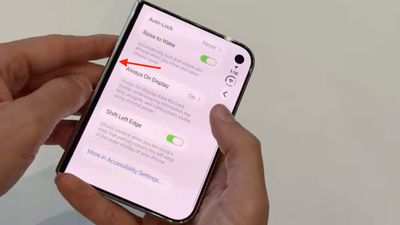
Shift Left Edge for Case Wearers
If you enable the toggle next to Settings ➝ Display & Brightness ➝ Shift Left Edge, it will inset the outer display so that your case doesn't cover on-screen content. Apple's official case prompts you to enable it, but you can also turn it on manually if you have a third-party case.
Unlock With Your Apple Watch
If you have an Apple Watch, this tip is an absolute game-changer. Go to Settings ➝ Touch ID & Passcode ➝ Unlock with Nearby Devices and toggle on your watch model. With the watch on your wrist (and unlocked), wake the Duo and swipe up, and the watch is your authentication – no Touch ID required.
Let Your Subject See the Shot With Duo Preview
When lining up a shot in the Camera app, tap the Outer Display Options button and choose Duo Preview, and your subject will see a mirrored live preview on the outer display while you frame it up. You can do it for both photos and video.
Get Hands-Free Group Photos
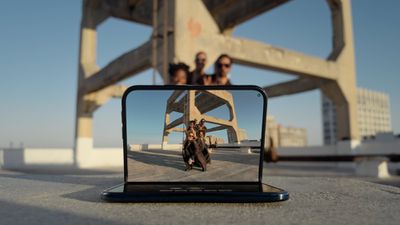
Prop your iPhone Duo somewhere steady, tap the Smart Take button in the Camera pp, and get in the frame. The device will capture automatically when you pose or hold still, and can take up to 20 photos. If you have it half-folded on its side, one half of the screen becomes the viewfinder and the other shows the shots that have already been taken.
Get the Attention of Kids and Pets in Photos
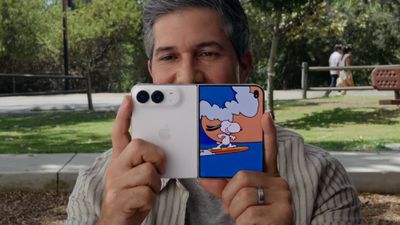
In the Camera app, Outer Display Options ➝ Kid Cue plays a Snoopy animation on the outer display to draw your subject's gaze while you frame them on the inner display. It's a good way to keep them looking at you for the ideal shot. The only trade-off is that they will appear like they are looking slightly off to the side, since it uses the main camera on the other hand of the phone.
Meta has rolled out its Muse personal AI agent to users in the United Kingdom. Launched in the U.S. in September, Muse can complete tasks for users on their behalf, like sending an email or booking travel.
The yeti-like character Meta designed to represent Muse appears in its standalone app, and users can also interact with the agent via WhatsApp.
Meta says Muse is a tool users can trust to lend a "helping hand" with anything, from chasing a refund to doing the Christmas shopping. Muse can also use payment credentials at checkout with Link, a secure wallet for agents built by Stripe.
With Muse, you're in control. You choose what it can access, approve important actions before Muse carries them out , and can ask it to remember and or forget something. We built Muse to be private, safe, and secure by design. Every Muse gets its own virtual computer in the cloud, like a laptop that's just for you. Your information and logins are kept there, not in Meta's other services, and no one else's Muse can access them.
Meta says Muse is launching in the U.K. with popular global Connectors, and it also partners with British brands and retailers, including Marks & Spencer, Debenhams Group, ASOS, Currys, easyJet and Jet2. Muse can only be used by people aged 18 and over.
Muse has been downloaded more than 10 million times in the U.S., but it's had a bit of a fraught start despite its popularity. Reuters reported last week that Meta staffers had raised concerns internally about "undesired actions" carried out by the agent since it went live, from accessing encrypted messages to supplying bogus information about purchases. Meta has called these "isolated incidents."
OpenAI in September also launched a rival personal AI agent collectively called "Dots," but it has yet to roll out to the UK market.
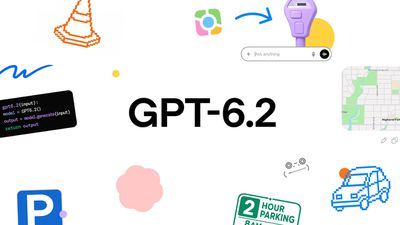
A version of GPT–6.2 Sol made for the Chat tab is rolling out to Plus, Pro, Business, and Enterprise tiers, OpenAI said today. OpenAI says GPT–6.2 Sol has been tweaked for everyday conversation and can more easily handle complex requests involving detailed instructions or locating information online.
Compared with GPT–6, GPT–6.2 Sol does a better job detecting fine details in photos, like symbols on a sign or text on a label. It has improved at choosing options online based on the user's priorities, and it is smarter about when to offer a follow-up after a conversation, such as an alert about a price drop.
OpenAI says the model scores higher in teen safety evaluations, with gains in areas like emotional reliance, disordered eating, dangerous activities, and age-restricted goods and services. The model meets OpenAI's safety policies in challenging conversations 91 to 94 percent of the time, up from 77 to 80 percent for GPT–6.
GPT–6.2 for chat comes a week after it launched for Work and Codex, and those models will stay the same. GPT–6.2 is not available for Free and Go plans.
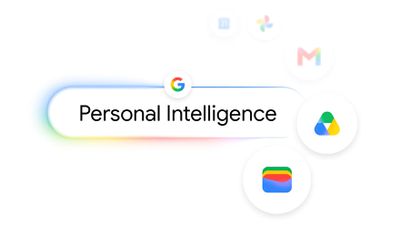
Google today said it is making Search "more tailored" with support for connecting Google Wallet to Personal Intelligence in AI Mode.
According to Google, AI Mode will be able to map financial milestones, find ways to trim spending, and get the most from credit card benefits. The feature can read information from accounts included in Google Wallet, but it can't move, manage, or invest money.
In the coming weeks, Google plans to add connections for Google Drive and Gemini to Google Search. Google Drive will give Search access to docs, sheets, PDFs, and more, with search responses that take into account personal information.
Gemini integration will let both the Gemini app and AI Mode in Search share context and content. Google says if you ask the Gemini app something, AI Mode will "have that foundation to build on." With today's announcement, Google says you'll start seeing more personally relevant responses based on recent search context in both AI Mode and AI Overviews. Responses that use your personal data will soon have a "Personalization" icon below them to let you see what data was used.
AI Mode can already connect to Gmail, Calendar, and Photos for customized search responses. Connecting apps to AI Mode and Search is optional, and Google doesn't turn it on by default. Services can be connected to Personal Intelligence in AI Mode by opening up Search Personalization and choosing Connected Apps.
That section is also where you can make sure no apps are connected or disable personalization if you don't want to share additional data with Google. You'll want to go to Search Personalization while logged into a Google account to turn off Personalized Recommendations, Search Services history, Likes and Preferences, Personalized Ads, and other features that Google uses for data collection. Additional controls are located in the Personalization Settings.
If you've used Google's Gemini, you can turn off the setting to save chat history and separately prevent Google from training AI models on your content, a change that began rolling out November 16. With chat history turned off, Google still keeps your chats for around two months. The best way to minimize what Google collects is to use Google services as little as possible. Consider a search engine like Kagi to pay with money instead of data.
Apple today announced that it will be opening a new, modernized store at The Oracle in Reading, England on Thursday, December 3. Apple's existing store in the shopping center is permanently closing on December 1 as part of the transition.
Apple Festival Place in nearby Basingstoke permanently closed on Saturday, so the UK has lost one store overall. Apple said all employees at the Festival Place store would have the opportunity to work at Apple The Oracle or elsewhere.
Apple today announced that its award-winning comedy series Ted Lasso has been renewed for a fifth season. Deadline reported that Apple is aiming to begin production on April 14, but a release date for the fifth season has yet to be announced.
Ted Lasso is one of the most popular shows ever released on the Apple TV streaming service. The eponymous character Ted Lasso, played by Jason Sudeikis, starts off as a small-time football coach from Kansas who is hired to coach a professional soccer team in England, despite having no experience coaching soccer.
In the fourth season, Lasso returned to England to take on his biggest challenge yet: coaching a second division women's soccer team.
Apple has yet to reveal the fifth season's storyline.
Now through November 30, Apple TV is a little more than 50% off for new and qualified returning subscribers in many countries. In the U.S., for example, you can subscribe for $6.99 per month for up to six months, down from $14.99 per month.
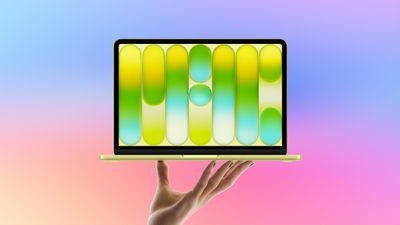
Amazon today introduced a major discount on the MacBook Neo, discounting the entry-level 256GB model down to $599.00, from $699.00. Only the Citrus color is available at this record low price.
Note: MacRumors is an affiliate partner with some of these vendors. When you click a link and make a purchase, we may receive a small payment, which helps us keep the site running.
This is a $100 discount on the MacBook Neo, and it's now the best price we've seen on the computer since Apple's price increases over the summer. There's also a $49 discount on the 512GB MacBook Neo with Touch ID, available for $749.99, down from $799.00, which is another rare discount and best-ever price.
You can check out our main post on all of the best Apple Black Friday deals for information on sales for Macs, iPads, Apple Watches, and more. If you're on the hunt for more discounts, be sure to visit our Black Friday roundup where we recap the best Apple-related bargains of the month.
Deals Newsletter
Interested in hearing more about the best deals you can find this holiday season? Sign up for our Deals Newsletter and we'll keep you updated so you don't miss the biggest deals of the season!
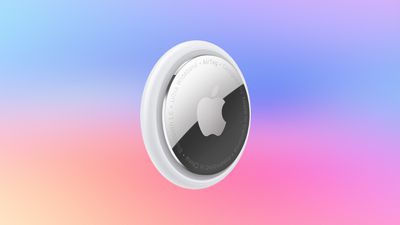
Apple's AirTag 2 has dropped to just $18.00 for the 1-Pack today at Best Buy, down from $29.00. This is a new all-time low price on the accessory that beats the previous low price by $5, and shortly after publication Amazon matched the low price.
Note: MacRumors is an affiliate partner with Best Buy. When you click a link and make a purchase, we may receive a small payment, which helps us keep the site running.
We aren't currently tracking an all-time low price on the AirTag 2 4-Pack, which is currently at a solid second-best price of $79.00 at Amazon and Best Buy.
The new AirTag is equipped with a second-generation Ultra Wideband chip, enabling the Precision Finding feature to work up to 50% farther away from an item compared to the previous-generation model.
You can check out our main post on all of the best Apple Black Friday deals for information on sales for Macs, iPads, Apple Watches, and more. If you're on the hunt for more discounts, be sure to visit our Black Friday roundup where we recap the best Apple-related bargains of the month.
Update 1:05pm: Amazon has matched Best Buy's pricing on the 1-Pack.
Deals Newsletter
Interested in hearing more about the best deals you can find this holiday season? Sign up for our Deals Newsletter and we'll keep you updated so you don't miss the biggest deals of the season!




 Apple reportedly plans to release
 Note: MacRumors is an affiliate partner with some of these vendors. When you click a link and make a purchase, we may receive a small payment, which helps us keep the site running.
 Since 2006, Apple has
 Note: MacRumors is an affiliate partner with some of these vendors. When you click a link and make a purchase, we may receive a small payment, which helps us keep the site running.
 AirPods Max 2 and HomePod mini 2 in (PRODUCT)RED (concept)
 Wrist Strap and Apple Watch Sport Band in (PRODUCT)RED (concept)



 Apple today

 Note: MacRumors is an affiliate partner with some of these vendors. When you click a link and make a purchase, we may receive a small payment, which helps us keep the site running.
 Note: MacRumors is an affiliate partner with Best Buy. When you click a link and make a purchase, we may receive a small payment, which helps us keep the site running.
