Skip to Content

Disable Touch on MacBook Pro PROLED XDR and When Using Sidecar

by

Apple has long rejected the idea of a touchscreen Mac, so moving ahead with one was always going to be a major shift in the company's thinking. In 2010, Steve Jobs argued that "touch surfaces don't want to be vertical," citing the arm fatigue that comes from repeatedly reaching up to a screen.
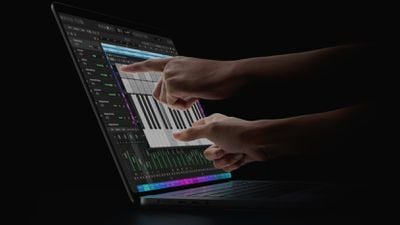
oled macbook pro touch

Some would call this sacrilege...

More than a decade later, in 2021, Apple's then-hardware engineering chief John Ternus remarked that the Mac was made exclusively for indirect input and that Apple saw no compelling reason to change its approach.

"We make the world's best touch computer on an iPad. It's totally optimized for that. And the Mac is totally optimized for indirect input. We haven't really felt a reason to change that," Ternus said in an interview with Joanna Stern.

Touch Comes to the Mac

Fast forward to 2026, and Apple has had a change of heart. The new MacBook Pro with PROLED XDR is the first Mac to adopt touchscreen technology. Many younger people who grew up with smartphones and tablets expect to interact with their computers the same way they do with their mobile devices, and that expectation appears to have twisted Apple's arm (no pun intended).

Of course, just because the new MacBook Pro models have a touchscreen doesn't mean you have to use it. If you forget it's even there, you can turn off the function and pretend it doesn't exist. If you use Sidecar with an iPad on another Mac, you can turn off touch in the same way.

Turn Off Touch on MacBook Pro and Sidecar

The steps are the same whether you want to disable the MacBook Pro's touchscreen or touch input in Sidecar:

  1. Click the Apple logo in the top-left corner of the menu bar and choose System Settings....
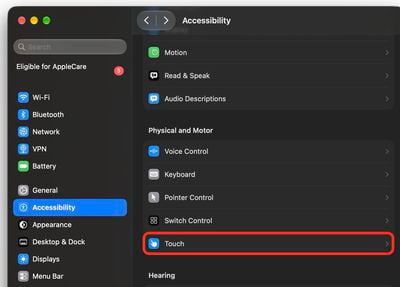
  2. Select Accessibility in the sidebar.
  3. Under "Physical and Motor," click Touch.
    settings

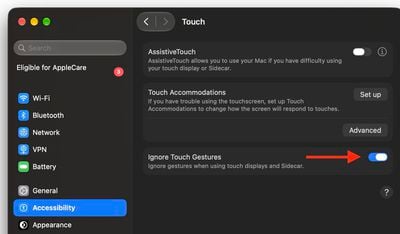
  4. Toggle on the switch next to Ignore Touch Gestures.
    settings

That's all there is to it. Your Mac will now ignore touch input, and since the setting covers Sidecar too, an iPad you use as a second display will ignore touches as well. If you ever want touch back, return to the same screen and toggle off Ignore Touch Gestures.

Touch Friendly, Not Touch First

If some gestures prove useful but others keep being triggered by accident, you can adjust them individually instead of disabling touch altogether. In System Settings, select Touch Display in the sidebar, where each gesture can be switched off, and Swipe between spaces, Mission Control, and App Exposé also have pop-up menus for changing how the gesture is performed.
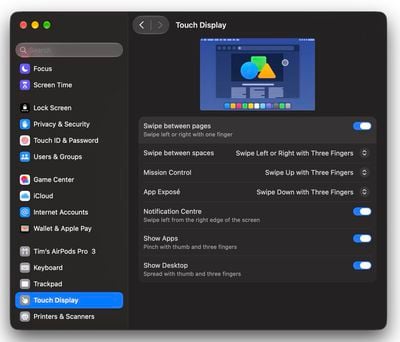
settings
Don't overlook the fact that the Accessibility ➝ Touch screen (where "Ignore Touch Gestures" lives) offers further customization options. Touch Accommodations changes how the screen responds to taps, swipes, and touch-and-hold input. AssistiveTouch can also be found on this settings menu if you want alternative ways to control the screen, and the Accessibility ➝ Zoom menu includes an option to zoom using the touch display or Sidecar.
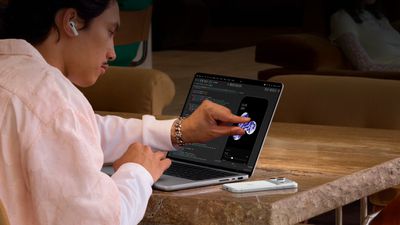
macbook pro proled touch
Whatever you think about touch on a Mac, one group with a genuine reason to leave it on is app developers. Xcode's iOS Simulator responds to direct touch, so you can test your app's taps, swipes, and pinches right on the screen instead of approximating them with a trackpad and keyboard modifiers.
Related Roundup: MacBook Pro
Buyer's Guide: MacBook Pro (Buy Now)
Related Forum: MacBook Pro

Top Rated Comments

iMac The Knife Avatar
2 weeks ago
Steve Jobs was right, for the most part.
Score: 18 Votes (Like | Disagree)
Omega Mac Avatar
2 weeks ago
Looking forward to the "Disable Ai on macOS/iOS" MR article. 🍿
Score: 10 Votes (Like | Disagree)
2 weeks ago
Who wants to have dirty screen all the time? It's ok on iPad or iPhone (even though it's annoying) but Mac? No way, I like my screen nice and clean.
Score: 8 Votes (Like | Disagree)
dannys1 Avatar
2 weeks ago

"We make the world's best touch computer on an iPad. It's totally optimized for that. And the Mac is totally optimized for indirect input. We haven't really felt a reason to change that," Ternus said in an interview ('https://www.macrumors.com/2021/10/29/apple-face-id-touchscreens-macs/') with Joanna Stern.
Now look at him...


Attachment Image
Score: 7 Votes (Like | Disagree)
vegetassj4 Avatar
2 weeks ago
A Touch Mac smh. What's next, a keyboard for the iPhone?
Score: 6 Votes (Like | Disagree)
2 weeks ago

Steve Jobs was right, for the most part.
I think that’s why they didn’t emphasize it during the rollout. It was more like “look at this beautiful screen” and “oh, by the way, you can touch it.”
Score: 6 Votes (Like | Disagree)

Popular Stories

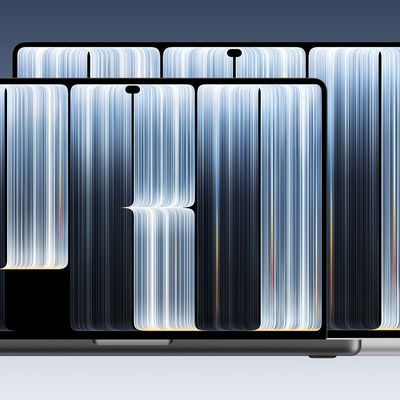
Apple MacBook Pro with PROLED XDR Display family lineup feature

Apple Announces OLED MacBook Pro With Touch Display

Wednesday October 28, 2026 10:11 am PDT by
Apple today announced a new high-end MacBook Pro, which is available in 14-inch and 16-inch sizes. The new device has a PROLED XDR display that supports touch gestures, and a glowing rear Apple logo. Pricing on the MacBook Pro starts at $2,899 for the 14-inch model and $3,399 for the 16-inch model. Apple says the MacBook Pro has the "world's best display in a pro laptop." The PROLED...
World Travel Adapter Kit Feature with Charger

Apple Releases Redesigned Mac Chargers and 'World Travel Adapter Kit'

Wednesday October 28, 2026 11:29 am PDT by
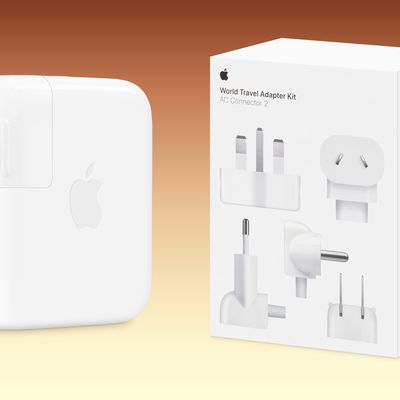
Apple today began selling updated versions of its 70W Power Adapter, 140W Power Adapter, and Power Adapter Extension Cable, all with a new "AC Connector 2." The updated power adapters and extension cable are available on Apple's online store in the U.S. and many other countries around the world. Apple also released an updated version of its World Travel Adapter Kit that had disappeared...
MacBook Pro Glowing Apple Logo

'Backglow' Lets You Customize New MacBook Pro's Glowing Apple Logo

Saturday November 7, 2026 12:44 pm PST by
A new "Backglow" app created by designer Juan Buis lets you customize the illuminated Apple logo on the lid of the new MacBook Pro models. The free version of the app allows you to manually adjust the brightness level of the Apple logo, independent of the MacBook Pro's display brightness level. You can also turn it off entirely with a single click, rather than having to use Terminal....
Latest Stories
The 50+ Best Apple Black Friday Deals on AirPods, iPads, MacBooks, and More
4 hours ago
The 60+ Best Black Friday Accessory Deals on iPhone Chargers, TVs, Headphones, and More
8 minutes ago
GTA VI Now (Barely) Running on Apple Silicon Macs
28 minutes ago
The Best Black Friday Streaming Deals on Apple TV, Disney+, and More
1 hour ago
Apple TV's 'Carême' Wins International Emmy for Best Drama
2 hours ago
iPhone 18 Production Delay Leaves Apple Little Time Before Launch
2 hours ago
The Best Black Friday AirPods Deals
3 hours ago
The Best Black Friday Deals on Apple Home Products
3 hours ago
The Best Black Friday iPhone Deals
3 hours ago
The Best Black Friday iPad Deals
3 hours ago
The Best Black Friday Apple Watch Deals
3 hours ago
The Best Black Friday AirTag Deals
4 hours ago
The Best Black Friday Mac Deals
4 hours ago
iPhone Share of US Smartphone Market Hits 57% as Rivals Slip
4 hours ago
iPhone 20 Pro Rumored to Feature 3D-Printed Titanium Frame
6 hours ago
Apple's Official 2026 Black Friday Offer Starts Rolling Out
1 day ago
Halide Adds Fill Light Feature for iPhone Duo
1 day ago
MacBook Air Black Friday Deals Now Live With Massive $399 Savings
1 day ago
Amazon Discounts All MacBook Neo Models by $99 for Black Friday
1 day ago
Kodak Launches Unique AirTag Rival With E-Ink Display
1 day ago
Here's Why the Apple Store is Going Down
1 day ago
Apple Still Working on Giant Foldable iPad That Could Cost $5,000
1 day ago
iPhones Dominate China's Weak Singles' Day Smartphone Sales
1 day ago
iPhone 20 Pro Could Feature Ceramic in Limited-Edition Model
1 day ago
Apple Faces Korean Regulator Review Over iPhone 16 AI Advertising
1 day ago
Apple Watch Ultra 4 Hits New Best-Ever Price of $649.99 for Black Friday
1 day ago
New Apple Store Opening in India, Download the Special Wallpaper Now
2 days ago
Redesigned OLED MacBook Air Could Launch in 2027 or 2028
2 days ago
AirPods Pro 3 for $149 is One of The Best Black Friday Deals This Year
2 days ago
1Password Security Breach: What Was Accessed and What Wasn't
2 days ago
Related Apple News: Entertainment | Lifestyle | Education | Mac | Sport