Skip to Content

macOS Sonoma Launching This Week With These New Features

Apple previously announced that macOS Sonoma will be released this Tuesday, September 26. The free software update includes many new features and changes for the Mac, including the five that we have highlighted below.
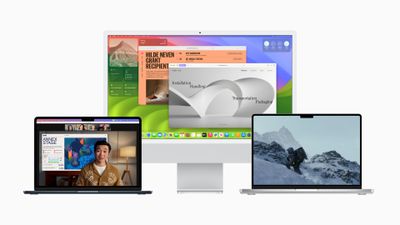
Apple WWDC23 macOS Sonoma hero
In addition to these five features, we have shared the full release notes for macOS Sonoma below for a complete overview of everything new.

Desktop Widgets
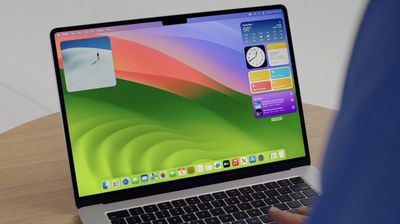
macOS Sonoma Widgets
macOS Sonoma brings widgets to the desktop on the Mac, and they are now fully interactive like on the iPhone. It is even possible to use widgets from your iPhone apps automatically, without having to install the corresponding Mac apps.

Game Mode

Apple WWDC23 macOS Sonoma gaming 230605

macOS Sonoma features a new Game Mode that temporarily prioritizes CPU and GPU performance for gaming on Apple silicon Macs. Game Mode also reduces audio latency for AirPods and input latency for select game controllers connected via Bluetooth.

Web Apps in Dock
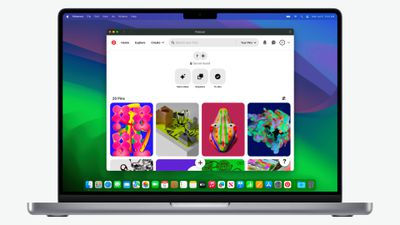
macOS Sonoma Web App 1

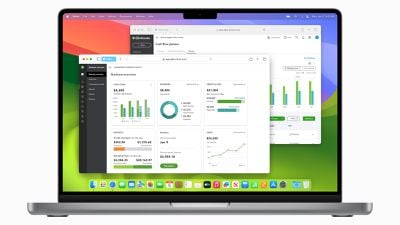
On macOS Sonoma, any website can be added to the Dock as a web app for convenient access. To create a web app, load the website in Safari, open the File menu, and select Add to Dock. Web apps offer a simplified toolbar and support push notifications.

New Screen Savers and Wallpapers
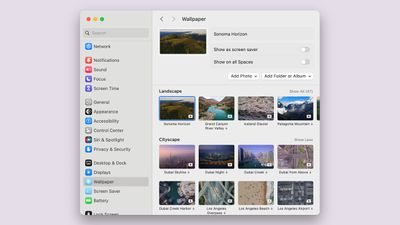
macos sonoma new aerial wallpaper
macOS Sonoma adds new Apple TV-like aerial screen savers that feature slow-motion videos of places around the world, such as Yosemite National Park and Dubai. Each screen saver can transition to a matching desktop wallpaper.

Safari Profiles
macOS Sonoma Safari Profiles
The latest version of Safari introduced support for profiles, allowing you to keep your browsing separate for work, personal life, and more. Apple says each profile has separate history, cookies, extensions, Tab Groups, and favorites.

macOS Sonoma Compatibility

macOS Sonoma is compatible with the following Macs:

  • MacBook Pro: 2018 and later
  • MacBook Air: 2018 and later
  • Mac mini: 2018 and later
  • iMac: 2019 and later
  • iMac Pro: 2017
  • Mac Studio: 2022 and later
  • Mac Pro: 2019 and later

macOS Sonoma Release Notes

macOS Sonoma brings all‑new capabilities that elevate your productivity and creativity. Discover even more ways to personalize your Mac with stunning screensavers and widgets that you can add to your desktop. Elevate your presence on video calls with a new way to present your work that keeps you a part of the presentation. Safari profiles and web apps help you organize your browsing in all-new ways. Game Mode boosts your gaming performance. Sonoma also brings big updates to Messages, Keyboard, and Accessibility. And when you upgrade, you get the latest security and privacy protections available for Mac.

Screen Savers
- Stunning screen savers of locations from around the world seamlessly become your desktop wallpaper when you log-in
- Shuffle settings for rotating through screensavers by theme including Landscape, Cityscape, Underwater, and Earth

Widgets
- Widgets can be placed anywhere on the desktop and adapt to the color of your wallpaper while working in apps
- iPhone widgets can be added to your Mac when your iPhone is nearby or on the same Wi-Fi network
- Interactive widgets let you take actions directly from the widget such as running a shortcut, pausing media, and more

Video Conferencing
- Presenter Overlay keeps you front and center while sharing your screen in FaceTime or third-party video conferencing apps (Mac with Apple silicon)
- Reactions layer 3D effects like hearts, balloons, confetti, and more around you in video calls and can be triggered with gestures (Mac with Apple silicon, Continuity Camera with iPhone 12 and later)

Safari and Passwords
- Profiles keep your browsing separate for topics like work and personal, separating your history, cookies, extensions, Tab Groups, and favorites
- Web apps let you use any website like an app, complete with an icon in the Dock for faster access and a simplified toolbar for easier browsing
- Enhanced Private Browsing locks your private browsing windows when you’re not using them, blocks known trackers from loading, and removes tracking that identifies you from URLs
- Password and passkey sharing allows you to easily share accounts with trusted contacts

Messages
- Live Stickers sync from iOS and iPadOS to macOS, giving you access to the Live Stickers you create on your iPhone and iPad
- Search filters for people, keywords, and content types like photos or links help you more easily find what you are looking for
- Swipe to reply inline on any iMessage bubble

Gaming
- Game Mode gives games the highest priority on the CPU and GPU, delivering more consistent frame rates and lower latency to wireless controllers and AirPods (Mac with Apple silicon)

Keyboard
- Improved autocorrect accuracy makes typing even easier by leveraging a more powerful transformer-based language model
- Inline predictive text shows single- and multi-word predictions that you can add by pressing the Space bar
- Improved Dictation experience supports using your voice and keyboard together to enter and edit text

AirPods
- Adaptive Audio delivers a new listening mode that dynamically blends Active Noise Cancellation and Transparency to tailor the noise control experience based on the conditions of your environment (AirPods Pro (2nd generation) with the latest firmware)
- Personalized Volume adjusts the volume of your media in response to your environment and listening preferences over time (AirPods Pro (2nd generation) with the latest firmware)
- Conversation Awareness lowers your media volume and enhances the voices of the people in front of the user, all while reducing background noise (AirPods Pro (2nd generation) with the latest firmware)
- Press to mute and unmute your microphone by pressing the AirPods stem or the Digital Crown on AirPods Max when on a call (AirPods (3rd generation), AirPods Pro (1st and 2nd generation), or AirPods Max with the latest firmware)
- Improved AirPods automatic switching now detects Mac up to 2X faster (AirPods (2nd and 3rd generation), AirPods Pro (1st and 2nd generation), AirPods Max with the latest firmware)

Privacy
- Sensitive Content Warnings can be enabled to help prevent users from unexpectedly viewing sensitive images in Messages
- Expanded Communication Safety protections for children now detect videos containing nudity in addition to photos shared through Messages and the system Photos picker
- Improved sharing permissions let you choose which photos to share and add calendar events without providing access to your entire photo library or calendar

Accessibility
- Live Speech lets you type what you want to say and reads it aloud in FaceTime calls or in-person conversations
- Personal Voice helps users at risk of speech loss create a voice that sounds like them in a private and secure way using on-device machine learning
- Made for iPhone compatible hearing devices can be paired and used with Mac (MacBook Pro (2021), Mac Studio (2022), and Mac computers with M2 chip)

This release also includes other features and improvements:
- One-Time verification code AutoFill from Mail helps you quickly sign into sites in Safari, without leaving the browser
- Inline PDFs and document scans in Notes are presented full-width making them easy to view
- Grocery Lists in Reminders automatically group related items into sections as you add them
- Visual Look Up for recipes helps you find similar dishes from photo
- Visual Look Up in video helps you learn about objects that appear in paused video frames
- Pets in the People album in Photos surfaces individual pets just like friends or family members
- Option to say "Siri" in addition to "Hey Siri" for a more natural way to activate Siri (Mac with Apple silicon, AirPods Pro (2nd generation))
- High performance mode in Screen Sharing supports color workflows and improves responsiveness while remotely accessing a Mac (Mac with Apple silicon)
- Item sharing in Find My allows you to share an AirTag with up to five other people
- Activity History in Home displays a recent history of events for door locks, garage doors, security systems, and contact sensors
- Battery health management updated on 13-inch MacBook Air with M2 chip to better optimize long term battery health

Some features may not be available for all regions or on all Apple devices.

macOS Sonoma should be released at approximately 10 a.m. Pacific Time / 1 p.m. Eastern Time on Tuesday. Once the update is available, it can be installed from the System Settings app under General → Software Update.


Related Forum: macOS Sonoma

Popular Stories

apple design award 2025

Apple Announces 2025 Design Award Winners Ahead of WWDC 2025

Tuesday June 3, 2025 10:14 am PDT by
As we wait for WWDC to kick off next Monday, Apple today announced the winners of its annual Apple Design Awards, recognizing apps and games for their innovation, ingenuity, and technical achievement. The 2025 Apple Design Award winners are listed below, with one app and one game selected per category: Delight and Fun - CapWords (App) and Balatro (Game) Innovation - Play (App) and PBJ -...
1password deal blue

1Password Security Breach: What Was Accessed and What Wasn't

Wednesday November 25, 2026 1:09 pm PST by
Popular password management app 1Password today said it experienced a security breach earlier this month. 1Password says some customer names and email addresses were accessed, but no customer vault contents were compromised. On November 19, 1Password saw indications that an employee's GitHub account had been breached and began investigating. The company says the breached GitHub account was...
Apple 2026 Black Friday Event Hero

Apple's Official 2026 Black Friday Offer Starts Rolling Out

Thursday November 26, 2026 8:37 am PST by
Apple's annual four-day Black Friday through Cyber Monday shopping event is now live in Australia, New Zealand, and Thailand, and it will continue to roll out across Europe, the U.S., and Canada as the calendar turns to Friday, November 27 around the world. In the U.S., Apple's terms and conditions say the promotion begins on November 27 at 12 a.m. Pacific Time and ends on November 30 at...

Top Rated Comments

DMG35 Avatar
42 months ago
I really wish Apple would stop with the yearly OSX releases. Its exhausting wondering if your apps are all going to be compatible and in the end I just end up waiting several months until I know everything works and there won't be an app I need that hasn't been updated or crashes regularly.

Just refine what we have and go on a two year cycle of upgrades. Then they will seem more significant.
Score: 67 Votes (Like | Disagree)
sajlonix Avatar
42 months ago
So basically desktop widgets, safari tweaks and new screen savers.. so underwhelming
Score: 58 Votes (Like | Disagree)
42 months ago
remember.... the purpose of yearly OS updates is mainly to obsolete older versions. Oh yeah, and throw the customers a bone of questionable new features
Score: 42 Votes (Like | Disagree)
128KMac Avatar
42 months ago
Based on iOS17 and multiple other releases, I think I'll wait a week or two, until after the not uncommon "security & bug fixes" that get pumped out shortly after the initial release. :-).
Score: 30 Votes (Like | Disagree)
42 months ago
Yawn. I'll upgrade in exactly 12 months and not a second earlier. I NEED my Macs to be stable, (reasonably) bug free, and functional. It's the functional part that is even more critical than the bugs. I'm sick of all the issues I've had in the past from this – even waiting 6 months isn't enough for them to patch the most glaring issues anymore.

If Apple switched to releasing new versions of macOS to every two years, no one would care. No one is clamouring for these new features, tbh. Nothing is stopping them from updating FaceTime, for example, as independent apps; they already do it for Safari even.

These new versions of macOS every single year is just a marketing exercise for new Macs, and to make us used to free updates to gradually bring obsolescence to older hardware.
Score: 27 Votes (Like | Disagree)
trusso Avatar
42 months ago

So basically desktop widgets, safari tweaks and new screen savers.. so underwhelming

remember.... the purpose of yearly OS updates is mainly to obsolete older versions. Oh yeah, and throw the customers a bone of questionable new features

I really wish Apple would stop with the yearly OSX releases. Its exhaustingn wondering if your apps are all going to be compatible and in the end I just end up waiting several months until I know everything works and there won't be an app I need that hasn't been updated or crashes regularly.

Just refine what we have and go on a two year cycle of upgrades. Then they will seem more significant.
Give me stability over everything else. I don't mind "underwhelming" features, except that the "underwhelming" features could (most of the time) be implemented as standalone apps or updates (feature packs?) untethered from the OS upgrade cycle.

Of course, because macOS (and iOS) are mature products now, the only way Apple can entice users to continue upgrading (even if it breaks other items in their workflow) is by offering these little "goodies" which are largely unnecessary.

I'm tired of the treadmill. It's not just Apple, and it's not just computers. Everything these days seems designed to break or stop working after a while (or perhaps it's not active malfeasance, but things are just no longer engineered to last). Even though I don't care for the new features, the fact that I feel compelled to upgrade in order to make sure my devices keep working together properly (and to avoid the nag screens) keeps me on the hedonic treadmill in other facets of my life as well. It's a pernicious loop, and it's working exactly as big tech wants it to.

To the Apple engineers reading this: stand up to your bosses and work for the betterment of everyone, not your CEO's stock price.

I'm going to consider downgrading to Mojave if this keeps up.
Score: 25 Votes (Like | Disagree)
Latest Stories
The 50+ Best Apple Black Friday Deals Still Available on AirPods, iPads, and More
10 hours ago
HomePod Mini 2 in (RED) Seemingly Spotted Ahead of Announcement
7 hours ago
Apple's M6 and PROLED MacBook Pro Reach New Low Prices for Black Friday
17 hours ago
The MacRumors Show: iPhone Air 2 and iPhone 18 Are Coming
17 hours ago
Apple Store in Brisbane Reopening Next Month With New Design
18 hours ago
The 60+ Best Black Friday Accessory Deals on iPhone Chargers, TVs, Headphones, and More
19 hours ago
GTA VI Now (Barely) Running on Apple Silicon Macs
19 hours ago
The Best Black Friday Streaming Deals on Apple TV, Disney+, and More
20 hours ago
Apple TV's 'Carême' Wins International Emmy for Best Drama
20 hours ago
iPhone 18 Production Delay Leaves Apple Little Time Before Launch
21 hours ago
The Best Black Friday AirPods Deals Still Available
13 hours ago
The Best Black Friday Deals on Apple Home Products
22 hours ago
The Best Black Friday iPhone Deals Still Available
13 hours ago
The Best Black Friday iPad Deals Still Available
13 hours ago
The Best Black Friday Apple Watch Deals Still Available
13 hours ago
The Best Black Friday AirTag Deals Still Available
13 hours ago
The Best Black Friday Mac Deals Still Available
13 hours ago
iPhone Share of US Smartphone Market Hits 57% as Rivals Slip
23 hours ago
iPhone 20 Pro Rumored to Feature 3D-Printed Titanium Frame
1 day ago
Apple's Official 2026 Black Friday Offer Starts Rolling Out
2 days ago
Halide Adds Fill Light Feature for iPhone Duo
2 days ago
MacBook Air Black Friday Deals Now Live With Massive $399 Savings
2 days ago
Amazon Discounts All MacBook Neo Models by $99 for Black Friday
2 days ago
Kodak Launches Unique AirTag Rival With E-Ink Display
2 days ago
Here's Why the Apple Store is Going Down
2 days ago
Apple Still Working on Giant Foldable iPad That Could Cost $5,000
2 days ago
iPhones Dominate China's Weak Singles' Day Smartphone Sales
2 days ago
iPhone 20 Pro Could Feature Ceramic in Limited-Edition Model
2 days ago
Apple Faces Korean Regulator Review Over iPhone 16 AI Advertising
2 days ago
Apple Watch Ultra 4 Hits New Best-Ever Price of $649.99 for Black Friday
2 days ago
Related Apple News: South Africa | Education | Lifestyle | Mac | Mac






























