Skip to Content

Here's How Web Apps Work in macOS Sonoma

In macOS Sonoma, currently in beta, you can create individual web apps for any website that you frequent in Safari, and have them sit beside other apps in your Dock. Let's take a closer look at how it all works by turning MacRumors.com into a virtual Mac app as an example.
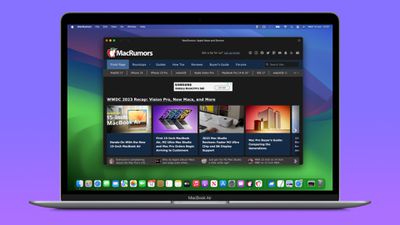
macos sonoma web app MacRumors
In macOS Sonoma, any website viewed in Safari can be turned into a web app, thanks to a new "Add to Dock" option in the File menu. In other words, no work is required on the part of web developers to make a site web app compatible, although there are some elements of web apps that developers can have control over (see below).

How to Turn MacRumors into a Web App

  1. In macOS Sonoma developer beta, navigate to MacRumors.com in Safari.
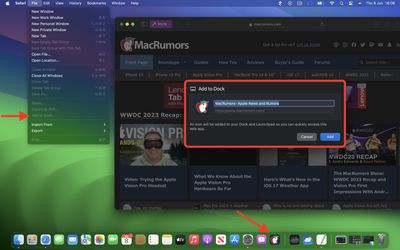
  2. Choose File -> Add to Dock in the menu bar.
  3. If you want, you can change the MacRumors icon by clicking it in the Add to Dock window. You can also edit the web app's name using the title field – "MacRumors" is more succinct, for example.
  4. Click the blue Add button.

macos sonoma tidbits6

You will now see the MacRumors web app sitting in your Dock, ready for use independently of Safari. The web app works with Mission Control and Stage Manager just like any app, and can also be opened via Launchpad or Spotlight Search.

On opening the web app, you'll notice its window includes a simplified toolbar with navigation buttons (note: Website developers can control whether these are shown). As you can see in the image, the MacRumors theme color for the site blends into the toolbar for a more seamless look.
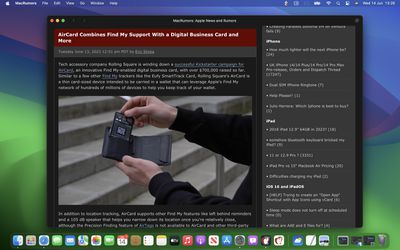
web app MacRumors macos
In terms of navigation, the scope of the web app is dictated by the host of the webpage – in this case www.macrumors.com – so you can navigate anywhere within the MacRumors website, but if you click a link outside of the host page, such as the MacRumors Forums, which is separately hosted at forums.macrumors.com, this will open the linked webpage in Safari. Therefore, if you are a frequenter of both the MacRumors website and the MacRumors Forums, you should create separate web apps for each.

Web developers have the ability to refine the scope of a web app to a specific path on their site if they wish. For example, MacRumors could theoretically provide a facility to make web apps dedicated to navigating only how-to articles or guides. This is something MacRumors may implement in the future.

Website Logins and Notifications

By default, Safari copies a website's cookies to its web app. So if you create a MacRumors Forums web app and you were logged into your account at the time, you will remain logged in inside the web app. Even if you weren't logged in, you can do so within the web app with minimal effort, since Apple has integrated support for Password and Passkey AutoFill.

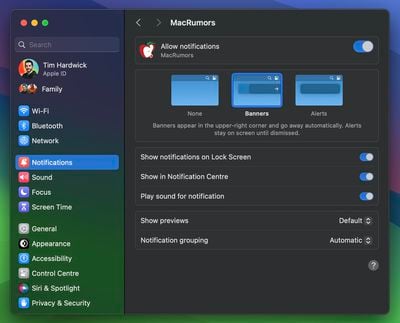
If a website already supports web push notifications – as MacRumors does – and you have signed up to them, you will receive web app push notifications that display the corresponding MacRumors icon, giving you more context than a standard Safari notification and icon would.

The web app icon in the Dock will also show a badge when a notification is received. Web app notifications are silent by default, although developers can change them to play a sound. However, the end decision over sound and icon badges is left to the user in System Settings -> Notifications.
web app notifications mr
Web apps also respect Focus modes, so you can include or exclude them from allowed notifications based on what you're doing. Lastly, with privacy in mind, Apple has added options to control web apps' access to camera, microphone, and location in System Settings -> Privacy & Security, just like for native apps.

For those who wish to delve further into macOS Sonoma, it is currently available to download as a developer beta, although caution is warranted, as beta versions can be unstable and buggy. For those willing to wait, the official public release is expected to land in the fall.


Related Forum: macOS Sonoma

Popular Stories

apple design award 2025

Apple Announces 2025 Design Award Winners Ahead of WWDC 2025

Tuesday June 3, 2025 10:14 am PDT by
As we wait for WWDC to kick off next Monday, Apple today announced the winners of its annual Apple Design Awards, recognizing apps and games for their innovation, ingenuity, and technical achievement. The 2025 Apple Design Award winners are listed below, with one app and one game selected per category: Delight and Fun - CapWords (App) and Balatro (Game) Innovation - Play (App) and PBJ -...
1password deal blue

1Password Security Breach: What Was Accessed and What Wasn't

Wednesday November 25, 2026 1:09 pm PST by
Popular password management app 1Password today said it experienced a security breach earlier this month. 1Password says some customer names and email addresses were accessed, but no customer vault contents were compromised. On November 19, 1Password saw indications that an employee's GitHub account had been breached and began investigating. The company says the breached GitHub account was...
Apple 2026 Black Friday Event Hero

Apple's Official 2026 Black Friday Offer Starts Rolling Out

Thursday November 26, 2026 8:37 am PST by
Apple's annual four-day Black Friday through Cyber Monday shopping event is now live in Australia, New Zealand, and Thailand, and it will continue to roll out across Europe, the U.S., and Canada as the calendar turns to Friday, November 27 around the world. In the U.S., Apple's terms and conditions say the promotion begins on November 27 at 12 a.m. Pacific Time and ends on November 30 at...

Top Rated Comments

45 months ago
This was the biggest eyeroll moment of the WWDC keynote for me. (I liked all the rest)

PWA's are a thing for years and years. They even got a spokesperson and demo for pinning a webapp and made it sound like they invented something magical and revolutionary that will enrich people's lives.

Can't believe it took them so long to add something that has been considered 'a basic feature' for years on other platforms and browsers.
Score: 46 Votes (Like | Disagree)
45 months ago
The fact that subdomains (forums.maxrumors.com) need their own web app is not ideal. It could definitely break web apps for some sites that use subdomains for load balancing or other purposes such as login.
Score: 12 Votes (Like | Disagree)
45 months ago
Nice to see MacOS finally catching up to iPadOS/iOS in this regard
Score: 11 Votes (Like | Disagree)
bigjnyc Avatar
45 months ago

This was the biggest eyeroll moment of the WWDC keynote for me. (I liked all the rest)

PWA's are a thing for years and years. They even got a spokesperson and demo for pinning a webapp and made it sound like they invented something magical and revolutionary that will enrich people's lives.

Can't believe it took them so long to add something that has been considered 'a basic feature' for years on other platforms and browsers.
Is this your first Apple keynote? They do this with at least 2 or 3 features every. single. year. It never fails and is a running joke at this point.
Score: 9 Votes (Like | Disagree)
45 months ago

This was the biggest eyeroll moment of the WWDC keynote for me. (I liked all the rest)

PWA's are a thing for years and years. They even got a spokesperson and demo for pinning a webapp and made it sound like they invented something magical and revolutionary that will enrich people's lives.

Can't believe it took them so long to add something that has been considered 'a basic feature' for years on other platforms and browsers.
It's apple, what do you expect . They self congratulated themselves for the "new" 15" design, almost sucking their own *censored* , and people cheering up

Still , the implementation is nice , and with the power apple has , it might make their web app and guidelines respected by devs

In all fairness I've no idea why theyve been waiting so long while iOS had it a deceny ago already

But yeah apple can afford to be late in any area they want
Score: 8 Votes (Like | Disagree)
mattopotamus Avatar
45 months ago

Does it need to remain in the dock or can that be deleted? Does it show up as an application in the Applications folder?
It does not need to remain in the dock. You can remove it there and still access it through finder or spotlight search.
Score: 7 Votes (Like | Disagree)
Latest Stories
The 50+ Best Apple Black Friday Deals Still Available on AirPods, iPads, and More
10 hours ago
HomePod Mini 2 in (RED) Seemingly Spotted Ahead of Announcement
7 hours ago
Apple's M6 and PROLED MacBook Pro Reach New Low Prices for Black Friday
17 hours ago
The MacRumors Show: iPhone Air 2 and iPhone 18 Are Coming
18 hours ago
Apple Store in Brisbane Reopening Next Month With New Design
18 hours ago
The 60+ Best Black Friday Accessory Deals on iPhone Chargers, TVs, Headphones, and More
19 hours ago
GTA VI Now (Barely) Running on Apple Silicon Macs
19 hours ago
The Best Black Friday Streaming Deals on Apple TV, Disney+, and More
20 hours ago
Apple TV's 'Carême' Wins International Emmy for Best Drama
20 hours ago
iPhone 18 Production Delay Leaves Apple Little Time Before Launch
21 hours ago
The Best Black Friday AirPods Deals Still Available
13 hours ago
The Best Black Friday Deals on Apple Home Products
22 hours ago
The Best Black Friday iPhone Deals Still Available
13 hours ago
The Best Black Friday iPad Deals Still Available
13 hours ago
The Best Black Friday Apple Watch Deals Still Available
13 hours ago
The Best Black Friday AirTag Deals Still Available
13 hours ago
The Best Black Friday Mac Deals Still Available
13 hours ago
iPhone Share of US Smartphone Market Hits 57% as Rivals Slip
23 hours ago
iPhone 20 Pro Rumored to Feature 3D-Printed Titanium Frame
1 day ago
Apple's Official 2026 Black Friday Offer Starts Rolling Out
2 days ago
Halide Adds Fill Light Feature for iPhone Duo
2 days ago
MacBook Air Black Friday Deals Now Live With Massive $399 Savings
2 days ago
Amazon Discounts All MacBook Neo Models by $99 for Black Friday
2 days ago
Kodak Launches Unique AirTag Rival With E-Ink Display
2 days ago
Here's Why the Apple Store is Going Down
2 days ago
Apple Still Working on Giant Foldable iPad That Could Cost $5,000
2 days ago
iPhones Dominate China's Weak Singles' Day Smartphone Sales
2 days ago
iPhone 20 Pro Could Feature Ceramic in Limited-Edition Model
2 days ago
Apple Faces Korean Regulator Review Over iPhone 16 AI Advertising
2 days ago
Apple Watch Ultra 4 Hits New Best-Ever Price of $649.99 for Black Friday
2 days ago
Related Apple News: Iphone | Technology | South Africa | Local News | Opinion