Skip to Content

Here's How Interactive Widgets Work in macOS Sonoma

In macOS Sonoma, Apple has changed the widgets landscape. No longer do widgets have to be hidden offscreen and largely forgotten in the Notifications Center panel. Now they live right on your desktop – and they're interactive, too.
Widgets on Your Mac Thumb 3
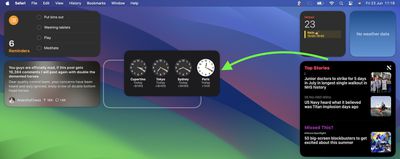
It's worth noting from the off that widgets can still be parked in Notification Center, but now they can also be dragged out onto the desktop. The first widget can be placed anywhere, then Apple provides placement guidance for subsequent widgets by displaying a widget-shaped outline, indicating where they can be snapped into position in relation to the others.
Screenshot 2023 06 23 at 11
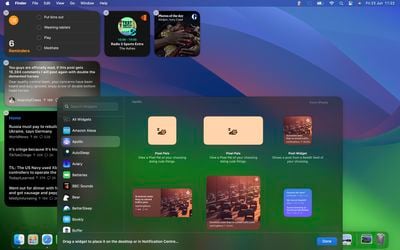
Alternatively, if you right-click on an empty space on the desktop, the menu that appears includes a new "Edit Widgets..." option. Selecting this brings up a widget gallery, which – thanks to a new Continuity feature between Apple devices – also includes widgets from your iPhone in all available sizes. So even if you don't have the corresponding Mac app, you can still use the iOS widget right on your desktop. Simply drag it from the gallery into an available space.
widgets macos
If you're running the macOS Sonoma beta, trying out iPhone widgets is a good way to get used to their interactivity until third-party developers have a chance to bake this into their Mac widgets. As it stands, only Apple's own widgets offer (sometimes buggy) interactions.

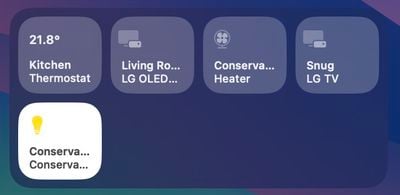
In the Home app widget, for example, you can control specific accessories by clicking the individual buttons to turn them on and off.
home widget
If you right-click a widget, any available customization options appear in the contextual menu. Widgets are available in Small, Medium, and Large sizes, and all include an option to "Remove Widget" if you want to get rid of it.
widgets fade
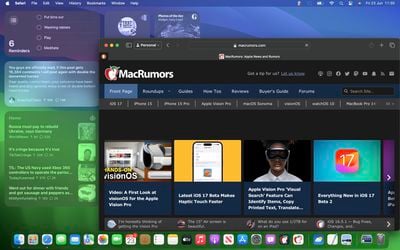
When not in use, widgets fade into the background by taking on the color of your wallpaper, so you can concentrate on the active app or window. There's also an option in System Settings to change the widget style to from full color to Monochrome, for a more uniform look.

Widgets have evolved in macOS Sonoma. By bringing them in from the dark and out into the open workspace of your desktop, users are actively encouraged to work alongside them. What are your thoughts on Apple's new take on Mac widgets? Are you more likely to use them in their new guise? Let us know in the comments.


Related Forum: macOS Sonoma

Popular Stories

1password deal blue

1Password Security Breach: What Was Accessed and What Wasn't

Wednesday November 25, 2026 1:09 pm PST by
Popular password management app 1Password today said it experienced a security breach earlier this month. 1Password says some customer names and email addresses were accessed, but no customer vault contents were compromised. On November 19, 1Password saw indications that an employee's GitHub account had been breached and began investigating. The company says the breached GitHub account was...
apple design award 2025

Apple Announces 2025 Design Award Winners Ahead of WWDC 2025

Tuesday June 3, 2025 10:14 am PDT by
As we wait for WWDC to kick off next Monday, Apple today announced the winners of its annual Apple Design Awards, recognizing apps and games for their innovation, ingenuity, and technical achievement. The 2025 Apple Design Award winners are listed below, with one app and one game selected per category: Delight and Fun - CapWords (App) and Balatro (Game) Innovation - Play (App) and PBJ -...
ipad pro prime

Apple Has iPads Running macOS Internally, Says Gurman

Wednesday November 25, 2026 4:55 am PST by
Apple has iPads running macOS internally and has had them "for some time," according to Bloomberg's Mark Gurman, although he says no work is currently being done to bring the Mac operating system to iPads. Speaking on his latest Power On podcast, Gurman said there is "no work being done to consumerize macOS on the iPad." Rather, Apple will continue to bring Mac features and apps like Final Cut ...

Top Rated Comments

therunningman Avatar
45 months ago

I'm surprised it has taken Apple this long to bring back widget functionality on the Mac desktop.
Absolutely!


Attachment Image
Score: 36 Votes (Like | Disagree)
ratbastard Avatar
45 months ago
Sounds a lot like an updated version of Dashboard.
Score: 31 Votes (Like | Disagree)
contacos Avatar
45 months ago

I'm surprised it has taken Apple this long to implement widget functionality on the Mac desktop.

I'm surprised it has taken Apple this long to bring back widget functionality on the Mac desktop.
Score: 24 Votes (Like | Disagree)
gwhizkids Avatar
45 months ago

Stop cluttering my desktop.
Active Desktop went nowhere, I highly doubt this will go anywhere either.
Easy response: just don’t add any widgets. Problem solved.

Not sure why you would deny this to all the rest of us who actually like this feature though.
Score: 22 Votes (Like | Disagree)
TheYayAreaLiving 🎗️ Avatar
45 months ago
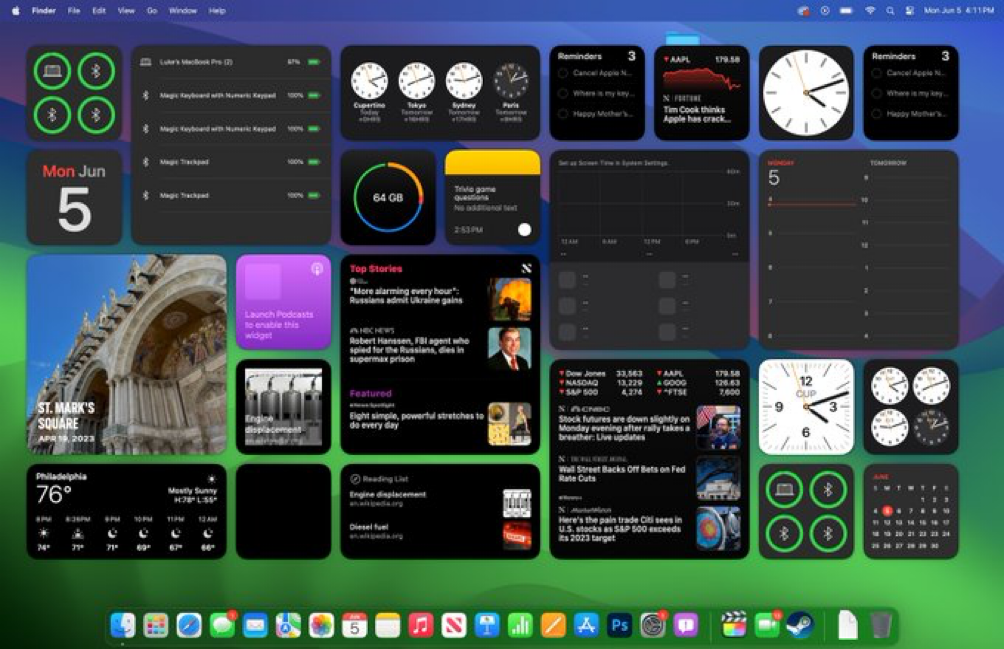
Seems like you can fill your entire desktop with Widgets on Sonoma!

Check it out! 👇


Attachment Image
Score: 14 Votes (Like | Disagree)
adrianlondon Avatar
45 months ago
What's good about these (and yes, they're available on Intel macs - it's what I have) is that they're widgets from my phone's apps.

They keep themselves updated by magic (I have Bluetooth turned off on my phone and laptop). OK, it's via iCloud of course.

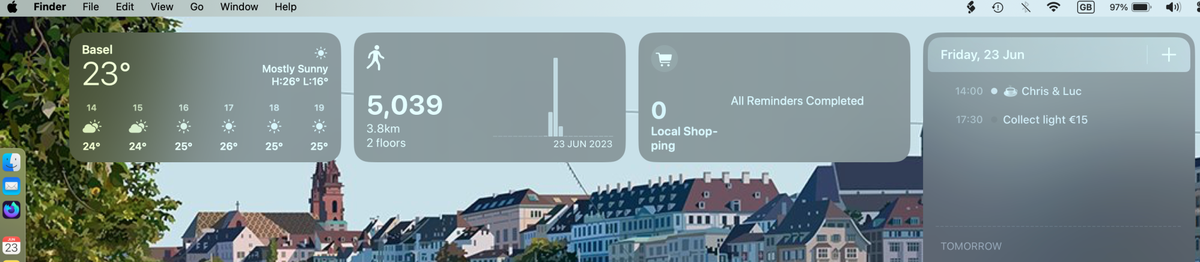
For example, I have desktop widgets now from iOS apps Readdle Calendars and Pedometer. They keep in sync with the phone.

Hint: Turn on the monochrome mode for widgets in Settings. They look great. You can duplicate them (in colour) in the Notification Centre thing if you wish.


Attachment Image
Score: 13 Votes (Like | Disagree)
Latest Stories
The 50+ Best Apple Black Friday Deals on AirPods, iPads, MacBooks, and More
2 hours ago
Apple's M6 and PROLED MacBook Pro Reach New Low Prices for Black Friday
2 hours ago
The MacRumors Show: iPhone Air 2 and iPhone 18 Are Coming
2 hours ago
Apple Store in Brisbane Reopening Next Month With New Design
3 hours ago
The 60+ Best Black Friday Accessory Deals on iPhone Chargers, TVs, Headphones, and More
4 hours ago
GTA VI Now (Barely) Running on Apple Silicon Macs
4 hours ago
The Best Black Friday Streaming Deals on Apple TV, Disney+, and More
5 hours ago
Apple TV's 'Carême' Wins International Emmy for Best Drama
5 hours ago
iPhone 18 Production Delay Leaves Apple Little Time Before Launch
6 hours ago
The Best Black Friday AirPods Deals
7 hours ago
The Best Black Friday Deals on Apple Home Products
7 hours ago
The Best Black Friday iPhone Deals
7 hours ago
The Best Black Friday iPad Deals
7 hours ago
The Best Black Friday Apple Watch Deals
7 hours ago
The Best Black Friday AirTag Deals
7 hours ago
The Best Black Friday Mac Deals
7 hours ago
iPhone Share of US Smartphone Market Hits 57% as Rivals Slip
8 hours ago
iPhone 20 Pro Rumored to Feature 3D-Printed Titanium Frame
9 hours ago
Apple's Official 2026 Black Friday Offer Starts Rolling Out
1 day ago
Halide Adds Fill Light Feature for iPhone Duo
1 day ago
MacBook Air Black Friday Deals Now Live With Massive $399 Savings
1 day ago
Amazon Discounts All MacBook Neo Models by $99 for Black Friday
1 day ago
Kodak Launches Unique AirTag Rival With E-Ink Display
1 day ago
Here's Why the Apple Store is Going Down
1 day ago
Apple Still Working on Giant Foldable iPad That Could Cost $5,000
1 day ago
iPhones Dominate China's Weak Singles' Day Smartphone Sales
1 day ago
iPhone 20 Pro Could Feature Ceramic in Limited-Edition Model
1 day ago
Apple Faces Korean Regulator Review Over iPhone 16 AI Advertising
1 day ago
Apple Watch Ultra 4 Hits New Best-Ever Price of $649.99 for Black Friday
1 day ago
New Apple Store Opening in India, Download the Special Wallpaper Now
2 days ago
Related Apple News: Iphone | Technology | Local News | Business | Sport