Skip to Content

How to Use the Siri Raise to Speak Feature in watchOS 5

by

Apple's watchOS 5 update includes a new Siri feature that eliminates the need to say "Hey ‌Siri‌" or push the Digital Crown to activate the personal assistant.

Instead, you can raise your wrist and speak right to ‌Siri‌, with the Apple Watch able to detect your movements and your desire to relay a ‌Siri‌ command. It's simple to enable, and it works well once you know a few tricks.

Enabling Raise to Speak
siriraisetospeak

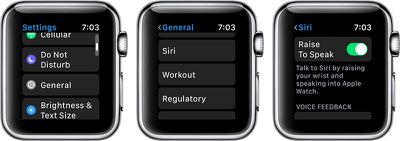
  1. Open the Settings app.
  2. Choose "General."
  3. Scroll down to "‌Siri‌" and Tap it.
  4. Make sure "Raise to Speak" is toggled on.

You can leave "Hey ‌Siri‌" enabled right alongside "Raise to Speak," and use whichever ‌Siri‌ activation method is most convenient.

Using Raise to Speak

Using Raise to Speak is as simple as raising up your wrist and speaking into your Apple Watch.

Lift your wrist as you would to view the time or do any other Apple Watch activity, and then speak a command. Most people will find that they need to bring the watch a little closer to their face than they would just to view it, so if you can't get Raise to Speak to work, hold your wrist closer to your mouth.

Raise to Speak is a slightly different gesture than just raising your arm to look at the time, and the Apple Watch can tell the difference in intent.

Raise to Speak Tips

  • Raise to Speak needs to be fairly close to your face to interpret a ‌Siri‌ voice command, which prevents it from automatically activating for the most part. If it's not working, bring your wrist closer to the speaker of the Apple Watch before trying a command.
  • Raise to Speak works both at the watch face and when an app is open. It does need to be activated with the wrist raising gesture, though.
  • You need to speak at a normal speaking volume for the watch to detect a Raise to Speak command. Whispering will not work.
  • Because Raise to Speak seems to rely on proximity to the Apple Watch's speaker, ‌Siri‌ is not going to trigger when other people are speaking.

Other Siri Options

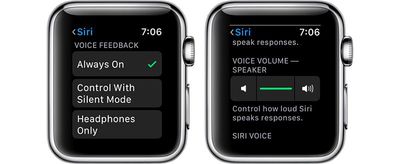
In the ‌Siri‌ section of the Settings app, accessible by following the steps above, you can also choose your Voice Feedback settings for whenever ‌Siri‌ is activated if you have an Apple Watch Series 3.
sirioptionsapplewatch
This isn't a new setting, but it's worth revisiting alongside Raise to Speak. You can choose to set Voice Feedback (aka vocal replies) to "Always On," "Control With Silent Mode," which will silence ‌Siri‌ if Silent Mode is turned on, or Headphones Only, which will cause ‌Siri‌ to provide vocal replies if you're wearing AirPods or other Bluetooth enabled headphones.

You can also set ‌Siri‌'s voice volume in the same section of the Settings app by tapping the volume icons or using the Digital Crown. This sets ‌Siri‌'s overall response volume when the personal assistant responds to queries aloud.

Raise to Speak is a useful feature on Apple Watch for everyone, but especially for HomePod owners. If you want to activate ‌Siri‌ on your watch, you can now do so without accidentally triggering a ‌HomePod‌ that might be in the room with the "Hey ‌Siri‌" command.

Related Roundup: Apple Watch 12
Buyer's Guide: Apple Watch (Buy Now)
Related Forum: Apple Watch

Top Rated Comments

DocMultimedia Avatar
109 months ago
Couldn't we wait until watchOS 5 is past beta for these instructional videos? It doesn't even mention the word beta in the entire article.

Not everyone lives in the beta world. Of course I do. Just not on my watch. ;)
Score: 7 Votes (Like | Disagree)
Craiger Avatar
109 months ago
Is this for series 3 only? I’m not seeing this on series 2.
Score: 6 Votes (Like | Disagree)
HiVolt Avatar
109 months ago
I would hope they would get raise to wake working properly first. So many times when i want to look at my watch it doesnt wake. This was with the Series 0 and Series 3.
Score: 4 Votes (Like | Disagree)
chrisdazzo Avatar
109 months ago
Is this for series 3 only? I’m not seeing this on series 2.
Same. Pretty sure it’s a Series 3 only feature. Good ol’ Apple.
Score: 3 Votes (Like | Disagree)
109 months ago
I turned this feature off 12 hours in. I’m a hand talker and it kept activating every few minutes. Very annoying.
Score: 2 Votes (Like | Disagree)
FelixDerKater Avatar
109 months ago
1st - Raise
2nd - Speak
...
Score: 2 Votes (Like | Disagree)

Popular Stories

Siri AI Icon

Siri AI Settlement: Here's How Much Apple Will Pay You

Saturday November 21, 2026 9:08 am PST by
In May, Apple agreed to pay $250 million to settle a U.S. class action lawsuit over Siri AI's delayed launch, and there is one month remaining to submit a claim through the settlement website. In a court document earlier this week, lawyers said that claimants will likely receive at least $61 per eligible iPhone, based on early participation data so far. The exact payment amount per eligible ...
apple watch series 3 design

Apple Offers Steps to Fix Daylight Saving Time Bug on Apple Watch

Sunday November 1, 2026 3:34 am PST by
Apple has published a support document describing what to do if your Apple Watch continues to show time that's off by one hour after daylight savings time changes. "This incorrect time appears only on the Always On display when your wrist is down," says Apple. "When you activate the display by tapping it or raising your wrist, the time changes to the correct hour." To fix the issue, Apple says ...
Siri AI Icon

iOS 27.3 Beta Adds Daily Siri AI Limits and iCloud+ Upgrades

Monday November 16, 2026 10:14 am PST by
With the latest iOS 27.3, iPadOS 27.3, and macOS 27.3 betas, Apple is starting to test limits and paid upgrades for Siri AI and Apple Intelligence features. Every Apple device gets a free daily access allowance for Siri AI and Apple Intelligence features that rely on server-side AI processing, such as Image Playground and Clean Up in Photos. When that limit is hit, there will be an option to ...
Latest Stories
The 50+ Best Apple Black Friday Deals Still Available on AirPods, iPads, and More
6 hours ago
HomePod Mini 2 in (RED) Seemingly Spotted Ahead of Announcement
4 hours ago
Apple's M6 and PROLED MacBook Pro Reach New Low Prices for Black Friday
14 hours ago
The MacRumors Show: iPhone Air 2 and iPhone 18 Are Coming
14 hours ago
Apple Store in Brisbane Reopening Next Month With New Design
14 hours ago
The 60+ Best Black Friday Accessory Deals on iPhone Chargers, TVs, Headphones, and More
15 hours ago
GTA VI Now (Barely) Running on Apple Silicon Macs
16 hours ago
The Best Black Friday Streaming Deals on Apple TV, Disney+, and More
16 hours ago
Apple TV's 'Carême' Wins International Emmy for Best Drama
17 hours ago
iPhone 18 Production Delay Leaves Apple Little Time Before Launch
18 hours ago
The Best Black Friday AirPods Deals Still Available
10 hours ago
The Best Black Friday Deals on Apple Home Products
18 hours ago
The Best Black Friday iPhone Deals Still Available
10 hours ago
The Best Black Friday iPad Deals Still Available
10 hours ago
The Best Black Friday Apple Watch Deals Still Available
10 hours ago
The Best Black Friday AirTag Deals Still Available
10 hours ago
The Best Black Friday Mac Deals Still Available
10 hours ago
iPhone Share of US Smartphone Market Hits 57% as Rivals Slip
19 hours ago
iPhone 20 Pro Rumored to Feature 3D-Printed Titanium Frame
21 hours ago
Apple's Official 2026 Black Friday Offer Starts Rolling Out
2 days ago
Halide Adds Fill Light Feature for iPhone Duo
2 days ago
MacBook Air Black Friday Deals Now Live With Massive $399 Savings
2 days ago
Amazon Discounts All MacBook Neo Models by $99 for Black Friday
2 days ago
Kodak Launches Unique AirTag Rival With E-Ink Display
2 days ago
Here's Why the Apple Store is Going Down
2 days ago
Apple Still Working on Giant Foldable iPad That Could Cost $5,000
2 days ago
iPhones Dominate China's Weak Singles' Day Smartphone Sales
2 days ago
iPhone 20 Pro Could Feature Ceramic in Limited-Edition Model
2 days ago
Apple Faces Korean Regulator Review Over iPhone 16 AI Advertising
2 days ago
Apple Watch Ultra 4 Hits New Best-Ever Price of $649.99 for Black Friday
2 days ago
Related Apple News: Local News | Technology | South Africa | Health | Ipad