Skip to Content

Most Useful Siri Commands on macOS

by

Starting with macOS Sierra in 2016, Apple introduced support for Siri on the Mac, allowing you to access the personal assistant across all of your Apple devices for the first time.

Siri on Mac can actually do quite a few useful things that aren't available on iOS devices, and because the technology is still rather new on Apple's desktop and laptop machines, we thought we'd highlight some of the most useful Siri commands on the Mac.


Siri on Mac can be accessed from the menu bar, the dedicated Siri app that can be added to the dock, or through a keyboard shortcut like Command + Space. You can manage your Siri preferences and options by opening up System Preferences and choosing "Siri" from the options at the bottom of the window.
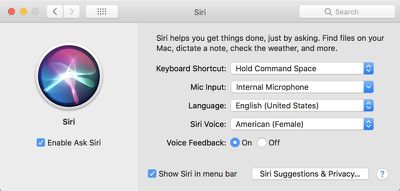
asksirimac
One of the simplest and most useful ways to use Siri is to open apps without accessing the dock or finding the app in the applications folder. You can ask Siri to "open the Calendar app" or "open Evernote."

Open works with any app on your Mac, and it also works with websites and files. Some sample commands:

  • Open MacRumors.com
  • Open Google.com
  • Open the Applications Folder
  • Open the iCloud Drive folder

Siri's "Show Me" command on macOS works hand in hand with the series of open commands. You can ask Siri to show you all kinds of files stored on your Mac, which makes it easier to search for specific content. You can also ask for files within apps like Photos. Some sample commands:

  • Show me my most recent files
  • Show me files from June 2017
  • Show me photos from April 2017
  • Show me photos from last week
  • Show me files from today
  • Show me privacy settings
  • Show me network settings

Siri is also interactive and can be used to turn settings on your Mac on and off, just like on iOS devices. Siri can turn on Night Shift, activate Bluetooth, turn off Wi-Fi, and more. Some sample commands:

  • Turn off Wi-Fi
  • Turn on Bluetooth
  • Activate the screensaver
  • Turn up the volume
  • Turn down the brightness
  • Go to sleep
  • Change my wallpaper

Another useful way to use Siri on the Mac is to get information about the Mac itself. You can ask Siri questions about the hardware installed on your Mac. Some sample commands:

  • How fast is my Mac?
  • What processor does my Mac have?
  • Tell me about my Mac
  • What is my Mac's serial number?
  • How much RAM does my Mac have?
  • How much storage do I have?

Siri can, of course, answer simple queries and provide information, just like you can do on iOS. Commands like "What time is it?" and "What's the weather?" are available, as are more complicated requests like "Find me a good restaurant nearby" or "Get me directions to the mall."

Do you use Siri for Mac? What are the most useful commands you've found? Let us know if we've missed any in the comments below.

Top Rated Comments

avanpelt Avatar
112 months ago
I genuinely feel bad for the MR writers who have to write these articles touting 'useful' things that Siri can do. I used Siri on my Mac for about two minutes when it was first introduced. Haven't activated it a single time since then. In my opinion, Siri is even less helpful on the Mac than it is on iOS devices. I have a full-size keyboard and a mouse connected to my Mac. Usually, I can do just about anything Siri could do on a Mac just as fast or faster if I do it myself.
Score: 27 Votes (Like | Disagree)
CLS727 Avatar
112 months ago
most useful command for macOS is:

settings > siri > disable

The ONLY device I actually use voice commands on is the new Apple TV (easier than typing in search terms with that little remote)
Score: 13 Votes (Like | Disagree)
Apple Knowledge Navigator Avatar
112 months ago
The best command is “Turn off Siri”
Score: 9 Votes (Like | Disagree)
CmdrLaForge Avatar
112 months ago
I have deactivated Siri on all my Apple devices. I cannot find it useful at all.
Score: 8 Votes (Like | Disagree)
SBlue1 Avatar
112 months ago
The one and only use it is capable of doing on my iPhone is missing entirely on the Mac: setting a timer. :(
Score: 6 Votes (Like | Disagree)
112 months ago
Open works with any app on your Mac, and it also works with websites and files. Some sample commands:
* Open MacRumors.com
* Open Google.com
* Open the Applications Folder
* Open the iCloud Drive folder
Obviously this is all a boon for anyone with accessibility issues, but if you've got a full-sized keyboard under your fingers Siri gets a whole lot less useful than it is on iOS.

I can hit ⌘-space and open those URLs in Alfred or even Spotlight faster than you can say them and wait for them to be recognized (especially assuming Siri's less than stellar recognition rate). Hell, Alfred lets you just type a word and start a custom search immediately on any site you have it set up with.

Also, in the Finder ⌘⇧A opens the Applications folder and ⌘⇧I opens the iCloud Drive folder -- both way faster and less irritating than trying to say all that and hope it's recognized.

I guess they don't consider dictation part of Siri, but it can be pretty useful. It's gotten a lot better than it used to be. Again, on a full size keyboard it always seems a little more cumbersome than just typing but I suppose if you're a slow typist or just don't feel like it or have carpel tunnel or something then it's nice to have. (I just dictated this last paragraph and didn't make any manual correctons. Not bad!)
Score: 6 Votes (Like | Disagree)

Popular Stories

Siri AI Icon

Siri AI Settlement: Here's How Much Apple Will Pay You

Saturday November 21, 2026 9:08 am PST by
In May, Apple agreed to pay $250 million to settle a U.S. class action lawsuit over Siri AI's delayed launch, and there is one month remaining to submit a claim through the settlement website. In a court document earlier this week, lawyers said that claimants will likely receive at least $61 per eligible iPhone, based on early participation data so far. The exact payment amount per eligible ...
Siri AI Icon

iOS 27.3 Beta Adds Daily Siri AI Limits and iCloud+ Upgrades

Monday November 16, 2026 10:14 am PST by
With the latest iOS 27.3, iPadOS 27.3, and macOS 27.3 betas, Apple is starting to test limits and paid upgrades for Siri AI and Apple Intelligence features. Every Apple device gets a free daily access allowance for Siri AI and Apple Intelligence features that rely on server-side AI processing, such as Image Playground and Clean Up in Photos. When that limit is hit, there will be an option to ...
Apple TV 4K 4th Generation feature0

Apple Releases tvOS 27.2.1 With Siri AI for Older Apple TVs

Friday November 13, 2026 11:26 am PST by
Apple today released tvOS 27.2.1, an update to the tvOS 27 operating system that launched in September. tvOS 27.2.1 comes nearly three weeks after Apple released tvOS 27.2. tvOS 27.2.1 brings Siri AI support to the 2nd- and 3rd-generation Apple TV 4K models, but it is available for all Apple TV 4K models that support tvOS 27. Apple announced Siri AI for the Apple TV when debuting the...
Latest Stories
The 50+ Best Apple Black Friday Deals Still Available on AirPods, iPads, and More
8 hours ago
HomePod Mini 2 in (RED) Seemingly Spotted Ahead of Announcement
5 hours ago
Apple's M6 and PROLED MacBook Pro Reach New Low Prices for Black Friday
16 hours ago
The MacRumors Show: iPhone Air 2 and iPhone 18 Are Coming
16 hours ago
Apple Store in Brisbane Reopening Next Month With New Design
16 hours ago
The 60+ Best Black Friday Accessory Deals on iPhone Chargers, TVs, Headphones, and More
17 hours ago
GTA VI Now (Barely) Running on Apple Silicon Macs
18 hours ago
The Best Black Friday Streaming Deals on Apple TV, Disney+, and More
18 hours ago
Apple TV's 'Carême' Wins International Emmy for Best Drama
19 hours ago
iPhone 18 Production Delay Leaves Apple Little Time Before Launch
20 hours ago
The Best Black Friday AirPods Deals Still Available
12 hours ago
The Best Black Friday Deals on Apple Home Products
20 hours ago
The Best Black Friday iPhone Deals Still Available
12 hours ago
The Best Black Friday iPad Deals Still Available
12 hours ago
The Best Black Friday Apple Watch Deals Still Available
12 hours ago
The Best Black Friday AirTag Deals Still Available
12 hours ago
The Best Black Friday Mac Deals Still Available
12 hours ago
iPhone Share of US Smartphone Market Hits 57% as Rivals Slip
21 hours ago
iPhone 20 Pro Rumored to Feature 3D-Printed Titanium Frame
23 hours ago
Apple's Official 2026 Black Friday Offer Starts Rolling Out
2 days ago
Halide Adds Fill Light Feature for iPhone Duo
2 days ago
MacBook Air Black Friday Deals Now Live With Massive $399 Savings
2 days ago
Amazon Discounts All MacBook Neo Models by $99 for Black Friday
2 days ago
Kodak Launches Unique AirTag Rival With E-Ink Display
2 days ago
Here's Why the Apple Store is Going Down
2 days ago
Apple Still Working on Giant Foldable iPad That Could Cost $5,000
2 days ago
iPhones Dominate China's Weak Singles' Day Smartphone Sales
2 days ago
iPhone 20 Pro Could Feature Ceramic in Limited-Edition Model
2 days ago
Apple Faces Korean Regulator Review Over iPhone 16 AI Advertising
2 days ago
Apple Watch Ultra 4 Hits New Best-Ever Price of $649.99 for Black Friday
2 days ago
Related Apple News: Iphone | News | Reviews | Entertainment | Lifestyle





























