Skip to Content

How to Set Up Medical ID on Your iPhone

by

ios10 medical id custom e1521017583630Medical ID is a built-in feature of your iPhone's Health app that gives ambulance crews and other emergency first responders fast access to potentially life-saving information about any allergies or medical conditions you have, even if your iPhone is locked.

Even if you don't suffer from any health conditions, it's still worth enabling Medical ID, because it can also provide other vital information about you to emergency services, such as your blood type and who to contact in an emergency. This article shows you how to set up Medical ID in iOS 11.

How to Set Up Your Medical ID in iOS 11

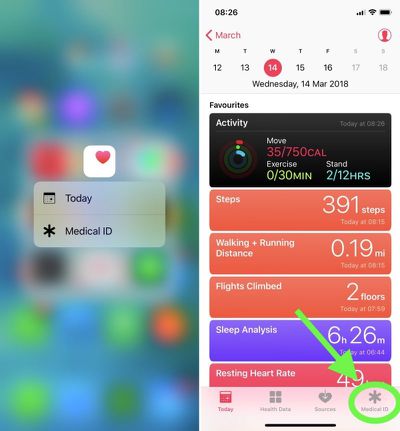
  1. Launch the Health app on your iPhone. (If you're using an iPhone 6s or later, firmly press the Health app icon to jump straight to the Medical ID via 3D Touch and skip the next step.)
    medical id health app

  2. Tap Medical ID at the bottom of the screen.

  3. If you're in the U.S., you can opt to register as an organ donor with Donate Life America by tapping the option at the bottom of the Medical ID screen. If you don't want to register, or you're outside the U.S., simply skip this step.

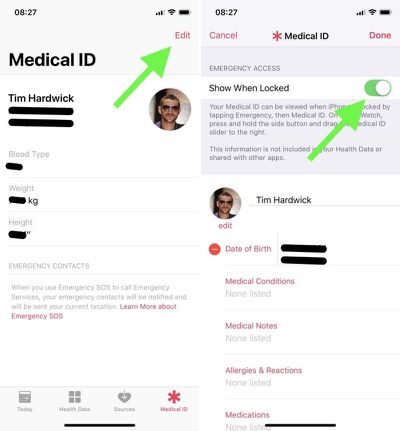
  4. Tap the Edit button at the top right of the screen.
    apple medical id edit

  5. Under Emergency Access, toggle the Show When Locked switch to the On position. Make sure you perform this step, otherwise emergency services won't be able to access your Medical ID.

  6. Start adding information to your Medical ID card. Apart from your name and date of birth, the other types of information you can add in this section include medical conditions and medical notes, allergies and reactions, medications, blood type, organ donor status, weight, and height. (Note that information added to your Medical ID isn't included in your Health Data or shared with other apps.)

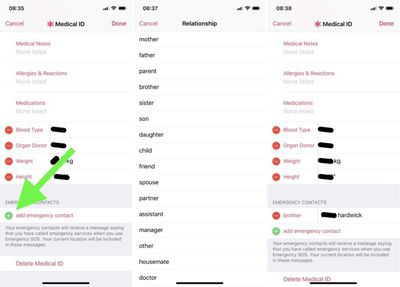
  7. Under Emergency Contacts, tap the green plus sign to add someone from your Contacts list. (You can add several people, but bear in mind that if you use the Emergency SOS feature on your iPhone's lock screen, all emergency contacts receive a message alerting them of the SOS and your location.)
    apple medical id emergency contact

  8. For each emergency contact you add, select an option from the list that best describes your relationship to that person, e.g. "father" or "doctor".

  9. Tap Done in the top right of the screen when you're finished.
If you decide against keeping a Medical ID record, the Edit mode includes a Delete Medical ID option at the very bottom of the screen.

Accessing Medical ID on a Locked iPhone 8 or Earlier

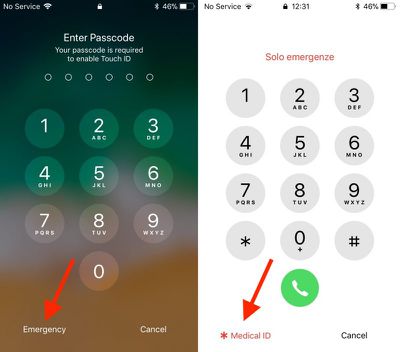
  1. Press the Home button on the iPhone to activate the passcode screen.

  2. Tap Emergency in the bottom left corner of the passcode screen.

  3. Tap Medical ID in the bottom left corner of the Emergency keypad screen.
medical ID lock screen access
Note: If the Apple handset doesn't have a Home button, swipe up with your finger from the bottom of the screen to trigger the passcode screen, or use the alternative method for accessing Medical ID below.

Accessing Medical ID on a Locked iPhone X or Later

  1. Simultaneously press and hold the Side (power) button on the right and the Volume Up button on the left of the handset.

  2. Swipe rightwards across the Medical ID slider.

You can also access the Medical ID on Apple Watch: Press and hold the side button and drag the Medical ID slider to the right.


Tag: Health
Related Forum: iOS 11

Top Rated Comments

kemperman Avatar
114 months ago
As a Paramedic, I can confidently say, NOT ENOUGH PEOPLE DO THIS. If you are unconscious and you have an iPhone, the first thing I will do when trying to ascertain a history, is find out if you have the medical ID set up. It needs to be something you can't skip during setup if Apple are serious about their health ambitions
Score: 7 Votes (Like | Disagree)
114 months ago
It’s not intuitive at all to access the medical ID on an iPhone 10.
Score: 2 Votes (Like | Disagree)
RootBeerMan Avatar
114 months ago
Glad to see this posted. I frankly had no idea it even existed. It was easy to set up and I did it immediately. Now to get everyone else in the family on board!
Score: 1 Votes (Like | Disagree)
114 months ago
Do yourself, and your loved ones, a favor. Do this with them. Make sure they use a picture so that ID information can be matched to the right person it situations so warranted. Tell them this replaces In Case of Emergency (ICE) which no longer applies. And tell the to not get so crazy about making this information "public" - when was the last time their phone was out of their possession (other than at home...).
Score: 1 Votes (Like | Disagree)
114 months ago
I could be wrong but I believe the universal donor blood type is O+ (NOT O-).
Generally, it is O Negative in the civilian world. From what I've heard, the military uses O Positive, as it is more common and the risks of an Rh reaction is not as risky for men, rather than fertile women and men (historically) are more likely going to be the recipients in the military... a factor that may change with more and more women being in forward locations.

When I was working as an emergency nurse in a trauma center, we would use O Negative for emergencies with no time to crossmatch. By knowing the blood type in advance, we can possibly reduce the time to crossmatch, but we still crossmatch before administering blood. I haven't observed the process, but they essentially mix patient blood with donor blood in the lab and look for reactions before releasing the unit to be administered.

When I have donated blood, I let them know that my blood type is AB Negative. This is one of the rarest blood types (there are rarer types but most people don't know about them). When I was donating blood during the height of the battles in Afganistan and Iraq, the nurses in the mobile donation bus called for a courier to rush my blood and the blood of another AB Negative donor in the bus at the same time, saying it would be in a cargo plane and probably in the Middle East in about 24 hours (we're an hour away from Travis AFB). Despite the military using O Positive for unmatched, they still prefer to give crossmatched blood if available.
Score: 1 Votes (Like | Disagree)
114 months ago
Not sure paramedics seeing your blood type on your phone is going to do anything.
We used to write it on our kit in Afghanistan but were later told we would get the generic type (o-) until a test could be done as they wouldn’t trust it to be right.

Score: 1 Votes (Like | Disagree)

Popular Stories

apple design award 2025

Apple Announces 2025 Design Award Winners Ahead of WWDC 2025

Tuesday June 3, 2025 10:14 am PDT by
As we wait for WWDC to kick off next Monday, Apple today announced the winners of its annual Apple Design Awards, recognizing apps and games for their innovation, ingenuity, and technical achievement. The 2025 Apple Design Award winners are listed below, with one app and one game selected per category: Delight and Fun - CapWords (App) and Balatro (Game) Innovation - Play (App) and PBJ -...
1password deal blue

1Password Security Breach: What Was Accessed and What Wasn't

Wednesday November 25, 2026 1:09 pm PST by
Popular password management app 1Password today said it experienced a security breach earlier this month. 1Password says some customer names and email addresses were accessed, but no customer vault contents were compromised. On November 19, 1Password saw indications that an employee's GitHub account had been breached and began investigating. The company says the breached GitHub account was...
apple store down feature

Here's Why the Apple Store is Going Down

Thursday November 26, 2026 5:49 am PST by
Apple's online store is going down for a few hours on a rolling country-by-country basis right now, but do not get your hopes up for new products. Apple takes its online store down for a few hours ahead of Black Friday every year to tease its annual gift card offer with the purchase of select products. The store is down in Australia, New Zealand, and Thailand, right now, and it will...
Latest Stories
The 50+ Best Apple Black Friday Deals Still Available on AirPods, iPads, and More
50 minutes ago
Apple's M6 and PROLED MacBook Pro Reach New Low Prices for Black Friday
8 hours ago
The MacRumors Show: iPhone Air 2 and iPhone 18 Are Coming
8 hours ago
Apple Store in Brisbane Reopening Next Month With New Design
9 hours ago
The 60+ Best Black Friday Accessory Deals on iPhone Chargers, TVs, Headphones, and More
10 hours ago
GTA VI Now (Barely) Running on Apple Silicon Macs
10 hours ago
The Best Black Friday Streaming Deals on Apple TV, Disney+, and More
11 hours ago
Apple TV's 'Carême' Wins International Emmy for Best Drama
11 hours ago
iPhone 18 Production Delay Leaves Apple Little Time Before Launch
12 hours ago
The Best Black Friday AirPods Deals Still Available
4 hours ago
The Best Black Friday Deals on Apple Home Products
13 hours ago
The Best Black Friday iPhone Deals Still Available
4 hours ago
The Best Black Friday iPad Deals Still Available
4 hours ago
The Best Black Friday Apple Watch Deals Still Available
4 hours ago
The Best Black Friday AirTag Deals Still Available
4 hours ago
The Best Black Friday Mac Deals Still Available
4 hours ago
iPhone Share of US Smartphone Market Hits 57% as Rivals Slip
14 hours ago
iPhone 20 Pro Rumored to Feature 3D-Printed Titanium Frame
15 hours ago
Apple's Official 2026 Black Friday Offer Starts Rolling Out
1 day ago
Halide Adds Fill Light Feature for iPhone Duo
1 day ago
MacBook Air Black Friday Deals Now Live With Massive $399 Savings
1 day ago
Amazon Discounts All MacBook Neo Models by $99 for Black Friday
1 day ago
Kodak Launches Unique AirTag Rival With E-Ink Display
2 days ago
Here's Why the Apple Store is Going Down
2 days ago
Apple Still Working on Giant Foldable iPad That Could Cost $5,000
2 days ago
iPhones Dominate China's Weak Singles' Day Smartphone Sales
2 days ago
iPhone 20 Pro Could Feature Ceramic in Limited-Edition Model
2 days ago
Apple Faces Korean Regulator Review Over iPhone 16 AI Advertising
2 days ago
Apple Watch Ultra 4 Hits New Best-Ever Price of $649.99 for Black Friday
2 days ago
New Apple Store Opening in India, Download the Special Wallpaper Now
2 days ago
Related Apple News: Travel | Motoring | News | Business | Ipad