Skip to Content

How to Use Emergency SOS on iPhone and Apple Watch

by

Starting with iOS 11, Apple added a new emergency feature to the iPhone, which is designed to allow you to quickly and discreetly place a call to emergency services. In the United States, SOS dials 911, and in other countries, it works with local emergency response teams.

Emergency SOS is activated through a series of button presses on an iPhone running iOS 11 or later, and the buttons you need to press will vary based on your device. On the iPhone 7, iPhone 7 Plus, and older iPhones, rapidly press the Side button on the right of the device five times to activate Emergency SOS.

On the iPhone 8, iPhone 8 Plus, iPhone X, iPhone XS, iPhone XS Max, and iPhone XR, you will need to press and hold on the Side button while also holding one of the two Volume buttons at the same time.

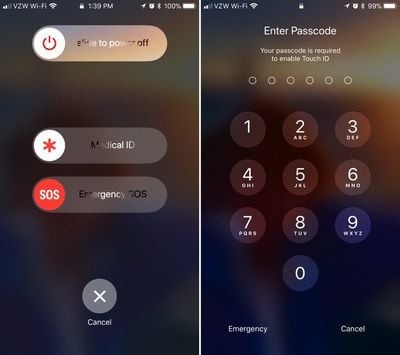
When you use these gestures, it brings up a slider bar that allows you to slide a finger across the screen to quickly place an emergency call. While this slider screen is the default option and is in place to make sure you don't accidentally place a 911 call, there's also an option to enable "Auto Call" for initiating a 911 call as soon as you activate Emergency SOS.
touchiddisabled
When you use Emergency SOS on an iPhone, the feature also disables Touch ID, preventing a would-be thief or other person with malicious intent from accessing your device without entering your passcode. It also automatically alerts any emergency contacts you've set in the Health app, sending them an iMessage with your location.

Enabling Auto Call

SOS is automatically included on every iPhone running iOS 11 and there is no disabling it. Activate it by pressing on the sleep/wake button five times in rapid succession to bring up the swipe interface. If you want the feature to call emergency services automatically without the need for an extra gesture, here's how to toggle it on:

  1. Open the Settings app.
  2. Scroll down to "Emergency SOS."emergencysosiphone
  3. Toggle on "Auto Call."
  4. To turn it off, simply toggle off Auto Call.
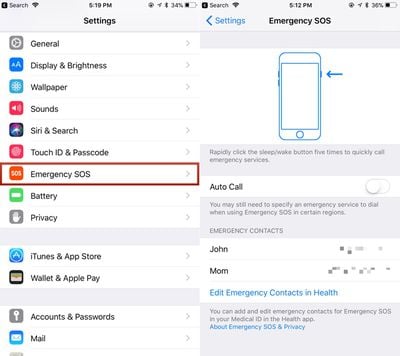
With Auto Call enabled, your phone will dial "911" (or your country's emergency line) after a three second countdown that gives you enough time to cancel the call if it's placed accidentally.

SOS on the Apple Watch

On the Apple Watch, an emergency call can be placed when you press and hold down on the side button for several seconds in a row. When you set up your Apple Watch, Apple prompts you to turn it on, but if you didn't, you can still choose to do so later.

On the Apple Watch, it's a lot easier to accidentally make an emergency call if something presses against the side button, so many people may not want this feature on. Here's how to turn it on:

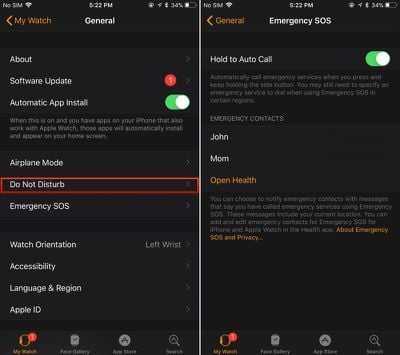
  1. Open the Apple Watch app on the iPhone.
  2. Scroll down to General and tap it.
  3. Look for Emergency SOS. It's the sixth option.
  4. Tap to the Emergency SOS interface. emergencysosapplewatch
  5. Toggle on "Hold to Auto Call."
  6. To turn it off again, toggle off Hold to Auto Call.
Setting Emergency Contacts

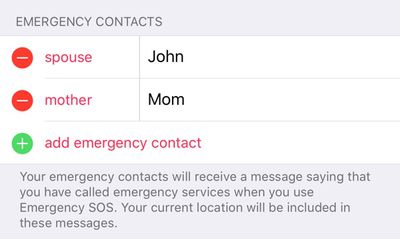
As mentioned above, whenever you use the SOS feature, Apple will automatically notify your emergency contacts if you have them set. Emergency contacts can be set up in the Health app:

  1. Open the Health app.
  2. Choose Medical ID.
  3. Select "Edit" in the top right corner.
  4. Scroll down to the Emergency Contacts section.
  5. Tap the "+" button to add an emergency contact.emergencycontacts

You can add multiple emergency contacts, each of which will receive a text message with your location if you ever use the Emergency SOS feature.


Related Forum: iOS 11

Top Rated Comments

sulpfiction Avatar
120 months ago
Countdown to people being stopped by the police sticking their hands in their pockets to secure their iPhones, and getting shot for it.
Way to take a good feature and twist it all up. That will never happen. Why the heck would u need to “secure” ur iPhone when a cop pulls u over?? Your comment makes absolutely zero sense.
Score: 7 Votes (Like | Disagree)
Rajani Isa Avatar
120 months ago
Way to take a good feature and twist it all up. That will never happen. Why the heck would u need to “secure” ur iPhone when a cop pulls u over?? Your comment makes absolutely zero sense.
By secure, they mean disable Touch/FaceID. In part due to the fact that some mid-level courts have held that while passwords are protected by 5th Amendment protections, fingerprints (and most likely, faces) are not.

So you'd do this to prevent the cops from forcing you to unlock your phone for whatever reason with your fingerprint or Face.
[doublepost=1505982982][/doublepost]
I don't think that will happen much either, but look up 'civil forfeiture' and read up on it. It's a real, actual problem in a lot of US states.
I think it's more the forced unlock rather than civil forfeiture.
Score: 3 Votes (Like | Disagree)
mattyj2001 Avatar
120 months ago
Way to take a good feature and twist it all up. That will never happen. Why the heck would u need to “secure” ur iPhone when a cop pulls u over?? Your comment makes absolutely zero sense.
I don't think that will happen much either, but look up 'civil forfeiture' and read up on it. It's a real, actual problem in a lot of US states.
Score: 3 Votes (Like | Disagree)
120 months ago
Countdown to people being stopped by the police sticking their hands in their pockets to secure their iPhones, and getting shot for it.
Don't be silly. Most of those people will already have their phone firmly in their hand. Pockets... ha! You can watch most people on the road and know their phones are far from being in their pockets.
Score: 3 Votes (Like | Disagree)
KazKam Avatar
120 months ago
If you are feeling awkward during a serious emergency for pressing a damn button 5 times, you shouldn’t.
It's not about "feeling" awkward, it's about "being" awkward. Maybe awkward is the wrong word... overly-fidley? In many emergency situations, time and timing is of the essence, three vs five button clicks might be the difference between activating the feature and not.
Score: 2 Votes (Like | Disagree)
phillytim Avatar
120 months ago
Regardless, I love that Apple finally gives us this great feature.

Score: 2 Votes (Like | Disagree)

Popular Stories

apple design award 2025

Apple Announces 2025 Design Award Winners Ahead of WWDC 2025

Tuesday June 3, 2025 10:14 am PDT by
As we wait for WWDC to kick off next Monday, Apple today announced the winners of its annual Apple Design Awards, recognizing apps and games for their innovation, ingenuity, and technical achievement. The 2025 Apple Design Award winners are listed below, with one app and one game selected per category: Delight and Fun - CapWords (App) and Balatro (Game) Innovation - Play (App) and PBJ -...
1password deal blue

1Password Security Breach: What Was Accessed and What Wasn't

Wednesday November 25, 2026 1:09 pm PST by
Popular password management app 1Password today said it experienced a security breach earlier this month. 1Password says some customer names and email addresses were accessed, but no customer vault contents were compromised. On November 19, 1Password saw indications that an employee's GitHub account had been breached and began investigating. The company says the breached GitHub account was...
apple store down feature

Here's Why the Apple Store is Going Down

Thursday November 26, 2026 5:49 am PST by
Apple's online store is going down for a few hours on a rolling country-by-country basis right now, but do not get your hopes up for new products. Apple takes its online store down for a few hours ahead of Black Friday every year to tease its annual gift card offer with the purchase of select products. The store is down in Australia, New Zealand, and Thailand, right now, and it will...
Latest Stories
The 50+ Best Apple Black Friday Deals Still Available on AirPods, iPads, and More
21 minutes ago
Apple's M6 and PROLED MacBook Pro Reach New Low Prices for Black Friday
5 hours ago
The MacRumors Show: iPhone Air 2 and iPhone 18 Are Coming
5 hours ago
Apple Store in Brisbane Reopening Next Month With New Design
5 hours ago
The 60+ Best Black Friday Accessory Deals on iPhone Chargers, TVs, Headphones, and More
6 hours ago
GTA VI Now (Barely) Running on Apple Silicon Macs
6 hours ago
The Best Black Friday Streaming Deals on Apple TV, Disney+, and More
7 hours ago
Apple TV's 'Carême' Wins International Emmy for Best Drama
7 hours ago
iPhone 18 Production Delay Leaves Apple Little Time Before Launch
8 hours ago
The Best Black Friday AirPods Deals Still Available
17 minutes ago
The Best Black Friday Deals on Apple Home Products
9 hours ago
The Best Black Friday iPhone Deals Still Available
17 minutes ago
The Best Black Friday iPad Deals Still Available
16 minutes ago
The Best Black Friday Apple Watch Deals Still Available
16 minutes ago
The Best Black Friday AirTag Deals Still Available
15 minutes ago
The Best Black Friday Mac Deals Still Available
15 minutes ago
iPhone Share of US Smartphone Market Hits 57% as Rivals Slip
10 hours ago
iPhone 20 Pro Rumored to Feature 3D-Printed Titanium Frame
12 hours ago
Apple's Official 2026 Black Friday Offer Starts Rolling Out
1 day ago
Halide Adds Fill Light Feature for iPhone Duo
1 day ago
MacBook Air Black Friday Deals Now Live With Massive $399 Savings
1 day ago
Amazon Discounts All MacBook Neo Models by $99 for Black Friday
1 day ago
Kodak Launches Unique AirTag Rival With E-Ink Display
1 day ago
Here's Why the Apple Store is Going Down
1 day ago
Apple Still Working on Giant Foldable iPad That Could Cost $5,000
1 day ago
iPhones Dominate China's Weak Singles' Day Smartphone Sales
1 day ago
iPhone 20 Pro Could Feature Ceramic in Limited-Edition Model
1 day ago
Apple Faces Korean Regulator Review Over iPhone 16 AI Advertising
1 day ago
Apple Watch Ultra 4 Hits New Best-Ever Price of $649.99 for Black Friday
1 day ago
New Apple Store Opening in India, Download the Special Wallpaper Now
2 days ago
Related Apple News: Iphone Mirroring Not Working In Macos Fix | Ipados | Halide | Is It Worth Buying A Ceramic Apple Watch | Macos