Skip to Content

Save Time Resizing Images on Mac With a Quick Action

by

Resizing images in macOS is easily done in the Preview app, but if your daily workflow requires you to scale images to a specific size – for uploading to a blog, for example – then using an image resize Quick Action is a much faster way of getting the job done.
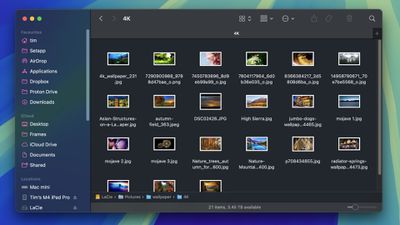
finder images folder
In this article, we'll show you how to use the Automator app to create a simple Quick Action that, once saved, will have you resizing images in just a couple of clicks, without even going near an image editing app. Keep reading to learn how it's done.

Create a Resize Image Quick Action

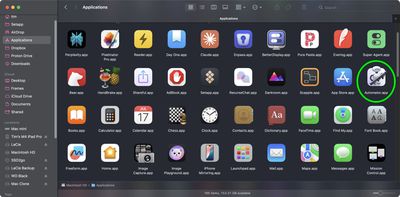
  1. Launch Automator from the Applications folder.
    finder automator

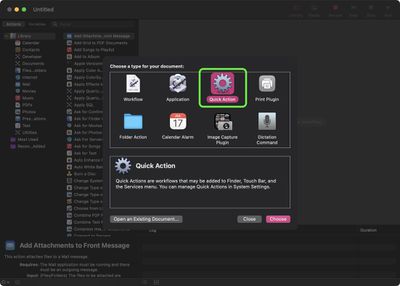
  2. Click New Document, then choose Quick Action as the type of your document.
    automator

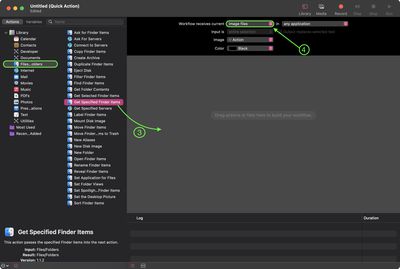
  3. Select Files and Folders in the Actions sidebar, then drag Get Specified Finder Items to the workflow area.
  4. Click the Workflow received current dropdown at the top and select image files from the menu.
    automator

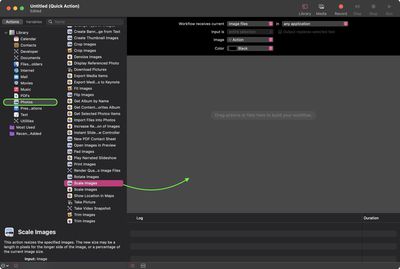
  5. Select Photos in the Actions sidebar, then drag Scale Images to the workflow area.
    automator

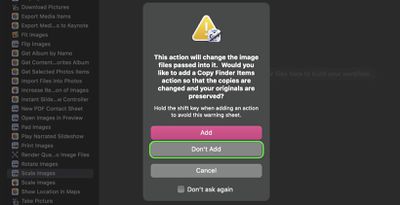
  6. Automator will prompt you to add a Copy Finder Items Action to save the original files in a separate folder. We're sticking to a simple workflow of resizing images here, so we click Don't Add.
    automator

  7. In the Scale Images action panel, type the width that you want to resize your images to. We're going to use 1200 pixels.
    automator

  8. In the Automator menu bar, select File ➝ Save..., call your new Quick Action "Resize Image", then click Save.
Use Your New Quick Action

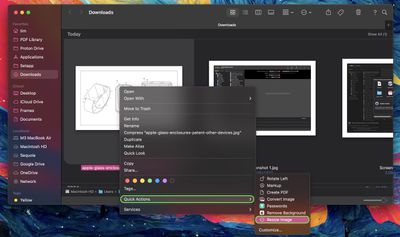
Next time you want to resize an image, simply right-click (or Ctrl-click) the item in Finder and select Quick Actions ➝ Resize Image from the contextual dropdown menu. You can also drag a selection box over several images and resize them all in one go using the Quick Action.
automator

Add a Keyboard Shortcut

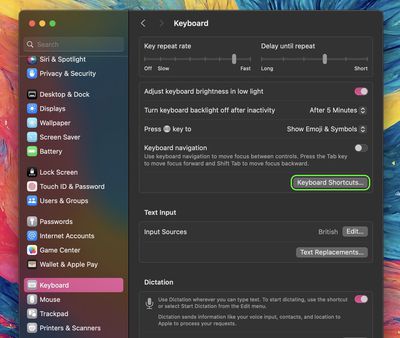
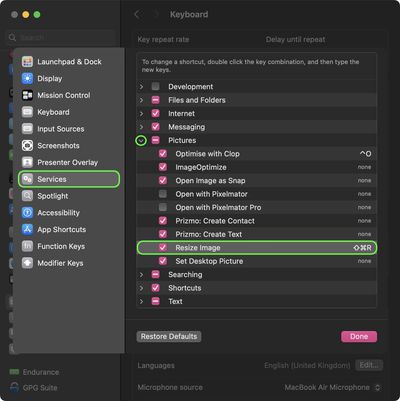
Why not assign a key shortcut to your image resize Quick Action to speed up the process? To do so, launch System Settings, select Keyboard in the sidebar, then click the Keyboard Shortcuts... button.
automator
Select Services from the sidebar, expand the "Pictures" checklist, and you should find Resize Image near the bottom of the list. Double-click the line item where it says "none", then enter your custom key combination. Click Done when you're finished.
settings
By integrating this Quick Action into your macOS workflow, you should be able to efficiently resize images with just a few clicks, saving you time and enhancing your productivity.


Top Rated Comments

22 months ago
this is the contents we would like to see. not kuo/gurman advertisements.
Score: 25 Votes (Like | Disagree)
22 months ago
Love these kind of articles on MR! 👍
Score: 16 Votes (Like | Disagree)
neotint Avatar
22 months ago
More recipes and playbooks like this, thanks. Great reminders. Btw are these saved to iCloud and part of one's account, or just part of current OS install and would need to be redone over and over with each machine? Is there way to save them for reimport use on other/new machines?
Score: 5 Votes (Like | Disagree)
mrnoark Avatar
22 months ago

Articles like this are really useful but, we’ve had Shortcuts app on the Mac for several years already… why are we still relying on Automator? I’m just genuinely curious. What can Automator do that Shortcuts can’t?
Automator has way more functions, like AppleScript, Watch Me Do (action recording) and Folder Actions.

Here’s a MacRumors article ('https://www.macrumors.com/how-to/turn-macos-folder-into-image-converter-how/') to achieve similar functions with Folder Actions.
Score: 4 Votes (Like | Disagree)
22 months ago
A bit saddened from seeing how few Mac users don't know what the Mac can do.
Score: 3 Votes (Like | Disagree)
22 months ago

Very useful. For example, 2048px is supposed to be best size to preserve quality for Facebook.
Anything you upload to Facebook is good for Facebook.
Score: 2 Votes (Like | Disagree)

Popular Stories

1password deal blue

1Password Security Breach: What Was Accessed and What Wasn't

Wednesday November 25, 2026 1:09 pm PST by
Popular password management app 1Password today said it experienced a security breach earlier this month. 1Password says some customer names and email addresses were accessed, but no customer vault contents were compromised. On November 19, 1Password saw indications that an employee's GitHub account had been breached and began investigating. The company says the breached GitHub account was...
apple design award 2025

Apple Announces 2025 Design Award Winners Ahead of WWDC 2025

Tuesday June 3, 2025 10:14 am PDT by
As we wait for WWDC to kick off next Monday, Apple today announced the winners of its annual Apple Design Awards, recognizing apps and games for their innovation, ingenuity, and technical achievement. The 2025 Apple Design Award winners are listed below, with one app and one game selected per category: Delight and Fun - CapWords (App) and Balatro (Game) Innovation - Play (App) and PBJ -...
ipad pro prime

Apple Has iPads Running macOS Internally, Says Gurman

Wednesday November 25, 2026 4:55 am PST by
Apple has iPads running macOS internally and has had them "for some time," according to Bloomberg's Mark Gurman, although he says no work is currently being done to bring the Mac operating system to iPads. Speaking on his latest Power On podcast, Gurman said there is "no work being done to consumerize macOS on the iPad." Rather, Apple will continue to bring Mac features and apps like Final Cut ...
Latest Stories
The 50+ Best Apple Black Friday Deals on AirPods, iPads, MacBooks, and More
2 hours ago
Apple's M6 and PROLED MacBook Pro Reach New Low Prices for Black Friday
2 hours ago
The MacRumors Show: iPhone Air 2 and iPhone 18 Are Coming
3 hours ago
Apple Store in Brisbane Reopening Next Month With New Design
3 hours ago
The 60+ Best Black Friday Accessory Deals on iPhone Chargers, TVs, Headphones, and More
4 hours ago
GTA VI Now (Barely) Running on Apple Silicon Macs
4 hours ago
The Best Black Friday Streaming Deals on Apple TV, Disney+, and More
5 hours ago
Apple TV's 'Carême' Wins International Emmy for Best Drama
5 hours ago
iPhone 18 Production Delay Leaves Apple Little Time Before Launch
6 hours ago
The Best Black Friday AirPods Deals
7 hours ago
The Best Black Friday Deals on Apple Home Products
7 hours ago
The Best Black Friday iPhone Deals
7 hours ago
The Best Black Friday iPad Deals
7 hours ago
The Best Black Friday Apple Watch Deals
7 hours ago
The Best Black Friday AirTag Deals
7 hours ago
The Best Black Friday Mac Deals
7 hours ago
iPhone Share of US Smartphone Market Hits 57% as Rivals Slip
8 hours ago
iPhone 20 Pro Rumored to Feature 3D-Printed Titanium Frame
10 hours ago
Apple's Official 2026 Black Friday Offer Starts Rolling Out
1 day ago
Halide Adds Fill Light Feature for iPhone Duo
1 day ago
MacBook Air Black Friday Deals Now Live With Massive $399 Savings
1 day ago
Amazon Discounts All MacBook Neo Models by $99 for Black Friday
1 day ago
Kodak Launches Unique AirTag Rival With E-Ink Display
1 day ago
Here's Why the Apple Store is Going Down
1 day ago
Apple Still Working on Giant Foldable iPad That Could Cost $5,000
1 day ago
iPhones Dominate China's Weak Singles' Day Smartphone Sales
1 day ago
iPhone 20 Pro Could Feature Ceramic in Limited-Edition Model
1 day ago
Apple Faces Korean Regulator Review Over iPhone 16 AI Advertising
1 day ago
Apple Watch Ultra 4 Hits New Best-Ever Price of $649.99 for Black Friday
1 day ago
New Apple Store Opening in India, Download the Special Wallpaper Now
2 days ago
Related Apple News: Motoring | Iphone Mirroring Not Working In Macos Fix | Iphone Duo Activate Standby Mode When Not Charging | Ipad Mini Vs Ipad Air 2026 | Satechi Cubedock