Skip to Content

How to Add Reminders and View Your Daily Schedule on Apple Watch

by

Apple Watch is the perfect device for quickly glancing at the things you need to do today or to fill you in on your plans for the weekend. It is also a useful device for quickly setting up a reminder without needing to pull out an iPhone.
Apple Watch Calendar 1
While much of the setup for Calendars is done on iPhone, you can use Apple Watch to respond to invites, add a quick event, and get alerts to remind you when to leave for your next appointment.

Using the Calendar App

The Calendar App on Apple Watch is tied to Apple's native Calendar app on iOS, which is also compatible with OS X. I sync my Calendar app with Google Calendar, but it is compatible with a number of services, like Exchange, Facebook, Yahoo, and remote servers via CalDAV. In order to use the Calendar app on Apple Watch, you must be using it in some form on iPhone.
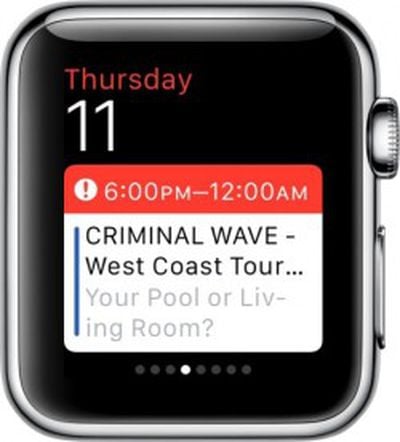
Apple Watch Calendar GlancesAdd the Calendar app to Glances via the Apple Watch app on your iPhone to get a quick view of the next event on your calendar. Open the Apple Watch App and navigate to My Watch. Then, select Calendar from the list and toggle the "Show in Glances" option to the on position.

You can also customize your calendar alerts in this section of the iPhone app. You can either mirror the alert preferences from your iPhone or customize notifications for Upcoming Events, Invitations, Invitee Responses, and Shared Calendar Alerts. For each alert, you can choose to have sound, haptics, or both.

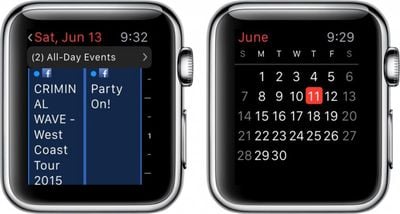
On the Apple Watch, you can tap on the Glance to open the Calendar app, or open it from the home screen. If you have a watch face with the Calendar feature enabled, you can also tap the date to open the Calendar app. The full Calendar app displays a more detailed description of the day's events.

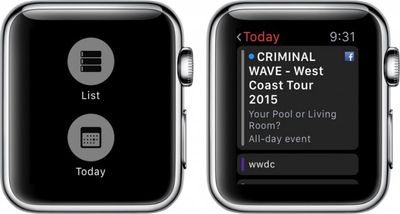
Events within the Calendar app can be viewed as a daily timeline or as a list that shows the events for the next week. In the daily timeline view, you can swipe left on the screen to see a different day and tap on an event to see it in more detail. To get back to the current day, firmly press the screen and then select Today.

In the daily timeline, events are organized by hour so you can get a clear picture of what you need to do in a day. All-day events are listed in a separate window. Tap the banner at the top of the daily timeline window to see a list of all-day events.
Apple Watch Calendar 3
To switch to a list of events, firmly press the display and then select List. Tap an event to view more details. The List view shows one week of upcoming events, making it easy to see an entire week's worth of information in just a few seconds.

If you have your Facebook calendar enabled, you'll be able to see detailed information about Facebook events, like who the organizer is, who has accepted the invitation, and any additional notes on the event. Turn the Digital Crown to scroll down to view the event details.

To see the full month's calendar, tap the arrow in the upper left corner of the screen. Tap the month to go back to the day view.
Apple Watch Calendar 4
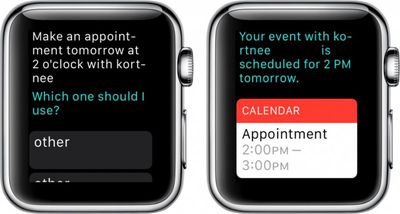
You can use your iPhone to create new calendar events, but if you want to do it right on the watch, you can ask for Siri's help. Activate Siri and say, "Make an appointment" or "Create a calendar event." Siri will let you know if there is a conflict and give you the option to create the event anyway. Then, it will sync with the rest of your connected calendars.

Setting Reminders

You may have noticed that the Apple Watch does not have a Reminders app. That doesn't mean you can't make use of the iOS app. You can address reminders when you receive a notification. Scroll to the bottom of the reminder and either Snooze, Complete, or Dismiss it.
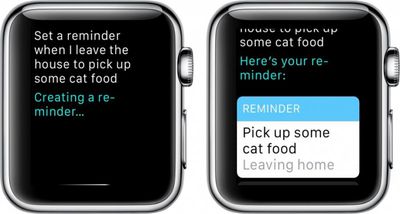
Apple Watch Calendar 5
To create a reminder, just ask Siri. Say something like, "Set a reminder when I leave the house to get milk," or "Remind me to check the slow cooker at 4:00." The reminder will sync across your devices where you can later edit it if you need to.

With help from Siri, it is easy and convenient to create quick calendar events and reminders right on Apple Watch. Plus, since the Calendar app syncs across iOS and OS X devices, you can deal with your daily schedule the way you normally do and see your upcoming events with just a glance on Apple Watch.

Related Roundup: Apple Watch 12
Buyer's Guide: Apple Watch (Buy Now)
Related Forum: Apple Watch

Top Rated Comments

slprescott Avatar
150 months ago
MacRumors: thanks for posting these occasional "How To" articles.

Despite much of this information being available elsewhere, the Apple Watch is new enough -- and different enough -- that many of us are still working our way through use-cases and techniques. Your articles provide both guidance and a forum for peer-to-peer conversation.
Score: 7 Votes (Like | Disagree)
OllyW Avatar
150 months ago
Hmm... so now MacRumors is deleting comments that call it out for making lame "How-To" posts.
Not deleted but moved to a more appropriate place to discuss the subject.

Getting sick of MacRumors click and bait articles ('https://forums.macrumors.com/threads/getting-sick-of-macrumors-click-and-bait-articles.1892084/')
Score: 1 Votes (Like | Disagree)

Popular Stories

Siri AI Icon

Siri AI Settlement: Here's How Much Apple Will Pay You

Saturday November 21, 2026 9:08 am PST by
In May, Apple agreed to pay $250 million to settle a U.S. class action lawsuit over Siri AI's delayed launch, and there is one month remaining to submit a claim through the settlement website. In a court document earlier this week, lawyers said that claimants will likely receive at least $61 per eligible iPhone, based on early participation data so far. The exact payment amount per eligible ...
apple watch series 3 design

Apple Offers Steps to Fix Daylight Saving Time Bug on Apple Watch

Sunday November 1, 2026 3:34 am PST by
Apple has published a support document describing what to do if your Apple Watch continues to show time that's off by one hour after daylight savings time changes. "This incorrect time appears only on the Always On display when your wrist is down," says Apple. "When you activate the display by tapping it or raising your wrist, the time changes to the correct hour." To fix the issue, Apple says ...
Siri AI Icon

iOS 27.3 Beta Adds Daily Siri AI Limits and iCloud+ Upgrades

Monday November 16, 2026 10:14 am PST by
With the latest iOS 27.3, iPadOS 27.3, and macOS 27.3 betas, Apple is starting to test limits and paid upgrades for Siri AI and Apple Intelligence features. Every Apple device gets a free daily access allowance for Siri AI and Apple Intelligence features that rely on server-side AI processing, such as Image Playground and Clean Up in Photos. When that limit is hit, there will be an option to ...
Latest Stories
The 50+ Best Apple Black Friday Deals Still Available on AirPods, iPads, and More
9 hours ago
HomePod Mini 2 in (RED) Seemingly Spotted Ahead of Announcement
6 hours ago
Apple's M6 and PROLED MacBook Pro Reach New Low Prices for Black Friday
17 hours ago
The MacRumors Show: iPhone Air 2 and iPhone 18 Are Coming
17 hours ago
Apple Store in Brisbane Reopening Next Month With New Design
17 hours ago
The 60+ Best Black Friday Accessory Deals on iPhone Chargers, TVs, Headphones, and More
18 hours ago
GTA VI Now (Barely) Running on Apple Silicon Macs
19 hours ago
The Best Black Friday Streaming Deals on Apple TV, Disney+, and More
19 hours ago
Apple TV's 'Carême' Wins International Emmy for Best Drama
20 hours ago
iPhone 18 Production Delay Leaves Apple Little Time Before Launch
21 hours ago
The Best Black Friday AirPods Deals Still Available
13 hours ago
The Best Black Friday Deals on Apple Home Products
21 hours ago
The Best Black Friday iPhone Deals Still Available
13 hours ago
The Best Black Friday iPad Deals Still Available
13 hours ago
The Best Black Friday Apple Watch Deals Still Available
13 hours ago
The Best Black Friday AirTag Deals Still Available
13 hours ago
The Best Black Friday Mac Deals Still Available
13 hours ago
iPhone Share of US Smartphone Market Hits 57% as Rivals Slip
22 hours ago
iPhone 20 Pro Rumored to Feature 3D-Printed Titanium Frame
1 day ago
Apple's Official 2026 Black Friday Offer Starts Rolling Out
2 days ago
Halide Adds Fill Light Feature for iPhone Duo
2 days ago
MacBook Air Black Friday Deals Now Live With Massive $399 Savings
2 days ago
Amazon Discounts All MacBook Neo Models by $99 for Black Friday
2 days ago
Kodak Launches Unique AirTag Rival With E-Ink Display
2 days ago
Here's Why the Apple Store is Going Down
2 days ago
Apple Still Working on Giant Foldable iPad That Could Cost $5,000
2 days ago
iPhones Dominate China's Weak Singles' Day Smartphone Sales
2 days ago
iPhone 20 Pro Could Feature Ceramic in Limited-Edition Model
2 days ago
Apple Faces Korean Regulator Review Over iPhone 16 AI Advertising
2 days ago
Apple Watch Ultra 4 Hits New Best-Ever Price of $649.99 for Black Friday
2 days ago
Related Apple News: Reviews | Business | Sport | Ipad | Mac





























