Skip to Content

Migrate Your Notes From Evernote to Apple Notes

by

Apple's stock Notes app has come a long way since it first appeared on Mac, with password protection, tables, and document scanning being just a few of the top features it has gained in recent years. These and other improvements offer compelling reasons to migrate from a rival note-taking platform, especially if you've been paying for the privilege.

evernote
Evernote users in particular may feel they now have extra motivation to make the switch. Evernote recently said it is going to limit new and existing free users to a maximum of just 50 notes and one notebook starting December 4, 2024.

Whatever your reasons for migrating platforms, you can do so by following these steps. Note that the export file that Evernote spits out will also work with other note-taking apps like OneNote and Bear, which offer similar import options to the Apple Notes method described below. Also bear in mind that Evernote has a 100 notes selection limit, so you may need to export several files to take account of all of your notes.

How to Migrate From Evernote to Apple Notes

  1. Launch Evernote on your Mac.
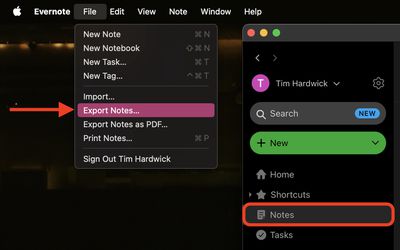
  2. In the sidebar, click Notes.
    how to migrate from evernote to apple notes 1

  3. Select Edit -> Select All from the menu bar. This will select 100 notes maximum.
  4. Select File -> Export Notes... from the menu bar.
    evernote

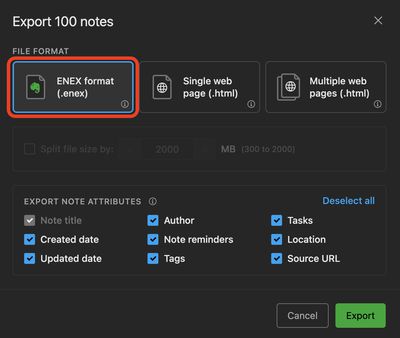
  5. In the Export dialog, make sure Evernote ENEX (.enex) is selected as the File Format, and check the boxes to include the note attributes relevant to you.
  6. Click Export.
    evernote

  7. Give the export file a name, then click Save.
  8. Next, launch Apple's Notes app.
  9. Select File -> Import to Notes from the menu bar.
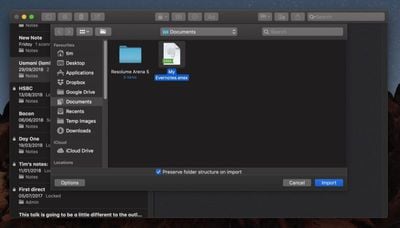
  10. Navigate to the .enex file that you just exported from Evernote.
    how to migrate from evernote to apple notes 3

  11. Check the box next to Preserve folder structure on import if needed, and then click Import.

  12. Click Import.

That's all there is to it. Your Evernotes will appear automatically in the Notes app.

Top Rated Comments

FoxyKaye Avatar
44 months ago

So, I was an Evernote user since about 2009. Started paying when I needed to sync 3 devices (Mac, iPhone, iPad).
Got an email this week with EverNote announcing they were jacking up the yearly rate to $129 ($141 after taxes!) $76 to $141? WHAT!?!?! That was the end for me.

Anyway, exporting worked fine.

One caveat, EverNote only allows 50 notes to be exported at a time. Nice trick.
I was able to select a bunch. The 50 note hard limit selected and exported the 50 notes.
Luckily, they stay selected, so I carefully scrolled down and Shift-clicked to select the next batch.
Same thing. It exported 50 and those remained selected.
It took maybe 20 minutes to export about 400 notes.

Importing was a snap. Folder structure remains intact.
Another resurrection on this thread: I've been a consistent Evernote user since 2012, though I'd intermittently used it for several years prior. Endured the whole "You Have To Pay Us To Edit The Home Screen" drama (which, I didn't, because it was a "feature" I didn't want), and kept a legacy subscription plan active for "offline," access and syncing to three devices as @gojira mentions. I noticed I was coming up on my subscription renewal this month, and decided enough is enough.

Migrated a dozen Notebooks out of Evernote one at a time in ENEX format, and they each came in as a folder in Notes called "Imported Notes," that I renamed to the title of my existing Evernote notebook. Everything came over pretty much intact with a few formatting bugs for checklists/unordered lists. Didn't hit the 50 note export limit, but I wonder if it was because I was creating ENEX files directly on my laptop? <shrug>

The whole process took under an hour, I re-shared a few key folders with my wife, and we're both up and running.

Wow, I loved Evernote when it was first released, but agree with many others that the app has since lost its way.
Score: 5 Votes (Like | Disagree)
106 months ago
Naive question: what if you’ve only ever used Evernote on iOS?
My guess is that installing the Mac version of Evernote would sync up all your notes from your iOS version and then you could export from there?
Score: 5 Votes (Like | Disagree)
106 months ago
Naive question: what if you’ve only ever used Evernote on iOS?
Just download the Mac client and sync. It’s a cloud-based product.
[doublepost=1540569880][/doublepost]
Apple's stock Notes app has come a long way since it first appeared on Mac, with password protection ('https://www.macrumors.com/how-to/password-protect-notes-ios-os-x/'), tables, and document scanning ('https://www.macrumors.com/how-to/ios-11-document-scanner-notes/') being just a few of the top features it has gained in recent years. These and other improvements offer compelling reasons to migrate from a rival note-taking platform, especially if you've been paying for the privilege.


Evernote users in particular may feel they now have extra motivation to make the switch. Last month, rumors that Evernote was struggling to keep afloat were bolstered by reports ('https://www.macrumors.com/2018/09/05/evernote-slashes-subscription-rate/') of a flurry of key departures at the company, with one source even claiming the company was in a "death spiral" because of its inability to attract new users.

Whatever your reasons for migrating platforms, you can do so by following these simple steps. Note that the export file that Evernote spits out will also work with other note-taking apps like OneNote and Bear, which offer similar import options to the Apple Notes method described below.

How to Migrate From Evernote to Apple Notes
[LIST=1]
* Launch Evernote on your Mac.
* In the sidebar, click All Notes.


Select Edit -> Select All from the menu bar.
* Select File -> Export Notes... from the menu bar.
* In the Save dialog, make sure Evernote XML (.enex) is selected in the Format dropdown and give the export file an identifiable name.


Click Save.
* Launch Apple's Notes app.

* Select File -> Import to Notes from the menu bar.
* Navigate to the .enex file that you just exported from Evernote.


Check the box next to Preserve folder structure on import if needed, and then click Import.
Click Import Notes.


Article Link: How to Migrate Your Notes From Evernote to Apple Notes ('https://www.macrumors.com/how-to/migrate-from-evernote-to-apple-notes/')
Apple's stock Notes app has come a long way since it first appeared on Mac, with password protection ('https://www.macrumors.com/how-to/password-protect-notes-ios-os-x/'), tables, and document scanning ('https://www.macrumors.com/how-to/ios-11-document-scanner-notes/') being just a few of the top features it has gained in recent years. These and other improvements offer compelling reasons to migrate from a rival note-taking platform, especially if you've been paying for the privilege.


Evernote users in particular may feel they now have extra motivation to make the switch. Last month, rumors that Evernote was struggling to keep afloat were bolstered by reports ('https://www.macrumors.com/2018/09/05/evernote-slashes-subscription-rate/') of a flurry of key departures at the company, with one source even claiming the company was in a "death spiral" because of its inability to attract new users.

Whatever your reasons for migrating platforms, you can do so by following these simple steps. Note that the export file that Evernote spits out will also work with other note-taking apps like OneNote and Bear, which offer similar import options to the Apple Notes method described below.

How to Migrate From Evernote to Apple Notes
[LIST=1]
* Launch Evernote on your Mac.
* In the sidebar, click All Notes.


Select Edit -> Select All from the menu bar.
* Select File -> Export Notes... from the menu bar.
* In the Save dialog, make sure Evernote XML (.enex) is selected in the Format dropdown and give the export file an identifiable name.


Click Save.
* Launch Apple's Notes app.

* Select File -> Import to Notes from the menu bar.
* Navigate to the .enex file that you just exported from Evernote.


Check the box next to Preserve folder structure on import if needed, and then click Import.
Click Import Notes.


Article Link: How to Migrate Your Notes From Evernote to Apple Notes ('https://www.macrumors.com/how-to/migrate-from-evernote-to-apple-notes/')
The whole “Evernote is going to die” flurry of articles a couple months back was a great example of Silicon Valley groupthink and did hurt the company far more than any of the departures did. It has a large paying user base and it’s doing alright (pays the bills with its income as companies should).

There are other reasons for concern with Evernote but they are not the ones that have been reported.
Score: 3 Votes (Like | Disagree)
MareLuce Avatar
24 months ago
@NervousFish2 thank you for taking the time to document that, especially the tip about tagging before exporting from Evernote
Score: 2 Votes (Like | Disagree)
NervousFish2 Avatar
24 months ago

Question: When you say, "search within a folder," can you define this more? I've got Notes organized in multiple folders, and when I search for content from the main search bar, it will pull results from multiple folders concurrently, including a folder I have as shared with my spouse. Are you meaning, isolate your search within a particular folder? That I haven't seen Notes do, but I also haven't tried.
Yes, that's the issue exactly. I can't figure out how to limit my search to a specific/particular folder. It seems like it should be a basic feature!
Score: 2 Votes (Like | Disagree)
NervousFish2 Avatar
30 months ago

Evernote offered to bump my sub from $49 USD to $99 at my next renewal, so after 15 years I guess I am done.

The export->import process worked perfectly for me, including all pictures and such. Was a little bit of a PITA to select 100 notes at a time, but doable.
Don't select notes. Select individual notebooks. If you do that, the note limit doesn't apply (or didn't for me at least)
Score: 2 Votes (Like | Disagree)

Popular Stories

apple design award 2025

Apple Announces 2025 Design Award Winners Ahead of WWDC 2025

Tuesday June 3, 2025 10:14 am PDT by
As we wait for WWDC to kick off next Monday, Apple today announced the winners of its annual Apple Design Awards, recognizing apps and games for their innovation, ingenuity, and technical achievement. The 2025 Apple Design Award winners are listed below, with one app and one game selected per category: Delight and Fun - CapWords (App) and Balatro (Game) Innovation - Play (App) and PBJ -...
1password deal blue

1Password Security Breach: What Was Accessed and What Wasn't

Wednesday November 25, 2026 1:09 pm PST by
Popular password management app 1Password today said it experienced a security breach earlier this month. 1Password says some customer names and email addresses were accessed, but no customer vault contents were compromised. On November 19, 1Password saw indications that an employee's GitHub account had been breached and began investigating. The company says the breached GitHub account was...
apple store down feature

Here's Why the Apple Store is Going Down

Thursday November 26, 2026 5:49 am PST by
Apple's online store is going down for a few hours on a rolling country-by-country basis right now, but do not get your hopes up for new products. Apple takes its online store down for a few hours ahead of Black Friday every year to tease its annual gift card offer with the purchase of select products. The store is down in Australia, New Zealand, and Thailand, right now, and it will...
Latest Stories
The 50+ Best Apple Black Friday Deals Still Available on AirPods, iPads, and More
8 hours ago
HomePod Mini 2 in (RED) Seemingly Spotted Ahead of Announcement
6 hours ago
Apple's M6 and PROLED MacBook Pro Reach New Low Prices for Black Friday
16 hours ago
The MacRumors Show: iPhone Air 2 and iPhone 18 Are Coming
16 hours ago
Apple Store in Brisbane Reopening Next Month With New Design
16 hours ago
The 60+ Best Black Friday Accessory Deals on iPhone Chargers, TVs, Headphones, and More
17 hours ago
GTA VI Now (Barely) Running on Apple Silicon Macs
18 hours ago
The Best Black Friday Streaming Deals on Apple TV, Disney+, and More
18 hours ago
Apple TV's 'Carême' Wins International Emmy for Best Drama
19 hours ago
iPhone 18 Production Delay Leaves Apple Little Time Before Launch
20 hours ago
The Best Black Friday AirPods Deals Still Available
12 hours ago
The Best Black Friday Deals on Apple Home Products
20 hours ago
The Best Black Friday iPhone Deals Still Available
12 hours ago
The Best Black Friday iPad Deals Still Available
12 hours ago
The Best Black Friday Apple Watch Deals Still Available
12 hours ago
The Best Black Friday AirTag Deals Still Available
12 hours ago
The Best Black Friday Mac Deals Still Available
12 hours ago
iPhone Share of US Smartphone Market Hits 57% as Rivals Slip
21 hours ago
iPhone 20 Pro Rumored to Feature 3D-Printed Titanium Frame
23 hours ago
Apple's Official 2026 Black Friday Offer Starts Rolling Out
2 days ago
Halide Adds Fill Light Feature for iPhone Duo
2 days ago
MacBook Air Black Friday Deals Now Live With Massive $399 Savings
2 days ago
Amazon Discounts All MacBook Neo Models by $99 for Black Friday
2 days ago
Kodak Launches Unique AirTag Rival With E-Ink Display
2 days ago
Here's Why the Apple Store is Going Down
2 days ago
Apple Still Working on Giant Foldable iPad That Could Cost $5,000
2 days ago
iPhones Dominate China's Weak Singles' Day Smartphone Sales
2 days ago
iPhone 20 Pro Could Feature Ceramic in Limited-Edition Model
2 days ago
Apple Faces Korean Regulator Review Over iPhone 16 AI Advertising
2 days ago
Apple Watch Ultra 4 Hits New Best-Ever Price of $649.99 for Black Friday
2 days ago
Related Apple News: Iphone Duo Enable Reachability One Handed Use | Apple Store | Bluetti Elite 10 Power Station | Mac | Macos