Skip to Content

How to Password Protect Notes in iOS 9.3 and OS X 10.11.4

by

Although more prominent features like Night Shift and a few new Quick Actions are getting the spotlight with the launch of iOS 9.3, one new lesser-known update is definitely worth checking out. In iOS 9.3, Apple has improved the functionality of its first-party Notes app with the ability to add password or Touch ID security for individual notes.

The feature allows users to prevent access to sensitive information on a case-by-case basis (some notes, like a shopping list, might not be as high risk), just in case someone gets past the lock screen security of the iPhone itself. With some people even using Notes to store passwords for various sites and services, Apple's security-enhanced update is well worth checking out.

Creating a Password in Notes on iOS

The steps needed to set up a password or Touch ID for your Notes are straight-forward and should only take a few moments to complete.
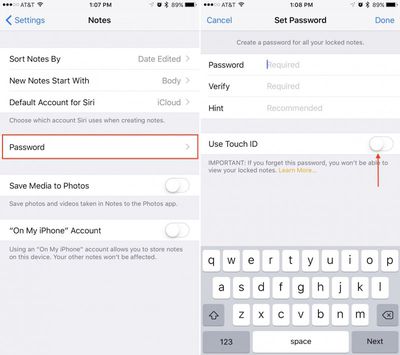
iPhone Notes Touch ID How To

  1. Navigate to the Settings app on your iPhone or iPad.
  2. Scroll down to "Notes" and tap on it.
  3. Midway down the screen will be a "Password" option. Tap on it.
  4. If this is your first time setting it up, a menu will immediately appear asking to set up the new password.
  5. Fill out the fields requiring the Notes password (remember that something other than your iPhone passcode will be preferable), and then verify the password in the next field.
  6. Provide a hint to the password you entered to ensure that if you ever forget it you can be guided back through guessing.
  7. In the same menu, toggle on "Use Touch ID."
  8. Tap "Done" in the top right corner to confirm your selections.

To test out the new password and Touch ID features of Notes, head over to the Notes app on your iPhone or iPad. There are just a few more steps to go through to fully protect a note of your choice from prying eyes.
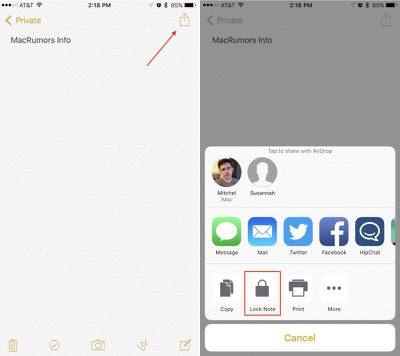
How To Touch ID Notes 2

  1. Once inside Notes, if you've already got a particular note in mind to protect, skip to the next step. Otherwise, tap on the bottom right of the app to create a new Note, and enter any private information you wish to hide.
  2. Inside the note, tap on the top right of the screen to bring up the share menu. Tap the "Lock Note" option in the bottom row.
  3. If you haven't entered the Notes password recently, the app will ask for the password or Touch ID fingerprint you created in the Settings menu. Comply by providing either measure of security. If no password or fingerprint is required, the lock will be added automatically.
  4. This adds a lock to the note, but doesn't actually lock it yet. To do that, click on the new unlocked button on the top right of the screen.
  5. The note should now be hidden with a simple "This note is locked" message.
  6. To view the locked note again, simply tap "View Note" and place your finger on the Home Button to use Touch ID, or enter your password.

Using a Password in the OS X Notes App

Alongside the iOS 9.3 update, Apple's OS X 10.11.4 introduces similar support for password-protected Notes for the company's desktop operating system. The password setup process carries over from the iOS installation, but you'll have to ensure that Notes are syncing with iCloud to properly use the password feature on a Mac.

  1. Navigate to System Preferences.
  2. Click on iCloud.
  3. Scroll until you see "Notes" and make sure the box is checked.

From here, any changes made to your Notes on iOS -- from their content to the locked/unlocked status -- should be reflected on the Mac. Of course, Apple's desktops and laptops don't have Touch ID, so if you want to unlock a Note away from your iPhone, you'll have to enter the password into the app.
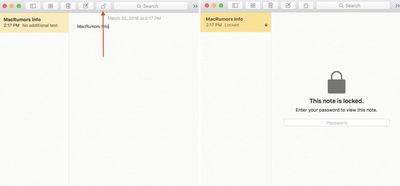
Notes Mac App Password
At any time you can change or turn off the password in Notes by revisiting the Settings iOS app, navigating back through the Notes, then Password submenus, and following either the "Change Password" or "Reset Password" buttons.

There are plenty of other neat features that debuted in both iOS 9.3 and OS X 10.11.4, so check out MacRumors' recent coverage of each for more information.


Top Rated Comments

DCstewieG Avatar
139 months ago
Leave it to Apple -- the company that lets you to put a disk in the garbage to eject it -- to have you click the Share button so you can lock a note for private use...the exact opposite of sharing. Kinda like clicking the Start button in Windows to shutdown.
Score: 9 Votes (Like | Disagree)
Norbs12 Avatar
139 months ago
The interface for the lock is so odd. I always thought of the button on the top right as more of a "share" button. I looked for the lock almost everywhere except there because I thought it would be a ridiculous place for it.
Score: 6 Votes (Like | Disagree)
brunosh Avatar
139 months ago
It's not intuitive at all on iOS
Score: 5 Votes (Like | Disagree)
Glassed Silver Avatar
139 months ago
The interface for the lock is so odd. I always thought of the button on the top right as more of a "share" button. I looked for the lock almost everywhere except there because I thought it would be a ridiculous place for it.
Hidden features is exactly the reason why Steve Jobs opposed a menu button Android-style.

That Share button has become a complete joke, but it's only a symbol for the many other things that get hidden away, nested, convoluted, etc... All while at the same time not even increasing possibilities!

Yes, I'm looking at you, iOS 7 and up on iPad... It's basically a blown up, "less nested options" version of the iPhone interface.
Sounds like Android to me and hell, even there things have changed for the better.

Glassed Silver:mac
Score: 4 Votes (Like | Disagree)
139 months ago
Absolutely unintuitive. No casual user will even think about digging through settings for a new feature like that.

And then to lock a note.. And then it stays unlocked until you lock it again. Touch ID is fast enough that it should always be locked.
Score: 3 Votes (Like | Disagree)
139 months ago
I wish the Notes app would automatically lock the notes as soon as you close the app, similar to how Credit Karma requires your Touch ID every time you close the app. Right now they seem to only lock automatically if you lock your phone, unless I'm missing something. If I unlock the notes and switch over to Safari, the notes remain unlocked unless I manually hit the lock button.
Score: 3 Votes (Like | Disagree)

Popular Stories

face id

iPhone Duo 2 Likely to Retain Touch ID as Face ID Remains Uncertain

Wednesday November 18, 2026 6:16 am PST by
Apple's second-generation iPhone Duo will retain its existing display sizes and side-mounted fingerprint sensor, according to the leaker known as "Digital Chat Station." In a new post on Weibo, the leaker said information about the iPhone Duo 2 remains limited, but engineering units continue to feature a 7.6-inch inner display, a 5.4-inch outer display, and a fingerprint sensor on the side,...
apple design award 2025

Apple Announces 2025 Design Award Winners Ahead of WWDC 2025

Tuesday June 3, 2025 10:14 am PDT by
As we wait for WWDC to kick off next Monday, Apple today announced the winners of its annual Apple Design Awards, recognizing apps and games for their innovation, ingenuity, and technical achievement. The 2025 Apple Design Award winners are listed below, with one app and one game selected per category: Delight and Fun - CapWords (App) and Balatro (Game) Innovation - Play (App) and PBJ -...
1password deal blue

1Password Security Breach: What Was Accessed and What Wasn't

Wednesday November 25, 2026 1:09 pm PST by
Popular password management app 1Password today said it experienced a security breach earlier this month. 1Password says some customer names and email addresses were accessed, but no customer vault contents were compromised. On November 19, 1Password saw indications that an employee's GitHub account had been breached and began investigating. The company says the breached GitHub account was...
Latest Stories
The 50+ Best Apple Black Friday Deals Still Available on AirPods, iPads, and More
2 hours ago
Apple's M6 and PROLED MacBook Pro Reach New Low Prices for Black Friday
7 hours ago
The MacRumors Show: iPhone Air 2 and iPhone 18 Are Coming
7 hours ago
Apple Store in Brisbane Reopening Next Month With New Design
7 hours ago
The 60+ Best Black Friday Accessory Deals on iPhone Chargers, TVs, Headphones, and More
8 hours ago
GTA VI Now (Barely) Running on Apple Silicon Macs
8 hours ago
The Best Black Friday Streaming Deals on Apple TV, Disney+, and More
9 hours ago
Apple TV's 'Carême' Wins International Emmy for Best Drama
9 hours ago
iPhone 18 Production Delay Leaves Apple Little Time Before Launch
10 hours ago
The Best Black Friday AirPods Deals Still Available
2 hours ago
The Best Black Friday Deals on Apple Home Products
11 hours ago
The Best Black Friday iPhone Deals Still Available
2 hours ago
The Best Black Friday iPad Deals Still Available
2 hours ago
The Best Black Friday Apple Watch Deals Still Available
2 hours ago
The Best Black Friday AirTag Deals Still Available
2 hours ago
The Best Black Friday Mac Deals Still Available
2 hours ago
iPhone Share of US Smartphone Market Hits 57% as Rivals Slip
12 hours ago
iPhone 20 Pro Rumored to Feature 3D-Printed Titanium Frame
14 hours ago
Apple's Official 2026 Black Friday Offer Starts Rolling Out
1 day ago
Halide Adds Fill Light Feature for iPhone Duo
1 day ago
MacBook Air Black Friday Deals Now Live With Massive $399 Savings
1 day ago
Amazon Discounts All MacBook Neo Models by $99 for Black Friday
1 day ago
Kodak Launches Unique AirTag Rival With E-Ink Display
1 day ago
Here's Why the Apple Store is Going Down
1 day ago
Apple Still Working on Giant Foldable iPad That Could Cost $5,000
1 day ago
iPhones Dominate China's Weak Singles' Day Smartphone Sales
1 day ago
iPhone 20 Pro Could Feature Ceramic in Limited-Edition Model
2 days ago
Apple Faces Korean Regulator Review Over iPhone 16 AI Advertising
2 days ago
Apple Watch Ultra 4 Hits New Best-Ever Price of $649.99 for Black Friday
2 days ago
New Apple Store Opening in India, Download the Special Wallpaper Now
2 days ago
Related Apple News: Health | Travel | Education | Reviews | News






























