Skip to Content

How to Use the Redesigned Messages App Drawer in iOS 11

by

In iOS 10, Apple introduced the Messages App Store, allowing users to jump into miniature versions of their favorite apps so they could do things like choose a movie time, send their location, pay a friend, give a recommendation from Apple Music, and attach stickers. With the launch of iOS 11, the app drawer and selection experience of Messages apps have been streamlined, and this guide will walk you through the fastest way to access your favorite apps, organize them, and add more from the Messages App Store.

Navigating the New App Drawer in Messages
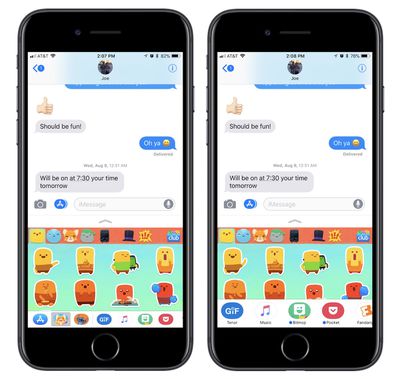
how to messenger app drawer 1

  1. Open Messages.
  2. Choose a contact to text.
  3. At the bottom of the screen sits the new app drawer, and you can tap one to bring it up or scroll to dive deeper into your collection.

From here, apps within Messages function essentially the same as they did in iOS 10: the bottom half of the screen represents the app, which you can interact with and send content into the upper half section of the screen in the form of an iMessage. A small chevron sitting just below the text entry field can be tapped to expand the Messages app to full screen, and tapped again to reduce it.

If you ever accidentally leave the app by tapping the text field, simply tap the App Store icon to the left of the text field. Conversely, if you're inside of a Messages app and want to make it and the app drawer disappear, tap the same App Store icon to the left of the text field (it'll be blue when the app drawer is open) to make the app disappear (returning the icon to gray).

Editing the New App Drawer in Messages
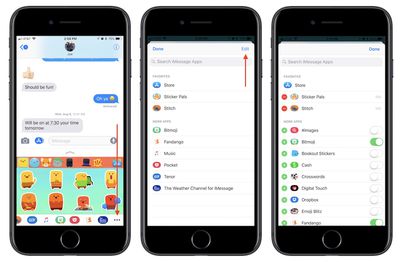
how to messenger app drawer 2

  1. Navigate to the app drawer in Messages.
  2. Scroll the drawer all the way to the right and tap the ellipses, or "More," icon.
  3. Tap "Edit."
  4. On the right side, choose any installed app you want or don't want in your Messages app drawer by tapping the green toggles.
  5. On the left side, tap the green "+" icon next to any app you want as a favorite.
  6. Tap "Done."

Now that your app drawer is fully customized, your favorites will appear on the far left side of the drawer, and any other apps you have toggled on will appear after your favorites. Any time you want to search for more, you can tap the blue App Store icon sitting to the left of your favorites to visit the Messages App Store. There are numerous standalone Messages apps, but many popular apps have also been updated over the past year to include Messages support.

For this reason, it's easy for your app drawer to become crowded, making the deeper editing and favoriting options in iOS 11 a welcome addition. If you'd rather not see the app drawer, tap on the gray App Store icon at the left of the Messages text box to hide it from view.


Related Forum: iOS 11

Top Rated Comments

ck2875 Avatar
120 months ago
With the launch of iOS 11, the app drawer and selection experience of Messages apps have been streamlined, and this guide will walk you through the fastest way to access your favorite apps, organize them, and add more from the Messages App Store.

You left off the most important part: Tap the gray App Store icon to hide the app drawer.
Score: 12 Votes (Like | Disagree)
120 months ago
How do you disable this stupid thing?

I’m a grown up. I text people. I don’t need everything to be shared or “connected”.
Score: 6 Votes (Like | Disagree)
120 months ago
You left off the most important part: Tap the gray App Store icon to hide the app drawer.
I can’t believe I didn’t figure that out and I’ve been using the beta.

THANK YOU !!! honestly, I search the setting and I figures you couldn’t turn it off cuz they wanted to you to buy those stupid stickers. Thank you again. MR needs a post with just this info for us who aren’t in middle school.
Score: 2 Votes (Like | Disagree)
120 months ago
This thing is still really buggy. I edited the apps available and when I was done I couldn't press "Done." I had to force quit the app. I've noticed some other weirdness that makes iOS 11 still feel very much beta to me.
Score: 2 Votes (Like | Disagree)
120 months ago
How about an article to discuss that turning off WiFi in control center in iOS 11 doesn’t turn it off and it reconnects automatically even after you’ve turned it off?
https://www.macrumors.com/2017/09/20/bluetooth-wifi-not-disabled-ios-11-control-center/
Score: 1 Votes (Like | Disagree)
Prof. Avatar
120 months ago
You left off the most important part: Tap the gray App Store icon to hide the app drawer.
I was so happy when I found this out.
Score: 1 Votes (Like | Disagree)

Popular Stories

apple design award 2025

Apple Announces 2025 Design Award Winners Ahead of WWDC 2025

Tuesday June 3, 2025 10:14 am PDT by
As we wait for WWDC to kick off next Monday, Apple today announced the winners of its annual Apple Design Awards, recognizing apps and games for their innovation, ingenuity, and technical achievement. The 2025 Apple Design Award winners are listed below, with one app and one game selected per category: Delight and Fun - CapWords (App) and Balatro (Game) Innovation - Play (App) and PBJ -...
1password deal blue

1Password Security Breach: What Was Accessed and What Wasn't

Wednesday November 25, 2026 1:09 pm PST by
Popular password management app 1Password today said it experienced a security breach earlier this month. 1Password says some customer names and email addresses were accessed, but no customer vault contents were compromised. On November 19, 1Password saw indications that an employee's GitHub account had been breached and began investigating. The company says the breached GitHub account was...
apple store down feature

Here's Why the Apple Store is Going Down

Thursday November 26, 2026 5:49 am PST by
Apple's online store is going down for a few hours on a rolling country-by-country basis right now, but do not get your hopes up for new products. Apple takes its online store down for a few hours ahead of Black Friday every year to tease its annual gift card offer with the purchase of select products. The store is down in Australia, New Zealand, and Thailand, right now, and it will...
Latest Stories
The 50+ Best Apple Black Friday Deals Still Available on AirPods, iPads, and More
5 hours ago
HomePod Mini 2 in (RED) Seemingly Spotted Ahead of Announcement
2 hours ago
Apple's M6 and PROLED MacBook Pro Reach New Low Prices for Black Friday
13 hours ago
The MacRumors Show: iPhone Air 2 and iPhone 18 Are Coming
13 hours ago
Apple Store in Brisbane Reopening Next Month With New Design
13 hours ago
The 60+ Best Black Friday Accessory Deals on iPhone Chargers, TVs, Headphones, and More
14 hours ago
GTA VI Now (Barely) Running on Apple Silicon Macs
14 hours ago
The Best Black Friday Streaming Deals on Apple TV, Disney+, and More
15 hours ago
Apple TV's 'Carême' Wins International Emmy for Best Drama
16 hours ago
iPhone 18 Production Delay Leaves Apple Little Time Before Launch
16 hours ago
The Best Black Friday AirPods Deals Still Available
9 hours ago
The Best Black Friday Deals on Apple Home Products
17 hours ago
The Best Black Friday iPhone Deals Still Available
8 hours ago
The Best Black Friday iPad Deals Still Available
8 hours ago
The Best Black Friday Apple Watch Deals Still Available
8 hours ago
The Best Black Friday AirTag Deals Still Available
8 hours ago
The Best Black Friday Mac Deals Still Available
8 hours ago
iPhone Share of US Smartphone Market Hits 57% as Rivals Slip
18 hours ago
iPhone 20 Pro Rumored to Feature 3D-Printed Titanium Frame
20 hours ago
Apple's Official 2026 Black Friday Offer Starts Rolling Out
2 days ago
Halide Adds Fill Light Feature for iPhone Duo
2 days ago
MacBook Air Black Friday Deals Now Live With Massive $399 Savings
2 days ago
Amazon Discounts All MacBook Neo Models by $99 for Black Friday
2 days ago
Kodak Launches Unique AirTag Rival With E-Ink Display
2 days ago
Here's Why the Apple Store is Going Down
2 days ago
Apple Still Working on Giant Foldable iPad That Could Cost $5,000
2 days ago
iPhones Dominate China's Weak Singles' Day Smartphone Sales
2 days ago
iPhone 20 Pro Could Feature Ceramic in Limited-Edition Model
2 days ago
Apple Faces Korean Regulator Review Over iPhone 16 AI Advertising
2 days ago
Apple Watch Ultra 4 Hits New Best-Ever Price of $649.99 for Black Friday
2 days ago
Related Apple News: Touchscreen Macbook Pro | Fixed Focus Digital | Rockstar Games | Iphone 18 Pro Texture Controls Photographic Styles | Find My Network Accessory Program






























