Skip to Content

iPhone 18 Pro: Use Texture Controls in Photographic Styles

by

With Apple's latest iPhone 18 Pro models and iPhone Duo, you can adjust not only specific colors in certain parts of your photos, but also their texture and grain, thanks to the latest-generation Photographic Styles 3. Here's how to use them.

photographic styles 3%402x scaled
Photographic Styles are tone presets that adjust the color and warmth of a photo as it is captured, rather than as a filter applied afterward, while preserving skin tones. The ‌new iPhone 18 Pro‌ models and iPhone Duo feature a redesigned computational imaging pipeline for the 48-megapixel Fusion Main camera that Apple says produces sharper, more detailed shots. And the new texture and grain controls in Photographic Styles 3 build on that pipeline, allowing you to further dial in your desired appearance for more creative control over your photos.

When you first open the Camera app on your ‌iPhone 18 Pro or iPhone Duo, you'll be asked if you want to choose a default Photographic Style that changes the overall mood before you take a photo. You can go ahead with this, or you can dismiss the prompt and add Photographic Styles as you see fit for each photo.

Photographic Styles on iPhone 18 Pro and iPhone Duo

Here's how to use the new controls in Photographic Styles on iPhone 18 Pro and iPhone Duo.

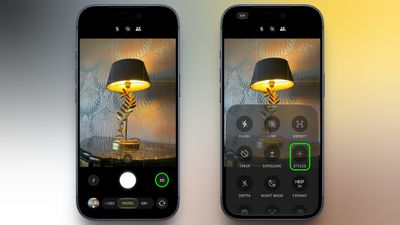
  1. In the Camera app, tap the button with six dots at the bottom-right of the interface.
  2. Select Styles from the control pane.
    iphone 18 pro photographic styles

  3. Swipe to a style that you want to use, then tap the Customize button below it.
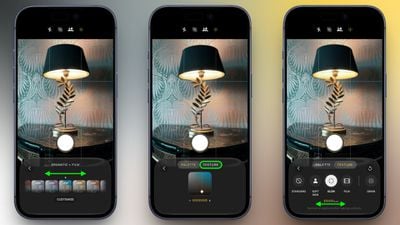
  4. Use the square palette to adjust tone and color simultaneously, or use the + and - dial below it to adjust the palette separately.
  5. When you're done, tap Texture.
  6. Select a texture from the options: Soft Skin, Glow, or Film. Drag the slider below to adjust the intensity of each texture, or choose Standard to apply no texture. Tap Grain to add film grain to any texture.
  7. When you're happy with the applied effect, take your shot.
    iphone 18 pro photographic styles 1

Note that the texture and grain effects are applied after you take the photo.

Remove or Reset a Photographic Style

If you set a default Photographic Style that you no longer want to use, you can remove the effect by following these steps:

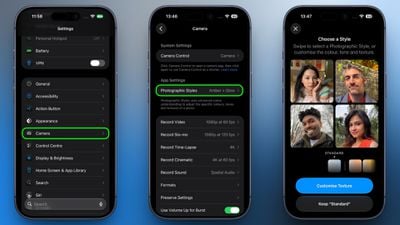
  1. Open the Settings app on your ‌iPhone.
  2. Tap Camera.
  3. Tap Photographic Styles.
  4. Select Customize Texture, Use Standard, or choose a different style.
    change default photographic style 3

Did you know that you can also adjust the photographic style of a picture after it has been taken? Click the link to our dedicated how-to article to learn how.
Related Roundups: iPhone 18 Pro, iPhone Duo
Related Forum: iPhone

Popular Stories

iPhone Duo Outer Display Hand

Apple Aiming to Upgrade the iPhone Duo in Four Ways

Sunday November 15, 2026 8:42 am PST by
Bloomberg's Mark Gurman today said Apple has four goals for future iPhone Duo models: Face ID, an Action button, a telephoto camera, and a thinner-and-lighter design. Gurman said Apple has already developed iPhone Duo 2 prototypes with Face ID on the outer display, but it is "running out of time" to finalize the feature for that model, so it might not arrive until the iPhone Duo...
iPhone Duo Display Cracking

Apple Alerts Stores to iPhone Duo's Display Cracking Issue

Friday October 30, 2026 3:20 pm PDT by
In a memo shared with Apple Stores and Apple Authorized Service Providers this week, and later obtained by MacRumors, Apple provided technicians with guidance on how to diagnose and address the iPhone Duo's inner display cracking issue. If a customer reports the issue, Apple advised technicians to inspect the iPhone Duo and repair or replace it in accordance with their standard procedures....
iphone duo yellow hand

Apple Adds Facial Unlock Option on iPhone Duo in iOS 27.3

Monday November 16, 2026 10:17 am PST by
Apple today added a new option for unlocking the iPhone Duo using the front-facing camera, giving device users multiple ways to access their content. The feature is available in the second iOS 27.3 beta. The option to unlock with facial recognition is only available on the Lock Screen, and authentication via Touch ID is still needed for Apple Pay purchases, adding passwords and logins, and...
Latest Stories
The 50+ Best Apple Black Friday Deals on AirPods, iPads, MacBooks, and More
1 hour ago
Apple's M6 and PROLED MacBook Pro Reach New Low Prices for Black Friday
1 hour ago
The MacRumors Show: iPhone Air 2 and iPhone 18 Are Coming
2 hours ago
Apple Store in Brisbane Reopening Next Month With New Design
2 hours ago
The 60+ Best Black Friday Accessory Deals on iPhone Chargers, TVs, Headphones, and More
3 hours ago
GTA VI Now (Barely) Running on Apple Silicon Macs
3 hours ago
The Best Black Friday Streaming Deals on Apple TV, Disney+, and More
4 hours ago
Apple TV's 'Carême' Wins International Emmy for Best Drama
4 hours ago
iPhone 18 Production Delay Leaves Apple Little Time Before Launch
5 hours ago
The Best Black Friday AirPods Deals
6 hours ago
The Best Black Friday Deals on Apple Home Products
6 hours ago
The Best Black Friday iPhone Deals
6 hours ago
The Best Black Friday iPad Deals
6 hours ago
The Best Black Friday Apple Watch Deals
6 hours ago
The Best Black Friday AirTag Deals
6 hours ago
The Best Black Friday Mac Deals
6 hours ago
iPhone Share of US Smartphone Market Hits 57% as Rivals Slip
7 hours ago
iPhone 20 Pro Rumored to Feature 3D-Printed Titanium Frame
9 hours ago
Apple's Official 2026 Black Friday Offer Starts Rolling Out
1 day ago
Halide Adds Fill Light Feature for iPhone Duo
1 day ago
MacBook Air Black Friday Deals Now Live With Massive $399 Savings
1 day ago
Amazon Discounts All MacBook Neo Models by $99 for Black Friday
1 day ago
Kodak Launches Unique AirTag Rival With E-Ink Display
1 day ago
Here's Why the Apple Store is Going Down
1 day ago
Apple Still Working on Giant Foldable iPad That Could Cost $5,000
1 day ago
iPhones Dominate China's Weak Singles' Day Smartphone Sales
1 day ago
iPhone 20 Pro Could Feature Ceramic in Limited-Edition Model
1 day ago
Apple Faces Korean Regulator Review Over iPhone 16 AI Advertising
1 day ago
Apple Watch Ultra 4 Hits New Best-Ever Price of $649.99 for Black Friday
1 day ago
New Apple Store Opening in India, Download the Special Wallpaper Now
2 days ago
Related Apple News: Local News | Education | Entertainment | Buyers Guide | Iphone