Skip to Content

How to Make Your iPhone Display Dimmer Than Standard Brightness Controls Allow

by

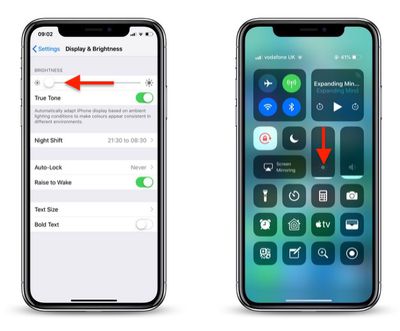
If the screen of your iPhone or iPad is too bright for comfort, the usual solution is to go to Settings -> Display & Brightness and drag the Brightness slider to the left, or open Control Center and adjust the corresponding setting from there.
how to reduce screen brightness further in iOS 1
However, if the lowest setting offered by the Brightness level just isn't dim enough for you, there are a couple of ways to make your screen even darker. One method we've covered previously is to adjust white point using the Accessibility Shortcut. Another way is to enable a low light filter, which you can do by following the steps below.

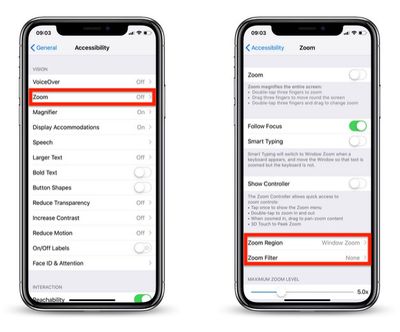
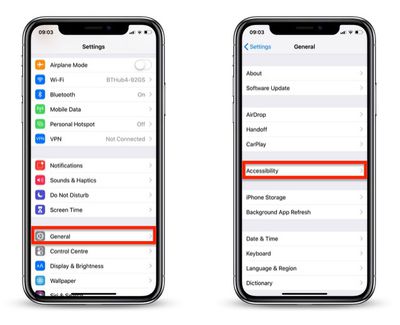
  1. Launch the Settings app on your iOS device.
  2. Tap General.
  3. Tap Accessibility.
    how to reduce screen brightness further in iOS 2

  4. Tap Zoom.
  5. Tap Zoom Region.
    how to reduce screen brightness further in iOS 3

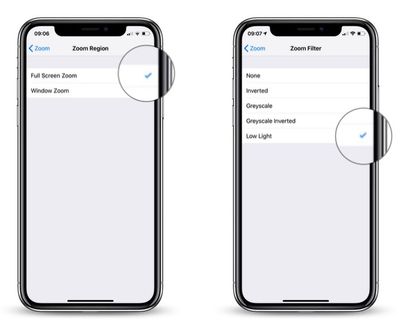
  6. Select Full Screen Zoom and return to the main Zoom menu.
  7. Tap Zoom Filter.
  8. Select Low Light and return to the main Zoom menu.
    how to reduce screen brightness further in iOS 4

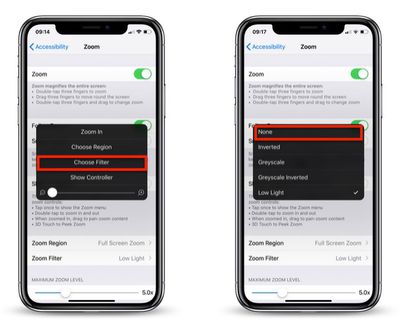
  9. Now, turn on Zoom by toggling the switch at the top of the Zoom menu.
  10. Double-tap the screen with three fingers to zoom out to fullscreen.
how to reduce iphone screen brightness5
Your device's display brightness should now be extra dim. Note that you can disable the low light filter at any time: Simply triple-tap the screen with three fingers, tap Choose Filter from the overlay panel and then select None.

Top Rated Comments

McFreggle Avatar
103 months ago
Settings > General > Accessibility > Accessibility Shortcut > Reduce White Point.

Much simpler than the procedure described in this article. Triple-click on home button (or side button) for reducing the brightness. Triple-clicking again to increase it again.

You're welcome.
Score: 16 Votes (Like | Disagree)
Sovon Halder Avatar
103 months ago
Settings > General > Accessibility > Accessibility Shortcut > Reduce White Point.

Much simpler than the procedure described in this article. Triple-click on home button (or side button) for reducing the brightness. Triple-clicking again to increase it again.

You're welcome.
WARNING : This triple clicking home button accessibility feature brings a noticeable lag into double clicking function.
Score: 4 Votes (Like | Disagree)
jacjustjac Avatar
103 months ago
There’s an easier way to invoke this. At the bottom of the accessibility page, there’s one called “Accessibility Shortcut”. Select Zoom (and I also have Reduce White Point, which in my opinion is more effective). Now when you triple tap your home button (or the sleep wake button if you don’t have one), your screen can instantly dim. It’s that easy.

Lastly, I use Color Filters (Color Tint) found in Display Accomadations to make an extreme version of Night Shift, whereby my screen removes almost 99% of blue and green light, making my screen appear an ultra red. This in my opinion is more effective than lowering the brightness and Night Shift alone, because you can actually have your screen at a comfortable brightness to read black and white text, but still fall easily asleep.

I’d love to help write and article or video on this process, because I use it every night and have no problems falling asleep while using my phone, and I think others can benefit from it too.
Score: 3 Votes (Like | Disagree)
103 months ago
Settings > General > Accessibility > Accessibility Shortcut > Reduce White Point.

Much simpler than the procedure described in this article. Triple-click on home button (or side button) for reducing the brightness. Triple-clicking again to increase it again.

You're welcome.
Any difference between this and Reduce White Point?

Is it redundent to have both enabled?
I was just about to reply to this. The method macrumours shown is far too long-winded.
Yeah I was thinking the same when I read that post. Way too many steps.
Pretty sure Reduce White Point doesn't dim it as much as the Zoom Low Light filter does.
Exactly... sadly this zoom method has been doing the rounds in the last day or so and this is just 100% lazy copy and paste crap.
This method (as well as the Reduce White Point one) have been around for quite a while (at least a number of years and iOS versions).
[doublepost=1547767528][/doublepost]
Has anyone ever complained that their iPhone was too bright?
Sure, in various dark environments, for one.
Score: 2 Votes (Like | Disagree)
103 months ago
The battery
I’m not a fan of the minimum brightness in phones currently. It’s still way too bright if you’re in a dark room/half asleep
Score: 2 Votes (Like | Disagree)
ItzJordan Avatar
103 months ago
Theres probably a thread already, but does anyone else’s iPhone X/XS/XS Max experience the display to dim to a max brightness of 50% when it is quite warm (or doing instense work loads). Also the CPU and graphics seem to be throttled as everything lags while the device is warm to touch.

Experienced it heavily on the iPhone X and worked with Apple to try a resolve this with diagnostics. The performance throttling is less noticeable on the XS Max but the brightness being maxed at 50% is still noticeable...

Intensive usage needs to be occurring in order this to happen. Using Personal Hotspot (downloading/uploading files) while on a FaceTime call on the iPhone usually does the trick... also room temp needs to be around 20°c or warmer maybe. Only noticed in the summer time and noticing the past few days, as I’m over in Australia! :)
Score: 2 Votes (Like | Disagree)

Popular Stories

Apple TV Sign Language Interpretation

New Apple TV Sign Language Feature Announced

Tuesday November 10, 2026 8:54 am PST by
Apple today announced a new accessibility feature for the Apple TV app that gives viewers the option to watch supported movies and shows with on-screen sign language interpretation. An interpreter will appear in the bottom-right corner of the screen, with the experience said to have been designed and tested by Deaf and native signers. The feature is available in the Apple TV app on devices...
apple design award 2025

Apple Announces 2025 Design Award Winners Ahead of WWDC 2025

Tuesday June 3, 2025 10:14 am PDT by
As we wait for WWDC to kick off next Monday, Apple today announced the winners of its annual Apple Design Awards, recognizing apps and games for their innovation, ingenuity, and technical achievement. The 2025 Apple Design Award winners are listed below, with one app and one game selected per category: Delight and Fun - CapWords (App) and Balatro (Game) Innovation - Play (App) and PBJ -...
1password deal blue

1Password Security Breach: What Was Accessed and What Wasn't

Wednesday November 25, 2026 1:09 pm PST by
Popular password management app 1Password today said it experienced a security breach earlier this month. 1Password says some customer names and email addresses were accessed, but no customer vault contents were compromised. On November 19, 1Password saw indications that an employee's GitHub account had been breached and began investigating. The company says the breached GitHub account was...
Latest Stories
The 50+ Best Apple Black Friday Deals on AirPods, iPads, MacBooks, and More
3 hours ago
Apple's M6 and PROLED MacBook Pro Reach New Low Prices for Black Friday
3 hours ago
The MacRumors Show: iPhone Air 2 and iPhone 18 Are Coming
3 hours ago
Apple Store in Brisbane Reopening Next Month With New Design
4 hours ago
The 60+ Best Black Friday Accessory Deals on iPhone Chargers, TVs, Headphones, and More
5 hours ago
GTA VI Now (Barely) Running on Apple Silicon Macs
5 hours ago
The Best Black Friday Streaming Deals on Apple TV, Disney+, and More
6 hours ago
Apple TV's 'Carême' Wins International Emmy for Best Drama
6 hours ago
iPhone 18 Production Delay Leaves Apple Little Time Before Launch
7 hours ago
The Best Black Friday AirPods Deals
7 hours ago
The Best Black Friday Deals on Apple Home Products
8 hours ago
The Best Black Friday iPhone Deals
8 hours ago
The Best Black Friday iPad Deals
8 hours ago
The Best Black Friday Apple Watch Deals
8 hours ago
The Best Black Friday AirTag Deals
8 hours ago
The Best Black Friday Mac Deals
8 hours ago
iPhone Share of US Smartphone Market Hits 57% as Rivals Slip
9 hours ago
iPhone 20 Pro Rumored to Feature 3D-Printed Titanium Frame
10 hours ago
Apple's Official 2026 Black Friday Offer Starts Rolling Out
1 day ago
Halide Adds Fill Light Feature for iPhone Duo
1 day ago
MacBook Air Black Friday Deals Now Live With Massive $399 Savings
1 day ago
Amazon Discounts All MacBook Neo Models by $99 for Black Friday
1 day ago
Kodak Launches Unique AirTag Rival With E-Ink Display
1 day ago
Here's Why the Apple Store is Going Down
1 day ago
Apple Still Working on Giant Foldable iPad That Could Cost $5,000
1 day ago
iPhones Dominate China's Weak Singles' Day Smartphone Sales
1 day ago
iPhone 20 Pro Could Feature Ceramic in Limited-Edition Model
1 day ago
Apple Faces Korean Regulator Review Over iPhone 16 AI Advertising
1 day ago
Apple Watch Ultra 4 Hits New Best-Ever Price of $649.99 for Black Friday
1 day ago
New Apple Store Opening in India, Download the Special Wallpaper Now
2 days ago
Related Apple News: Travel | Reviews | Iphone | South Africa | Ipad