Skip to Content

How to Set Up and Use Accessibility Shortcut on iPhone and iPad

by

accessibilityApple includes a raft of accessibility options in iOS to meet the various needs of its users, allowing them to customize their iPhone and iPad interface in several helpful ways. To make these features quicker to access, Apple also includes an Accessibility Shortcut feature in iOS that, once set up, can be invoked using a triple click of the Home button (or Side button if you have a device with Face ID).

This shortcut feature is ideal for users who could benefit from fast access to a customized menu of accessibility options. It's also a great solution if you just want a quick way to control a single accessibility mode like Reduce White Point, for example, which dims the screen below standard low brightness levels. Here we'll show you how to set up Accessibility Shortcut for either use case.

How to Set up Accessibility Shortcut in iOS

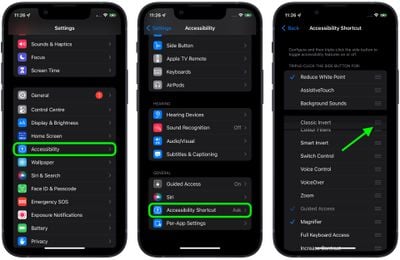
  1. Launch the Settings app on your iPhone or ‌iPad‌.

  2. Tap Accessibility.

  3. Scroll down to the bottom of the list and tap Accessibility Shortcut.

  4. Tap the options you'd like to include in the shortcut menu. You can also drag on the bars at the far right of each option to change the order in which they appear.
    settings

Here are just some of the Accessibility options available to you:

  • AssistiveTouch: Enables the AssistiveTouch onscreen menu, which can help users perform gestures, and find and adjust certain settings like volume, Rotate Screen, Lock Screen, and more.
  • Classic Invert Colors: Inverts all colors on the screen, which can be invaluable for users with certain visual impairments.
  • Color Filters: Specific filters and tint options for users with different types of color blindness.
  • Reduce White Point: Dims the brightness of whites and bright colors on the screen.
  • Smart Invert Colors: Like classic invert, above, but inverts only certain areas of the user interface and leaves images and some graphical elements in their original format and colors.
  • Switch Control: Management hub for controlling ability switches and other adaptive devices, for users with limited mobility.
  • VoiceOver: Makes your iOS device speak to you during use – helpful for people who have trouble seeing display information.
  • Zoom: Three-fingered double tap zoom function that makes display elements bigger and easier to read.

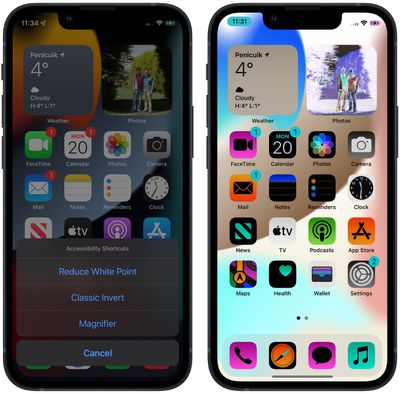
Note that if you tick only one option for your Accessibility Shortcut, you can enable it instantly with a triple-click of the Side/Home button. If you've ticked several, the triple-click action brings up the Accessibility Shortcut menu. Then just tap the option you want to use.
accessibility
If you're having trouble pressing the Side/Home button three times in quick succession, you can adjust the triple-click speed by going to Settings -> Accessibility -> Side Button / Home Button. Alternatively, you can add the Accessibility Shortcut to Control Center in the following way.

How to Add Accessibility Shortcut to Control Center

  1. Launch the Settings app.
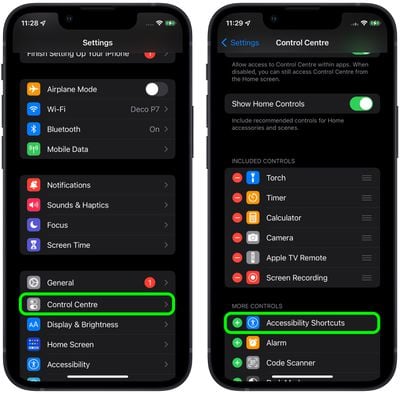
  2. Tap Control Center.
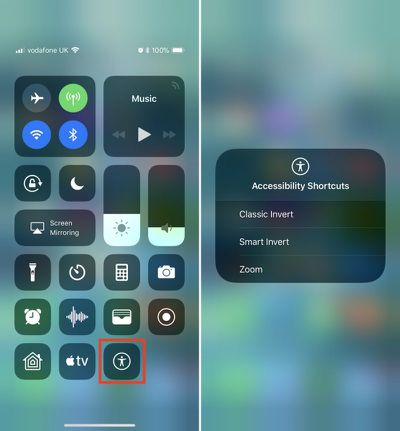
  3. Find Accessibility Shortcuts under the "More Controls" list and then tap the entry to include it in Control Center.
    settings

  4. Next, launch Control Center on your iOS device in the following manner: On ‌iPad‌, double-tap the Home button; on iPhone 8 or earlier, swipe up from the bottom of the screen; or on an iPhone with ‌Face ID‌, swipe down from the upper right "ear".
  5. Tap the Accessibility Shortcut button in the Control Center grid and select the desired accessibility option from the onscreen menu.
    accessibility 5

Top Rated Comments

Apple_Robert Avatar
114 months ago
Another good article from MacRumors. I hope that articles like this appear weekly, as there are many people who may not know the proverbial in and outs of iOS.
Score: 2 Votes (Like | Disagree)

Popular Stories

Apple TV Sign Language Interpretation

New Apple TV Sign Language Feature Announced

Tuesday November 10, 2026 8:54 am PST by
Apple today announced a new accessibility feature for the Apple TV app that gives viewers the option to watch supported movies and shows with on-screen sign language interpretation. An interpreter will appear in the bottom-right corner of the screen, with the experience said to have been designed and tested by Deaf and native signers. The feature is available in the Apple TV app on devices...
apple design award 2025

Apple Announces 2025 Design Award Winners Ahead of WWDC 2025

Tuesday June 3, 2025 10:14 am PDT by
As we wait for WWDC to kick off next Monday, Apple today announced the winners of its annual Apple Design Awards, recognizing apps and games for their innovation, ingenuity, and technical achievement. The 2025 Apple Design Award winners are listed below, with one app and one game selected per category: Delight and Fun - CapWords (App) and Balatro (Game) Innovation - Play (App) and PBJ -...
1password deal blue

1Password Security Breach: What Was Accessed and What Wasn't

Wednesday November 25, 2026 1:09 pm PST by
Popular password management app 1Password today said it experienced a security breach earlier this month. 1Password says some customer names and email addresses were accessed, but no customer vault contents were compromised. On November 19, 1Password saw indications that an employee's GitHub account had been breached and began investigating. The company says the breached GitHub account was...
Latest Stories
The 50+ Best Apple Black Friday Deals Still Available on AirPods, iPads, and More
7 hours ago
HomePod Mini 2 in (RED) Seemingly Spotted Ahead of Announcement
4 hours ago
Apple's M6 and PROLED MacBook Pro Reach New Low Prices for Black Friday
14 hours ago
The MacRumors Show: iPhone Air 2 and iPhone 18 Are Coming
14 hours ago
Apple Store in Brisbane Reopening Next Month With New Design
15 hours ago
The 60+ Best Black Friday Accessory Deals on iPhone Chargers, TVs, Headphones, and More
15 hours ago
GTA VI Now (Barely) Running on Apple Silicon Macs
16 hours ago
The Best Black Friday Streaming Deals on Apple TV, Disney+, and More
16 hours ago
Apple TV's 'Carême' Wins International Emmy for Best Drama
17 hours ago
iPhone 18 Production Delay Leaves Apple Little Time Before Launch
18 hours ago
The Best Black Friday AirPods Deals Still Available
10 hours ago
The Best Black Friday Deals on Apple Home Products
18 hours ago
The Best Black Friday iPhone Deals Still Available
10 hours ago
The Best Black Friday iPad Deals Still Available
10 hours ago
The Best Black Friday Apple Watch Deals Still Available
10 hours ago
The Best Black Friday AirTag Deals Still Available
10 hours ago
The Best Black Friday Mac Deals Still Available
10 hours ago
iPhone Share of US Smartphone Market Hits 57% as Rivals Slip
20 hours ago
iPhone 20 Pro Rumored to Feature 3D-Printed Titanium Frame
21 hours ago
Apple's Official 2026 Black Friday Offer Starts Rolling Out
2 days ago
Halide Adds Fill Light Feature for iPhone Duo
2 days ago
MacBook Air Black Friday Deals Now Live With Massive $399 Savings
2 days ago
Amazon Discounts All MacBook Neo Models by $99 for Black Friday
2 days ago
Kodak Launches Unique AirTag Rival With E-Ink Display
2 days ago
Here's Why the Apple Store is Going Down
2 days ago
Apple Still Working on Giant Foldable iPad That Could Cost $5,000
2 days ago
iPhones Dominate China's Weak Singles' Day Smartphone Sales
2 days ago
iPhone 20 Pro Could Feature Ceramic in Limited-Edition Model
2 days ago
Apple Faces Korean Regulator Review Over iPhone 16 AI Advertising
2 days ago
Apple Watch Ultra 4 Hits New Best-Ever Price of $649.99 for Black Friday
2 days ago
Related Apple News: Local News | Airpods Pro | Iphone Deals | Mac | Enable Sound Recognition Apple Watch Listen