Skip to Content

How to Use Instant Tuning in iOS 12 and Change Notification Behavior on the Fly

by

As part of its digital health initiative in iOS 12, Apple has introduced some improvements to the way app notifications can be managed, enabling users to more easily reduce the number of daily distractions their iPhone or iPad throws their way.

One of these new features is called Instant Tuning, which allows you to quickly adjust the future behavior of app notifications whenever they appear in the Lock Screen or the Notifications Center. Here's how to make the most of it.

How to Use Instant Tuning in iOS 12

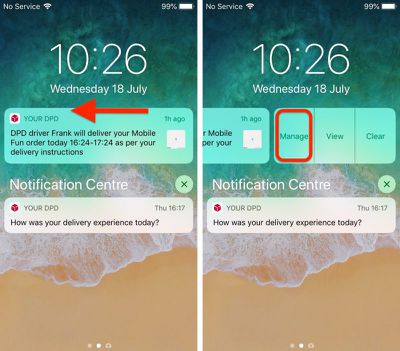
Next time an alert appears in your device's Notifications Center or on the Lock Screen, swipe left on it, then tap Manage. Alternatively, if your device supports 3D Touch, hard press on the alert and then tap the three dots in the upper right corner of the expanded notification.
ios 12 notifications instant tuning 1
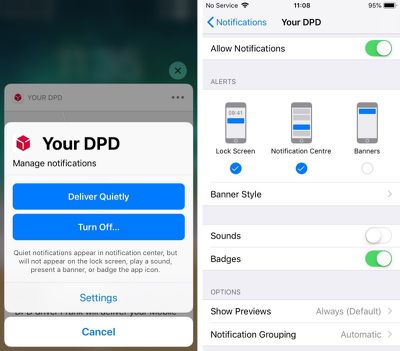
A Manage Notifications pop-up will appear on the screen featuring two blue button options. Deliver Quietly ensures future alerts from this app only appear in the Notification Center (accessed by swiping down from the top of your device's screen).

Note that selecting this option means alerts will no longer show in the Lock Screen and you won't see any banner notifications on any other screens. Deliver Quietly also turns off any sound or vibration alerts set for the associated app.

If you tap Deliver Quietly and then decide you'd rather not stick with the setting, open the Manage Notifications pop-up again in the same way and tap the Deliver Prominently button to reinstate the previous settings.
ios 12 fine tuning notifications 2
The second option, Turn Off..., completely disables all notifications for the related app. Tap this button and you will be prompted to confirm it's what you want.

Below the two large blue buttons is a less prominent Settings button that takes you to the individual app's various notification options, usually accessed via the main Settings app.

From here you can adjust where alerts should appear (if at all), enable or disable sounds and badges, select alert preview options (Always, When Unlocked, Never) and choose how notifications should be grouped (Automatic, By App, Off).


Related Forum: iOS 12

Top Rated Comments

mdelvecchio Avatar
109 months ago
Why on earth would you want quiet notifications?

The only difference between quiet notifications and no notifications is that quiet notifications adds them to a hidden app with no proper UI. The only time I ever open notification center is if I saw a banner that I was reading that hid itself too quickly. Without having it appear on the lock screen or as a banner, I'd never even know to open notification center to look for anything.
Is it really so hard to imagine? There are plenty of things that I'd like to know about but are not time sensitive and therefore do not wish to bother me with a chime or alert.
Score: 6 Votes (Like | Disagree)
jonnysods Avatar
109 months ago
I'm wondering when they are going to redesign iOS. Look at the DPD buttons. Two blue, two plain at the bottom. So much text. Sometimes it strikes me as odd.
Score: 5 Votes (Like | Disagree)
Mr Lizard Avatar
109 months ago
Why on earth would you want quiet notifications?

The only difference between quiet notifications and no notifications is that quiet notifications adds them to a hidden app with no proper UI. The only time I ever open notification center is if I saw a banner that I was reading that hid itself too quickly. Without having it appear on the lock screen or as a banner, I'd never even know to open notification center to look for anything.
Surprise! Different people use their phones in different ways.

I’m loving this feature in the beta. I’ve changed most of my notifications to Deliver Quietly. I’m definately less distracted as a result, and when I want to catch up on what I’ve missed I just swipe down to reveal Notification Center and everything is there in one place. I can then either tap to open the relevant app or just dismiss the notifications if they’re not worthy of my time.
Score: 3 Votes (Like | Disagree)
109 months ago
Yes, I get that you don't want to be bombarded with banners and sounds. In that case, you set the app to only display the badge on its icon, which Quiet Notifications disables.

With the badge, you know how many notifications you have waiting for you in the app, plus that little reminder that the app exists and has useful data. And then you launch it and it has a nice UI for showing you whatever it has.

With Notification Center, you don't know what's in there until you open it. You have no reminders that it exists or that it needs to be checked. And should you open it, the UI is garbage. Checking your email from a command line has a better UI than Notification Center.
So... don't use Quiet Notifications. Problem solved. I myself will probably for some things, but you are definitely not being forced to.
Score: 3 Votes (Like | Disagree)
JohnnyW2K1 Avatar
109 months ago
Nifty feature. Agree about the redesign. I’ve never liked the look of Jony Ive’s iOS, although it’s improved as time has passed.
Score: 3 Votes (Like | Disagree)
ArtOfWarfare Avatar
107 months ago
I agree, I think that the iOS settings need to have a UX makeover as they’re getting complicated and confusing regarding where everything is, as you mentioned.


Ie another case in point is that bedtime is in iOS settings but it’s also in the clock. Makes sense I guess but...

Also, for a few years now, it’s not been obvious if an app’s settings are in the app itself or in iOS settings.

Commonly system wide settings for the app are in iOS settings (notifications and privacy etc) whereas app specific settings are in the app itself - but sometimes they are all in iOS settings, depending on what the dev decides.

You try and explain all of that to your parents!
My parents aren't a problem. My dad is as up on this as I am, and my mom refuses to ever upgrade anything or use it to it's full potential.

It's my in-laws that are a problem. They want to upgrade and keep up with everything, but they don't do it on their own, so they ask me for assistance.
Score: 1 Votes (Like | Disagree)

Popular Stories

apple design award 2025

Apple Announces 2025 Design Award Winners Ahead of WWDC 2025

Tuesday June 3, 2025 10:14 am PDT by
As we wait for WWDC to kick off next Monday, Apple today announced the winners of its annual Apple Design Awards, recognizing apps and games for their innovation, ingenuity, and technical achievement. The 2025 Apple Design Award winners are listed below, with one app and one game selected per category: Delight and Fun - CapWords (App) and Balatro (Game) Innovation - Play (App) and PBJ -...
1password deal blue

1Password Security Breach: What Was Accessed and What Wasn't

Wednesday November 25, 2026 1:09 pm PST by
Popular password management app 1Password today said it experienced a security breach earlier this month. 1Password says some customer names and email addresses were accessed, but no customer vault contents were compromised. On November 19, 1Password saw indications that an employee's GitHub account had been breached and began investigating. The company says the breached GitHub account was...
apple store down feature

Here's Why the Apple Store is Going Down

Thursday November 26, 2026 5:49 am PST by
Apple's online store is going down for a few hours on a rolling country-by-country basis right now, but do not get your hopes up for new products. Apple takes its online store down for a few hours ahead of Black Friday every year to tease its annual gift card offer with the purchase of select products. The store is down in Australia, New Zealand, and Thailand, right now, and it will...
Latest Stories
The 50+ Best Apple Black Friday Deals Still Available on AirPods, iPads, and More
2 hours ago
Apple's M6 and PROLED MacBook Pro Reach New Low Prices for Black Friday
7 hours ago
The MacRumors Show: iPhone Air 2 and iPhone 18 Are Coming
7 hours ago
Apple Store in Brisbane Reopening Next Month With New Design
7 hours ago
The 60+ Best Black Friday Accessory Deals on iPhone Chargers, TVs, Headphones, and More
8 hours ago
GTA VI Now (Barely) Running on Apple Silicon Macs
8 hours ago
The Best Black Friday Streaming Deals on Apple TV, Disney+, and More
9 hours ago
Apple TV's 'Carême' Wins International Emmy for Best Drama
10 hours ago
iPhone 18 Production Delay Leaves Apple Little Time Before Launch
10 hours ago
The Best Black Friday AirPods Deals Still Available
2 hours ago
The Best Black Friday Deals on Apple Home Products
11 hours ago
The Best Black Friday iPhone Deals Still Available
2 hours ago
The Best Black Friday iPad Deals Still Available
2 hours ago
The Best Black Friday Apple Watch Deals Still Available
2 hours ago
The Best Black Friday AirTag Deals Still Available
2 hours ago
The Best Black Friday Mac Deals Still Available
2 hours ago
iPhone Share of US Smartphone Market Hits 57% as Rivals Slip
12 hours ago
iPhone 20 Pro Rumored to Feature 3D-Printed Titanium Frame
14 hours ago
Apple's Official 2026 Black Friday Offer Starts Rolling Out
1 day ago
Halide Adds Fill Light Feature for iPhone Duo
1 day ago
MacBook Air Black Friday Deals Now Live With Massive $399 Savings
1 day ago
Amazon Discounts All MacBook Neo Models by $99 for Black Friday
1 day ago
Kodak Launches Unique AirTag Rival With E-Ink Display
1 day ago
Here's Why the Apple Store is Going Down
1 day ago
Apple Still Working on Giant Foldable iPad That Could Cost $5,000
1 day ago
iPhones Dominate China's Weak Singles' Day Smartphone Sales
1 day ago
iPhone 20 Pro Could Feature Ceramic in Limited-Edition Model
2 days ago
Apple Faces Korean Regulator Review Over iPhone 16 AI Advertising
2 days ago
Apple Watch Ultra 4 Hits New Best-Ever Price of $649.99 for Black Friday
2 days ago
New Apple Store Opening in India, Download the Special Wallpaper Now
2 days ago
Related Apple News: Iphone 16 Pro Vs 18 Pro | Iphone 18 Pro Texture Controls Photographic Styles | Iphone Duo Split Keyboard Landscape Mode | Iphone 18 Pro Record Time Lapse Video 4k | Bluetti Elite 10 Power Station






























