Skip to Content

How to Sign Up for iCloud Family Storage Plans in iOS 11

by

Apple's Family Sharing feature allows you to share music, movies, apps, photos, and more with family members, and in iOS 11, Family Sharing extends to Apple's iCloud Storage plans.

When you purchase a 200GB or 2TB iCloud Storage plan, all members of your family can share the storage space. Depending on how many family members you have, family plans offer more storage at a better price than individual plans.

For example, a 50GB storage plan is priced at $0.99 per person. For two people, the $2.99 200GB plan offers each person an additional 50GB of storage for only $1 more.

How to Upgrade to a Family iCloud Storage Plan

  1. Open the Settings app.
  2. Tap on your Apple ID profile at the top of the app.
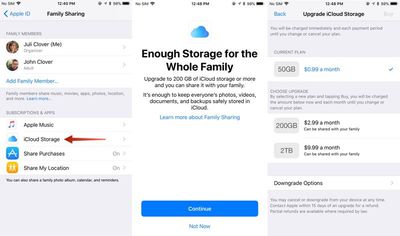
  3. Choose "Family Sharing," the sixth option in the list.icloudfamilysharing
  4. Tap on "iCloud Storage" to bring up a notice about the new Family Sharing options.
  5. Click "Continue" to choose a plan.
  6. Pick a 200GB or 2TB plan.

You can also access the plan settings through the standard iCloud Storage menu in the Settings app, accessible by going to iCloud > Manage Storage after tapping on your profile.

How to Stop Sharing iCloud Storage With Family

You can sign up for a 2TB or 200GB storage plan and keep family members from accessing your storage space. Here's how:

  1. Open the Settings app.
  2. Tap on your Apple ID profile.
  3. Choose "Family Sharing."
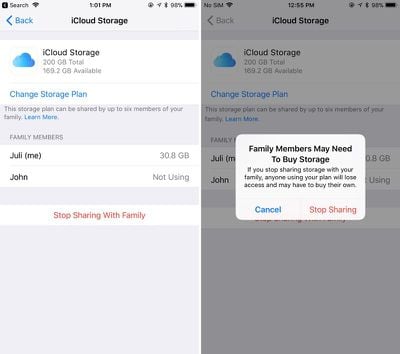
  4. Choose "iCloud Storage."familystoragestopsharing
  5. Tap on "Stop Sharing With Family."

How to Downgrade iCloud Storage

If you want to go back to a cheaper iCloud Storage option, downgrading is as simple as choosing a new plan. New rates won't kick in until the next billing period.

  1. Open the Settings app.
  2. Tap on your Apple ID profile.
  3. Choose "iCloud."
  4. Tap on "Manage Storage."
  5. Choose "Change" under the iCloud Storage option.
  6. Select a 5GB or 50GB plan to downgrade.

It's important to note that there's no way to allocate how much storage each person gets when using one of Apple's new iCloud Storage plans for families, so it's not always an even split. If a family member is hogging too much space, that's a problem that will need to be worked out offline. You can see how much storage each family member is using by going to profile > Family Sharing > iCloud Storage.
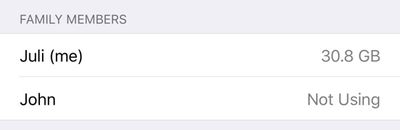
familystoragespaceused
When you choose a 200GB or 2TB storage plan and opt in to Family Sharing, family members who are on the free 5GB plan will be upgraded automatically and will begin using the family storage plan.

Family members who already have a paid plan will need to opt in to the family storage plan to transfer over from their own plans. If they want to have separate storage, your family members can continue to pay for their own plans and choose not to opt into the family plan.

To let your family know that you've signed up for a family iCloud plan, Apple offers an automatic iMessage alert that can be sent out to family members that lets them easily switch over to the family plan.

Tag: iCloud

Top Rated Comments

Blackstick Avatar
120 months ago
Great. When can I share the damn Photos library with my wife?
Score: 11 Votes (Like | Disagree)
120 months ago
This is a great question. I hope so because the shared folders are not full resolution. I want to share photo library with my wife but with current iCliud set up it can't be done. Basically the way it works now is one of us has he main photo library that is synced to the family iMac and one has another iCloud account where we have to airdrop the pics we want into the main one.
This is why my wife and I still use the same iCloud account when setting up our iPhones. I just make sure I turn some things off that conflict between the two (or that we don't want - iCloud Drive, iMessages and FaceTime for each others number etc), and just live with it. But in an ideal world, we should be able to have our own accounts under family sharing, and just sync the same default photo albums. I like how I can just open up my Photos app and see what photos my wife has taken of my kids today when they were out, and vice versa.
Score: 4 Votes (Like | Disagree)
load97 Avatar
120 months ago
+1, need! As it stands, we have to manually copy photos in to a shared album. It's silly.
It’s embarrassing for Apple.
Score: 3 Votes (Like | Disagree)
Anonymous Freak Avatar
120 months ago
Great. When can I share the damn Photos library with my wife?
+1, need! As it stands, we have to manually copy photos in to a shared album. It's silly.
Score: 3 Votes (Like | Disagree)
Eduardo1971 Avatar
120 months ago
Thank you for the reminder MR!!!

With all these iOS 11 goodies I totally forgot about this...I’m adding my family to this!!
Score: 3 Votes (Like | Disagree)
120 months ago
Wish you could use family sharing and still have each Apple ID on a separate credit card.
Score: 2 Votes (Like | Disagree)

Popular Stories

General iCloud App Feature

Apple Says iCloud+ Plans Will Not Include Increased Siri AI Usage in UK

Tuesday November 17, 2026 7:07 am PST by
Apple on Monday announced that it is implementing daily usage limits on Siri AI and select other Apple Intelligence features that rely on "powerful server models" starting with iOS 27.3 and corresponding software updates, but increased access will be included with most iCloud+ plans at no additional cost in most countries, with one notable exception. In a support document, Apple said...
iCloud Link Harmful Content Feature 1

Apple Will Check Public iCloud Links for Harmful Content Starting in iOS 27.3

Wednesday November 4, 2026 11:12 am PST by
Apple says it will start checking public iCloud links for harmful content in iOS 27.3, iPadOS 27.3, macOS 27.3, and visionOS 27.3. Images in iCloud Photos and files in iCloud Drive shared using the "Anyone with the link" option will be "made accessible to Apple" for a content check. Apple doesn't define harmful content, but it could mean malware, malicious files, and/or child sexual abuse...
Siri AI Icon

Apple Continues to Say Some AI Features Will Have Fees for Extra Usage

Monday November 9, 2026 9:45 am PST by
Apple continues to advise customers that certain Apple Intelligence features that rely on its server-side Private Cloud Compute system have daily usage limits, with expanded access to such features to be "available for a fee in the future." Apple has repeatedly mentioned these upcoming fees in press releases over the past several months, but it has yet to provide any specific details about...
Latest Stories
Here Are the Best Apple Black Friday Leftover Deals You Can Get Today
5 hours ago
HomePod Mini 2 in (RED) Seemingly Spotted Ahead of Announcement
17 hours ago
Apple's M6 and PROLED MacBook Pro Reach New Low Prices for Black Friday
1 day ago
The MacRumors Show: iPhone Air 2 and iPhone 18 Are Coming
1 day ago
Apple Store in Brisbane Reopening Next Month With New Design
1 day ago
The 60+ Best Black Friday Accessory Deals on iPhone Chargers, TVs, Headphones, and More
5 hours ago
GTA VI Now (Barely) Running on Apple Silicon Macs
1 day ago
The Best Black Friday Streaming Deals on Apple TV, Disney+, and More
1 day ago
Apple TV's 'Carême' Wins International Emmy for Best Drama
1 day ago
iPhone 18 Production Delay Leaves Apple Little Time Before Launch
1 day ago
The Best Black Friday AirPods Deals Still Available
23 hours ago
The Best Black Friday Deals on Apple Home Products
1 day ago
The Best Black Friday iPhone Deals Still Available
23 hours ago
The Best Black Friday iPad Deals Still Available
23 hours ago
The Best Black Friday Apple Watch Deals Still Available
23 hours ago
The Best Black Friday AirTag Deals Still Available
23 hours ago
The Best Black Friday Mac Deals Still Available
23 hours ago
iPhone Share of US Smartphone Market Hits 57% as Rivals Slip
1 day ago
iPhone 20 Pro Rumored to Feature 3D-Printed Titanium Frame
1 day ago
The 50+ Best Apple Black Friday Deals Still Available on AirPods, iPads, and More
7 hours ago
Apple's Official 2026 Black Friday Offer Starts Rolling Out
2 days ago
Halide Adds Fill Light Feature for iPhone Duo
2 days ago
MacBook Air Black Friday Deals Now Live With Massive $399 Savings
2 days ago
Amazon Discounts All MacBook Neo Models by $99 for Black Friday
2 days ago
Kodak Launches Unique AirTag Rival With E-Ink Display
2 days ago
Here's Why the Apple Store is Going Down
2 days ago
Apple Still Working on Giant Foldable iPad That Could Cost $5,000
2 days ago
iPhones Dominate China's Weak Singles' Day Smartphone Sales
2 days ago
iPhone 20 Pro Could Feature Ceramic in Limited-Edition Model
2 days ago
Apple Faces Korean Regulator Review Over iPhone 16 AI Advertising
2 days ago
Related Apple News: Bloomberg Com | Disable Touch Macbook Pro Proled Xdr Sidecar | Apple Homeview | Foldable Ipad | Apple Watch Series 10 Rumors