Skip to Content

How to Set Up Your New HomePod

by

Before you can start using your new Apple HomePod, you'll need to set it up using an iPhone or iPad that's synced to an iCloud account.
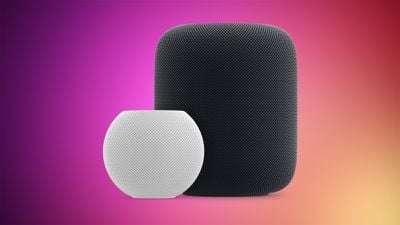
HomePod 2 and Mini feature 2
During the setup process, ‌HomePod‌ will link the ‌iCloud‌ account to personal request features accessed through the speaker via Siri voice commands, such as the ability to send messages, set up reminders, and get calendar notifications.

It will also link the ‌HomePod‌ to any existing Apple Music subscription tied to that ‌iCloud‌/iTunes user, so it's worth thinking carefully about which account holder in your household you want to associate with the speaker.

For the ‌HomePod‌ setup process to work you'll need an iOS device running iOS 16.3 or later, so check your iPhone or ‌iPad‌ is up to date. To do so, open the Settings app, tap General -> About, and look for the version number. If you need to update, tap back to Settings, select Software Update, and follow the onscreen instructions.

Enable iCloud Keychain and Two-Factor Authentication

To pair ‌HomePod‌ with your chosen ‌iCloud‌ account you'll also need to have ‌iCloud‌ Keychain and Two-Factor Authentication enabled. You can simplify the the speaker's setup process by making sure these functions are already activated. See our separate step-by-step guides for using iCloud Keychain and Two-Factor Authentication on your ‌iPad‌ and iPhone, and meet us back here when you've enabled both.

Once you've unboxed the ‌HomePod‌, place it on a stable flat surface that's about waist-height and close to a power outlet. Don't worry too much about where you put it in the room, as ‌HomePod‌ will dynamically adjust its audio output by analyzing the environmental acoustics. Now plug in the speaker unit using the supplied power cable and follow the instructions below.

Initial HomePod Setup Using an iPhone or iPad

You're now ready to begin the account-linking setup procedure for your new ‌HomePod‌. The speaker will communicate wirelessly with other Apple devices, so if you've ever connected a pair of wireless AirPods to an iPhone or ‌iPad‌ then you're already in familiar territory. Here are all the steps you need to follow to set up ‌HomePod‌.

  1. Make sure your iPhone or ‌iPad‌ has Bluetooth turned on, and bring it close to the speaker.
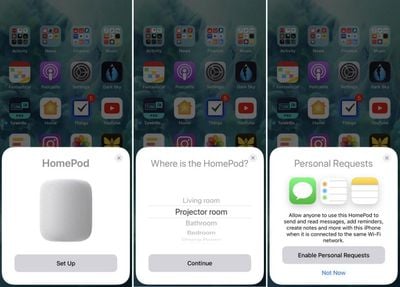
  2. Tap Set Up on the pairing card that appears on your iOS device's screen.
  3. If you have HomeKit enabled and use multiple homes, you'll be asked which one you want ‌HomePod‌ to be associated with. Choose an option from the list and tap Continue.
  4. Select which room of your home the ‌HomePod‌ is in and tap Continue.
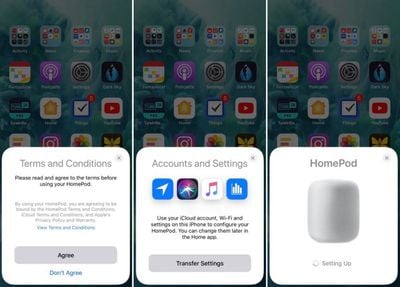
    homepod setup 1
  5. Select Enable Personal Requests to let ‌Siri‌ access your messages, reminders, and notes whenever your iOS device is on the same Wi-Fi network, or tap Not now if you'd rather not grant this permission for privacy reasons. You can adjust this setting later.
  6. If you enabled Personal Requests in the last step, you'll be asked if you want to "Use This Device" when sharing your location. You can either tap to agree, or tap Don't Enable to turn off the Personal Requests function.
  7. Tap Continue on the "‌Siri‌ on ‌HomePod‌" card.
  8. Tap Agree to agree to Apple's terms and conditions.
  9. Tap Transfer Settings to use your ‌iCloud‌ account, Wi-Fi, and other relevant settings on your iPhone or ‌iPad‌ to configure your ‌HomePod‌. You can change them later in the Home app.
homepod setup part 2
At this point, any existing ‌Apple Music‌ subscription will automatically be synced to ‌HomePod‌, while users without a subscription will be offered a free three-month trial.

Note that if the setup screen doesn't appear automatically (step 2 above), open the Home app on your iOS device, tap the plus (+) symbol in the upper right of the screen, and then tap Add Accessory. Lastly, tap "Don't Have a Code or Can't Scan?" and select ‌HomePod‌ in the "Nearby Accessories" list.

Related Roundups: HomePod, HomePod mini 2

Top Rated Comments

115 months ago
Hmmm. I have 2 different accounts. One for Apple Music (set up long before itunes store, icloud etc) and one for everything else (reminders, messages, etc). Am I screwed?
It allowed me to use two accounts that it automatically took from my phone setup. One I use for the Apple Store (music) and one for my iCloud (notes, iMessage etc.).
Score: 1 Votes (Like | Disagree)
bruinsrme Avatar
115 months ago
I read that as well, I thought that meant that it could be registered at the same time however it was not clear if it could play at the same time?
I just signed up for the family plan.
I’m curious if it will play any playlist from anyone under the plan.
For instance
Siri play Scott’s hair band playlist
Siri play Julianne’s pop playlist.
Score: 1 Votes (Like | Disagree)
bruinsrme Avatar
115 months ago
Any Apple product that needs a guide to set it up has already failed...Can't wait to hear it though!! :)
I was less than impressed with the guide.
Sign in to your iCloud account
Turn on HP
Follow prompts
Enjoy
:p:p
[doublepost=1518173621][/doublepost]
Does anyone know what happens if I link my account (with music subscription) to the HomePod and my OH wants to stream via it at the same time as me streaming on a train? We have 2 personal subscriptions (free with phone plans for 6 months).
It’s been mentioned that stream to the HomePod doesn’t count as a device. If it did it would render the HP useless.
Not sure if that answers your question.
Score: 1 Votes (Like | Disagree)

Popular Stories

AirPods Max and HomePod mini Red Mock 2

Apple Bringing Back (PRODUCT)RED With Red HomePod Mini 2 and AirPods Max 2

Monday November 23, 2026 11:27 am PST by
Apple plans to release (PRODUCT)RED versions of the HomePod mini 2 and AirPods Max 2, reports Bloomberg. The new products will be part of Apple's annual fundraiser for The Global Fund to Fight AIDS, Tuberculosis and Malaria in developing countries. The red HomePod mini 2 and AirPods Max 2 could be introduced on World AIDS Day, which falls on Tuesday, December 1. The HomePod mini will have ...
AirPods Max and HomePod mini Red Mock 2

Apple to Release Four (RED) Products by Next Week

Tuesday November 24, 2026 6:33 am PST by
Bloomberg's Mark Gurman this week reported that Apple plans to release (PRODUCT)RED versions of the existing AirPods Max 2 and HomePod mini 2 on or around Tuesday, December 1, which is World AIDS Day. The new color will likely be the only change. AirPods Max 2 and HomePod mini 2 in (PRODUCT)RED (concept) Gurman said the (PRODUCT)RED version of the HomePod mini 2 will have a red mesh exterior, ...
Four HomePod Mini 2 Surround Sound

Does HomePod Mini 2 Have Improved Sound? Here's What Reviews Say

Wednesday November 4, 2026 6:52 am PST by
Apple's press release for the HomePod mini 2 last month touted "rich sound" and "advanced computational audio," but it did not explicitly mention if the second-generation model has better sound compared to the original. A few early reviews of the speaker, however, said that audio quality has in fact improved. Apple's tech specs pages for both the HomePod mini 2 and the original HomePod mini...
Latest Stories
The 50+ Best Apple Black Friday Deals Still Available on AirPods, iPads, and More
5 hours ago
HomePod Mini 2 in (RED) Seemingly Spotted Ahead of Announcement
2 hours ago
Apple's M6 and PROLED MacBook Pro Reach New Low Prices for Black Friday
13 hours ago
The MacRumors Show: iPhone Air 2 and iPhone 18 Are Coming
13 hours ago
Apple Store in Brisbane Reopening Next Month With New Design
13 hours ago
The 60+ Best Black Friday Accessory Deals on iPhone Chargers, TVs, Headphones, and More
14 hours ago
GTA VI Now (Barely) Running on Apple Silicon Macs
14 hours ago
The Best Black Friday Streaming Deals on Apple TV, Disney+, and More
15 hours ago
Apple TV's 'Carême' Wins International Emmy for Best Drama
16 hours ago
iPhone 18 Production Delay Leaves Apple Little Time Before Launch
16 hours ago
The Best Black Friday AirPods Deals Still Available
8 hours ago
The Best Black Friday Deals on Apple Home Products
17 hours ago
The Best Black Friday iPhone Deals Still Available
8 hours ago
The Best Black Friday iPad Deals Still Available
8 hours ago
The Best Black Friday Apple Watch Deals Still Available
8 hours ago
The Best Black Friday AirTag Deals Still Available
8 hours ago
The Best Black Friday Mac Deals Still Available
8 hours ago
iPhone Share of US Smartphone Market Hits 57% as Rivals Slip
18 hours ago
iPhone 20 Pro Rumored to Feature 3D-Printed Titanium Frame
20 hours ago
Apple's Official 2026 Black Friday Offer Starts Rolling Out
2 days ago
Halide Adds Fill Light Feature for iPhone Duo
2 days ago
MacBook Air Black Friday Deals Now Live With Massive $399 Savings
2 days ago
Amazon Discounts All MacBook Neo Models by $99 for Black Friday
2 days ago
Kodak Launches Unique AirTag Rival With E-Ink Display
2 days ago
Here's Why the Apple Store is Going Down
2 days ago
Apple Still Working on Giant Foldable iPad That Could Cost $5,000
2 days ago
iPhones Dominate China's Weak Singles' Day Smartphone Sales
2 days ago
iPhone 20 Pro Could Feature Ceramic in Limited-Edition Model
2 days ago
Apple Faces Korean Regulator Review Over iPhone 16 AI Advertising
2 days ago
Apple Watch Ultra 4 Hits New Best-Ever Price of $649.99 for Black Friday
2 days ago
Related Apple News: Travel | Business | Ipad | News | Education