Skip to Content

How to Use iCloud Keychain on Your iOS Devices

by

icloud keychainiCloud Keychain is a feature of your Apple account that you can use to keep your website login credentials, personal details, credit card details, and wireless network information up to date and available across all your Apple devices.

With so many usernames and passwords to remember these days, iCloud Keychain provides a convenient way of always having this information at hand. And with its AutoFill feature, iCloud Keychain can even enter your credentials for you when required.

It's also very secure, thanks to Apple's use of end-to-end encryption. This means that only you can access your information, and only on devices where you're signed in to iCloud. Keep reading to learn how to enable iCloud Keychain on your iOS devices.

How to Enable iCloud Keychain on Your iPhone or iPad

  1. Open the Settings app and tap your Apple ID banner at the top of the Settings menu.
  2. Tap iCloud.
  3. Scroll down the list and select Keychain.
  4. Toggle on the iCloud Keychain switch and enter your Apple ID password if prompted.
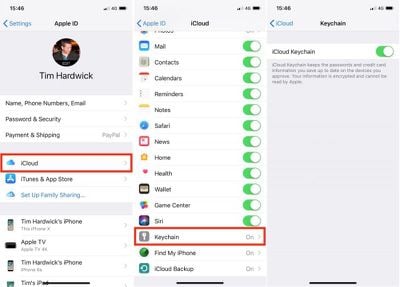
icloud keychain 1
If this is the first time you've enabled iCloud Keychain, you'll be asked to create an iCloud Security Code or use your existing device passcode. You'll also need to enter a phone number where you can receive SMS messages for authorization purposes. If you've already enabled iCloud Keychain in the past, you'll be prompted to enter the passcode that was used to set it up previously.

Accessing Your Login Details in iCloud Keychain

With iCloud Keychain enabled, Apple's Autofill feature will fill in your login credentials for you whenever you come across the relevant input fields on a website or in an app. On occasion, you may encounter a login screen that doesn't play nice with Autofill. In such cases, you'll need to copy and paste your username and password manually. Here's how it's done.

  1. Open the Settings app on your iOS device.
  2. Tap Accounts and Passwords.
  3. Tap App & Website Passwords and use Touch ID if prompted.
  4. Tap the relevant login entry in the list, or using the search field at the top of the Passwords screen, type in the name of the app or website for which you need login credentials.
  5. Long press on the username/password and tap the Copy pop-up option.
  6. Now navigate back to the relevant app or website, long press the username/password input field, and then tap the Paste pop-up option.
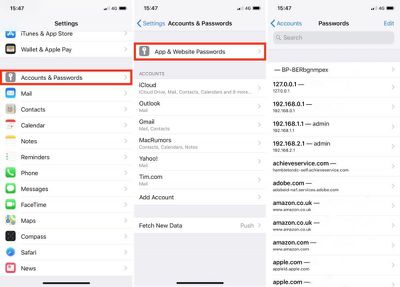
icloud keychain 2
Note that you can delete login credentials by tapping Edit at the top right of the Passwords screen. You can also tap a website entry and use the Edit option to change existing username and password fields.

Adding Credit Cards and Personal Information

You can add personal information and credit card information to iCloud Keychain at any time using your iPhone or iPad, after which it will be available across all of your devices. Simply follow these steps:

  1. Open the Settings app.
  2. Tap Safari.
  3. Tap AutoFill.
  4. To add personal information, tap My Info and select your contact card from the list of contacts. To add credit card details, tap Saved Credit Cards and then tap Add Credit Card.
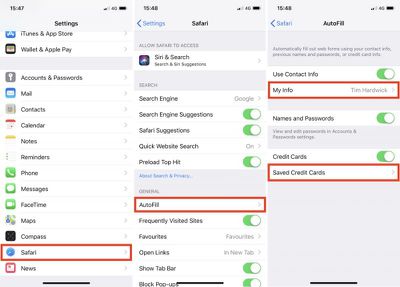
icloud keychain 3
The last screen you see here also includes three toggles for selectively disabling/re-enabling AutoFill functions, which can come in handy if someone else is going to be using your iPhone or iPad.

Top Rated Comments

jclo Avatar
115 months ago
HomePod setup and use requires iCloud Keychain to be turned on. I’m gonna assume that’s why it was posted.
Yep, this is why we've posted this and our two-factor authentication how to. HomePod preparation. https://www.macrumors.com/how-to/apple-id-two-factor-authentication/
Score: 8 Votes (Like | Disagree)
Macaholic868 Avatar
115 months ago
Sure it’s a slow news day but these kinds of articles are helpful for both newbies and long time casual users / Apple news consumers who may not always be aware of everything their iPhone and the latest iOS release can do.
Score: 4 Votes (Like | Disagree)
gim Avatar
115 months ago
iCloud Keychain is awful. I‘ve been using this since release and years later it’s still an unreliable mess. I just had to sign in and out of iCloud on all my devices last weekend because keychain had stopped syncing new passwords, like usual. This has happened every couple of months over the last 4 years for me.
Score: 4 Votes (Like | Disagree)
115 months ago
iCloud Keychain is awful. I‘ve been using this since release and years later it’s still an unreliable mess. I just had to sign in and out of iCloud on all my devices last weekend because keychain had stopped syncing new passwords, like usual. This has happened every couple of months over the last 4 years for me.
Never had this issue before.
Score: 3 Votes (Like | Disagree)
newyorksole Avatar
115 months ago
HomePod setup and use requires iCloud Keychain to be turned on. I’m gonna assume that’s why it was posted.
Score: 3 Votes (Like | Disagree)
115 months ago
Ugh. 1Password please.
Score: 2 Votes (Like | Disagree)

Popular Stories

General iCloud App Feature

Apple Says iCloud+ Plans Will Not Include Increased Siri AI Usage in UK

Tuesday November 17, 2026 7:07 am PST by
Apple on Monday announced that it is implementing daily usage limits on Siri AI and select other Apple Intelligence features that rely on "powerful server models" starting with iOS 27.3 and corresponding software updates, but increased access will be included with most iCloud+ plans at no additional cost in most countries, with one notable exception. In a support document, Apple said...
iCloud Link Harmful Content Feature 1

Apple Will Check Public iCloud Links for Harmful Content Starting in iOS 27.3

Wednesday November 4, 2026 11:12 am PST by
Apple says it will start checking public iCloud links for harmful content in iOS 27.3, iPadOS 27.3, macOS 27.3, and visionOS 27.3. Images in iCloud Photos and files in iCloud Drive shared using the "Anyone with the link" option will be "made accessible to Apple" for a content check. Apple doesn't define harmful content, but it could mean malware, malicious files, and/or child sexual abuse...
Siri AI Icon

Apple Continues to Say Some AI Features Will Have Fees for Extra Usage

Monday November 9, 2026 9:45 am PST by
Apple continues to advise customers that certain Apple Intelligence features that rely on its server-side Private Cloud Compute system have daily usage limits, with expanded access to such features to be "available for a fee in the future." Apple has repeatedly mentioned these upcoming fees in press releases over the past several months, but it has yet to provide any specific details about...
Latest Stories
The 50+ Best Apple Black Friday Deals Still Available on AirPods, iPads, and More
1 hour ago
HomePod Mini 2 in (RED) Seemingly Spotted Ahead of Announcement
11 hours ago
Apple's M6 and PROLED MacBook Pro Reach New Low Prices for Black Friday
21 hours ago
The MacRumors Show: iPhone Air 2 and iPhone 18 Are Coming
21 hours ago
Apple Store in Brisbane Reopening Next Month With New Design
22 hours ago
The 60+ Best Black Friday Accessory Deals on iPhone Chargers, TVs, Headphones, and More
23 hours ago
GTA VI Now (Barely) Running on Apple Silicon Macs
23 hours ago
The Best Black Friday Streaming Deals on Apple TV, Disney+, and More
1 day ago
Apple TV's 'Carême' Wins International Emmy for Best Drama
1 day ago
iPhone 18 Production Delay Leaves Apple Little Time Before Launch
1 day ago
The Best Black Friday AirPods Deals Still Available
17 hours ago
The Best Black Friday Deals on Apple Home Products
1 day ago
The Best Black Friday iPhone Deals Still Available
17 hours ago
The Best Black Friday iPad Deals Still Available
17 hours ago
The Best Black Friday Apple Watch Deals Still Available
17 hours ago
The Best Black Friday AirTag Deals Still Available
17 hours ago
The Best Black Friday Mac Deals Still Available
17 hours ago
iPhone Share of US Smartphone Market Hits 57% as Rivals Slip
1 day ago
iPhone 20 Pro Rumored to Feature 3D-Printed Titanium Frame
1 day ago
Apple's Official 2026 Black Friday Offer Starts Rolling Out
2 days ago
Halide Adds Fill Light Feature for iPhone Duo
2 days ago
MacBook Air Black Friday Deals Now Live With Massive $399 Savings
2 days ago
Amazon Discounts All MacBook Neo Models by $99 for Black Friday
2 days ago
Kodak Launches Unique AirTag Rival With E-Ink Display
2 days ago
Here's Why the Apple Store is Going Down
2 days ago
Apple Still Working on Giant Foldable iPad That Could Cost $5,000
2 days ago
iPhones Dominate China's Weak Singles' Day Smartphone Sales
2 days ago
iPhone 20 Pro Could Feature Ceramic in Limited-Edition Model
2 days ago
Apple Faces Korean Regulator Review Over iPhone 16 AI Advertising
2 days ago
Apple Watch Ultra 4 Hits New Best-Ever Price of $649.99 for Black Friday
2 days ago
Related Apple News: Iphone | Culture | Reviews | Business | Iphone