Skip to Content

How to Delete or Deactivate Your Apple ID Account and Data

by

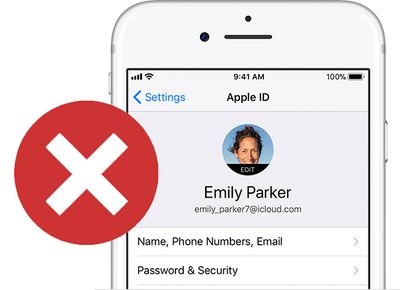
Apple has launched a new Data and Privacy website that enables users to request a copy of all of the data associated with their Apple ID accounts that the company maintains on its servers. The page also provides options to delete or deactivate an Apple ID by following the step-by-step instructions outlined below.
apple id account delete deactivate
While any customer anywhere can delete an Apple ID account, Apple says the ability to deactivate an Apple ID account is limited to accounts with locations set in the European Union, Iceland, Liechtenstein, Norway, and Switzerland. Apple intends to roll out the deactivation option around the world "in the coming months."

Keep in mind that deleting an Apple ID account and any associated data is a permanent, irreversible* action. After your account is deleted, Apple can't reopen or reactivate your account or restore any of your data, and you will no longer be able to access any of the content and services listed below.

  • Photos, videos, documents, and other content that you stored in iCloud are permanently deleted

  • You will no longer receive any messages or calls sent to your account via iMessage, FaceTime, or iCloud Mail

  • You will no longer be able to sign in to or use services such as iCloud, the App Store, iTunes Store, iBooks Store, Apple Pay, iMessage, FaceTime, and Find My iPhone

  • Your paid iCloud storage plans if any will be canceled

  • Any remaining Apple Store appointments and support cases are canceled, but any AppleCare plans you may have purchased remain valid

Content without Digital Rights Management, such as iTunes music purchases, continue working normally when your account is deleted or deactivated. However, any DRM-free content stored in iCloud Music Library isn't accessible or playable.

If you aren't planning to use your Apple ID for now, but may in the future, Apple recommends temporarily deactivating your account where possible instead of deleting it. Apple IDs can be reactivated by contacting Apple Support and providing the unique access code received during deactivation.

Apple also recommends that you take the following steps before you request deletion or deactivation of your account:

  • Back up the data that you store in iCloud, including content for any Apple or third-party apps that store data using iCloud

  • Download any DRM-free purchases, iTunes Match tracks that you don't have copies of, and any other music and media

  • Review any active subscriptions, as any remaining subscriptions are canceled at the end of their billing cycles, even during deactivation

  • Save copies of any Apple-related information that you currently need or expect to need

  • Sign out of all your devices to avoid issues with apps that use your Apple ID account or iCloud. If your account is deleted, you can't sign out of iCloud or turn off Find My iPhone Activation Lock on your devices. If you forget to sign out, you might not be able to use your device when your account is deleted.

How to Delete Your Apple ID Account

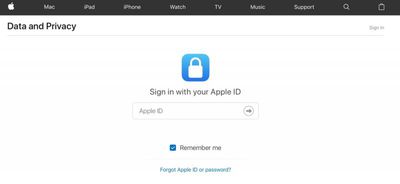
  1. Open a web browser on your Mac, PC, or iPad, and navigate to privacy.apple.com. The option is not available on iPhone.

  2. Enter your Apple ID email and password. Answer any security questions or authorize two-factor authentication on another device if prompted.
    get a copy of your apple data

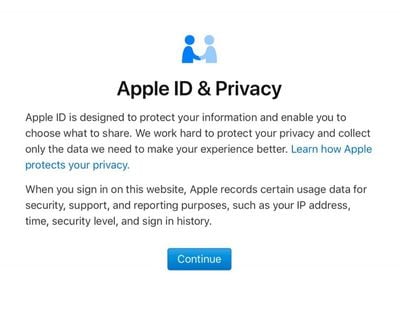
  3. On the Apple ID & Privacy page, select Continue.
    get a copy of your apple data5

  4. Under Delete Your Account, select Get Started.
    delete get started

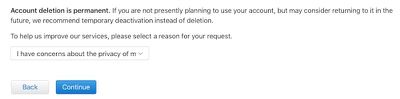
  5. Select a reason for deleting your account from the dropdown menu, such as "prefer not to say," and select Continue.
    account deletion reason

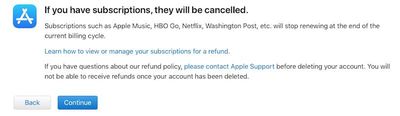
  6. Review the checklist of important things to know before deleting your account and select Continue.
    account deletion first checklist

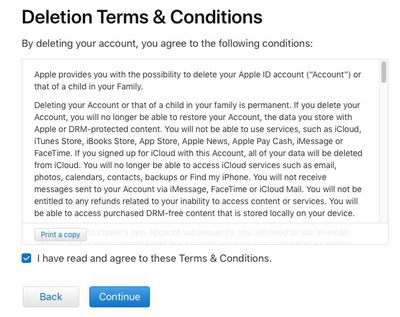
  7. Review the deletion terms and conditions, check off the read and agree box, and select Continue.
    account deletion terms

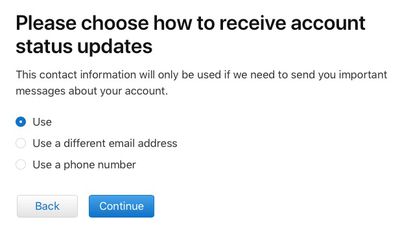
  8. Choose how to receive account status updates: the email used to create the Apple ID, a different email address, or by phone. Then select Continue.
    how to reach

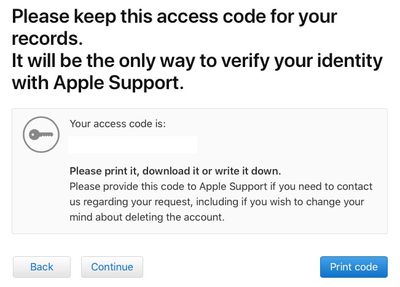
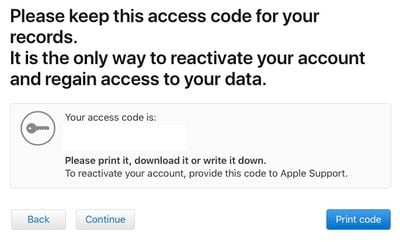
  9. Print, download, or write down the unique access code, which is needed to contact Apple Support regarding your request, including if you wish to change your mind about deleting the account for a short period after the request is submitted. Then select Continue.
    deletion write down code

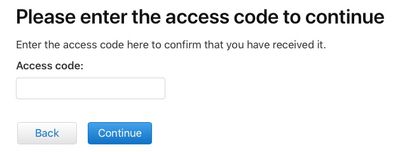
  10. Enter the access code to confirm that you have received it. Then select Continue.
    enter code to continue

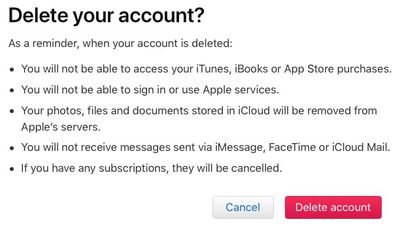
  11. Review the list of important details one more time and select Delete Account.
    delete account red button

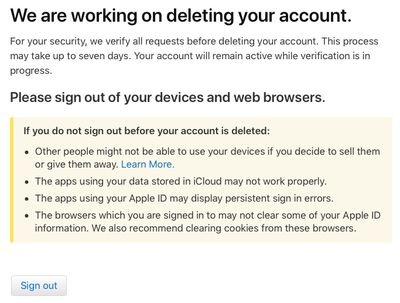
  12. Apple will confirm it is working on deleting your account on the website and in an email. Apple says the process may take up to seven days. Your account will remain active while verification is in progress.
    working on deleting

  13. Remember to sign out of the Apple ID on all devices and web browsers before the account is deleted.
How to Deactivate Your Apple ID Account

  1. Open a web browser on your Mac, PC, or iPad, and navigate to privacy.apple.com. The option is not available on iPhone.

  2. Enter your Apple ID email and password. Answer any security questions or authorize two-factor authentication on another device if prompted.
    get a copy of your apple data

  3. On the Apple ID & Privacy page, click Continue.
    get a copy of your apple data5

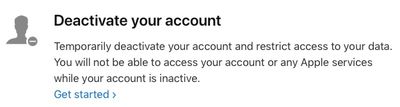
  4. Under Deactivate Your Account, select Get Started.
    deactivate get started

  5. Select a reason for deactivating your account from the dropdown menu, such as "prefer not to say," and select Continue.

  6. Review the checklist of important things to know before deactivating your account and select Continue.

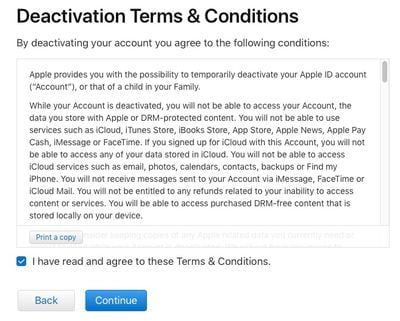
  7. Review the deactivation terms and conditions, check off the read and agree box, and select Continue.
    deactivation terms

  8. Choose how to receive account status updates: the email used to create the Apple ID, a different email address, or by phone. Then select Continue.
    how to reach

  9. Print, download, or write down the unique access code, which is needed to contact Apple Support regarding your request, including if you wish to reactivate your account at any time. Then select Continue.
    deactivate code

  10. Enter the access code to confirm that you have received it. Then select Continue.
    enter code to continue

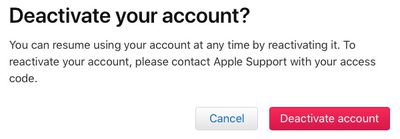
  11. Review the important details one more time and select Deactivate Account.
    deactivate red button

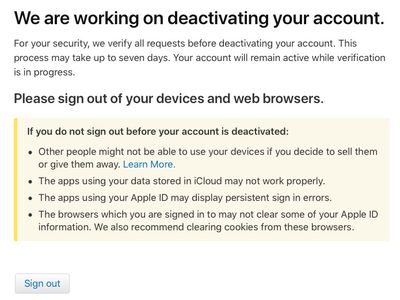
  12. Apple will confirm it is working on deactivating your account on the website and in an email. Apple says the process may take up to seven days. Your account will remain active while verification is in progress.
    working on deactivation

  13. Remember to sign out of the Apple ID on all devices and web browsers before the account is deactivated.
These new options satisfy the requirements of the European Union's new General Data Protection Regulation (GDPR), enforceable starting May 25, but Apple plans to make them available around the world.

* For a short time, you can enter a unique access code provided by Apple during the deletion process should you change your mind about deleting your account. Apple will notify you when your account has been irreversibly deleted.


Top Rated Comments

Kabeyun Avatar
111 months ago
So what happens when hackers access your account and delete it?
The same thing that happens if a hacker deletes any other account: it’s deleted.

Won’t happen though. We’ve been able to delete our Apple accounts for years. How many reports of this have you heard?
Score: 4 Votes (Like | Disagree)
macduke Avatar
111 months ago
How far can this be taken? Can you import this downloaded data into another account? I've got two Apple IDs because I was an idiot when setting up my accounts. I setup my iTunes Apple ID that uses a non-Apple email address in the early 2000s and my .MAC account a few years later when I got my first Mac. So I've got all these purchases on the first account and all my iCloud data on the second account, along with an account name I'd like to keep because it's shorter and ends with @mac.com. Could I, in theory, download my data from my iTunes/App Store account, delete it, and merge that into my @mac.com account? Or download/delete my old @mac.com account, and create a new account and import the data from both of those accounts and it will maintain the iCloud/iTunes/App Store data from both but under a new user name? This has been a hassle for so many years! If they never sort this out, when I strike it rich I'm going to just rebuy all my content on my iCloud account.
Score: 2 Votes (Like | Disagree)
timeconsumer Avatar
111 months ago
How far can this be taken? Can you import this downloaded data into another account? I've got two Apple IDs because I was an idiot when setting up my accounts. I setup my iTunes Apple ID that uses a non-Apple email address in the early 2000s and my .MAC account a few years later when I got my first Mac. So I've got all these purchases on the first account and all my iCloud data on the second account, along with an account name I'd like to keep because it's shorter and ends with @mac.com. Could I, in theory, download my data from my iTunes/App Store account, delete it, and merge that into my @mac.com account? Or download/delete my old @mac.com account, and create a new account and import the data from both of those accounts and it will maintain the iCloud/iTunes/App Store data from both but under a new user name? This has been a hassle for so many years! If they never sort this out, when I strike it rich I'm going to just rebuy all my content on my iCloud account.
Same situation here. At first they didn’t allow .MAC accounts to be used. So I signed up for my iTunes account with another email. I’d love to be able to merge the accounts together.
Score: 1 Votes (Like | Disagree)
111 months ago
So has anyone downloaded their data to see what Apple retains, above and beyond the obvious things like purchases?

And does the data tool allowing you to selectively purge data like Google (sort of) allows? I really wish that they’d let you delete purchases. So annoying having to go through and “hide” apps that are now defunct.
I've currently got a case open with this after I wrote Phil Schiller an email on this exact question. He never replied but I got contacted by the "sub-manager" of the App Store. They are aware there are cases where this is needed/useful. I hate having all that trash and old apps cluttering my Apple ID.
Score: 1 Votes (Like | Disagree)
riverfreak Avatar
111 months ago
So has anyone downloaded their data to see what Apple retains, above and beyond the obvious things like purchases?

And does the data tool allowing you to selectively purge data like Google (sort of) allows? I really wish that they’d let you delete purchases. So annoying having to go through and “hide” apps that are now defunct.
Score: 1 Votes (Like | Disagree)

Popular Stories

apple design award 2025

Apple Announces 2025 Design Award Winners Ahead of WWDC 2025

Tuesday June 3, 2025 10:14 am PDT by
As we wait for WWDC to kick off next Monday, Apple today announced the winners of its annual Apple Design Awards, recognizing apps and games for their innovation, ingenuity, and technical achievement. The 2025 Apple Design Award winners are listed below, with one app and one game selected per category: Delight and Fun - CapWords (App) and Balatro (Game) Innovation - Play (App) and PBJ -...
1password deal blue

1Password Security Breach: What Was Accessed and What Wasn't

Wednesday November 25, 2026 1:09 pm PST by
Popular password management app 1Password today said it experienced a security breach earlier this month. 1Password says some customer names and email addresses were accessed, but no customer vault contents were compromised. On November 19, 1Password saw indications that an employee's GitHub account had been breached and began investigating. The company says the breached GitHub account was...
apple store down feature

Here's Why the Apple Store is Going Down

Thursday November 26, 2026 5:49 am PST by
Apple's online store is going down for a few hours on a rolling country-by-country basis right now, but do not get your hopes up for new products. Apple takes its online store down for a few hours ahead of Black Friday every year to tease its annual gift card offer with the purchase of select products. The store is down in Australia, New Zealand, and Thailand, right now, and it will...
Latest Stories
The 50+ Best Apple Black Friday Deals Still Available on AirPods, iPads, and More
4 hours ago
HomePod Mini 2 in (RED) Seemingly Spotted Ahead of Announcement
1 hour ago
Apple's M6 and PROLED MacBook Pro Reach New Low Prices for Black Friday
11 hours ago
The MacRumors Show: iPhone Air 2 and iPhone 18 Are Coming
12 hours ago
Apple Store in Brisbane Reopening Next Month With New Design
12 hours ago
The 60+ Best Black Friday Accessory Deals on iPhone Chargers, TVs, Headphones, and More
13 hours ago
GTA VI Now (Barely) Running on Apple Silicon Macs
13 hours ago
The Best Black Friday Streaming Deals on Apple TV, Disney+, and More
14 hours ago
Apple TV's 'Carême' Wins International Emmy for Best Drama
14 hours ago
iPhone 18 Production Delay Leaves Apple Little Time Before Launch
15 hours ago
The Best Black Friday AirPods Deals Still Available
7 hours ago
The Best Black Friday Deals on Apple Home Products
16 hours ago
The Best Black Friday iPhone Deals Still Available
7 hours ago
The Best Black Friday iPad Deals Still Available
7 hours ago
The Best Black Friday Apple Watch Deals Still Available
7 hours ago
The Best Black Friday AirTag Deals Still Available
7 hours ago
The Best Black Friday Mac Deals Still Available
7 hours ago
iPhone Share of US Smartphone Market Hits 57% as Rivals Slip
17 hours ago
iPhone 20 Pro Rumored to Feature 3D-Printed Titanium Frame
19 hours ago
Apple's Official 2026 Black Friday Offer Starts Rolling Out
2 days ago
Halide Adds Fill Light Feature for iPhone Duo
2 days ago
MacBook Air Black Friday Deals Now Live With Massive $399 Savings
2 days ago
Amazon Discounts All MacBook Neo Models by $99 for Black Friday
2 days ago
Kodak Launches Unique AirTag Rival With E-Ink Display
2 days ago
Here's Why the Apple Store is Going Down
2 days ago
Apple Still Working on Giant Foldable iPad That Could Cost $5,000
2 days ago
iPhones Dominate China's Weak Singles' Day Smartphone Sales
2 days ago
iPhone 20 Pro Could Feature Ceramic in Limited-Edition Model
2 days ago
Apple Faces Korean Regulator Review Over iPhone 16 AI Advertising
2 days ago
Apple Watch Ultra 4 Hits New Best-Ever Price of $649.99 for Black Friday
2 days ago
Related Apple News: South Africa | Culture | Entertainment | Opinion | Iphone