Skip to Content

How to Use the HomePod's Physical Controls

by

As a smart speaker, HomePod comes with built-in Siri support, so you can use it without ever touching it, but Apple did include a touch panel at the top of the device that supports several gestures.
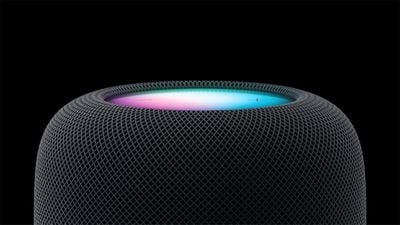
HomePod 2023
‌HomePod‌ gestures can activate ‌Siri‌, control the volume of what's playing, skip to the next song, pause/play and more. All of the touch gestures you can use with the ‌HomePod‌ are below.

Volume

Volume up - Tap on the "+" button to raise volume by one level, or touch and hold to increase the volume by several levels.

Volume down - Tap on the "-" button to lower the volume by one level, or touch and hold to decrease the volume by several levels.

Playback

Pause or resume playback - Tap in the middle of the ‌HomePod‌ to pause your music and tap it again to unpause.

Go to the next track - When a song is playing, double tap in the middle of the ‌HomePod‌ to skip a song.

Replay the previous track - When a song is playing from a playlist or an album, triple tap in the middle of the ‌HomePod‌ to go back to the previous song that was playing.

Siri

To activate ‌Siri‌, place a place a finger on the top of the ‌HomePod‌ and hold it there until the visual ‌Siri‌ waveform appears. From there, you can speak your ‌Siri‌ command.

Other Available Gestures

Dismiss an alarm - If an alarm is going off on the ‌HomePod‌, tap in the middle of it to stop it.

Activate VoiceOver - If you have VoiceOver enabled in the Accessibility settings, double tap to activate it. With VoiceOver enabled, all other gestures will require one extra tap, so pausing, for example will require two taps.

End a call - When using your HomePod as a speakerphone, you can end a call by tapping on the green light on top of the ‌HomePod‌.

Switch calls - If you're using ‌HomePod‌ as a speakerphone on a call and a second call comes in, you can touch and hold on the green light to put a hold on call. Switch between calls by double tapping.
Related Roundups: HomePod, HomePod mini 2

Top Rated Comments

myscrnnm Avatar
115 months ago
Am I the only one who finds these controls unintuitive and confusing? They put a display on the top of the HomePod. Why not just utilize a proximity sensor to display context-specific controls when you approach the device?
Score: 5 Votes (Like | Disagree)
115 months ago
Am I the only one who finds these controls unintuitive and confusing? They put a display on the top of the HomePod. Why not just utilize a proximity sensor to display context-specific controls when you approach the device?
Pretty sure you are the only one lol. Apple has used these controls for years on the headphones and iPods.... simple enough.
Score: 4 Votes (Like | Disagree)
Brookzy Avatar
115 months ago
I get that they are the same controls but I'm with you... why not just have some of the options on the display? I feel the display is not used at all... Such a beautiful display and all it does is display + and - I mean really?
It isn’t really a display, it’s just a small LED array in the centre, covered by a panel that blurs the light to make it look like a nice glowing orb.

The volume controls are simply one LED each.

So only a very small area of the top of the HomePod has the potential to illuminate, and even then it can only display vague shapes and colours rather than symbols.

(Fun fact: I noticed today that there must be an ambient light sensor hidden somewhere because the brightness of the volume controls changed to the room lighting. That’s a really nice touch!)
Score: 3 Votes (Like | Disagree)
Arran Avatar
115 months ago
It isn’t really a display, it’s just a small LED array in the centre, covered by a panel that blurs the light to make it look like a nice glowing orb.

The volume controls are simply one LED each.

So only a very small area of the top of the HomePod has the potential to illuminate, and even then it can only display vague shapes and colours rather than symbols.

(Fun fact: I noticed today that there must be an ambient light sensor hidden somewhere because the brightness of the volume controls changed to the room lighting. That’s a really nice touch!)
You're right. On close inspection it's not a screen at all. Just a few colored LEDs and a diffuser.

That's a bit limiting. I was secretly hoping a future software upgrade might support coverflow. I like visuals. No chance of that happening now.
Score: 2 Votes (Like | Disagree)
Arran Avatar
115 months ago
...Apple has used these controls for years on the headphones and iPods.... simple enough.
True, but that was through necessity: There was only one mechanical button, so it was necessary to learn morse code click combinations.

That all seems inappropriate on a device with a big color touchscreen. And since this is a shared device intended for common areas, what if your houseguests don't know about the secret click combos? Seems user-hostile. Seems like a wasted opportunity.
Score: 2 Votes (Like | Disagree)
115 months ago
True, but that was through necessity: There was only one mechanical button, so it was necessary to learn morse code click combinations.

That all seems inappropriate on a device with a big color touchscreen. And since this is a shared device intended for common areas, what if your houseguests don't know about the secret click combos? Seems user-hostile. Seems like a wasted opportunity.
I agree, seems like they could have easily had Skip Forward and Skip back on the North/South portions of the screen (assuming you consider +/- the East and West) and Play/Pause as one button in the center.

I also wish they would have used the standard figure 8 power cable like they do on the Apple TV, Airport Express, Airport Extreme, etc. Would have been nice to be able to buy a shorter cable so I don't have 4' of it wrapped up in a coil next to the speaker on my kitchen counter.

That said I am pretty impressed with the sound and am overall happy with it. I probably won't bother buying any more until I see what kind of firmware updates are made etc. Then I could see picking up a couple more for my kids' rooms. Would also be nice if they made a bit smaller/cheaper version better suited for bathrooms etc.
Score: 1 Votes (Like | Disagree)

Popular Stories

AirPods Max and HomePod mini Red Mock 2

Apple Bringing Back (PRODUCT)RED With Red HomePod Mini 2 and AirPods Max 2

Monday November 23, 2026 11:27 am PST by
Apple plans to release (PRODUCT)RED versions of the HomePod mini 2 and AirPods Max 2, reports Bloomberg. The new products will be part of Apple's annual fundraiser for The Global Fund to Fight AIDS, Tuberculosis and Malaria in developing countries. The red HomePod mini 2 and AirPods Max 2 could be introduced on World AIDS Day, which falls on Tuesday, December 1. The HomePod mini will have ...
AirPods Max and HomePod mini Red Mock 2

Apple to Release Four (RED) Products by Next Week

Tuesday November 24, 2026 6:33 am PST by
Bloomberg's Mark Gurman this week reported that Apple plans to release (PRODUCT)RED versions of the existing AirPods Max 2 and HomePod mini 2 on or around Tuesday, December 1, which is World AIDS Day. The new color will likely be the only change. AirPods Max 2 and HomePod mini 2 in (PRODUCT)RED (concept) Gurman said the (PRODUCT)RED version of the HomePod mini 2 will have a red mesh exterior, ...
Four HomePod Mini 2 Surround Sound

Does HomePod Mini 2 Have Improved Sound? Here's What Reviews Say

Wednesday November 4, 2026 6:52 am PST by
Apple's press release for the HomePod mini 2 last month touted "rich sound" and "advanced computational audio," but it did not explicitly mention if the second-generation model has better sound compared to the original. A few early reviews of the speaker, however, said that audio quality has in fact improved. Apple's tech specs pages for both the HomePod mini 2 and the original HomePod mini...
Latest Stories
The 50+ Best Apple Black Friday Deals Still Available on AirPods, iPads, and More
5 hours ago
HomePod Mini 2 in (RED) Seemingly Spotted Ahead of Announcement
2 hours ago
Apple's M6 and PROLED MacBook Pro Reach New Low Prices for Black Friday
13 hours ago
The MacRumors Show: iPhone Air 2 and iPhone 18 Are Coming
13 hours ago
Apple Store in Brisbane Reopening Next Month With New Design
13 hours ago
The 60+ Best Black Friday Accessory Deals on iPhone Chargers, TVs, Headphones, and More
14 hours ago
GTA VI Now (Barely) Running on Apple Silicon Macs
14 hours ago
The Best Black Friday Streaming Deals on Apple TV, Disney+, and More
15 hours ago
Apple TV's 'Carême' Wins International Emmy for Best Drama
16 hours ago
iPhone 18 Production Delay Leaves Apple Little Time Before Launch
16 hours ago
The Best Black Friday AirPods Deals Still Available
8 hours ago
The Best Black Friday Deals on Apple Home Products
17 hours ago
The Best Black Friday iPhone Deals Still Available
8 hours ago
The Best Black Friday iPad Deals Still Available
8 hours ago
The Best Black Friday Apple Watch Deals Still Available
8 hours ago
The Best Black Friday AirTag Deals Still Available
8 hours ago
The Best Black Friday Mac Deals Still Available
8 hours ago
iPhone Share of US Smartphone Market Hits 57% as Rivals Slip
18 hours ago
iPhone 20 Pro Rumored to Feature 3D-Printed Titanium Frame
20 hours ago
Apple's Official 2026 Black Friday Offer Starts Rolling Out
2 days ago
Halide Adds Fill Light Feature for iPhone Duo
2 days ago
MacBook Air Black Friday Deals Now Live With Massive $399 Savings
2 days ago
Amazon Discounts All MacBook Neo Models by $99 for Black Friday
2 days ago
Kodak Launches Unique AirTag Rival With E-Ink Display
2 days ago
Here's Why the Apple Store is Going Down
2 days ago
Apple Still Working on Giant Foldable iPad That Could Cost $5,000
2 days ago
iPhones Dominate China's Weak Singles' Day Smartphone Sales
2 days ago
iPhone 20 Pro Could Feature Ceramic in Limited-Edition Model
2 days ago
Apple Faces Korean Regulator Review Over iPhone 16 AI Advertising
2 days ago
Apple Watch Ultra 4 Hits New Best-Ever Price of $649.99 for Black Friday
2 days ago
Related Apple News: Culture | Health | Sport | Local News | News





























