Skip to Content

How to Use Your HomePod as a Speakerphone

by

Apple's HomePod smart speaker is primarily geared towards playing songs from the Apple Music catalog and listening to music and podcasts in your iTunes library, but it also features a handy speakerphone function that's ready to use out of the box.
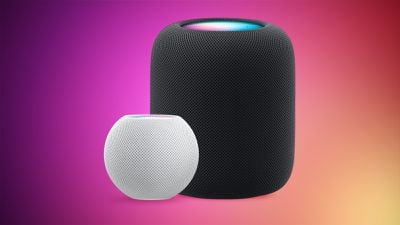
HomePod 2 and Mini feature 1
The speakerphone feature is available on both the ‌HomePod‌ mini and larger ‌HomePod‌, but it works best with the latter device since it has a multi-microphone array, which features an advanced echo cancellation system so that Siri can understand anyone speaking to it in the room.

This also means that anyone in your household on the same local network can easily hand off calls to the ‌HomePod‌ from a nearby iPhone, with the ‌HomePod‌ able to serve as both a speaker and a microphone for a handsfree conversation, regardless of their position in relation to the device. Here's how it's done.

How to Use Speakerphone Mode on HomePod

  1. When you're next in a call or about to accept a call on your iPhone, tap the Audio option in the call interface, then choose the ‌HomePod‌ in the list that you'd like to use as a speakerphone.
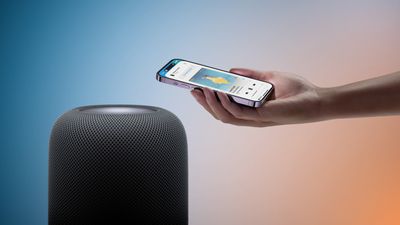
  2. Alternatively, hold your iPhone near the top of ‌HomePod‌ to handoff the call automatically. (To hand off audio, your device must have Bluetooth turned on and be on the same Wi-Fi network as ‌HomePod‌. You must also turn on Transfer to HomePod in Settings -> General -> AirPlay & Handoff on your iPhone.)
    HomePod 2 iPhone Feature Blue Orange

  3. Wait for the light on top of the ‌HomePod‌ to turn green, which tells you it's connected to the audio of your call.
  4. Now you can put down your iPhone and continue your call handsfree using the ‌HomePod‌ as your speakerphone.
  5. To hang up the call, simply tap the top of the ‌HomePod‌, or refer back to your iPhone's call interface to do so.
Managing Multiple Calls in Speakerphone Mode

With speakerphone mode active, you can also use ‌HomePod‌'s touch interface to manage multiple calls, either by ending the current call or putting the caller on hold to switch between conversations.
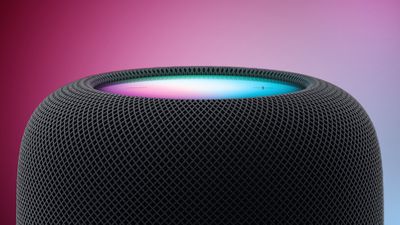
HomePod 2 Midnight Closeup Feature Purple Blue
Putting the current caller on hold to answer an incoming call couldn't be easier: Simply tap the green light on top of the speaker. Note that you can switch between calls at any time with a double tap. Alternatively, to end the current call and answer the new one, tap and hold the green light on top of the ‌HomePod‌ until the switchover occurs.

Related Roundups: HomePod, HomePod mini 2

Top Rated Comments

Chupa Chupa Avatar
115 months ago
Seems like that is how it would work on a non-Apple device. The point of Apple products -- to me at least, and why I've been attracted to them is that they are designed to simplify annoying tasks.

I can say "hey Siri -- call X" on my iDevices and done. I can press the Siri button on my Mac and do the same (actually configured the work around "hey Siri" command on my Mac but obviously that's not standard). So it's just one more Siri does this on that product, but not on that product. Why? If anything HomePod is ideal as a voice command speaker phone. Clearly Siri CAN do this.
[doublepost=1518179215][/doublepost]
This is a first generation product. Like with every other first gen apple product, it is incomplete and will get better with updates.
Bah. That's enabler talk. This isn't Apple's first Siri rodeo. Siri has been out longer than Jobs has been dead. Every previous Apple product with Siri has had a chip and at least one speaker. And smart speakers have been out for years. Apple supposedly took it's time to "get it right." OK. Then the features should be there. There really is no excuse here regarding hands-free calling with Siri.
Score: 12 Votes (Like | Disagree)
115 months ago
Here is the required Siri sucks, Alexa is better, no native Spotify support, late to the game, an echodot is cheaper, do not want post.

Please repost this every other post in every HomePod thread.
Score: 7 Votes (Like | Disagree)
danmart Avatar
115 months ago
I can say "hey Siri -- call X" on my iDevices and done. I can press the Siri button on my Mac and do the same (actually configured the work around "hey Siri" command on my Mac but obviously that's not standard). So it's just one more Siri does this on that product, but not on that product. Why?
Because, as the article says, you can use any iPhone on your WiFi network with the HomePod. If my wife and I are both home and we initiate a call from the HomePod, which iPhone would dial out? Many of my friends have iPhones and have access to my WiFi, so in a gathering context the effect would be even worse.

Apple hasn’t cracked multi-user on iOS yet. Even on the AppleTV, which has warranted multi-user for some time, there isn’t the option to have multiple users associated with it.

Other vendors have solved the multi-ID challenge as their voice assistants can differentiate between users.
Score: 6 Votes (Like | Disagree)
RagingBrosGaming Avatar
115 months ago
Just received my HomePod this morning. It sounds amazing, way better than any other smart speaker I’ve ever heard. Honestly who gives a rats butt about Crapify? Only hip hop and maybe some indie trendy hipsters do. Apple Music is where it’s at.
When answering calls on the HomePod...it’s fantastic. It sounds like the person is in the room with me(you can only get this kind of quality when using FaceTime Audio) cellular sound..is well...pretty tinny sounding.
Anyways, this HomePod has better bass and clarity then my Dolby Atmos surround system. Apple did it right!! This thing figured out your environment and I have music bouncing off the walls, over my head...coming through the floor.
I reset my echos and echo show and unplugged them and I’m selling them.
This is the greatest product Apple has released since the iPhone.

For those of you who call the iPhone Ten the iPhone EX....here’s my middle finger. I’m going to play my Xbox One TEN now and then I’ll use some Mac OS EX.
Score: 5 Votes (Like | Disagree)
G5isAlive Avatar
115 months ago
And yet I can do that with both Google Home and Echo products.
So use them
Score: 3 Votes (Like | Disagree)
dan9700 Avatar
115 months ago
But why cant we say hey siri call.... Handfree calling such a simple thing cant be done?
Score: 3 Votes (Like | Disagree)

Popular Stories

AirPods Max and HomePod mini Red Mock 2

Apple Bringing Back (PRODUCT)RED With Red HomePod Mini 2 and AirPods Max 2

Monday November 23, 2026 11:27 am PST by
Apple plans to release (PRODUCT)RED versions of the HomePod mini 2 and AirPods Max 2, reports Bloomberg. The new products will be part of Apple's annual fundraiser for The Global Fund to Fight AIDS, Tuberculosis and Malaria in developing countries. The red HomePod mini 2 and AirPods Max 2 could be introduced on World AIDS Day, which falls on Tuesday, December 1. The HomePod mini will have ...
AirPods Max and HomePod mini Red Mock 2

Apple to Release Four (RED) Products by Next Week

Tuesday November 24, 2026 6:33 am PST by
Bloomberg's Mark Gurman this week reported that Apple plans to release (PRODUCT)RED versions of the existing AirPods Max 2 and HomePod mini 2 on or around Tuesday, December 1, which is World AIDS Day. The new color will likely be the only change. AirPods Max 2 and HomePod mini 2 in (PRODUCT)RED (concept) Gurman said the (PRODUCT)RED version of the HomePod mini 2 will have a red mesh exterior, ...
Four HomePod Mini 2 Surround Sound

Does HomePod Mini 2 Have Improved Sound? Here's What Reviews Say

Wednesday November 4, 2026 6:52 am PST by
Apple's press release for the HomePod mini 2 last month touted "rich sound" and "advanced computational audio," but it did not explicitly mention if the second-generation model has better sound compared to the original. A few early reviews of the speaker, however, said that audio quality has in fact improved. Apple's tech specs pages for both the HomePod mini 2 and the original HomePod mini...
Latest Stories
Apple Now Aims to Repair Rather Than Replace iPhone Duos With Cracked Screens
2 hours ago
Here Are the Best Apple Black Friday Leftover Deals You Can Get Today
11 hours ago
HomePod Mini 2 in (RED) Seemingly Spotted Ahead of Announcement
22 hours ago
Apple's M6 and PROLED MacBook Pro Reach New Low Prices for Black Friday
1 day ago
The MacRumors Show: iPhone Air 2 and iPhone 18 Are Coming
1 day ago
Apple Store in Brisbane Reopening Next Month With New Design
1 day ago
The 60+ Best Black Friday Accessory Deals on iPhone Chargers, TVs, Headphones, and More
11 hours ago
GTA VI Now (Barely) Running on Apple Silicon Macs
1 day ago
The Best Black Friday Streaming Deals on Apple TV, Disney+, and More
1 day ago
Apple TV's 'Carême' Wins International Emmy for Best Drama
2 days ago
iPhone 18 Production Delay Leaves Apple Little Time Before Launch
2 days ago
The Best Black Friday AirPods Deals Still Available
1 day ago
The Best Black Friday Deals on Apple Home Products
2 days ago
The Best Black Friday iPhone Deals Still Available
1 day ago
The Best Black Friday iPad Deals Still Available
1 day ago
The Best Black Friday Apple Watch Deals Still Available
1 day ago
The Best Black Friday AirTag Deals Still Available
1 day ago
The Best Black Friday Mac Deals Still Available
1 day ago
iPhone Share of US Smartphone Market Hits 57% as Rivals Slip
2 days ago
iPhone 20 Pro Rumored to Feature 3D-Printed Titanium Frame
2 days ago
The 50+ Best Apple Black Friday Deals Still Available on AirPods, iPads, and More
3 hours ago
Apple's Official 2026 Black Friday Offer Starts Rolling Out
2 days ago
Halide Adds Fill Light Feature for iPhone Duo
2 days ago
MacBook Air Black Friday Deals Now Live With Massive $399 Savings
2 days ago
Amazon Discounts All MacBook Neo Models by $99 for Black Friday
2 days ago
Kodak Launches Unique AirTag Rival With E-Ink Display
3 days ago
Here's Why the Apple Store is Going Down
3 days ago
Apple Still Working on Giant Foldable iPad That Could Cost $5,000
3 days ago
iPhones Dominate China's Weak Singles' Day Smartphone Sales
3 days ago
iPhone 20 Pro Could Feature Ceramic in Limited-Edition Model
3 days ago
Related Apple News: Bluetti Elite 10 Power Station | Iphone Mirroring Not Working In Macos Fix | Mac | Lifestyle | Iphone 18 Pro How To Use New Features