Skip to Content

How To Play Music on HomePod When Activating HomeKit Scenes Using Siri Shortcuts

by

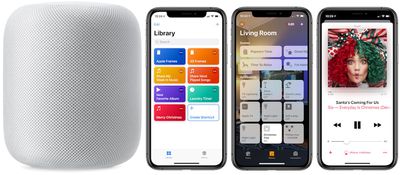
Although HomePod is available in Apple's Home app, the company's smart home speaker as of yet can't be integrated into HomeKit scenes and automations. With such a feature, users would be able to activate their favorite ‌HomeKit‌ scenes, alongside a specific Apple Music playlist, album, or song from their ‌HomePod‌.

how to homepod shorcuts pic
Reddit user Running_In_Space on r/HomeKit explained recently that this is actually possible today, thanks to a helpful (and super simple to create) Siri Shortcut. With the Shortcut, you can tie any Home scene together with any ‌Apple Music‌ playlist. While the Shortcut is limited to playlists, you can choose from your own playlists or those created by ‌Apple Music‌.

In the example below, we created a holiday themed ‌Siri‌ Shortcut that turns on Christmas tree lights (connected to an iDevices Switch) and shuffles a holiday playlist any time we say, "Hey ‌Siri‌, Merry Christmas." Also remember that you'll need an ‌Apple Music‌ subscription, HomeKit-enabled lights or other devices of some kind, and the updated ‌Siri‌ Shortcuts iOS app.

How to Create the Siri Shortcut

  1. Open the iOS "Shortcuts" app
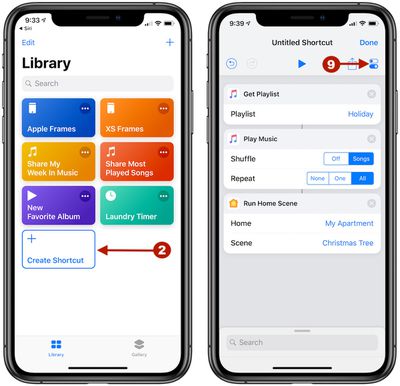
  2. Tap "Create Shortcut"
  3. homepod how to shortcut 5

  4. In the search bar, type "Get Playlist" and add it into your Shortcut
  5. Next to Playlist, tap "Choose" and pick your desired playlist
  6. Search for "Play Music" and add it (here you can also edit settings for shuffling and/or repeating the playlist)
  7. Search for "Run Home Scene" and add it
  8. Next to Home, tap "Choose" and select your home
  9. Next to Scene, tap "Choose" and select your desired scene
  10. Before you tap "Done," select the toggle icon under the Done button at the top right corner of the screen
  11. siri shortcuts homepod how to 2

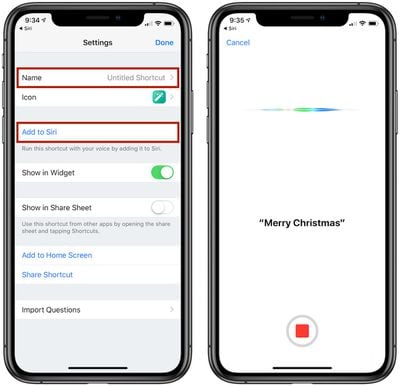
  12. Name the Shortcut, and tap "Add to ‌Siri‌" to record your preferred trigger phrase
  13. Tap "Done" until you're back on the Library screen of the app

Now you will be able to say, "Hey ‌Siri‌, [Trigger Phrase]" to your ‌HomePod‌ and have the selected Home scene activate along with the chosen ‌Apple Music‌ playlist, connected via AirPlay on your iPhone. ‌Siri‌ typically responds with, "Okay, running your shortcut," and it can take a bit longer than a normal scene activation in ‌HomeKit‌ due to the multiple actions.

There are numerous versions of this ‌Siri‌ Shortcut that could be created, like having a nighttime scene in ‌HomeKit‌ tied to a mellow ‌Apple Music‌ playlist that's triggered when you say, "Hey ‌Siri‌, goodnight." We tried testing out Home scenes that are activated via geofences, but in the few times we tried we could not get ‌HomePod‌ to turn on and play the specified ‌Apple Music‌ playlist when the arriving home scene in ‌HomeKit‌ was activated.

It's also worth noting that the desired ‌Apple Music‌ playlist will play on whatever device you are talking to ‌Siri‌ with, so in our example if we said, "Hey ‌Siri‌, Merry Christmas" and ‌HomePod‌ picked it up, then the holiday playlist played on ‌HomePod‌. If we said the same phrase to our iPhone, the playlist would play there instead. In both scenarios, the Christmas tree lights were still activated regardless of the Apple device used.

Apple introduced ‌Siri‌ Shortcuts as an update to its Workflow iOS app back in September, and although creating Shortcuts can be an arduous task in some cases, there are a few super useful actions that have been shared over the past few months. Do you use ‌Siri‌ Shortcuts and have a favorite one to share? Give us the details in the comments below or Tweet us @MacRumors to let us know your most-used Shortcuts.

Related Roundup: HomePod
Buyer's Guide: HomePod (Caution)

Top Rated Comments

104 months ago
Very cool hack, but way too many compromises.

Set up myself and ran into a number of issues. With trial and error I finally got it right. Ultimately it’s party trick that’s cool, but flawed mostly because of where the music comes from depending on which device picks up the request.

+1 for the guy who said in the comments Apple needs to allow HomePod in HomeKit automation scenes
Score: 3 Votes (Like | Disagree)
104 months ago
I really thought they would have 'fixed' this by now It's not tough Apple. Just put the homepod icon in the 'Scene' menu. I'd be perfectly happy just having it turn 'on' like any other device and have it continue playing where I 'paused' it. duhhh.
Score: 2 Votes (Like | Disagree)
ryannealcordwell Avatar
101 months ago
Very cool hack, but way too many compromises.

Set up myself and ran into a number of issues. With trial and error I finally got it right. Ultimately it’s party trick that’s cool, but flawed mostly because of where the music comes from depending on which device picks up the request.

+1 for the guy who said in the comments Apple needs to allow HomePod in HomeKit automation scenes
Likewise!

This seems like one of those blatantly obvious launch-features Apple would’ve worn on their sleeve, but we somehow won’t end up seeing for another long span of time.
Score: 1 Votes (Like | Disagree)
104 months ago
Although HomePod is available in Apple's Home app, the company's smart home speaker as of yet can't be integrated into HomeKit scenes and automations. With such a feature, users would be able to activate their favorite HomeKit scenes, alongside a specific Apple Music playlist, album, or song from their HomePod.


Reddit user Running_In_Space ('https://www.reddit.com/r/HomeKit/comments/a18ngb/play_music_on_homepod_via_scene/eanom8p/') on r/HomeKit ('https://www.reddit.com/r/HomeKit/comments/a18ngb/play_music_on_homepod_via_scene/') explained recently that this is actually possible today, thanks to a helpful (and super simple to create) Siri Shortcut. With the Shortcut, you can tie any Home scene together with any Apple Music playlist. While the Shortcut is limited to playlists, you can choose from your own playlists or those created by Apple Music.

In the example below, we created a holiday themed Siri Shortcut that turns on Christmas tree lights (connected to an iDevices Switch) and shuffles a holiday playlist any time we say, "Hey Siri, Merry Christmas." Also remember that you'll need an Apple Music subscription, HomeKit-enabled lights or other devices of some kind, and the updated Siri Shortcuts iOS app.

How to Create the Siri Shortcut

[LIST=1]
* Open the iOS "Shortcuts" app


* Tap "Create Shortcut"


* In the search bar, type "Get Playlist" and add it into your Shortcut


* Next to Playlist, tap "Choose" and pick your desired playlist


* Search for "Play Music" and add it (here you can also edit settings for shuffling and/or repeating the playlist)


* Search for "Run Home Scene" and add it


* Next to Home, tap "Choose" and select your home


* Next to Scene, tap "Choose" and select your desired scene


* Before you tap "Done," select the toggle icon under the Done button at the top right corner of the screen


* Name the Shortcut, and tap "Add to Siri" to record your preferred trigger phrase

* Tap "Done" until you're back on the Library screen of the app
Now you will be able to say, "Hey Siri, " to your HomePod and have the selected Home scene activate along with the chosen Apple Music playlist, connected via AirPlay on your iPhone. Siri typically responds with, "Okay, running your shortcut," and it can take a bit longer than a normal scene activation in HomeKit due to the multiple actions.

There are numerous versions of this Siri Shortcut that could be created, like having a nighttime scene in HomeKit tied to a mellow Apple Music playlist that's triggered when you say, "Hey Siri, goodnight." We tried testing out Home scenes that are activated via geofences, but in the few times we tried we could not get HomePod to turn on and play the specified Apple Music playlist when the arriving home scene in HomeKit was activated.

It's also worth noting that the desired Apple Music playlist will play on whatever device you are talking to Siri with, so in our example if we said, "Hey Siri, Merry Christmas" and HomePod picked it up, then the holiday playlist played on HomePod. If we said the same phrase to our iPhone, the playlist would play there instead. In both scenarios, the Christmas tree lights were still activated regardless of the Apple device used.

Apple introduced ('https://www.macrumors.com/2018/09/17/apple-releases-ios-12-shortcuts-app-for-all-users/') Siri Shortcuts as an update to its Workflow iOS app back in September, and although creating Shortcuts can be an arduous task in some cases, there are a few super useful actions that have been shared over the past few months. Do you use Siri Shortcuts and have a favorite one to share? Give us the details in the comments below or Tweet us @MacRumors ('https://twitter.com/MacRumors') to let us know your most-used Shortcuts.

Article Link: How To Play Music on HomePod When Activating HomeKit Scenes Using Siri Shortcuts ('https://www.macrumors.com/how-to/homepod-homekit-siri-shortcuts/')
Do I
Although HomePod is available in Apple's Home app, the company's smart home speaker as of yet can't be integrated into HomeKit scenes and automations. With such a feature, users would be able to activate their favorite HomeKit scenes, alongside a specific Apple Music playlist, album, or song from their HomePod.


Reddit user Running_In_Space ('https://www.reddit.com/r/HomeKit/comments/a18ngb/play_music_on_homepod_via_scene/eanom8p/') on r/HomeKit ('https://www.reddit.com/r/HomeKit/comments/a18ngb/play_music_on_homepod_via_scene/') explained recently that this is actually possible today, thanks to a helpful (and super simple to create) Siri Shortcut. With the Shortcut, you can tie any Home scene together with any Apple Music playlist. While the Shortcut is limited to playlists, you can choose from your own playlists or those created by Apple Music.

In the example below, we created a holiday themed Siri Shortcut that turns on Christmas tree lights (connected to an iDevices Switch) and shuffles a holiday playlist any time we say, "Hey Siri, Merry Christmas." Also remember that you'll need an Apple Music subscription, HomeKit-enabled lights or other devices of some kind, and the updated Siri Shortcuts iOS app.

How to Create the Siri Shortcut

[LIST=1]
* Open the iOS "Shortcuts" app


* Tap "Create Shortcut"


* In the search bar, type "Get Playlist" and add it into your Shortcut


* Next to Playlist, tap "Choose" and pick your desired playlist


* Search for "Play Music" and add it (here you can also edit settings for shuffling and/or repeating the playlist)


* Search for "Run Home Scene" and add it


* Next to Home, tap "Choose" and select your home


* Next to Scene, tap "Choose" and select your desired scene


* Before you tap "Done," select the toggle icon under the Done button at the top right corner of the screen


* Name the Shortcut, and tap "Add to Siri" to record your preferred trigger phrase

* Tap "Done" until you're back on the Library screen of the app
Now you will be able to say, "Hey Siri, " to your HomePod and have the selected Home scene activate along with the chosen Apple Music playlist, connected via AirPlay on your iPhone. Siri typically responds with, "Okay, running your shortcut," and it can take a bit longer than a normal scene activation in HomeKit due to the multiple actions.

There are numerous versions of this Siri Shortcut that could be created, like having a nighttime scene in HomeKit tied to a mellow Apple Music playlist that's triggered when you say, "Hey Siri, goodnight." We tried testing out Home scenes that are activated via geofences, but in the few times we tried we could not get HomePod to turn on and play the specified Apple Music playlist when the arriving home scene in HomeKit was activated.

It's also worth noting that the desired Apple Music playlist will play on whatever device you are talking to Siri with, so in our example if we said, "Hey Siri, Merry Christmas" and HomePod picked it up, then the holiday playlist played on HomePod. If we said the same phrase to our iPhone, the playlist would play there instead. In both scenarios, the Christmas tree lights were still activated regardless of the Apple device used.

Apple introduced ('https://www.macrumors.com/2018/09/17/apple-releases-ios-12-shortcuts-app-for-all-users/') Siri Shortcuts as an update to its Workflow iOS app back in September, and although creating Shortcuts can be an arduous task in some cases, there are a few super useful actions that have been shared over the past few months. Do you use Siri Shortcuts and have a favorite one to share? Give us the details in the comments below or Tweet us @MacRumors ('https://twitter.com/MacRumors') to let us know your most-used Shortcuts.
Article Link: How To Play Music on HomePod When Activating HomeKit Scenes Using Siri Shortcuts ('https://www.macrumors.com/how-to/homepod-homekit-siri-shortcuts/')
Do I have to select an accessory to get it to play the playlist? I set up the shortcuts but the HomePod doesn’t respond. Do I have to tell it the specific ‘scene’ if so, I can’t create a scene without selecting an accessory. I don’t want to have to turn lights on just for music.
Score: 1 Votes (Like | Disagree)
travoose Avatar
104 months ago
This is neat. This is exactly how I have mine setup. However, the problem still is that you can't execute this without an iPhone to get the music from...which you would think since the HomePod has access to your entire Apple Music collection and it can execute running the HomeKit scenes along with playing a separate playlist individually, that there should be no problem in creating a Siri Shortcut that allows you to do both at the same time with one voice command. This is where Apple has dropped the ball.
Score: 1 Votes (Like | Disagree)
swapmanager Avatar
104 months ago
This is the new age of doing simple things in complicated way.
A small software update can make you re-learn to do same things differently.... again.
Score: 1 Votes (Like | Disagree)

Popular Stories

Siri AI Icon

Siri AI Settlement: Here's How Much Apple Will Pay You

Saturday November 21, 2026 9:08 am PST by
In May, Apple agreed to pay $250 million to settle a U.S. class action lawsuit over Siri AI's delayed launch, and there is one month remaining to submit a claim through the settlement website. In a court document earlier this week, lawyers said that claimants will likely receive at least $61 per eligible iPhone, based on early participation data so far. The exact payment amount per eligible ...
Siri AI Icon

iOS 27.3 Beta Adds Daily Siri AI Limits and iCloud+ Upgrades

Monday November 16, 2026 10:14 am PST by
With the latest iOS 27.3, iPadOS 27.3, and macOS 27.3 betas, Apple is starting to test limits and paid upgrades for Siri AI and Apple Intelligence features. Every Apple device gets a free daily access allowance for Siri AI and Apple Intelligence features that rely on server-side AI processing, such as Image Playground and Clean Up in Photos. When that limit is hit, there will be an option to ...
Apple TV 4K 4th Generation feature0

Apple Releases tvOS 27.2.1 With Siri AI for Older Apple TVs

Friday November 13, 2026 11:26 am PST by
Apple today released tvOS 27.2.1, an update to the tvOS 27 operating system that launched in September. tvOS 27.2.1 comes nearly three weeks after Apple released tvOS 27.2. tvOS 27.2.1 brings Siri AI support to the 2nd- and 3rd-generation Apple TV 4K models, but it is available for all Apple TV 4K models that support tvOS 27. Apple announced Siri AI for the Apple TV when debuting the...
Latest Stories
The 50+ Best Apple Black Friday Deals Still Available on AirPods, iPads, and More
6 hours ago
Here Are the Best Apple Black Friday Leftover Deals You Can Get Today
5 hours ago
HomePod Mini 2 in (RED) Seemingly Spotted Ahead of Announcement
16 hours ago
Apple's M6 and PROLED MacBook Pro Reach New Low Prices for Black Friday
1 day ago
The MacRumors Show: iPhone Air 2 and iPhone 18 Are Coming
1 day ago
Apple Store in Brisbane Reopening Next Month With New Design
1 day ago
The 60+ Best Black Friday Accessory Deals on iPhone Chargers, TVs, Headphones, and More
4 hours ago
GTA VI Now (Barely) Running on Apple Silicon Macs
1 day ago
The Best Black Friday Streaming Deals on Apple TV, Disney+, and More
1 day ago
Apple TV's 'Carême' Wins International Emmy for Best Drama
1 day ago
iPhone 18 Production Delay Leaves Apple Little Time Before Launch
1 day ago
The Best Black Friday AirPods Deals Still Available
22 hours ago
The Best Black Friday Deals on Apple Home Products
1 day ago
The Best Black Friday iPhone Deals Still Available
22 hours ago
The Best Black Friday iPad Deals Still Available
22 hours ago
The Best Black Friday Apple Watch Deals Still Available
22 hours ago
The Best Black Friday AirTag Deals Still Available
22 hours ago
The Best Black Friday Mac Deals Still Available
22 hours ago
iPhone Share of US Smartphone Market Hits 57% as Rivals Slip
1 day ago
iPhone 20 Pro Rumored to Feature 3D-Printed Titanium Frame
1 day ago
Apple's Official 2026 Black Friday Offer Starts Rolling Out
2 days ago
Halide Adds Fill Light Feature for iPhone Duo
2 days ago
MacBook Air Black Friday Deals Now Live With Massive $399 Savings
2 days ago
Amazon Discounts All MacBook Neo Models by $99 for Black Friday
2 days ago
Kodak Launches Unique AirTag Rival With E-Ink Display
2 days ago
Here's Why the Apple Store is Going Down
2 days ago
Apple Still Working on Giant Foldable iPad That Could Cost $5,000
2 days ago
iPhones Dominate China's Weak Singles' Day Smartphone Sales
2 days ago
iPhone 20 Pro Could Feature Ceramic in Limited-Edition Model
2 days ago
Apple Faces Korean Regulator Review Over iPhone 16 AI Advertising
2 days ago
Related Apple News: Iphone Duo New Features To Try First | Apple Store | Enable Sound Recognition Apple Watch Listen | The Macrumors Show | Level Lock Pro