Skip to Content

How to Locate a Lost Apple Watch Using Find My

by

Find My is an Apple feature that enables you to locate lost or misplaced Apple devices – including your Apple Watch. If you've already set up ‌Find My‌ on your paired iPhone, it's automatically enabled on your Apple Watch too.
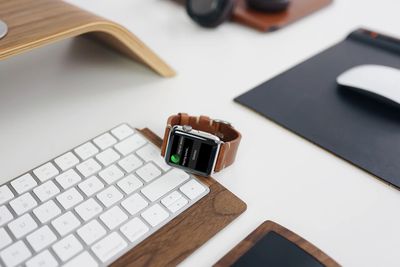
lost apple watch
When you sign in to iCloud.com or the Find app, you can see your Apple Watch on a map and play a sound to locate it if it's nearby. ‌Find My‌ also has a Lost Mode to lock, track, or remotely erase all of your personal information.

One of the newest features in ‌Find My‌ is its ability to locate lost devices even when they're not connected to WiFi or LTE by leveraging Bluetooth and proximity to other nearby Apple devices.

When your lost device is offline but close to another device, it's able to connect to that other device over Bluetooth and relay its location. That means that your devices are more trackable than ever, and there's a better chance you can find a device that's been lost. Of course, if your Apple Watch is nowhere near another device, this feature won't work, but you can still try locating it if it's nearby by getting it to play an audible tone. Here's how.

Locating an Apple Watch Lost Nearby

You can find your Apple Watch using the ‌Find My‌ app on iOS devices and iCloud.com. If your Apple Watch is powered on, it will show up on the ‌Find My‌ map, just like an iPad, iPhone, or Mac.

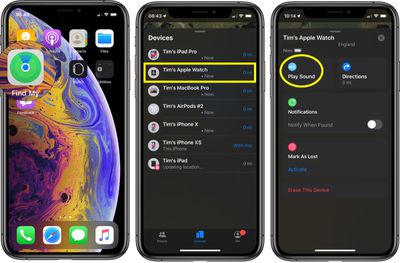
  1. Launch the Find My app on your iPhone or ‌iPad‌.
  2. Swipe up to reveal the full devices list.
  3. Tap the Apple Watch in the list.
  4. Tap Play Sound.

find my
A soft chirping sound will start playing after you initiate the "Play Sound" command, which will gradually get louder and louder with each chirp to make the Apple Watch easier to locate.

Locating an Apple Watch Lost Far Away

The way ‌Find My‌ works with an Apple Watch that's lost far away depends on the model. Apple Watch Series 3 and Series 4 use GPS and a trusted Wi-Fi or cellular connection to give you their approximate location, while Apple Watch Series 2 uses GPS and a trusted Wi-Fi connection. Apple Watch Series 1 models don't feature GPS, and they can only use the location of your paired iPhone or its Wi-Fi connection, making locating them at a distance impossible unless your iPhone is also nearby.

For these reasons, using ‌Find My‌ to locate an ‌Apple Watch Series 2‌, Series 3, or Series 4 that's been left behind isn't going to be very accurate, but it will give you a general idea of where the watch was lost so you can go back to that location. When attempting to locate an Apple Watch this way, tap the Directions option and you will be given Apple Maps directions to the last known location.

How to Put Your Apple Watch in Lost Mode

If you didn't turn on ‌Find My‌ before your Apple Watch was lost or stolen and your watch isn't connected to Wi-Fi, cellular, or your paired iPhone, you can't use it to locate your device. However, you can put your Apple Watch in Lost Mode, which ensures your passcode is required before anyone can turn off ‌Find My‌ iPhone, erase your watch, or pair it with another iPhone.

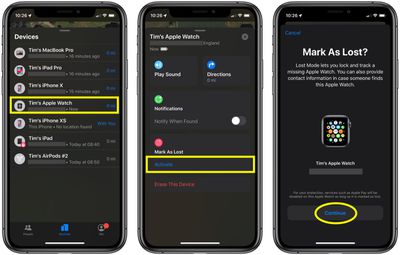
  1. Launch the Find My app on your iPhone.
  2. Swipe up to reveal a list of your devices, then tap your Apple Watch in the list.
  3. Swipe up to reveal the full device actions menu.
  4. Under Mark as Lost, tap Activate.
  5. Tap Continue to confirm that you want to turn on Lost Mode.
    find my Apple Watch

  6. Enter a phone number where you can be reached, then tap Next.
  7. Enter the message that you want to appear on the watch screen.
  8. Tap Enable.

‌Find My‌ iPhone will send you an email message to confirm that you've put your Apple Watch in Lost Mode. Once it's activated you can turn off lost mode any time using the same device actions menu described in the above steps (Pending -> Turn Off Mark as Lost).


Related Roundup: Apple Watch 12
Buyer's Guide: Apple Watch (Buy Now)
Related Forum: Apple Watch

Popular Stories

apple watch series 3 design

Apple Offers Steps to Fix Daylight Saving Time Bug on Apple Watch

Sunday November 1, 2026 3:34 am PST by
Apple has published a support document describing what to do if your Apple Watch continues to show time that's off by one hour after daylight savings time changes. "This incorrect time appears only on the Always On display when your wrist is down," says Apple. "When you activate the display by tapping it or raising your wrist, the time changes to the correct hour." To fix the issue, Apple says ...
muse apple watch app

Meta's Muse AI Agent Comes to Apple Watch

Monday November 9, 2026 1:55 pm PST by
Meta today updated the Muse app for iOS to add Apple Watch support, which means Muse users can access the proactive AI agent from the watch. The app adds the Muse character to the watch with an option to text it, dictate text to it, or call it. There's also a Muse complication for quick access. Muse is Meta's personal AI agent that can complete tasks for users. It is available as a...
siri recap live rewind

watchOS 27.3 Brings Live Rewind and Siri Recap to Apple Watch

Tuesday November 3, 2026 10:35 am PST by
With the first beta of watchOS 27.3, Apple is introducing new Audio Intelligence features it previewed for the Apple Watch Series 12 and Ultra 4 earlier this year. Powered by the S11 chip, Audio Intelligence includes Live Rewind, Siri Recap, Sound Recognition, and Shazam Music Recognition. Sound Recognition and Shazam are already on the watch, but Live Rewind and Siri Recap are now available ...
Latest Stories
The 50+ Best Apple Black Friday Deals Still Available on AirPods, iPads, and More
8 hours ago
HomePod Mini 2 in (RED) Seemingly Spotted Ahead of Announcement
5 hours ago
Apple's M6 and PROLED MacBook Pro Reach New Low Prices for Black Friday
15 hours ago
The MacRumors Show: iPhone Air 2 and iPhone 18 Are Coming
15 hours ago
Apple Store in Brisbane Reopening Next Month With New Design
16 hours ago
The 60+ Best Black Friday Accessory Deals on iPhone Chargers, TVs, Headphones, and More
16 hours ago
GTA VI Now (Barely) Running on Apple Silicon Macs
17 hours ago
The Best Black Friday Streaming Deals on Apple TV, Disney+, and More
17 hours ago
Apple TV's 'Carême' Wins International Emmy for Best Drama
18 hours ago
iPhone 18 Production Delay Leaves Apple Little Time Before Launch
19 hours ago
The Best Black Friday AirPods Deals Still Available
11 hours ago
The Best Black Friday Deals on Apple Home Products
19 hours ago
The Best Black Friday iPhone Deals Still Available
11 hours ago
The Best Black Friday iPad Deals Still Available
11 hours ago
The Best Black Friday Apple Watch Deals Still Available
11 hours ago
The Best Black Friday AirTag Deals Still Available
11 hours ago
The Best Black Friday Mac Deals Still Available
11 hours ago
iPhone Share of US Smartphone Market Hits 57% as Rivals Slip
21 hours ago
iPhone 20 Pro Rumored to Feature 3D-Printed Titanium Frame
22 hours ago
Apple's Official 2026 Black Friday Offer Starts Rolling Out
2 days ago
Halide Adds Fill Light Feature for iPhone Duo
2 days ago
MacBook Air Black Friday Deals Now Live With Massive $399 Savings
2 days ago
Amazon Discounts All MacBook Neo Models by $99 for Black Friday
2 days ago
Kodak Launches Unique AirTag Rival With E-Ink Display
2 days ago
Here's Why the Apple Store is Going Down
2 days ago
Apple Still Working on Giant Foldable iPad That Could Cost $5,000
2 days ago
iPhones Dominate China's Weak Singles' Day Smartphone Sales
2 days ago
iPhone 20 Pro Could Feature Ceramic in Limited-Edition Model
2 days ago
Apple Faces Korean Regulator Review Over iPhone 16 AI Advertising
2 days ago
Apple Watch Ultra 4 Hits New Best-Ever Price of $649.99 for Black Friday
2 days ago
Related Apple News: Ipad | South Korea | Apple Watch Se | Iphone 18 Pro Texture Controls Photographic Styles | Apple Vision Pro