Skip to Content

How to Erase an M1 Mac

by

This article explains how to erase (or format) the built-in startup disk of a Mac with Apple silicon. Note that erasing your Mac permanently deletes all files on it, so follow the backup advice carefully. If you plan to give away, sell, or trade in a Mac, erasing your Mac should be the final step.
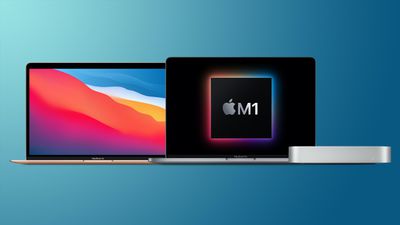
mac mini macbook pro macbook air m1

First, Back Up Your Data

Before you do anything, you should back up the files on your Mac. You could do this manually by copying across files onto an external drive. If you use iCloud, your photos, mail, contacts, documents, and so on should be automatically backed up in cloud storage.

hero timemachineHowever, we highly recommend that you take the time to perform a Time Machine backup of your system using an external drive. That way, the same backup volume can be used by Apple's Migration Assistant during a macOS installation to quickly transfer your applications, files and settings from the old Mac to a new one.

Check out our dedicated guide on how to back up your Mac using Time Machine.

Unlink your Apps

There are certain apps that will need to be manually unlinked from your Mac before you say goodbye to it. Some third-party apps require licenses that only work on a limited number of computers, so think about any licenses you may have purchased.

apple music logo
Similarly, you should de-authorize your iTunes account on the Mac, as this removes its access to content that you bought from the iTunes Store, iBooks Store, or App Store, including things like music, movies, TV shows, apps, and books.

To learn how to de-authorize your iTunes account, check out our dedicated guide.

Sign Out of iCloud

It's also important to disable Find My Mac and sign out of ‌iCloud‌ in macOS. That way you'll know for sure there isn't anything lingering on your Mac that links your Apple ID to this machine. The following steps show you how.

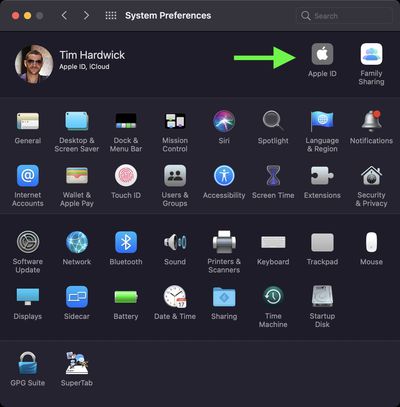
  1. Click the Apple () symbol in the top left corner of your Mac's screen and select System Preferences....
    Mac-preferences

  2. Click Apple ID in the preference pane.

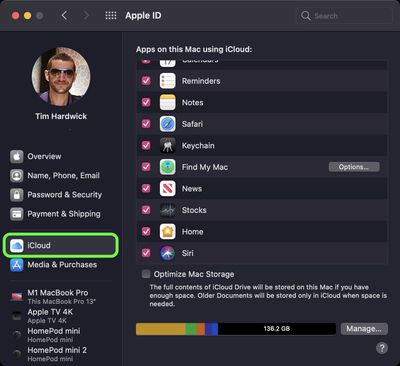
  3. Select iCloud in the sidebar, then uncheck all the boxes in the list to remove copies of the related data on this Mac.
    iCloud Mac

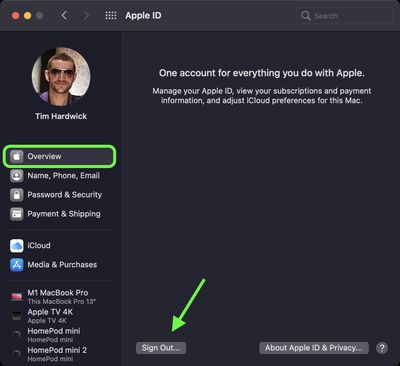
  4. Select Overview in the sidebar, then click Sign Out... to sign out of ‌iCloud‌ completely.
    iCloud Mac

How to Erase Your Apple Silicon Mac

Note that the following steps will cause Bluetooth devices to disconnect from your Mac, so connect your Bluetooth keyboard, mouse, or trackpad with a USB cable if possible.

  1. If your Mac is turned on, power it off by clicking the Apple symbol () in the top-left corner of the menu bar and selecting Shut Down... -> Shut Down. To start up again in macOS Recovery, turn on your Mac and continue to press and hold the power button until you see the startup options window.
  2. Select Options, then click Continue.
    m1 mac startup options

  3. If prompted, select a user, then click Next and enter the password.
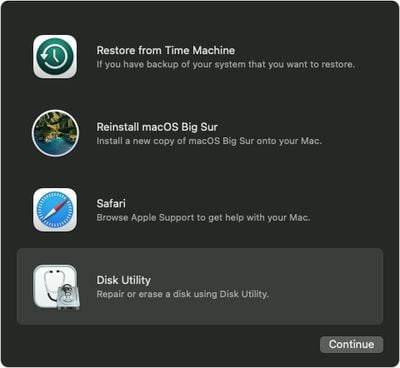
  4. From the utilities window, select Disk Utility and click Continue.
    macos big sur recovery disk

  5. Under the "Internal" section of the Disk Utility sidebar, make sure that you see the volume called Macintosh HD. If you don't see it there and you didn't change the name of the system disk yourself, choose Apple menu  > Shut Down, then unplug all nonessential devices from your Mac and try again.
    disk-utility

  6. If you previously used Disk Utility to create internal volumes on Macintosh HD, select each additional internal volume in the sidebar, then click the delete volume (–) button in the toolbar to delete that volume.
  7. Select Macintosh HD in the sidebar.
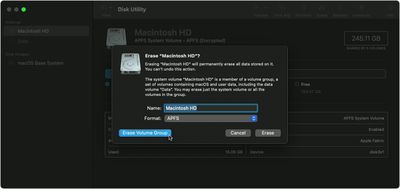
  8. Click the Erase button in the toolbar, then choose another name if desired and format the disk as APFS.
  9. Click Erase Volume Group.
    recovery Mac

  10. Enter your ‌Apple ID‌ if prompted to do so.
  11. Click Erase Mac and Restart to confirm the action.
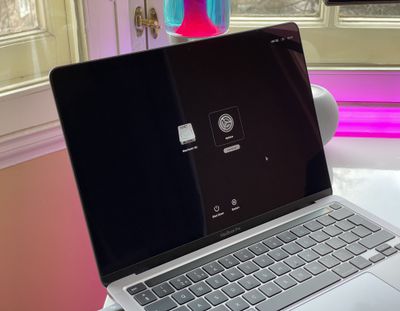
If you're parting ways with your Mac, you're all done. If you're holding on to it and want to start anew, follow the onscreen instructions when your Mac restarts to choose your language. Your Mac will attempt to activate using an internet connection. You can select a Wi-Fi network using the Wi-Fi menu in the menu bar. Alternatively, attach a network cable to your Mac.

After your Mac activates, click Exit to Recovery Utilities, then select Reinstall macOS in the utilities window and follow the onscreen instructions to reinstall macOS.


Popular Stories

grand theft auto iv

GTA VI Now (Barely) Running on Apple Silicon Macs

Friday November 27, 2026 7:46 am PST by
"Grand Theft Auto VI" can theoretically now run on Apple silicon Macs via unofficial community projects, despite Rockstar Games offering no official Mac version. Developers have adapted the Xbox Series version of the game to work on macOS unofficially, with some reporting that they can explore scenes and control the camera. Unfortunately, the projects remain experimental and performance is...
apple design award 2025

Apple Announces 2025 Design Award Winners Ahead of WWDC 2025

Tuesday June 3, 2025 10:14 am PDT by
As we wait for WWDC to kick off next Monday, Apple today announced the winners of its annual Apple Design Awards, recognizing apps and games for their innovation, ingenuity, and technical achievement. The 2025 Apple Design Award winners are listed below, with one app and one game selected per category: Delight and Fun - CapWords (App) and Balatro (Game) Innovation - Play (App) and PBJ -...
Apple 2026 Black Friday Event Hero

Apple's Official 2026 Black Friday Offer Starts Rolling Out

Thursday November 26, 2026 8:37 am PST by
Apple's annual four-day Black Friday through Cyber Monday shopping event is now live in Australia, New Zealand, and Thailand, and it will continue to roll out across Europe, the U.S., and Canada as the calendar turns to Friday, November 27 around the world. In the U.S., Apple's terms and conditions say the promotion begins on November 27 at 12 a.m. Pacific Time and ends on November 30 at...
Latest Stories
The 50+ Best Apple Black Friday Deals Still Available on AirPods, iPads, and More
3 hours ago
Here Are the Best Apple Black Friday Leftover Deals You Can Get Today
2 hours ago
HomePod Mini 2 in (RED) Seemingly Spotted Ahead of Announcement
13 hours ago
Apple's M6 and PROLED MacBook Pro Reach New Low Prices for Black Friday
23 hours ago
The MacRumors Show: iPhone Air 2 and iPhone 18 Are Coming
1 day ago
Apple Store in Brisbane Reopening Next Month With New Design
1 day ago
The 60+ Best Black Friday Accessory Deals on iPhone Chargers, TVs, Headphones, and More
2 hours ago
GTA VI Now (Barely) Running on Apple Silicon Macs
1 day ago
The Best Black Friday Streaming Deals on Apple TV, Disney+, and More
1 day ago
Apple TV's 'Carême' Wins International Emmy for Best Drama
1 day ago
iPhone 18 Production Delay Leaves Apple Little Time Before Launch
1 day ago
The Best Black Friday AirPods Deals Still Available
19 hours ago
The Best Black Friday Deals on Apple Home Products
1 day ago
The Best Black Friday iPhone Deals Still Available
19 hours ago
The Best Black Friday iPad Deals Still Available
19 hours ago
The Best Black Friday Apple Watch Deals Still Available
19 hours ago
The Best Black Friday AirTag Deals Still Available
19 hours ago
The Best Black Friday Mac Deals Still Available
19 hours ago
iPhone Share of US Smartphone Market Hits 57% as Rivals Slip
1 day ago
iPhone 20 Pro Rumored to Feature 3D-Printed Titanium Frame
1 day ago
Apple's Official 2026 Black Friday Offer Starts Rolling Out
2 days ago
Halide Adds Fill Light Feature for iPhone Duo
2 days ago
MacBook Air Black Friday Deals Now Live With Massive $399 Savings
2 days ago
Amazon Discounts All MacBook Neo Models by $99 for Black Friday
2 days ago
Kodak Launches Unique AirTag Rival With E-Ink Display
2 days ago
Here's Why the Apple Store is Going Down
2 days ago
Apple Still Working on Giant Foldable iPad That Could Cost $5,000
2 days ago
iPhones Dominate China's Weak Singles' Day Smartphone Sales
2 days ago
iPhone 20 Pro Could Feature Ceramic in Limited-Edition Model
2 days ago
Apple Faces Korean Regulator Review Over iPhone 16 AI Advertising
2 days ago
Related Apple News: Sport | Business | News | Entertainment | Politics