Skip to Content

How to Back Up Your Mac Using Time Machine

by

Time Machine iconFinding a reliable backup solution for the Mac that runs in the background and isn't a drain on system resources was once considered a challenging prospect.

With the arrival of OS X 10.5 Leopard, Apple changed that preconception by introducing its native backup solution, called Time Machine. This article explains the benefits of using Time Machine and runs you through the setup and restore process.

Benefits of Using Time Machine

Time Machine has won over many Mac users due to its automated scheduling and intuitive recovery process, along with its ability to run in the background without affecting overall system performance.

The application achieves this by making an initial full backup of your Mac's system disk and then stacking subsequent changes to the volume in a chronological hierarchy. Hourly backups, daily backups and weekly backups occur automatically, while the oldest backups are overwritten with new ones as the external backup disk reaches full capacity.

This creates a layered snapshot system that's reflected in Time Machine's navigable timeline and makes the recovery of individual files and folders a simple affair.
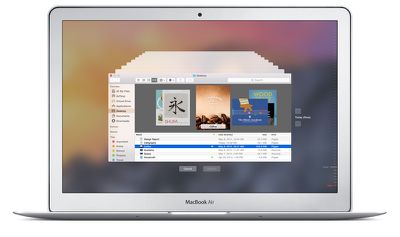
Time Machine on a MacBook Air
Another big plus with Apple's solution is that a Time Machine backup can be used in Recovery Mode to restore your Mac to its original state if the worst happens and your drive fails.

Likewise, the same backup volume can be used by Apple's Migration Assistant during an OS X installation to quickly transfer your applications, files and settings from an old Mac to a new one.

If you're using a Mac notebook running OS X Lion or later and you move away from the backup disk, Time Machine will save daily backups to your Mac's startup disk and even manage these local snapshots to ensure you still have storage space available.
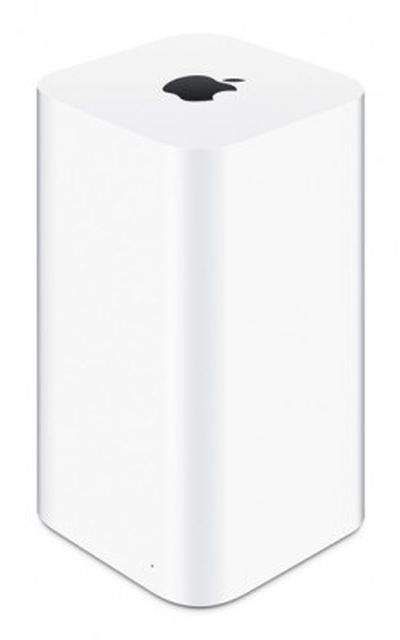
Time Capsule

What You Need

Apple's AirPort Time Capsule (from $299) is a Wi-Fi base station with a built-in backup disk, making it an ideal wireless solution for Time Machine since it avoids the need to keep an external hard drive physically connected to your Mac.

You can also use an external drive connected over a network, so long as it supports Apple File Protocol (AFP) file sharing. Otherwise, any hard drive that connects via USB, Thunderbolt or FireWire and uses a Mac filesystem format will do the job.

Bear in mind that the initial backup takes time, so you may want to set up Time Machine in the evening and leave your Mac on overnight for the process to complete.

Setting up Time Machine

When you connect an external hard drive to your Mac, a prompt may appear asking if you want to use it as a Time Machine backup disk. If you'd prefer to secure your backups with a password, check the "Encrypt Backup Disk" option, then click "Use as Backup Disk".
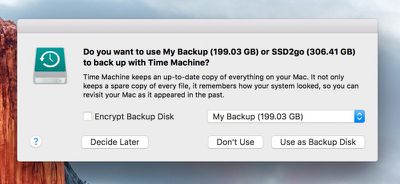
Time Machine query dialog

If the dialog prompt doesn't appear, follow these steps:

  1. Open Time Machine's settings by selecting System Preferences from the top-left Apple menu in the menu bar and clicking the Time Machine icon in the preference pane.
  2. Turn on the Time Machine slider and tick the "Show Time Machine in menu bar" option if it isn't already selected.
  3. To exclude specific items from your backups, click "Options…" and use the + button to select the files or folders in question. Here you can also choose whether to back up when your Mac's running on battery power and whether or not to be notified when old backups get deleted. Click Save when you're done.
  4. Click "Select Backup Disk…" and choose the drive you'd like to use from the list. Finally, tick the box if you want to Encrypt backups and then click "Use Disk".
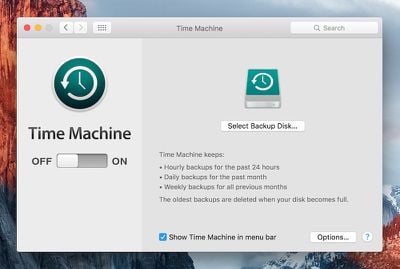
Time Machine preference pane

And that's it. The chosen volume will be formatted and the initial backup begins a couple of minutes later. Time Machine looks after the rest.

Using Multiple Backup Disks

Of course, using one backup disk may prove impractical if you often move your Mac between two locations. Fortunately, Time Machine supports multiple backups and will automatically rotate backups between disks, so there's nothing to stop you from keeping one in both places.

To add another backup disk to Time Machine, simply wait for the initial backup to complete on the first disk and then repeat step 4. Time Machine will ask if you want to use this new volume instead or to take turns backing up between the two disks. Select "Use Both".
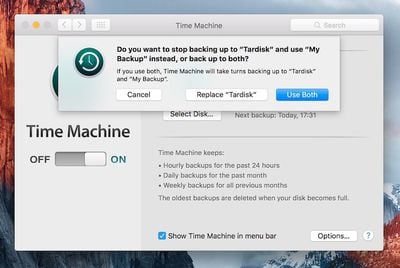
Time Machine Use Both Disks

Restoring From a Backup

To restore individual files and folders from your desktop, follow these steps:

  1. Enter Time Machine by selecting the option from the Time Machine icon on the OS X menu bar.

  2. In the screen that appears you'll see a Finder window and several more receding into the distance; select a date from the timeline right of the screen or click the up/down arrows to navigate the backup snapshots and locate the deleted item (or an earlier version of an item) you want to recover.

  3. Select the relevant item in the snapshot window, click Restore, and Time Machine will copy the file or folder to its original location on your Mac's startup disk.
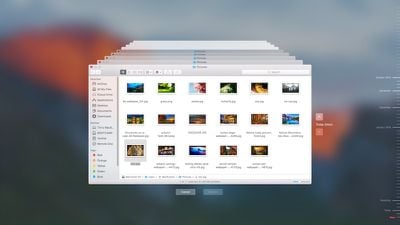
Time Machine screen
If you're using multiple backup disks and want to restore an item from another backup volume, return to the desktop, hold down the Option key and click on the Time Machine icon in the menu bar. Select the option that appears to "Browse Other Backup Disks…" and choose the attached volume in question.

Finally, to restore your startup disk wholesale in the event of a disaster, restart your Mac and hold down the Command and R keys to enter Recovery Mode. Select the option to "Restore your Mac from a Time Machine backup" from the OS X Utilities window and follow the steps on screen.

Alternatives to Time Machine

If you'd prefer more scheduling flexibility than Time Machine offers or you want to back up to a bootable clone disk, check out third-party apps like SuperDuper! ($27.95) and Carbon Copy Cloner ($39.99).

Alternatively, CrashPlan offers a free off-site backup solution as well as a cloud-based option for as little as $5 a month.


Top Rated Comments

141 months ago
Great article. Ignore the condescending comments. Some people are new and learning... "just search for it" is a terrible attitude
Score: 9 Votes (Like | Disagree)
JeffyTheQuik Avatar
141 months ago
This is nice for those new to Macs, or those that have forgotten to do so. This kind of thing would have been nice to have when I entered the Mac waters back in 2008.

Thank you!
Score: 4 Votes (Like | Disagree)
Crosscreek Avatar
141 months ago
SuperDuper runs every night on my Mac so I always have a fresh bootable copy from external WD drive.
Score: 4 Votes (Like | Disagree)
Weaselboy Avatar
141 months ago
If you're using a Mac notebook running OS X Yosemite or later and you move away from the backup disk, Time Machine will save daily backups to your Mac's startup disk and even manage these local snapshots to ensure you still have storage space available.
Just a correction Tim, local snapshots came out with Lion. http://pondini.org/TM/30.html

Well written article. Thank you.
Score: 4 Votes (Like | Disagree)
glenthompson Avatar
141 months ago
This doesn't offer any way of backing up the hard drive to itself, does it?

I mean... surely that would be more useful than nothing, wouldn't it?
Pretty much this is a useless approach. The only thing it would protect you against is accidental deletion or overwriting of a file. Almost any other disaster scenario would leave you without a backup. Think fire, theft, flood, etc.

Best practice for backups is to have at least 3 copies of your data with one of those copies being off-site.
Score: 2 Votes (Like | Disagree)
WigWag Workshop Avatar
141 months ago
I appreciate these articles, very helpful to the new folks.
Score: 1 Votes (Like | Disagree)

Popular Stories

apple design award 2025

Apple Announces 2025 Design Award Winners Ahead of WWDC 2025

Tuesday June 3, 2025 10:14 am PDT by
As we wait for WWDC to kick off next Monday, Apple today announced the winners of its annual Apple Design Awards, recognizing apps and games for their innovation, ingenuity, and technical achievement. The 2025 Apple Design Award winners are listed below, with one app and one game selected per category: Delight and Fun - CapWords (App) and Balatro (Game) Innovation - Play (App) and PBJ -...
1password deal blue

1Password Security Breach: What Was Accessed and What Wasn't

Wednesday November 25, 2026 1:09 pm PST by
Popular password management app 1Password today said it experienced a security breach earlier this month. 1Password says some customer names and email addresses were accessed, but no customer vault contents were compromised. On November 19, 1Password saw indications that an employee's GitHub account had been breached and began investigating. The company says the breached GitHub account was...

apple store down feature

Here's Why the Apple Store is Going Down

Thursday November 26, 2026 5:49 am PST by
Apple's online store is going down for a few hours on a rolling country-by-country basis right now, but do not get your hopes up for new products. Apple takes its online store down for a few hours ahead of Black Friday every year to tease its annual gift card offer with the purchase of select products. The store is down in Australia, New Zealand, and Thailand, right now, and it will...
Latest Stories
The 50+ Best Apple Black Friday Deals Still Available on AirPods, iPads, and More
2 hours ago
Apple's M6 and PROLED MacBook Pro Reach New Low Prices for Black Friday
6 hours ago
The MacRumors Show: iPhone Air 2 and iPhone 18 Are Coming
6 hours ago
Apple Store in Brisbane Reopening Next Month With New Design
7 hours ago
The 60+ Best Black Friday Accessory Deals on iPhone Chargers, TVs, Headphones, and More
8 hours ago
GTA VI Now (Barely) Running on Apple Silicon Macs
8 hours ago
The Best Black Friday Streaming Deals on Apple TV, Disney+, and More
9 hours ago
Apple TV's 'Carême' Wins International Emmy for Best Drama
9 hours ago
iPhone 18 Production Delay Leaves Apple Little Time Before Launch
10 hours ago
The Best Black Friday AirPods Deals Still Available
2 hours ago
The Best Black Friday Deals on Apple Home Products
11 hours ago
The Best Black Friday iPhone Deals Still Available
2 hours ago
The Best Black Friday iPad Deals Still Available
2 hours ago
The Best Black Friday Apple Watch Deals Still Available
2 hours ago
The Best Black Friday AirTag Deals Still Available
2 hours ago
The Best Black Friday Mac Deals Still Available
2 hours ago
iPhone Share of US Smartphone Market Hits 57% as Rivals Slip
12 hours ago
iPhone 20 Pro Rumored to Feature 3D-Printed Titanium Frame
13 hours ago
Apple's Official 2026 Black Friday Offer Starts Rolling Out
1 day ago
Halide Adds Fill Light Feature for iPhone Duo
1 day ago
MacBook Air Black Friday Deals Now Live With Massive $399 Savings
1 day ago
Amazon Discounts All MacBook Neo Models by $99 for Black Friday
1 day ago
Kodak Launches Unique AirTag Rival With E-Ink Display
1 day ago
Here's Why the Apple Store is Going Down
1 day ago
Apple Still Working on Giant Foldable iPad That Could Cost $5,000
1 day ago
iPhones Dominate China's Weak Singles' Day Smartphone Sales
1 day ago
iPhone 20 Pro Could Feature Ceramic in Limited-Edition Model
1 day ago
Apple Faces Korean Regulator Review Over iPhone 16 AI Advertising
2 days ago
Apple Watch Ultra 4 Hits New Best-Ever Price of $649.99 for Black Friday
2 days ago
New Apple Store Opening in India, Download the Special Wallpaper Now
2 days ago
Related Apple News: Mac | Technology | South Africa | Mac | Travel





























