Skip to Content

Troubleshoot Issues on Apple Watch by Backing Up and Restoring

by

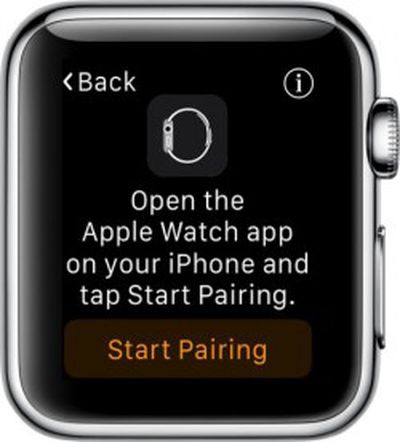
Apple Watch PairingNo matter how much research and testing goes into ensuring the Apple Watch runs smoothly with no problems, there's always a chance that you will have to perform a few IT-style actions in order to fix a minor issue with your device.

The best way to troubleshoot a problem on Apple Watch is to backup the data and restore it. We've got a guide for backing up your Apple Watch to your iPhone and then restoring data from a backup.

Backups include most data collection, like system settings, language, Mail, Calendar, Stocks, app-specific data, and health and fitness data (if you are using iCloud or an encrypted iTunes backup).

Backups do not include calibration data, synced playlists, credit and debit cards used for Apple Pay, and your Apple Watch passcode

Backup iPhone First

Before starting the process on your Apple Watch, it is a good idea to sync the data on your iPhone to ‌iCloud‌ or iTunes. When you do, any previously backed up Apple Watch data is included.

Unpair Apple Watch

The only way to force a backup on Apple Watch is to unpair it from your iPhone. Unfortunately, this is a time consuming process.
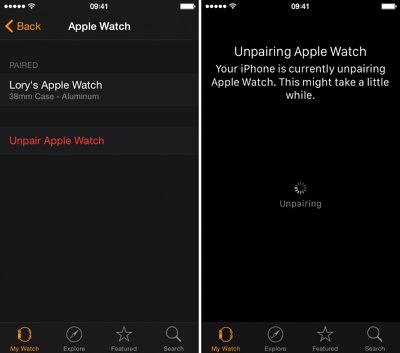
How to backup and restore apple watch 2

  1. Open the Apple Watch app on your iPhone and navigate to the My Watch section.
  2. Select Apple Watch from the list.
  3. Tap "Unpair Apple Watch." Tap again to confirm.
  4. Wait until Apple Watch is unpaired and the display asks you to confirm your language.

Re-pair Apple Watch

You will then be directed to pair Apple Watch with your iPhone. This process also takes a while.
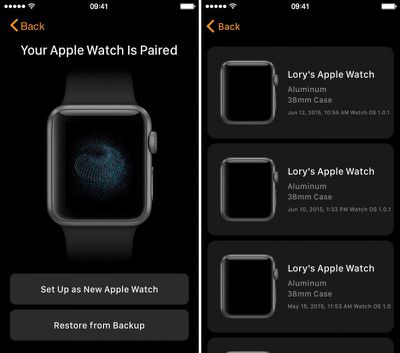
How to backup and restore apple watch 3

  1. Go back to the Apple Watch app and select Apple Watch from the list and tap "Pair Apple Watch."
  2. Select "Restore From Backup" and choose a backup you wish to restore from.
  3. Agree to the terms and conditions.
  4. Enter your Apple ID password when prompted.
  5. If two-step verification is enabled, complete the process when prompted.
  6. Create a four-digit passcode on Apple Watch when prompted.
  7. Select whether to unlock Apple Watch with your iPhone.
  8. Wait for the data to sync. When finished, you will get a notification on Apple Watch.

Reenter Unsaved Data

Because the backup does not include your workout calibrations, playlists, and credit or debit cards in ‌Apple Pay‌, this must all be added manually. Check out our guides for calibrating Apple Watch, listening to music, and setting up Apple Pay on Apple Watch.

Here is a tip: If you ever need to speak with Apple support for an issue with Apple Watch, do yourself a favor and follow the steps above to backup and restore Apple Watch before you contact them. One of the first steps they always have you follow is unpairing and re-pairing Apple Watch. This will save you 15 minutes of awkward silence.


Related Roundup: Apple Watch 12
Buyer's Guide: Apple Watch (Buy Now)
Related Forum: Apple Watch

Top Rated Comments

Traverse Avatar
149 months ago
Off all the things I have to worry about and trouble shoot in my life, my watch is one thing I don't want to have to worry about. A watch should "just work." Still, added features bring added complexities.
Score: 4 Votes (Like | Disagree)
149 months ago
Off all the things I have to worry about and trouble shoot in my life, my watch is one thing I don't want to have to worry about. A watch should "just work." Still, added features bring added complexities.
Oh Boy. Get yourself a regular watch and your troubles are over. And I had a cheapo Casio digital watch in the past that just suddenly displayed all sorts of incorrect data.

The Apple Watch is more than just a watch. It's a computer. And you know that very well. So to say you want it to function perfectly is just unrealistic. It does "just work" the vast majority of the time. Just as the iPhone and my other computers do. But the complexity of these devices is enormous. You are not being fair to expect perfection. You should consider deleting all electronic devices from your life. Living off the land in a shack in the middle of Idaho will eliminate many of the troubles you deal with.
Score: 3 Votes (Like | Disagree)
149 months ago
Off all the things I have to worry about and trouble shoot in my life, my watch is one thing I don't want to have to worry about. A watch should "just work." Still, added features bring added complexities.
Most things in life often require some troubleshooting at some point, even those that have been invented and used long ago before electricity or anything even close to it. There's really nothing out there that "just works" all the time the way you want it, even taking one of the most basic essentially prehistoric examples of simply using a rock to bang on a nut to break it open can fail sometime for various reason (perhaps the rock is porous or something like that, as an example).
Score: 1 Votes (Like | Disagree)
149 months ago
I still can't sync a playlist to the watch...very strange....I've tried everything. Not working...
Stuck with: "Syncing" changing to "Sync in progress"...it repeats into infinity.
And yes, all devices are plugged into power.
Score: 1 Votes (Like | Disagree)
149 months ago

No matter how much research and testing goes into ensuring the Apple Watch runs smoothly with no problems, there's always a chance that you will have to perform a few IT-style actions in order to fix a minor issue with your device.

The best way to troubleshoot a problem on Apple Watch is to backup the data and restore it. We've got a guide for backing up your Apple Watch to your iPhone and then restoring data from a backup.

Backups include most data collection, like system settings, language, Mail, Calendar, Stocks, app-specific data, and health and fitness data (if you are using iCloud or an encrypted iTunes backup).

Backups do not include calibration data, synced playlists, credit and debit cards used for Apple Pay, and your Apple Watch passcode

Backup iPhone First

Before starting the process on your Apple Watch, it is a good idea to sync the data on your iPhone to iCloud or iTunes. When you do, any previously backed up Apple Watch data is included.

Unpair Apple Watch

The only way to force a backup on Apple Watch is to unpair it from your iPhone. Unfortunately, this is a time consuming process.


Click here to read more... ('https://www.macrumors.com/how-to/backup-restore-apple-watch/')

Article Link: Troubleshoot Issues on Apple Watch by Backing Up and Restoring ('https://www.macrumors.com/how-to/backup-restore-apple-watch/')
It's not quite such a good idea to 'un-pair' and 'pair' the watch to create a backup, as this creates multiple 'Sources' in the Helath application on your iPhone.
Score: 1 Votes (Like | Disagree)
149 months ago
It's important to note that the activity data is not backed up either- well, it didn't back it up for me. I've had to restore my watch two times since I got it, and each time my activity and workouts were wiped clean. Any and every achievement you have gotten will also be gone.
Score: 1 Votes (Like | Disagree)

Popular Stories

apple watch series 3 design

Apple Offers Steps to Fix Daylight Saving Time Bug on Apple Watch

Sunday November 1, 2026 3:34 am PST by
Apple has published a support document describing what to do if your Apple Watch continues to show time that's off by one hour after daylight savings time changes. "This incorrect time appears only on the Always On display when your wrist is down," says Apple. "When you activate the display by tapping it or raising your wrist, the time changes to the correct hour." To fix the issue, Apple says ...
muse apple watch app

Meta's Muse AI Agent Comes to Apple Watch

Monday November 9, 2026 1:55 pm PST by
Meta today updated the Muse app for iOS to add Apple Watch support, which means Muse users can access the proactive AI agent from the watch. The app adds the Muse character to the watch with an option to text it, dictate text to it, or call it. There's also a Muse complication for quick access. Muse is Meta's personal AI agent that can complete tasks for users. It is available as a...
siri recap live rewind

watchOS 27.3 Brings Live Rewind and Siri Recap to Apple Watch

Tuesday November 3, 2026 10:35 am PST by
With the first beta of watchOS 27.3, Apple is introducing new Audio Intelligence features it previewed for the Apple Watch Series 12 and Ultra 4 earlier this year. Powered by the S11 chip, Audio Intelligence includes Live Rewind, Siri Recap, Sound Recognition, and Shazam Music Recognition. Sound Recognition and Shazam are already on the watch, but Live Rewind and Siri Recap are now available ...
Latest Stories
The 50+ Best Apple Black Friday Deals Still Available on AirPods, iPads, and More
26 minutes ago
HomePod Mini 2 in (RED) Seemingly Spotted Ahead of Announcement
10 hours ago
Apple's M6 and PROLED MacBook Pro Reach New Low Prices for Black Friday
21 hours ago
The MacRumors Show: iPhone Air 2 and iPhone 18 Are Coming
21 hours ago
Apple Store in Brisbane Reopening Next Month With New Design
21 hours ago
The 60+ Best Black Friday Accessory Deals on iPhone Chargers, TVs, Headphones, and More
22 hours ago
GTA VI Now (Barely) Running on Apple Silicon Macs
22 hours ago
The Best Black Friday Streaming Deals on Apple TV, Disney+, and More
23 hours ago
Apple TV's 'Carême' Wins International Emmy for Best Drama
1 day ago
iPhone 18 Production Delay Leaves Apple Little Time Before Launch
1 day ago
The Best Black Friday AirPods Deals Still Available
16 hours ago
The Best Black Friday Deals on Apple Home Products
1 day ago
The Best Black Friday iPhone Deals Still Available
16 hours ago
The Best Black Friday iPad Deals Still Available
16 hours ago
The Best Black Friday Apple Watch Deals Still Available
16 hours ago
The Best Black Friday AirTag Deals Still Available
16 hours ago
The Best Black Friday Mac Deals Still Available
16 hours ago
iPhone Share of US Smartphone Market Hits 57% as Rivals Slip
1 day ago
iPhone 20 Pro Rumored to Feature 3D-Printed Titanium Frame
1 day ago
Apple's Official 2026 Black Friday Offer Starts Rolling Out
2 days ago
Halide Adds Fill Light Feature for iPhone Duo
2 days ago
MacBook Air Black Friday Deals Now Live With Massive $399 Savings
2 days ago
Amazon Discounts All MacBook Neo Models by $99 for Black Friday
2 days ago
Kodak Launches Unique AirTag Rival With E-Ink Display
2 days ago
Here's Why the Apple Store is Going Down
2 days ago
Apple Still Working on Giant Foldable iPad That Could Cost $5,000
2 days ago
iPhones Dominate China's Weak Singles' Day Smartphone Sales
2 days ago
iPhone 20 Pro Could Feature Ceramic in Limited-Edition Model
2 days ago
Apple Faces Korean Regulator Review Over iPhone 16 AI Advertising
2 days ago
Apple Watch Ultra 4 Hits New Best-Ever Price of $649.99 for Black Friday
2 days ago
Related Apple News: News | Education | Culture | Sport | Business






























