Skip to Content

How to Set Up Apple Pay on Apple Watch

by

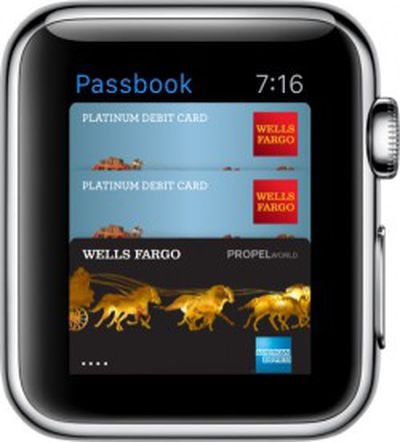
passbookapplewatchapplepayApple restricted Apple Pay to the iPhone 6 and 6 Plus due to the need for an NFC chip that's not included in older phones, which means Apple Pay has been limited to those with newer iPhones since it debuted in October of 2014.

One of the major perks of the Apple Watch is that it enables Apple Pay for some older iPhones because it has the same NFC chip that's in the iPhone 6 and 6 Plus. If you have an Apple Watch and an iPhone 5, 5c, or 5s, you can now use Apple Pay and the watch to make secure purchases in retail locations.

For those of you who haven't had a chance to use Apple Pay, we've written up a tutorial that walks through how to set it up on your watch.

Setting Up Apple Pay
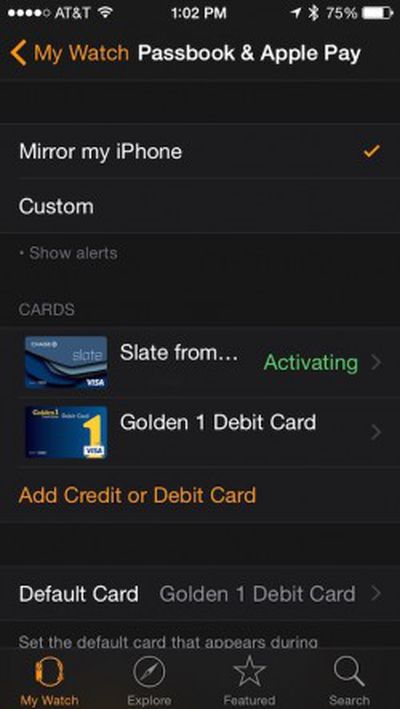
How to Apple Pay on Apple Watch 5Even if you are already using Apple Pay on iPhone 6, you will need to add your credit and debit cards to Apple Pay for Apple Watch. You can add up to eight cards.

  1. Open the Apple Watch app on your iPhone and then select My Watch.
  2. Select Passbook and Apple Pay.
  3. Tap "Add Credit or Debit Card.
  4. Apple will automatically ask you to enter the security code of the credit card that is on file for iTunes and the App Store. If you don't want to use this card, select "Add a different credit or debit card."
  5. When the camera viewfinder appears, position your credit or debit card inside the frame. The app will scan the card for relevant information.
  6. If the card does not automatically scan, you can enter the information manually.
applepayreadyapplewatch
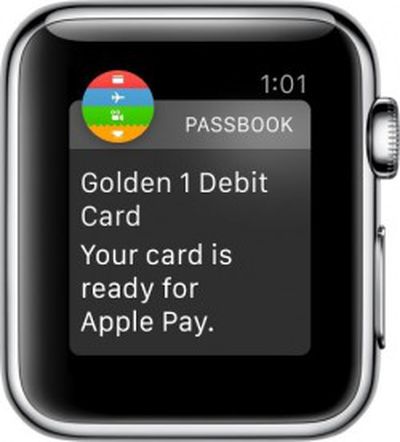
Once the card is added, you will see that it is listed as "activating." When it has been activated, you will receive a notification on Apple Watch that the card is ready for Apple Pay.

Using Apple Pay

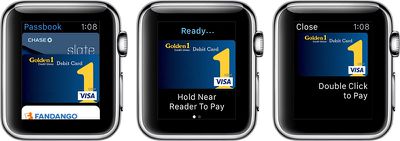
When you are ready, head out to one of the participating retail stores. At checkout, simply open Passbook and Apple Pay app on Apple Watch and select the card you wish to use.
usingapplepay
When prompted, you will double-click the Side button (the button normally used to access your favorite contacts list). Make sure you are close to the reader so it will register your Apple Watch via near-field communication.

Deleting Credit Cards

You can remove credit cards from Apple Pay through the app on Apple Watch. Tap to select the card, then firm press to delete it from the list. You can also remove a card using the Apple Watch app on the iPhone.

If Your Apple Watch is Lost or Stolen

Since Apple hasn't yet added Find My Apple Watch, you should probably first start by deleting your credit card information from Apple Watch

  1. Sign into your account via icloud.com.
  2. Select Settings, then My Devices.
  3. Choose Apple Watch and click Remove All.
  4. You can also put a hold on your cards by calling your bank or credit card issuer directly.

Using Passbook
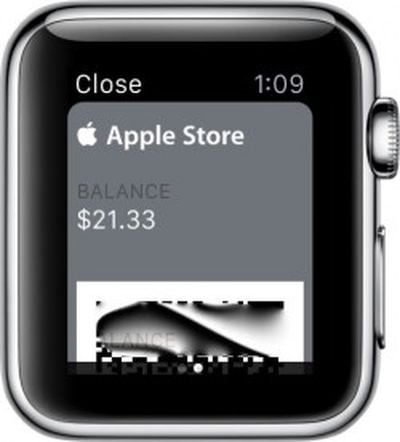
applewatchusingpassbookWithin the same app, you can use your Passbook loyalty and gift cards. Set up cards on your iPhone using the Passbook App.

When you are near the location of a store that you have a card saved in Passbook for, you will receive a notification on Apple Watch. Tap the notification to open Passbook and scroll to the relevant card. When ready, show the barcode on Apple Watch to the employee that will be scanning your card.

If you rearrange or delete old cards on Passbook on your iPhone, all changes will be reflected on Apple Watch.

Apple's contactless payment service uses a security feature that creates a unique Device Account Number that is assigned to cards once they are installed in Apple Pay. These encrypted card numbers, as well as a transaction-specific dynamic security code, are used at payment kiosks instead of your actual credit card numbers. So, not only is your transaction safer from hacking issues, but your personal information is no longer transmitted to the merchant.

Related Roundups: Apple Watch 12, Apple Pay
Buyer's Guide: Apple Watch (Buy Now)

Top Rated Comments

150 months ago
Step 1: Move to the US
Score: 24 Votes (Like | Disagree)
150 months ago
What does this have to do with rumors or news I care about? A guide is totally off point for this site. Editors...start pulling your site back to its purpose or we'll jump. Full on content fail here.

"We'll"??? Who is we?

It's fine with me. To you I say, bye bye.
Score: 16 Votes (Like | Disagree)
staveb Avatar
150 months ago
What does this have to do with rumors or news I care about? A guide is totally off point for this site. Editors...start pulling your site back to its purpose or we'll jump. Full on content fail here.
Score: 15 Votes (Like | Disagree)
150 months ago
What does this have to do with rumors or news I care about? A guide is totally off point for this site. Editors...start pulling your site back to its purpose or we'll jump. Full on content fail here.

These guides are redundant and a blatant attempt to get search engine hits for macrumors for people trying to set this stuff up. Apple has a full site set up with tutorials on how to do all this. Macrumors needs to quit repeating what Apple already has posted on their user guided tours on apple.com. https://www.apple.com/watch/guided-tours/#film-apple-pay
Score: 13 Votes (Like | Disagree)
150 months ago
You don't need to open the passbook app, you can double press the friends/side button to go directly to Apple Pay from anywhere on the watch.
Score: 8 Votes (Like | Disagree)
150 months ago
This doesn't work for me. A very detailed guide, but seems to be missing the only valid piece of information - this doesn't work outside of the USA. Does macrumors really assume everyone is in the USA?
Score: 7 Votes (Like | Disagree)

Popular Stories

Apple Pay Walmart Feature

Walmart App Rolls Back Apple Pay Support After Just Weeks

Tuesday November 24, 2026 12:14 pm PST by
Walmart recently added Apple Pay support to its iPhone app and website, but it removed the option just weeks later, according to Appleosophy's David Becker. The reason for this reversal is unknown. Walmart still accepts Apple Pay in its U.S. stores, after finally deciding to roll out tap-to-pay support earlier this year. We can confirm that we do not see Apple Pay on Walmart's website or in...
apple watch series 3 design

Apple Offers Steps to Fix Daylight Saving Time Bug on Apple Watch

Sunday November 1, 2026 3:34 am PST by
Apple has published a support document describing what to do if your Apple Watch continues to show time that's off by one hour after daylight savings time changes. "This incorrect time appears only on the Always On display when your wrist is down," says Apple. "When you activate the display by tapping it or raising your wrist, the time changes to the correct hour." To fix the issue, Apple says ...
muse apple watch app

Meta's Muse AI Agent Comes to Apple Watch

Monday November 9, 2026 1:55 pm PST by
Meta today updated the Muse app for iOS to add Apple Watch support, which means Muse users can access the proactive AI agent from the watch. The app adds the Muse character to the watch with an option to text it, dictate text to it, or call it. There's also a Muse complication for quick access. Muse is Meta's personal AI agent that can complete tasks for users. It is available as a...
Latest Stories
Here Are the Best Apple Black Friday Leftover Deals You Can Get Today
5 hours ago
HomePod Mini 2 in (RED) Seemingly Spotted Ahead of Announcement
16 hours ago
Apple's M6 and PROLED MacBook Pro Reach New Low Prices for Black Friday
1 day ago
The MacRumors Show: iPhone Air 2 and iPhone 18 Are Coming
1 day ago
Apple Store in Brisbane Reopening Next Month With New Design
1 day ago
The 60+ Best Black Friday Accessory Deals on iPhone Chargers, TVs, Headphones, and More
5 hours ago
GTA VI Now (Barely) Running on Apple Silicon Macs
1 day ago
The Best Black Friday Streaming Deals on Apple TV, Disney+, and More
1 day ago
Apple TV's 'Carême' Wins International Emmy for Best Drama
1 day ago
iPhone 18 Production Delay Leaves Apple Little Time Before Launch
1 day ago
The Best Black Friday AirPods Deals Still Available
22 hours ago
The Best Black Friday Deals on Apple Home Products
1 day ago
The Best Black Friday iPhone Deals Still Available
22 hours ago
The Best Black Friday iPad Deals Still Available
22 hours ago
The Best Black Friday Apple Watch Deals Still Available
22 hours ago
The Best Black Friday AirTag Deals Still Available
22 hours ago
The Best Black Friday Mac Deals Still Available
22 hours ago
iPhone Share of US Smartphone Market Hits 57% as Rivals Slip
1 day ago
iPhone 20 Pro Rumored to Feature 3D-Printed Titanium Frame
1 day ago
The 50+ Best Apple Black Friday Deals Still Available on AirPods, iPads, and More
6 hours ago
Apple's Official 2026 Black Friday Offer Starts Rolling Out
2 days ago
Halide Adds Fill Light Feature for iPhone Duo
2 days ago
MacBook Air Black Friday Deals Now Live With Massive $399 Savings
2 days ago
Amazon Discounts All MacBook Neo Models by $99 for Black Friday
2 days ago
Kodak Launches Unique AirTag Rival With E-Ink Display
2 days ago
Here's Why the Apple Store is Going Down
2 days ago
Apple Still Working on Giant Foldable iPad That Could Cost $5,000
2 days ago
iPhones Dominate China's Weak Singles' Day Smartphone Sales
2 days ago
iPhone 20 Pro Could Feature Ceramic in Limited-Edition Model
2 days ago
Apple Faces Korean Regulator Review Over iPhone 16 AI Advertising
2 days ago
Related Apple News: Lifestyle | World News | Reviews | Technology | Iphone






























