Skip to Content

How to Prevent Apps From Showing Up in Search and Siri Suggestions in iOS

by

In iOS 12 and earlier versions of iOS, Siri analyzes your app use, browsing history, emails, messages, contacts, and information from third-party apps to provide customized suggestions for searches, Look Up, News, Photos, and more.

‌Siri‌ syncs this information across all of your devices to provide a more personalized experience, and this information is also anonymously sent back to Apple to "make your searches more relevant."

All of this information is encrypted, but you may not want to use the feature because of privacy issues or you may not want certain apps showing up on your device. For that reason, Apple has expanded privacy controls so you can customize Search and ‌Siri‌ Suggestions to your liking.

How to Disable Siri Suggestions for Individual Apps

If you want to use ‌Siri‌ Suggestions but don't want certain apps to show up as suggested content, you can disable them on an app by app basis. This feature was introduced in iOS 11 and it keeps sensitive apps from showing up in suggestions, searches, and more across your operating system.
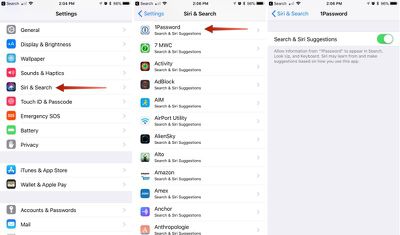
sirisuggestionsbyapp

  1. Open the Settings app.
  2. Scroll down to ‌Siri‌ & Search and tap it.
  3. Scroll down to see a list of all of the apps that work with the feature.
  4. Select each app you don't want to show up in search and ‌Siri‌ suggestions.
  5. Tap the ‌Siri‌ & Suggestions button to toggle it off.

When you disable apps, information from those apps will not show up in Search, Look Up, and Keyboard as you use your iOS device. So, for example, if I disable the Files app, content stored in my Files app will no longer come up in a search or anywhere else.

In the screenshot below, I have Files enabled for ‌Siri‌ and Search Suggestions on the left, and on the right, I've disabled the feature. As you can see, content from the Files app no longer shows up.
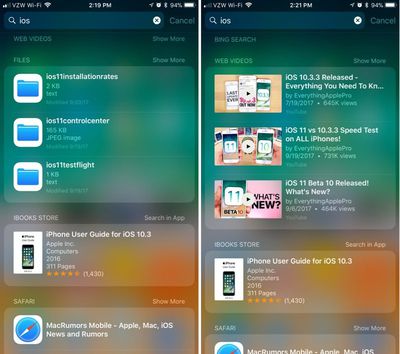
sirisuggestionsfilesdisabled
You can toggle off any of your installed apps to prevent their data from being displayed when you search, use the keyboard, and ask ‌Siri‌ questions.

‌Siri‌ will ignore disabled files but will continue to learn your preferences from enabled apps and show content from those apps, which is probably how most people will prefer to use this feature. For a full lockdown, though, disable your apps and turn off ‌Siri‌ Suggestions entirely.

How to Turn Off Siri Suggestions Entirely

If you don't want to use ‌Siri‌ suggestions at all, there are three simple toggles for turning it off.
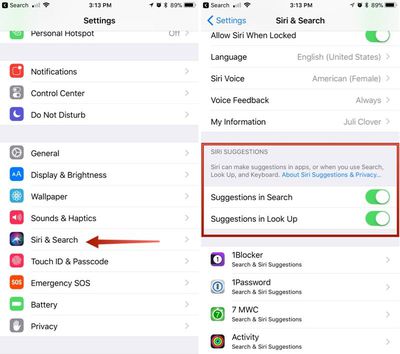
disablesirisuggestions

  1. Open the Settings app.
  2. Scroll down to ‌Siri‌ & Search and tap it.
  3. Scroll down to ‌Siri‌ Suggestions.
  4. Toggle off Suggestions in Search.
  5. Toggle off Suggestions in Look Up.
  6. Toggle off Suggestions on Lock Screen.

With these two settings toggled off ‌Siri‌ will not provide personalized suggestions when you search for things, and your data will not be anonymously sent to Apple to power the ‌Siri‌ features. Note that ‌Siri‌ will still bring up apps installed on your devices in search and other areas -- this just disables the feature that lets ‌Siri‌ learn your preferences and send data to Apple.

To keep apps from showing up entirely, you'll need to use the individual app settings, as outlined above.

Preventing Siri Suggestions From Sending Your Location to Apple

In some cases, ‌Siri‌ Suggestions sends the location of your device to Apple alongside your search queries so Apple can provide more relevant recommendations. You can keep your location from being sent to Apple by disabling a specific Location setting.
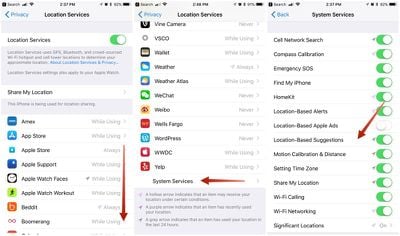
locationservicessiri

  1. Open the Settings app.
  2. Choose Privacy.
  3. Tap Location Services.
  4. Scroll down to System Services and tap it.
  5. Scroll down to Location-Based Suggestions and toggle it off.

‌Siri‌ Suggestions is a useful feature so most people won't want to toggle it off completely (and it is completely private -- Apple encrypts and anonymizes all data) but being able to prevent individual apps like Safari, Mail, and others from showing up lets you customize your results for a more streamlined experience and it prevents anything you don't want to see from popping up unexpectedly.
Related Forum: iOS 12

Top Rated Comments

Time Less Avatar
120 months ago
We need a toggle to disable all apps or toggles next to the names. 3 steps for each app is tedious.
Score: 5 Votes (Like | Disagree)
120 months ago
I’ve just figured out that you can’t even find an app with Spotlight anymore. WTF. Some show up, some don’t, and I have to type the entire app name before it shows up. Bad Apple. BAD!
Score: 4 Votes (Like | Disagree)
Compote Avatar
120 months ago
Siri always knows when I want to use Grindr... HA! Not anymore!
Score: 3 Votes (Like | Disagree)
120 months ago
I’ve just figured out that you can’t even find an app with Spotlight anymore. WTF. Some show up, some don’t, and I have to type the entire app name before it shows up. Bad Apple. BAD!
The app won’t show up at the top if ‘Search & Siri Suggestions’ is disabled for this particular app.

I always had it disabled for most because I found the in-app search result suggestions to be cluttering.

I want a quick and easy way to spotlight search an app by typing 2-4 characters.

The only way to do this now is to enable ‘Search & Siri Suggestions’ for this app. It will then show up almost at the top. Right below the text search suggestions.

Unfortunately this also enables all the other in-app search clutter again.

I’ve submitted feedback to the Apple iPhone feedback system. I suggest everybody who finds this annoying to do the same.
Score: 2 Votes (Like | Disagree)
120 months ago
Can someone explain the difference between search and “look up”
Score: 2 Votes (Like | Disagree)
mcdj Avatar
120 months ago
I’m more interested in a way to disable the word suggestions at the top of the results. It used to be apps at the top of search results and I used it as a launcher by typing a couple of letters of the app name. Now the app results are partially obstructed by the keyboard and less intuitive to reach.
Score: 2 Votes (Like | Disagree)

Popular Stories

Siri AI Icon

Siri AI Settlement: Here's How Much Apple Will Pay You

Saturday November 21, 2026 9:08 am PST by
In May, Apple agreed to pay $250 million to settle a U.S. class action lawsuit over Siri AI's delayed launch, and there is one month remaining to submit a claim through the settlement website. In a court document earlier this week, lawyers said that claimants will likely receive at least $61 per eligible iPhone, based on early participation data so far. The exact payment amount per eligible ...
Siri AI Icon

iOS 27.3 Beta Adds Daily Siri AI Limits and iCloud+ Upgrades

Monday November 16, 2026 10:14 am PST by
With the latest iOS 27.3, iPadOS 27.3, and macOS 27.3 betas, Apple is starting to test limits and paid upgrades for Siri AI and Apple Intelligence features. Every Apple device gets a free daily access allowance for Siri AI and Apple Intelligence features that rely on server-side AI processing, such as Image Playground and Clean Up in Photos. When that limit is hit, there will be an option to ...
Apple TV 4K 4th Generation feature0

Apple Releases tvOS 27.2.1 With Siri AI for Older Apple TVs

Friday November 13, 2026 11:26 am PST by
Apple today released tvOS 27.2.1, an update to the tvOS 27 operating system that launched in September. tvOS 27.2.1 comes nearly three weeks after Apple released tvOS 27.2. tvOS 27.2.1 brings Siri AI support to the 2nd- and 3rd-generation Apple TV 4K models, but it is available for all Apple TV 4K models that support tvOS 27. Apple announced Siri AI for the Apple TV when debuting the...
Latest Stories
The 50+ Best Apple Black Friday Deals Still Available on AirPods, iPads, and More
5 hours ago
Here Are the Best Apple Black Friday Leftover Deals You Can Get Today
3 hours ago
HomePod Mini 2 in (RED) Seemingly Spotted Ahead of Announcement
15 hours ago
Apple's M6 and PROLED MacBook Pro Reach New Low Prices for Black Friday
1 day ago
The MacRumors Show: iPhone Air 2 and iPhone 18 Are Coming
1 day ago
Apple Store in Brisbane Reopening Next Month With New Design
1 day ago
The 60+ Best Black Friday Accessory Deals on iPhone Chargers, TVs, Headphones, and More
3 hours ago
GTA VI Now (Barely) Running on Apple Silicon Macs
1 day ago
The Best Black Friday Streaming Deals on Apple TV, Disney+, and More
1 day ago
Apple TV's 'Carême' Wins International Emmy for Best Drama
1 day ago
iPhone 18 Production Delay Leaves Apple Little Time Before Launch
1 day ago
The Best Black Friday AirPods Deals Still Available
21 hours ago
The Best Black Friday Deals on Apple Home Products
1 day ago
The Best Black Friday iPhone Deals Still Available
21 hours ago
The Best Black Friday iPad Deals Still Available
21 hours ago
The Best Black Friday Apple Watch Deals Still Available
21 hours ago
The Best Black Friday AirTag Deals Still Available
21 hours ago
The Best Black Friday Mac Deals Still Available
21 hours ago
iPhone Share of US Smartphone Market Hits 57% as Rivals Slip
1 day ago
iPhone 20 Pro Rumored to Feature 3D-Printed Titanium Frame
1 day ago
Apple's Official 2026 Black Friday Offer Starts Rolling Out
2 days ago
Halide Adds Fill Light Feature for iPhone Duo
2 days ago
MacBook Air Black Friday Deals Now Live With Massive $399 Savings
2 days ago
Amazon Discounts All MacBook Neo Models by $99 for Black Friday
2 days ago
Kodak Launches Unique AirTag Rival With E-Ink Display
2 days ago
Here's Why the Apple Store is Going Down
2 days ago
Apple Still Working on Giant Foldable iPad That Could Cost $5,000
2 days ago
iPhones Dominate China's Weak Singles' Day Smartphone Sales
2 days ago
iPhone 20 Pro Could Feature Ceramic in Limited-Edition Model
2 days ago
Apple Faces Korean Regulator Review Over iPhone 16 AI Advertising
2 days ago
Related Apple News: South Africa | Opinion | Politics | Education | News





























