Skip to Content

How to Use Control Center's Apple TV Remote in iOS

by

ios10 apple tv remote app iconIn iOS 11 and later, it's possible to add an Apple TV Remote interface to the Control Center that will allow you to quickly navigate and control playback on your 4K Apple TV or fourth-generation Apple TV using your iPhone or iPad. It's a great solution if you just can't get on with Apple's Siri Remote, and doesn't require you to install an app. In this article, we'll show you how to set up the Apple TV Remote on your iOS device and explain how to use it once you've done so.

Before continuing, make sure that your iPhone, iPad, or iPod touch is updated to the latest version of iOS: Open the Settings app, tap General -> About, and look for the version number. If you need to update, tap back to Settings, select Software Update, and follow the onscreen instructions, then meet us back here when installation is complete.

How to Set Up Apple TV Remote in iOS Control Center

  1. Turn on your Apple TV and the TV/monitor connected to it, and make sure your iOS device and Apple TV are connected to the same Wi-Fi network.

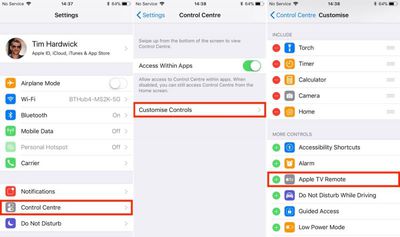
  2. Launch the Settings app on your iOS device.
    Apple TV Remote iOS 1

  3. Select Control Center from the options list.

  4. Tap Customize Controls.

  5. In the More Controls list, tap the entry called Apple TV Remote.

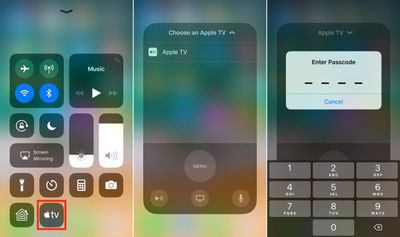
  6. Next, launch the Control Center on your iOS device in the following manner: On iPad, double-tap the Home button; on iPhone 8 or earlier, swipe up from the bottom of the screen; or on iPhone X, swipe down from the upper right "ear".
    TV Remote Control Center 1

  7. Tap the Apple TV button that now appears in the Control Center grid of options.

  8. In the Remote overlay that appears, choose the Apple TV that you want to connect to from the list.

  9. Enter the four-digit passcode that appears on your Apple TV's display to connect.
    6b

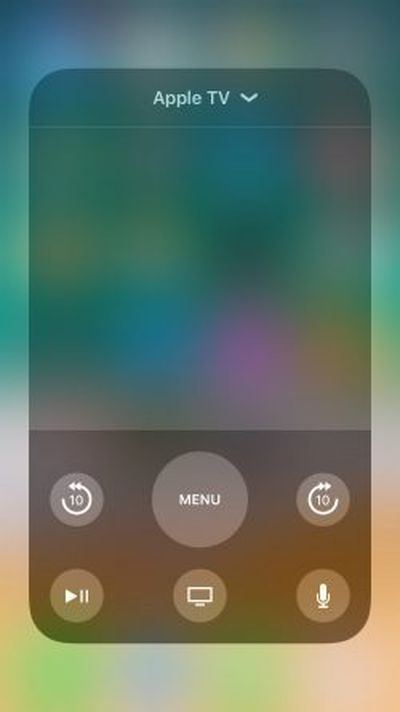
The touch interface that appears on your iPhone or iPad screen will replicate the function of the original Apple TV Remote. If your Apple TV is set up to stream audio to an AirPlay/Bluetooth speaker or headset, you can use the volume buttons on your iOS device to adjust the output volume. Otherwise, you'll have to continue to adjust sound levels using the dedicated remote, your television, or any hi-fi equipment your Apple TV is connected to. With that in mind, here's a quick breakdown of the touchscreen controls that are available to you.

How to Use the Apple TV Remote in iOS Control Center

    7

  • The large gray space in the middle of the onscreen interface acts as the touchpad. You can swipe it to move through Apple TV menus, tap it to select items, and use both actions to rewind and fast-forward media during playback.

  • The big Menu button can be used to go back a level in menu screens. A quick double tap on it will also activate the Apple TV screensaver.

  • During playback, two buttons will appear on either side of the Menu button that allow you to jump forward and back 10 seconds.

  • The Play/Pause button in the lower left of the interface can be used to start the selected item straight away, bypassing any associated content info screens.

  • The Home button (the one with the TV icon) takes you to the Home screen where all your installed Apple TV apps live in a grid formation. It may also take you to the TV app, depending on your settings.

  • The Microphone button activates Siri input, allowing you to perform a variety of voice commands from anywhere in the system. Activating a search field will also bring up a pop-up window that lets you either type using your iOS device's keyboard or dictate your search term. Either of these options is significantly easier than navigating the Apple TV's onscreen keyboard.
For more details on the functions you can perform using the Apple TV Remote's controls, be sure to check out our dedicated tips and tricks guide.

Related Roundup: Apple TV
Buyer's Guide: Apple TV (Buy Now)

Top Rated Comments

iParis Avatar
114 months ago
Ayee might wanna add this to the article -

It actually DOES have a volume control. If you can control your TV’s volume with the Siri remote, you’re using AirPods, connected to a Bluetooth speaker, or AirPlay speaker, you can change the volume using the physical volume buttons on your device. Super nifty.
Score: 5 Votes (Like | Disagree)
114 months ago
Ayee might wanna add this to the article -

It actually DOES have a volume control. If you can control your TV’s volume with the Siri remote, you’re using AirPods, connected to a Bluetooth speaker, or AirPlay speaker, you can change the volume using the physical volume buttons on your device. Super nifty.
Literally the only thing useful in this article was this comment.
Score: 2 Votes (Like | Disagree)
114 months ago
Not true.

The new Remote app for iOS (icon with gray text on black field) works fine with my 3rd gen AppleTV.

I know because I’ve been running it due to the horrible new TV remote and the screwed up nature of the new Netflix/Prime/Hulu/YouTube “apps” vs the old “channels” on the 3rd gen TV.
That's exactly what they said. You need to use the dedicated *app* and not the control center widget. So, true.
Score: 1 Votes (Like | Disagree)
bruinsrme Avatar
114 months ago
Absolutely, but actually this is Apple's job to push this knowledge to it's customers somehow more transparent, as most features are hidden and not used by the broad public at all.
i agree. However, my take in the overall tech gadget market is, there needs to be a balance of technology and advertised usability.
let's use the flick feature in regards to the ipad. Timesaver, keystroke saver.
Who knows about this? out of hundreds of people i have asked, the kids know about it and adults are amazed by it.

I have questioned why apple doesn't touted such gems.

another gem.
Apple support videos on youtube
type in common questions into google
how to set up an apple watch
set up activities on an apple watch
set up music on apple watch

people are amazed at how much info apple has posted. They just never knew it was all there.
Score: 1 Votes (Like | Disagree)
114 months ago
I'm being serious here....how is this more convenient than using the Apple TV Remote app. I don't get it. I have this app on my home screen. I tap the icon, and there is the remote.
Is there something that I'm missing?
Control centre is available anywhere, even when using other apps. That’s my thought anyway.
Score: 1 Votes (Like | Disagree)
114 months ago
I'm being serious here....how is this more convenient than using the Apple TV Remote app. I don't get it. I have this app on my home screen. I tap the icon, and there is the remote.
Is there something that I'm missing?
Score: 1 Votes (Like | Disagree)

Popular Stories

Apple Event Logo

Apple Releasing Yet Another Two New Products Next Week

Friday November 6, 2026 7:36 am PST by
Apple's massive wave of product launches will finally end next week, with its all-new HomeView smart home hub and the fourth-generation Apple TV 4K set to be released on Friday, November 13 and no other major hardware releases expected for the remainder of the year. Since late August, Apple has announced more than 25 new devices and accessories in one of its busiest stretches...
Apple TV 4K 4th Generation Top View5

New Apple TV 4K and iPad Mini: RAM Amounts Revealed

Thursday October 29, 2026 5:50 pm PDT by
Apple today released Xcode 27.2, and it reveals how much RAM is in the new fourth-generation Apple TV 4K and the new iPad mini with an OLED display. As expected, the new Apple TV 4K with the A19 chip is equipped with 8GB of RAM, while the new iPad mini with the A20 Pro chip has 12GB of RAM. For good measure, Xcode shows the iPhone Duo is equipped with 12GB of RAM. None of these RAM...
Apple TV Silo

Apple TV Reportedly Planning 'Silo' Spinoff

Wednesday November 4, 2026 8:56 am PST by
Apple TV is developing a "Silo" spinoff tied to Hugh Howey's upcoming Silo book trilogy, according to Apple TV commentator and podcaster Sigmund Judge. He said pre-production will begin later this year, with the books expected next summer. Hiring has apparently begun and some sets remain standing after season four wrapped in March. The reported project would follow the show's fourth and final...
Latest Stories
Here Are the Best Apple Black Friday Leftover Deals You Can Get Today
6 hours ago
HomePod Mini 2 in (RED) Seemingly Spotted Ahead of Announcement
17 hours ago
Apple's M6 and PROLED MacBook Pro Reach New Low Prices for Black Friday
1 day ago
The MacRumors Show: iPhone Air 2 and iPhone 18 Are Coming
1 day ago
Apple Store in Brisbane Reopening Next Month With New Design
1 day ago
The 60+ Best Black Friday Accessory Deals on iPhone Chargers, TVs, Headphones, and More
6 hours ago
GTA VI Now (Barely) Running on Apple Silicon Macs
1 day ago
The Best Black Friday Streaming Deals on Apple TV, Disney+, and More
1 day ago
Apple TV's 'Carême' Wins International Emmy for Best Drama
1 day ago
iPhone 18 Production Delay Leaves Apple Little Time Before Launch
1 day ago
The Best Black Friday AirPods Deals Still Available
23 hours ago
The Best Black Friday Deals on Apple Home Products
1 day ago
The Best Black Friday iPhone Deals Still Available
23 hours ago
The Best Black Friday iPad Deals Still Available
23 hours ago
The Best Black Friday Apple Watch Deals Still Available
23 hours ago
The Best Black Friday AirTag Deals Still Available
23 hours ago
The Best Black Friday Mac Deals Still Available
23 hours ago
iPhone Share of US Smartphone Market Hits 57% as Rivals Slip
1 day ago
iPhone 20 Pro Rumored to Feature 3D-Printed Titanium Frame
1 day ago
The 50+ Best Apple Black Friday Deals Still Available on AirPods, iPads, and More
7 hours ago
Apple's Official 2026 Black Friday Offer Starts Rolling Out
2 days ago
Halide Adds Fill Light Feature for iPhone Duo
2 days ago
MacBook Air Black Friday Deals Now Live With Massive $399 Savings
2 days ago
Amazon Discounts All MacBook Neo Models by $99 for Black Friday
2 days ago
Kodak Launches Unique AirTag Rival With E-Ink Display
2 days ago
Here's Why the Apple Store is Going Down
2 days ago
Apple Still Working on Giant Foldable iPad That Could Cost $5,000
2 days ago
iPhones Dominate China's Weak Singles' Day Smartphone Sales
2 days ago
iPhone 20 Pro Could Feature Ceramic in Limited-Edition Model
2 days ago
Apple Faces Korean Regulator Review Over iPhone 16 AI Advertising
2 days ago
Related Apple News: Health | Culture | Buyers Guide | Mac | Opinion