


How to Edit Siri Requests on iOS and macOS
As regular users of Siri will know, Apple's virtual assistant doesn't always interpret spoken queries and commands with one hundred percent accuracy, even after you've trained it to recognize your voice.
Certain words and phrases that you say may even be repeatedly misheard by Siri, usually ending up with the same useless responses. Fortunately, you can edit what Siri heard on both iOS and...
Read Full Article
How to Turn Siri Off in iOS and macOS
Siri is by no means universally loved by iPhone and iPad users, so it's a good thing that Apple provides a simple way to turn off the virtual assistant completely. Here's how it's done.
How to Disable Siri in iOS
Launch the Settings app on your iPhone or iPad.
Scroll down and tap Siri & Search.
Under the Ask Siri section, tap the switches next to Listen for "Hey Siri" and Press Side...

How to Turn Off 'Hey Siri' on HomePod
One of the main features of Apple's HomePod is its "Hey Siri" function, which allows you to invoke Apple's voice-activated assistant handsfree and get it to answer queries and control functions related to other devices and services.
If you don't find Siri particularly useful on HomePod or you just don't like the idea of your speaker constantly listening for the words "Hey Siri," you can...

How to Right-Click on a Mac
If you recently switched from a Windows PC to a Mac, you may be wondering how to right-click in macOS. Apple mice and trackpads have never had a secondary button, but there are actually several ways you can right-click on Mac, giving you access to a plethora of contextual menus and options throughout Apple's desktop operating system.
If you connect a third-party mouse with two buttons to...
How to Show Hidden Files on a Mac
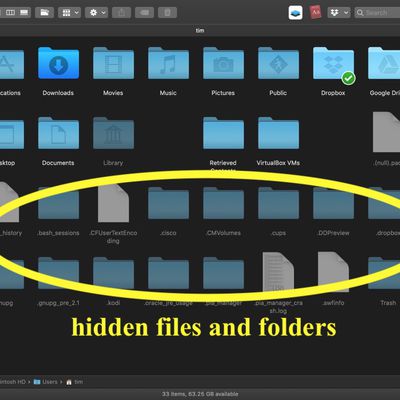
All Mac systems contain hidden files and folders. These are often preceded by a full stop or a slash, and are kept out of sight of the user either to prevent them from being deleted because they perform some essential function, or because they're irrelevant to everyday tasks.
Occasionally however, you might need to reveal these files and folders to fix a problem you're having with your Mac....

How to Reveal the Library Folder in macOS
In macOS, the library folder is used to store user account settings, preference files, app support files, caches, and other important data that allows your Mac to function as it should.
Making haphazard changes to the library folder can cause damage to your system, which is why Apple hides the folder by default. However, sometimes troubleshooting solutions require that you have access to the...

How to Locate a Lost Apple Watch Using Find My
Find My is an Apple feature that enables you to locate lost or misplaced Apple devices – including your Apple Watch. If you've already set up Find My on your paired iPhone, it's automatically enabled on your Apple Watch too.
When you sign in to iCloud.com or the Find app, you can see your Apple Watch on a map and play a sound to locate it if it's nearby. Find My also has a Lost Mode to...
How to Use Spotify on Apple Watch
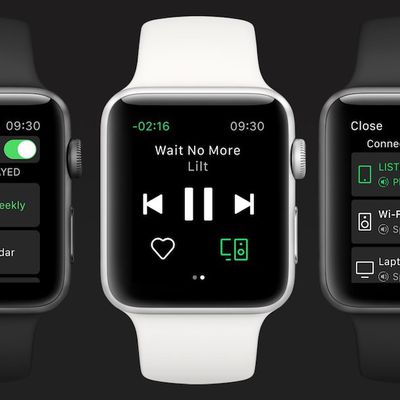
In November 2018, Spotify released an official app for Apple Watch that allows Spotify subscribers to access and control their favorite Spotify music and podcasts from their wrist. This article shows you how to get the Spotify app up and running on Apple Watch and explains how the interface works.
What the Spotify App for Apple Watch Can't Do
As great as it is that Spotify released an Apple ...
How to Turn Off Find My Mac
Find My Mac is a macOS feature that enables you to locate your machine if it's lost or missing. When you sign in to iCloud.com or the Find My iPhone app in iOS, you can see your missing Mac on a map and play a sound to locate it if it's close by. It also has a Lost Mode to lock, track, or remotely erase all of your personal information from your machine.
For these reasons, Apple recommends...
How to Turn Off Find My iPhone
Find My iPhone (or Find My iPad) is an iOS feature that enables users to locate a lost or missing Apple device. When you sign in to iCloud.com or the Find My iPhone app, you can see your missing device on a map and play a sound to locate it if it's close by. It also has a Lost Mode to lock, track, or remotely erase all of your personal information.
For these reasons, Apple recommends that...

How to Clear Your Apple News Reading History
Apple News keeps track of all the articles you read within the news app's interface to create a personal reading history. This provides you with a handy way of returning to a story, and avoids you having to trawl through the news to look for it.
To access your reading history in the Apple News app on iPhone or iPad, simply tap the Following tab, scroll down, and then tap History. In Apple News ...
How to Reset Your Apple News Recommendations
The Apple News app for iPhone, iPad, and Mac automatically recommends stories for you based on your reading habits within the app. You can find these stories in the Today tab under the For You section, divided into topics and channels you've selected.
The recommendations feature isn't infallible, and it can become confused if a friend or family member uses the Apple News app on your device or ...

How to Use 'Hey Siri' Hands-Free on a Mac
The latest version of Apple's "Hey Siri" feature works hands-free without being plugged into power, and it can be found in several recently announced Apple mobile products, including the fifth-generation iPad mini, third-generation iPad Air, and second-generation AirPods.
What's perhaps less well-known is that many of Apple's new Macs also support "Hey Siri" hands-free, meaning that users...

How to Listen to YouTube Music for Free on Your Google Home or Google Assistant Speaker
In April 2019, Google announced the launch of a free, ad-supported version of its YouTube Music streaming service for use with Google Home and other smart speakers that feature its voice-activated assistant.
Essentially, the free streaming tier means that you can listen to songs from the YouTube Music catalog, interspersed with occasional ads, on your Google Home or other Google...

How to Enable Dark Mode in Facebook Messenger
After previously only existing as an "Easter Egg" setting, Facebook in April 2019 added a Dark Mode theme as an official display feature of its standalone Messenger app.
Facebook says that Dark Mode is designed to provide less harsh brightness in situations where ambient lighting is lower while maintaining contrast and vibrancy.
If you have an OLED iPhone, such as an iPhone X, iPhone XS,...
How to Change or Reset Your Apple ID Password
Your Apple ID account is used for so many things you can do with Apple devices and services, such as shop on the iTunes Store, sign in to iCloud, buy apps on the App Store, and more.
If you forget your Apple ID password, all is not lost. Apple has a website that you can use to manage your Apple ID and reset your password at appleid.apple.com. The rest of this article shows you how you can...

How to Turn Off Parental Controls for a macOS User Account
As the admin account holder on a Mac, you have the ability to create and manage other user accounts including whether they have restrictions imposed via parental controls. The following steps show you how to disable parental controls for an existing account.
Note that by turning off parental controls you are essentially allowing the person with access to that account to use your Mac without...

How to Copy Parental Controls Between Mac User Accounts
As the admin account holder on a Mac, you have the ability to create and manage other user accounts including whether they have restrictions imposed via parental controls.
When it comes to setting up multiple accounts with parental controls, you can save time by copying restrictions from one user account to another. Follow the steps to learn how it's done.
Click the Apple () symbol in...
How to Create a User Account on Your Mac With Parental Controls Enabled
macOS features powerful parental controls that, once enabled, allow you to monitor and restrict the time your children spend on your Mac, ensuring they enjoy a safe and secure experience.
You can set up custom parental controls for each child who will be using your Mac by adding separate user accounts. Alternatively you can set up a guest account for anyone to use, but with parental controls...

How to Create a Guest Account in macOS
Setting up a guest account on your Mac provides a simple and convenient way for other people to use your computer without handing them access to your private data and digital workspace.
Essentially, a guest account allows a friend, family member or co-worker to perform basic computing tasks on your Mac while ensuring that your personal data and account settings remain private and secure....
