


iOS 15: How to Change Where 'Hide My Email' Addresses Forward
With iOS 15 and the Hide My Email feature exclusive to iCloud+ subscribers, you can create unique, random email addresses that forward to your personal inbox whenever you want to keep your personal email address private.
Hide My Email addresses are really useful if you think that a business or website is likely to share your email address with ad agencies or other third-parties for...
Read Full Article
iOS 15: How to Deactivate or Delete a 'Hide My Email' Private Address
In iOS 15, paid iCloud+ plans feature Hide My Email, which lets you create unique, random email addresses that forward messages to your personal inbox whenever you want to keep your personal email address private.
They're really useful if you think that a business or website is likely to share your email address with ad agencies or other third-parties for marketing purposes. Providing them...
iOS 15: How to Use Hide My Email
With the introduction of iOS 15, Apple rebadged its paid iCloud plans to "iCloud+" to reflect the fact that subscribers now get access to additional privacy features like Private Relay and Hide My Email. This article explains what Hide My Email is and how to use it.
Hide My Email builds on the idea of Sign in With Apple by providing you with unique, random email addresses that forward to...

How to Adjust iCloud Private Relay IP Address Settings
As part of iOS 15, Apple introduced iCloud Private Relay, a feature of all iCloud+ paid plans that's designed to encrypt all of the traffic leaving your device so no one can intercept it or read it.
Private Relay works by sending web traffic to a server that is maintained by Apple to strip the IP address. Once the IP info has been removed, Apple sends the traffic to a second server...
iOS 15: How to Turn iCloud Private Relay On and Off
Alongside iOS 15, Apple introduced an iCloud+ service that adds new features to its paid iCloud plans (upgraded iCloud storage tiers start at $0.99). One of these features is iCloud Private Relay, which is designed to encrypt all of the traffic leaving your device so no one can intercept it or read it.
Private Relay sends web traffic to a server that is maintained by Apple...
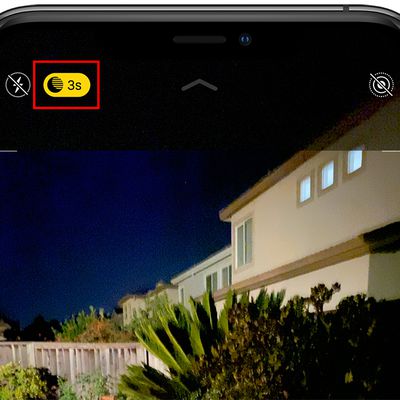
How to Disable Night Mode on Your iPhone's Camera
When using the Camera app on iPhones, the Night Mode feature comes on automatically when the camera sensor registers an indoor or outdoor scene that is dark enough to warrant brightening, resulting in natural colors and reduced noise. That's the idea, anyway. The reality is that Night Mode won't always capture the kind of nighttime image that you want.
If you're aiming to shoot an...

How to Watch Movies / TV Shows Together Over FaceTime
In iOS 15.1 and iPadOS 15.1, FaceTime received some major enhancements, including the ability for you to share your screen with other people on a video call.
Officially called SharePlay, this screen sharing feature also lets you watch streamed movies and TV shows together. When you're on a FaceTime call, everyone on the call will see the same synced playback and video controls.
The ...
iOS 15: How to Use On-Device Siri
In iOS 14 and earlier, Siri on iPhone and iPad doesn't work properly without an internet connection. For years now, the virtual assistant has had to "phone home" and ping Apple's servers to respond to almost every request or command, which has made it virtually useless when your device is offline.
In iOS 15, however, Apple has made some major changes to the way Siri works. Now, all Siri...
iOS 15: How to Have Siri Announce Your Notifications
In iOS 15, Siri comes with a new Announce Notifications feature that allows you to have notifications read out to you when you're wearing connected AirPods or Beats headphones.
Siri has been able to announce messages for some time now, but in iOS 15, the feature has been expanded to all notifications. When enabled, Siri will automatically announce Time Sensitive notifications from apps ...
iOS 15: How to Use Siri Offline
In iOS 15, Apple moved all Siri speech processing and personalization onto your device, making the virtual assistant more secure and faster at processing requests. This also means Siri can now handle a range of requests entirely offline.
Once you're using iOS 15, you don't need to enable anything for Siri to work offline. The types of requests that it can handle without phoning home to...
iOS 15: How to Ask Siri to Control Your HomeKit Devices at a Specific Time
In iOS 15, Apple has made some major improvements to Siri, and as a result the virtual assistant can now be used to control HomeKit devices at specific times.
For example, if you want your blinds to open at seven o'clock the next morning, you could say, "Hey Siri, open the blinds at 7 a.m." Siri will also respond to geolocation commands, so you can say things like "Hey Siri, turn off the...

Unlock with Apple Watch Not Working? Here's How to Fix the Problem
When Apple introduced iOS 14.5 in April, it introduced the ability to unlock your iPhone with Face ID while wearing a mask, so long as you are wearing an Apple Watch.
Subscribe to the MacRumors YouTube channel for more videos.
In the current health climate, many people are wearing masks that cover their faces when going outside, visiting stores, and other tasks, which is why Apple added the...
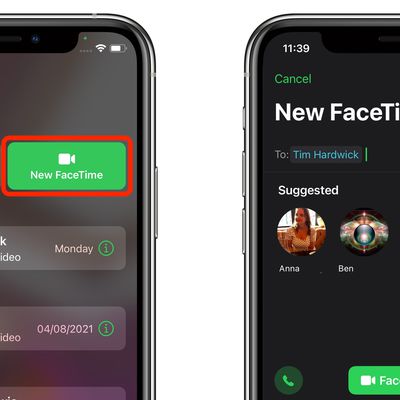
iOS 15.1: How to Share Your Screen on a FaceTime Call
In iOS 15.1, Apple has brought several enhancements to FaceTime, which means you can do more than just FaceTime call your friends and family.
Thanks to a new screen sharing feature called SharePlay, you can now share your screen with other people on a call, which is great for choosing a movie, browsing through a photo album, or anything else that's enhanced by group discussion.
Here's ...
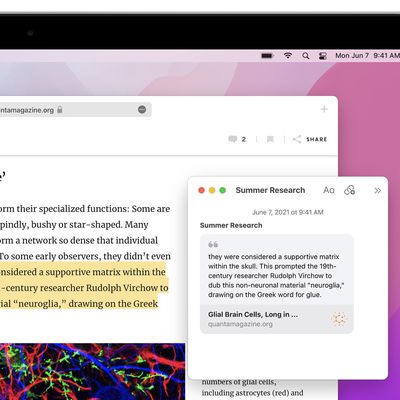
How to Turn Off Quick Note on macOS Monterey
macOS Monterey introduces a Quick Note feature that's designed to give you quick access to a fresh note in the built-in Notes app if you need to jot down some ideas in a hurry.
Quick Note is enabled by default and can be accessed by mousing over the bottom right hand corner of your Mac, but if you're not interested in using it, there is a way to disable it. Here's how:
Open up System...
iOS 15: How to Find Fun Things to Do With the Dedicated Apple Maps Guide Section
In iOS 15, has brought several major improvements to the Maps app, with better driving directions, improved transit directions, and more immersive AR-based walking directions.
In addition, Apple has added a dedicated Guides Home that houses editorially curated guides with tips on what to do in a city where you live or where you're visiting.
To explore Apple's guides at any time in the...
iOS 15: How to Find Transit Stations Near You in Apple Maps
In iOS 15, Apple's Maps app benefits from a range of new features and improvements, including the ability get real-time information on the nearby transit options available to you.
This transit information can be found for major bus routes and rail lines in cities with updated maps. Transit riders can see all of the departures listed near them, including any existing delays on services, and...

iPadOS 15: How to Use Quick Notes
In iPadOS 15, Apple introduced a new productivity feature called Quick Notes that aims to provide a quicker way to jot down things on your iPad without you having to go in and out of the Notes app.
Whether you're on the Home Screen or within any app, you can bring up a floating Quick Note window at any time using your finger or an Apple Pencil, by swiping diagonally up from the bottom...
iOS 15: How to Share Whatever's On Your Screen Using Siri
In iOS 15, Apple has significantly improved Siri by adding some much-anticipated features like on-device processing and support for offline requests, while also making the voice assistant more context-aware.
One result of Siri's increased contextual awareness is its ability to help you share whatever's on your iPhone screen with someone else via a Message, be it a website in Safari, a song...
iOS 15: How to Get AR Walking Directions in Maps
In iOS 15, Apple's Maps app benefits from a range of new features and improvements, including the ability to use augmented reality walking directions in big cities.
In a nod to Google Maps, the new AR mode can map walking directions onto the real world by using your iPhone's rear camera, making it easier to see where you need to go in built-up areas and reducing the need to look down at your ...
iOS 15: How to Find User Settings in Maps
In iOS 15, Apple has added a user account area in the Maps app that corrals several custom areas like direction mode, toll and highway avoidance options, transit options, and more.
To access it, simply tap the circular icon to the immediately to the right of the search bar. You should see your initials within the circle, indicating it's your account.
A new menu card will pop up with...
